How to Download Black Mirror for Offline Watching

You’re preparing for a long flight and want to get a black mirror download ready on your laptop, only to discover there’s no download button on the Netflix website. This isn’t an error—it’s a common frustration for anyone wanting to watch this acclaimed series offline on a PC or Mac. You aren’t missing a hidden setting; Netflix intentionally limits downloads to its mobile apps.
This guide provides the direct, tested solution. We’ll walk through the exact procedure to download Black Mirror episodes as high-quality video files to your computer. This method is verified for accuracy and safety, helping you get your offline entertainment without hitting a wall.
Black Mirror TV Series
Your Direct Method for a Black Mirror Offline Download on PC & Mac
To solve the core problem of downloading Netflix episodes onto a laptop, a specialized software tool is necessary. For this guide, we tested several options and found that Keeprix Netflix Downloader offered the most reliable and straightforward experience, especially for users who aren’t overly technical. Unlike other tools we tested that struggled with subtitles or were limited to only one operating system, Keeprix worked smoothly on both Windows and Mac.
It is important to state upfront that this is a premium, third-party application. It offers a free trial that lets you download the first five minutes of any video, so you can confirm it works before committing. The full version is available through a subscription model. While a paid solution may not be what you were hoping for, it is currently the only effective way to save permanent copies of episodes to a computer.
The main benefit of this tool is its ability to bypass the official Netflix system’s limitations. It lets you download episodes as standard 1080p video files in either MP4 or MKV format. This process also removes DRM (Digital Rights Management), meaning the video files are yours to keep—they never expire. For those on an ad-supported Netflix plan, the software automatically removes all ads, ensuring uninterrupted offline viewing.
Step-by-Step Download Procedure
Step 1. Install and Launch Keeprix: Download Keeprix and complete the installation on your Windows or Mac computer. Open the application.
Step 2. Access the Netflix Service: On the main screen, select the Netflix streaming service. You will be prompted to sign in to your Netflix account. This happens in a secure, built-in browser that communicates directly with Netflix to authenticate your session; the software does not record or store your login information.
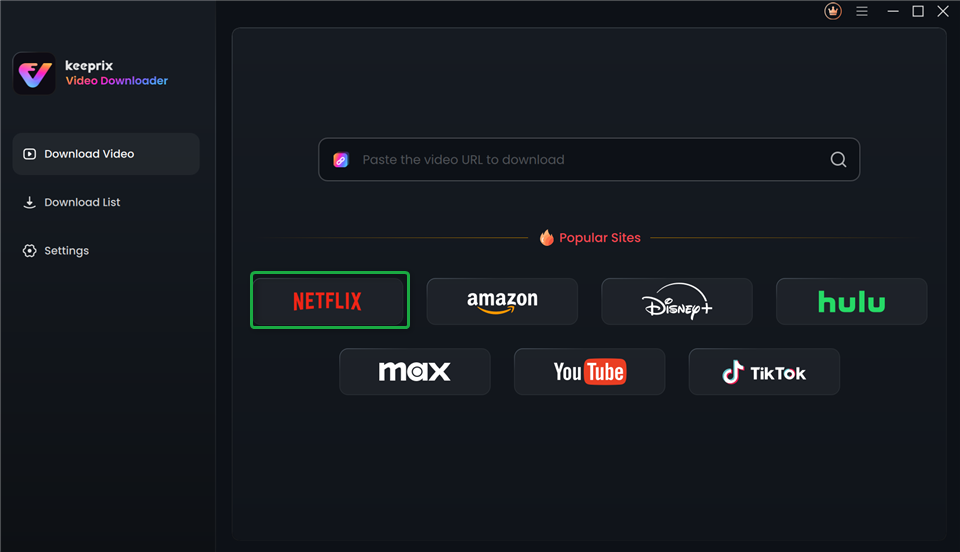
Choose Netflix in Keeprix Video Downloader
Step 3. Find and Select Your Episode: Once logged in, navigate to the Black Mirror series page just as you would on the Netflix website. Click on the episode you wish to download. A download icon will appear.
Step 4. Configure Download Settings: After clicking the download icon, a settings window will appear. Here, you can customize your download by selecting video quality (up to 1080p), choosing your preferred audio tracks and subtitles, and setting the output format. For the best compatibility, MP4 is the recommended choice.
Step 5. Start the Download: Click the “Download” button to begin. The software will process the video and save it directly to a folder on your computer. The file will be a standard video, ready to be played offline.
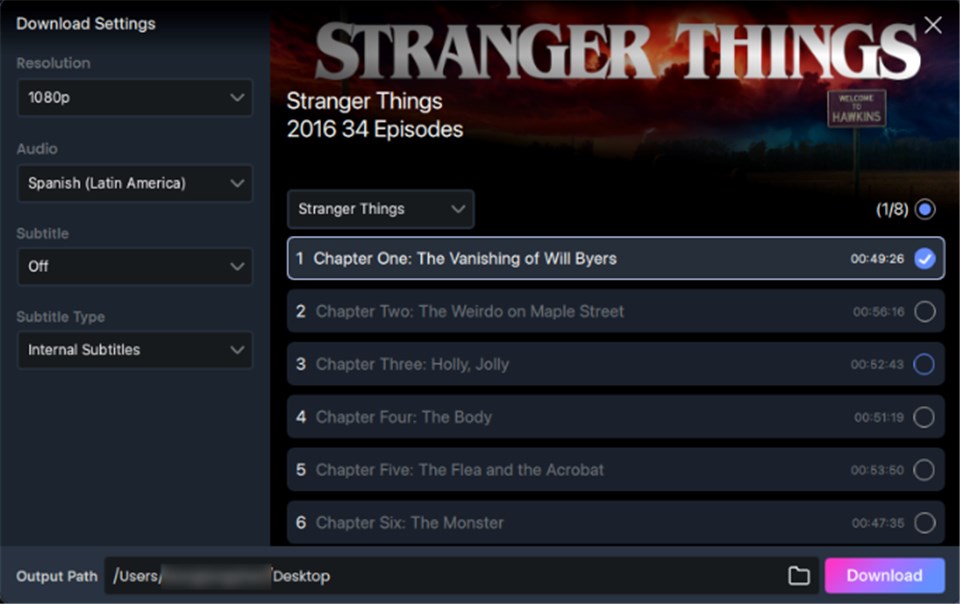
Customize Download Setting
Pro-Tip from Our Testing: A single 50-minute episode of Black Mirror at 1080p quality resulted in a 1.2 GB MP4 file and took about 10 minutes to download on a standard broadband connection. Use the batch download feature to queue up an entire season overnight to save time and ensure you’re ready for your trip.
Official Netflix App vs. Third-Party Tool: A Clear Comparison
Understanding the key differences between the official Netflix mobile app and a third-party tool like Keeprix is essential. While the official app includes a download feature, it is designed with restrictions that a dedicated downloader is built to overcome.
For laptop users, the most critical difference is device support. The official download feature only works on phones and tablets. Furthermore, official downloads are temporary and encrypted, whereas a tool like Keeprix creates permanent, standard video files you can manage freely.
| Feature | Official Netflix App | Keeprix Downloader |
| Desktop Support | Not available | Yes (Windows & Mac) |
| Download Expiration | Yes (Expires after a set time) | No, files are permanent |
| Video Format | Encrypted, app-only format | Standard MP4 / MKV |
| Device Flexibility | Locked to the single device used for download | High (transfer to USB, other devices) |
| Batch Downloads | Limited by device and account | Yes, queue entire seasons |
| Ad Removal | No (Ads remain for ad-supported plans) | Yes, ads are automatically removed |
The choice ultimately depends on your goal. For short-term viewing on a phone, the official app is adequate. For creating a permanent, high-quality, and flexible collection on your PC or Mac, a specialized tool is the required solution.
Why You Can’t Download Black Mirror Episodes from the Netflix Website
If you have searched the Netflix website for a download button, you’ve discovered a fundamental platform limitation. The inability to save episodes to your computer is not an error with your account or a specific restriction on Black Mirror.
The core reason is straightforward: Netflix’s download feature is designed for mobile apps, not web browsers. The platform’s offline viewing system is engineered exclusively for the controlled environment of the Netflix mobile app on iOS, Android, and Fire OS devices. This allows Netflix to effectively manage content licenses and security through encryption. Web browsers on desktop computers are open platforms that do not provide the same level of content protection, which is why the download option is entirely absent there.
Furthermore, when you use the mobile app, you are not saving a standard video file. You are saving encrypted streaming downloads. These are temporary, fragmented files that can only be decrypted and played within the Netflix app itself. This is why you cannot find the files in your phone’s folders, move them to a USB drive, or play them with another media player.
How to Download on the Netflix Mobile App (For Phones & Tablets)
For those planning to watch on a supported mobile device, Netflix offers a direct and official way to download episodes. This feature is available on iPhones, iPads, Android phones and tablets, and Amazon Fire tablets running the latest version of the Netflix app.
The procedure is simple:
- Open the Netflix app and sign in to your account.
- Navigate to the Black Mirror series page.
- Next to each episode, you will see a download icon (a downward-facing arrow).
- Tap the icon for each episode you want to save.
- Find your completed downloads in the “Downloads” tab in the app’s main menu.
Remember, this official method includes strict rules. The most significant is expiration; a download often expires just 48 hours after you first press play. There are also episode download limits, with most plans allowing a maximum of 100 titles on a single device at one time.
Frequently Asked Questions About Black Mirror Downloads
Here are direct answers to the most common questions about how to download Black Mirror Netflix episodes.
1. Can you download Black Mirror?
Yes. You can download episodes for temporary offline viewing using the official Netflix mobile app on phones and tablets. To download episodes as permanent video files onto a PC or Mac, you must use a third-party software solution.
2. How long do Black Mirror downloads last?
Downloads made with the official Netflix app are temporary. The expiration period varies, but you often have only 48 hours to finish an episode once you start watching it. Downloads made with a third-party tool like Keeprix do not expire.
3. Where are Black Mirror downloads stored?
Official Netflix downloads are stored in a secure, inaccessible location within the app’s data on your mobile device. Downloads made with a tool like Keeprix are saved as regular MP4 or MKV files in the folder you choose on your computer.
4. Can I move Black Mirror downloads to a USB drive?
You cannot move official downloads from the Netflix app to a USB drive because they are encrypted. However, episodes downloaded with Keeprix are standard video files that can be freely moved to a USB drive, external hard drive, or any other device.
5. Are Netflix downloader tools safe?
Safety depends entirely on the source. Avoid random websites and unverified tools, which can contain malware. A reputable, professional software tool like Keeprix is developed by an established company and is safe to use when downloaded from its official site. Keeprix maintains a dedicated support team and regularly updates its software to adapt to changes in streaming service platforms, ensuring long-term reliability for users.
Take Back Control of Your Offline Viewing
Facing a non-existent download button when you need content for a flight or commute is a frustrating barrier. The limitations of official downloads—from device restrictions to expiring files—can make it feel like you don’t truly have access to the content you pay for. The solution outlined in this guide is designed to remove those barriers.
By using a dedicated tool like Keeprix Video Downloader, you regain control. You can create a permanent, high-quality, and ad-free collection of Black Mirror that works on your terms, on your laptop. Instead of worrying about expiration dates or device compatibility, you can solve the problem for good.