How to Download The Last of Us Season 1-2 in 1080P

Key Takeaways
- Official Platforms: The Last of Us Seasons 1 and 2 are exclusively available for streaming on HBO Max.
- Download Capability: You can officially download episodes for offline viewing using the Max app on iOS, Android, and Fire OS devices.
- PC Limitations: Direct downloads on PC/Mac via a streaming subscription are generally restricted.
- Season 2 Status: With Season 2 concluding in 2025, all episodes are now available for binge-watching and downloading.
- Best Download Option: Use Keeprix Downloader to save all episodes of The Last of Us as MP4 files and keep them permanently on your computer.
In a world ravaged by Cordyceps and human cruelty, having reliable access to your favorite survival drama is essential. Whether you are revisiting Joel and Ellie’s initial journey or diving into the harrowing events of Season 2, a stable internet connection isn’t always guaranteed. This guide details exactly how to download The Last of Us in high definition so you can watch offline, anywhere, anytime.

The Last of Us TV Series
The Last of Us TV Shows Overview
Since its debut, The Last of Us has shattered the video game adaptation curse, delivering a gritty, emotional, and terrifyingly grounded look at a post-apocalyptic United States. Before you hit download, here is a quick refresher on the content you are about to save to your device.
Season 1: The Journey Begins
Adapted from Naughty Dog’s 2013 masterpiece, Season 1 introduced us to Joel Miller (Pedro Pascal), a hardened smuggler, and Ellie (Bella Ramsey), a 14-year-old girl who may hold the key to a cure. The season chronicles their trek from the quarantine zone in Boston across a ruined America. It received critical acclaim for its faithfulness to the source material while expanding on characters like Bill and Frank in heartbreaking detail.
Season 2: Consequences and Cycle of Violence
Released in Spring 2025, Season 2 adapted the complex narrative of The Last of Us Part II. Set five years after the first season, it explores the fallout of Joel’s decision at the Firefly hospital. Viewers are introduced to new, pivotal characters such as Abby (Kaitlyn Dever) and Dina (Isabela Merced). The season is darker, more intense, and visually stunning, making it a prime candidate for downloading in 1080p or 4K to appreciate the cinematography without buffering artifacts.
Technical Specs for Downloads:
- Resolution: Typically 1080p for Standard plans; 4K UHD for Ultimate/Premium plans.
- Audio: Dolby Atmos available on supported devices/plans.
- Subtitles: Embedded in official downloads.
You may also like: How to download The Hunting Wives
What Platform Is The Last of Us Available On?
To download The Last of Us, you first need to know where it lives. Unlike network TV shows that might appear on Hulu or Netflix, this is an HBO Original, so its distribution remains tight.
1. HBO Max
This is the primary home for the series. In the US, Latin America, and parts of Europe, the service is simply called Max.
- Subscription Required: Yes (Ad-Free or Ultimate Ad-Free).
- Download Feature: Yes (Mobile/Tablet only).
2. Sky Atlantic / NOW (United Kingdom)
In the UK, HBO content is licensed to Sky. You can stream it via Sky Atlantic or the NOW streaming service.
- Download Feature: Yes, via the NOW app on mobile devices.
3. Digital Stores (VOD – Video On Demand)
If you prefer not to subscribe or want a permanent copy, you can buy individual episodes or full seasons.
- Platforms: Apple TV (iTunes), Amazon Prime Video, Google Play Movies, Vudu (Fandango at Home).
- Download Feature: Yes, often supported on PC/Mac via their respective desktop apps.
4. Physical Media (4K Blu-Ray/DVD)
While not a download in the digital sense, ripping your own legally purchased Blu-Rays is the only way to get a truly DRM-free digital file, though this requires specific hardware and software.
Can You Download The Last of Us TV Show?
Yes, you can. However, the method depends entirely on your device. Streaming services like Max use encrypted files to prevent piracy, meaning you cannot simply “Save As” a video file to your desktop.
Below are the detailed, step-by-step instructions for the most common methods.
Method 1: Downloading via the Max App (iOS & Android)
This is the most popular method. It is included with your subscription, provided you are not on the “With Ads” plan.
Prerequisites:
- An active Max subscription (Ad-Free or Ultimate).
- A Wi-Fi connection (recommended for speed and data saving).
- Install the latest version of the Max app on your iPhone, iPad, Android phone, or Tablet.
Step-by-Step Guide:
Step 1. Launch the Max app on your device and sign in.
Step 2. Search for The Last of Us show.
Step 3. Navigate to the show page. You will see a dropdown menu to switch between Season 1 and Season 2. Select the season you wish to watch.
Step 4. Tap the icon. A progress circle will appear.
Step 5. Once finished, tap the Downloads icon (usually at the bottom of the screen) to view your offline library.
Step 6. You can now put your phone in Airplane mode and watch the episode without using data.
Method 2: Downloading on PC & Mac – Keeprix Downloader
While the downloads in the HBO Max app are restricted to DRM protection, they will expire after a certain time. Keeprix Downloader can help you out of this situation easily. It allows you to save movies and shows from multiple streaming platforms as MP4 files.
Steps to download The Last of Us TV Series permanently on a computer:
Step 1. Download and install Keeprix Downloader on your Windows or Mac computer.
Step 2. Launch the software and log in to your HBO Max account.
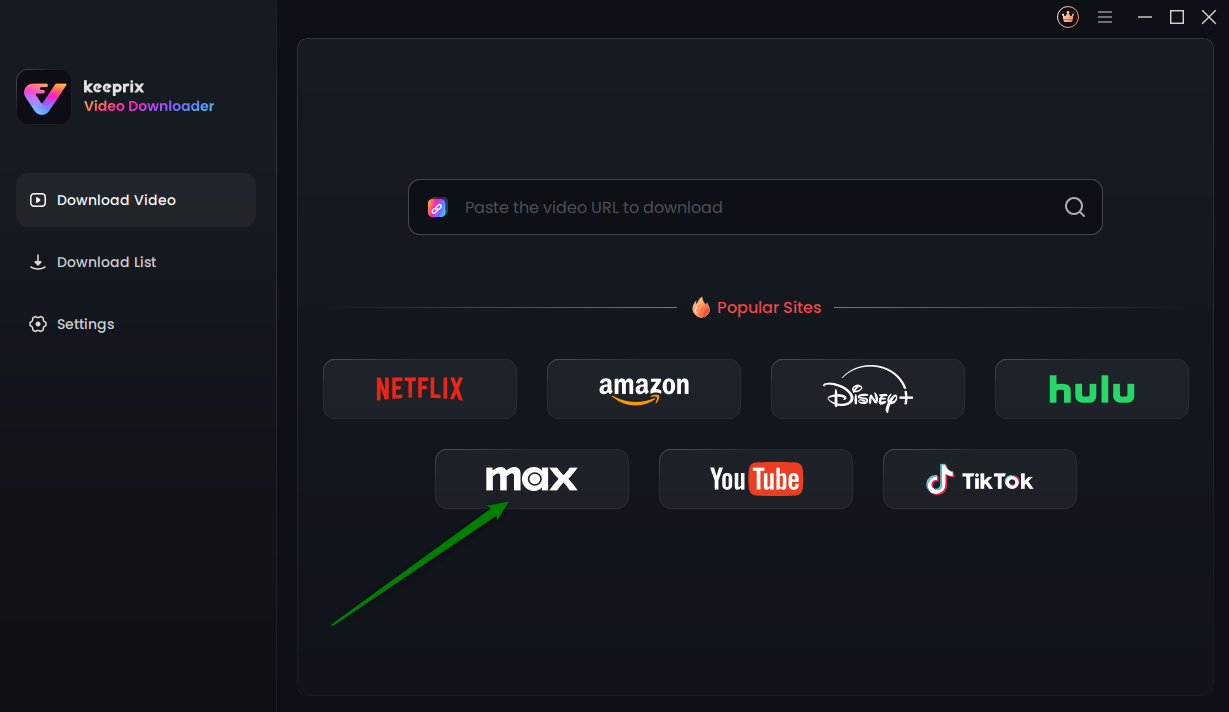
Choose Max in Keeprix Video Downloader
Step 3. Search for The Last of Us or paste the video link directly in the built-in browser.
Step 4. Access the video profile and click the download button.
Step 5. Wait for the download process. Once finished, you can watch The Last of Us offline on any media player.
Why Can’t I Download The Last of Us TV Shows?
If you are following the steps above but the download button is missing or failing, it is likely due to one of the following restrictions enforced by the streaming provider.
1. You Are on the “With Ads” Plan
The most common reason is your subscription tier. Max reserves offline viewing for their Ad-Free tiers. If you are paying the lowest monthly price, the download button will simply not appear.
- Fix: Upgrade your subscription plan in your account settings.
2. Device Storage is Full
HD and 4K video files are large. A single 60-minute episode of The Last of Us in 1080p can be 1.5GB to 2GB. In 4K, it can be significantly larger.
- Fix: Check your phone’s storage. Delete old photos, unused apps, or previously watched episodes.
3. Download Limit Reached
Max imposes a cap on how many videos you can save at once across all profiles on your account.
- Standard Plan: Usually limited to 30 downloads.
- Ultimate Plan: Usually limited to 100 downloads.
- Fix: Delete older downloads from other devices sharing your account.
4. VPN Interference
If you are using a VPN to access Max from a different country, the app may flag your connection as suspicious and disable downloading features, or the download may fail instantly.
- Fix: Disconnect your VPN or switch to a server optimized for streaming.
Conclusion
Downloading The Last of Us Season 1 and 2 is the best way to experience Joel and Ellie’s harrowing story without the frustration of buffering or data caps. For most users, the official Max app on a mobile device or tablet offers the smoothest experience, providing 1080p quality with minimal hassle. If you need to watch on a laptop and create an offline library permanently, consider Keeprix Downloader and enjoy a seamless viewing experience.
FAQs About The Last of Us TV Shows
1. Can you download The Last of Us TV Shows to MP4?
It depends on how you download the shows. When you download via the Max app, the file is saved in a proprietary, encrypted format that can only be read by the Max app itself. You cannot find an MP4 file in your file manager to transfer to a USB drive or play in VLC. However, you can easily download The Last of Us shows to MP4 in Keeprix Downloader by removing the DRM from the downloaded files.
2. Can I keep The Last of Us TV Shows downloads permanently?
It depends on where you download them from. On Max (Subscription): No. Downloads are temporary. They typically expire 30 days after you download them, or 48 hours after you press play. With Keeprix: Yes. All downloads are saved as MP4 or MKV files, which can be kept without expiration.
3. Why can’t I download The Last of Us TV Shows on my computer?
Streaming services prioritize mobile devices for offline viewing because they are closed ecosystems that are harder to pirate from. Computers allow for screen recording and file manipulation, so Max blocks browser downloads. To watch on a computer offline, you must purchase the content via a store app (Microsoft Store or Mac App Store).
4. How to download The Last of Us TV Shows for free?
Legally, you cannot download the show for free. The Last of Us is premium content. While some services offer free downloads, they can redirect you to malicious websites.