Hulu Downloads Not Working or Disappeared? How to Fix It

If your Hulu downloads are not working, check what happens before you reset the app: is the Download button missing, did a saved episode disappear, or is the episode still listed but won’t play offline? Each symptom calls for a different fix.
If you’re about to travel, start with the same phone or tablet you’ll take with you. Open Hulu while you’re still online, check that the title has finished downloading, and test it from Downloads with Wi-Fi and cellular data off. Avoid signing out or reinstalling Hulu until you’ve checked your saved titles. You may have to download them again.
Part 1. Why Are My Hulu Downloads Not Working?
Use this table to find the right starting point. This guide covers downloads in the U.S. Hulu app. If you saved Hulu content in the Disney+ app, check Disney+ download help and troubleshoot in the app you used to save the title.
| What You See | What to Check | What to Do First |
| No Download button | Plan, device, or title eligibility | On a supported phone or tablet, check another title you know is available to download. |
| Download stuck or incomplete | Free storage, connection, or mobile data settings | Check your device storage, connect to stable Wi-Fi, and retry one episode. |
| One download disappeared | Expiration or a change in title availability | Reconnect and check whether you can renew or download the title again. |
| All downloads disappeared | Account, app, or device change | Check that you’re using the same app, device, and account you used to download the titles. |
| Download is listed but won’t play offline | Incomplete download, expiration, or playback error | Open the title from Downloads and follow the airplane-mode test below. |
If Hulu also fails when you stream online, see how to fix Hulu not working for general app and playback issues.
Part 2. What to Do If the Hulu Download Button Is Missing
Way 1. Check Your Plan, Device, and Title
Open the Hulu app on the phone or tablet you want to use offline. Check that your subscription includes downloads and that your device supports them. A title being available to stream does not mean it is available to download.
Try a second title before changing any settings. If you can download another show, start by checking whether the original title is eligible. If the button is missing across multiple titles, check your plan, device compatibility, and app version before retrying. For the normal setup and download steps, see our guide to downloading shows on Hulu.
Way 2. Check for a Limit or an Incomplete Download
If Hulu shows a download-limit message, check the downloads already saved on your account. Remove a title you’ve finished if you need to make room, rather than deleting everything. If the download starts but stalls, check available device storage and try one episode on stable Wi-Fi. When downloading over cellular, check both your phone’s data permissions and Hulu’s download settings.
Wait for the episode to finish and confirm it appears in Downloads before turning off your connection. Seeing the episode in your watch history does not mean it has been saved for offline playback.
Part 3. How to Fix Hulu Downloads That Disappeared
Way 1. Reconnect and Check Whether the Title Can Be Renewed
If one movie or episode is missing, reconnect to the internet and look for it in Downloads and on its title page. If Hulu offers a renewal option for an expired download, try that first. If there is no renewal option but the title is still eligible, download it again. If the title is no longer available to download, reconnecting won’t restore the saved copy.
Check saved titles before leaving home, especially episodes you’ve already started. Hulu’s download window can change once you start watching, so don’t assume a partially watched episode will be available for the rest of your trip. See Hulu’s explanation of its offline viewing windows.
Way 2. Check the Original Device Before Resetting the App
If the whole list is empty, check whether you’re using the same device and app where you saved the titles. A download made on one device won’t appear as a saved copy on another. If Hulu asks you to sign in, reconnect on a reliable network and sign in to the intended account. Check Downloads again before assuming the files are gone.
If the list is still empty and the titles are eligible, download one episode again and test it offline. Leave clearing app storage or reinstalling until last, especially if other downloads still work. Those steps may remove saved titles and leave you unable to replace them until you’re back online.
Part 4. How to Test Hulu Downloads in Airplane Mode
A title that plays while you’re connected may be streaming rather than playing the saved copy. Test one episode from Downloads while you’re still somewhere you can reconnect if it fails.
- Finish the download while online. Open Hulu on the device you’ll take with you. Confirm the episode appears in Downloads and is no longer in progress.
- Turn on airplane mode and check Wi-Fi. Make sure Wi-Fi and cellular data are both off. Some devices allow Wi-Fi to remain on or be turned back on in airplane mode.
- Open the episode from Downloads. Don’t start it from Home, Search, or Continue Watching. Check that the video plays and that the audio and subtitles you need are available.
- If it fails, note what happened before reconnecting. Record whether Hulu asked you to sign in, showed an error, or no longer listed the episode. Reconnect, check whether the download expired or was incomplete, and retry with one eligible title.
If one title fails but another works, start with that title’s download rather than resetting the whole app. If several fully downloaded titles fail offline after a fresh download, contact Hulu Support with your device model, operating system, Hulu app version, and exact error message. Note whether the same titles play when you’re online.
Part 5. What If You Need to Watch on a Computer?
A Hulu app download and a local video file are different. If the goal is to repair a missing download on your phone, finish the Hulu checks above. A desktop tool won’t restore files that disappeared from the Hulu app.
If your goal is to save an authorized local copy for playback on Windows or Mac, Keeprix Hulu Downloader is a separate option for supported titles, with MP4 or MKV output. Check title compatibility before relying on it for a trip, and only save content you have permission to download.
Steps to Download Hulu Videos with Keeprix Video Downloader
Keeprix Video Downloader
Download videos from hot platforms like Hulu. Enjoy seamless offline watching on Windows and Mac computers.
Step 2. Launch Keeprix Video Downloader, select Hulu, and sign in to your Hulu account in the built-in browser.
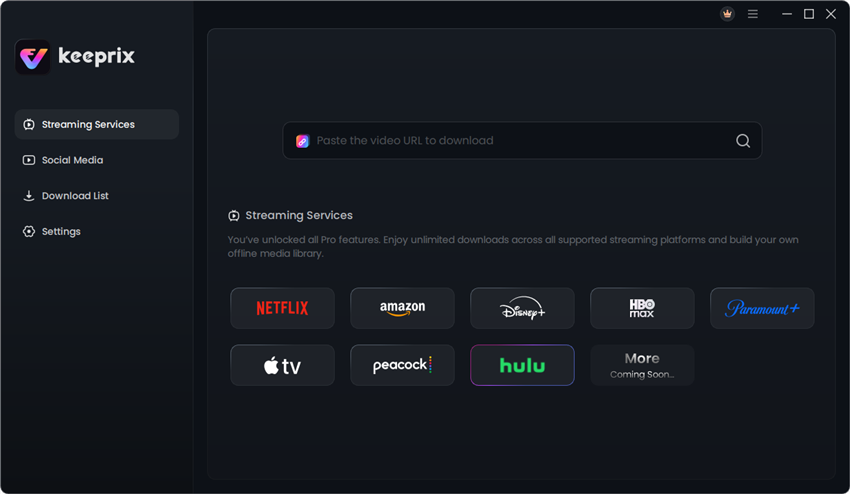
Step 3. Search for the movie or episode you want to save, or paste its Hulu link into the address bar. Open the title and click the Download icon when it appears.

Step 4. Choose MP4 or MKV, then select the video quality, audio track, and subtitles from the options available for that title. Choose an output folder and click Download.
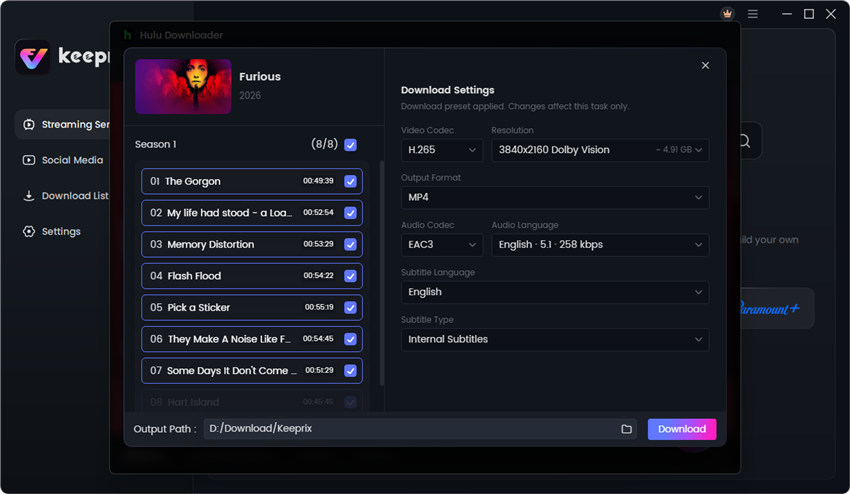
Step 5. Once the download finishes, open the saved file from the output folder in a compatible media player. Before traveling, disconnect from the internet and check that the video, audio, and subtitles play as expected.
Only save content you have permission to download. Available quality, audio tracks, and subtitles may vary by title.
Part 6. FAQs About Hulu Download Problems
Why Did My Hulu Downloads Disappear in Airplane Mode?
Airplane mode alone doesn’t tell you why the titles are missing. The app might be asking you to sign in, or the titles might have expired or failed to finish downloading. Reconnect, check Downloads on the original device, and try one eligible episode offline before downloading the rest again.
Why Can I Stream a Hulu Show but Not Download It?
Streaming and download eligibility are different. Check whether your plan supports downloads, whether you’re using a supported device, and whether the specific title has a Download button. If the issue affects only one title, try another eligible show before changing your app settings.
Can I Renew an Expired Hulu Download Without Internet?
Reconnect first. If Hulu offers renewal and the title is still eligible, renew it in the app. Otherwise, check whether the title can be downloaded again. If it is no longer available, don’t count on recovering the old download.
Part 7. Conclusion
When Hulu downloads stop working, start with the symptom. A missing button calls for an eligibility check. A missing episode calls for an expiration and availability check. A saved episode that won’t play calls for a test from Downloads with the connection off. If you’re about to travel, run that test before leaving Wi-Fi and keep reinstalling the app as a last resort.