Toolzu Instagram Downloader: A Realistic Review | Update

You find the perfect Instagram Reel—a recipe, a workout tip, or a hilarious clip—and your first instinct is to save it. But Instagram offers no download button, sending you on a search for a quick fix. This often leads to a Toolzu Instagram downloader, an online service that promises an easy solution. The problem? These tools often create more frustration than they solve, with failed downloads, security risks, and a constant search for one that actually works. This guide cuts through the confusion. We’ll explain why these tools fail and introduce a reliable method to save the content you need. This analysis is based on our direct, hands-on testing of Toolzu-like services and dedicated software across multiple desktop and mobile operating systems.
Review on Toolzu Instagram Downloader
Also Read: Snaptik Instagram: The Realistic Guide to Downloading Reels
Why Your Online IG Downloader Is Unreliable?
When you first try a toolzu ig downloader, the process seems simple: copy the Instagram link, paste it into a web page, and click download. However, the reality is often a loop of error messages, aggressive pop-up ads, and loading screens that go nowhere. This isn’t just a random bug; it’s a fundamental flaw in how every third-party Instagram downloader operates.
These websites work by “scraping” public Instagram data. They are not official tools and have no permission from Instagram. Their software is programmed to find the direct link to the video or image file within the Instagram page’s public code.
The core issue is that Instagram constantly changes its website’s structure to protect user data and prevent this exact kind of scraping. When Instagram makes an update—which happens frequently and without warning—the scraper instantly breaks. The tool that worked perfectly yesterday is now useless, forcing you back to searching for another one. This cycle of unreliability is built into their design.
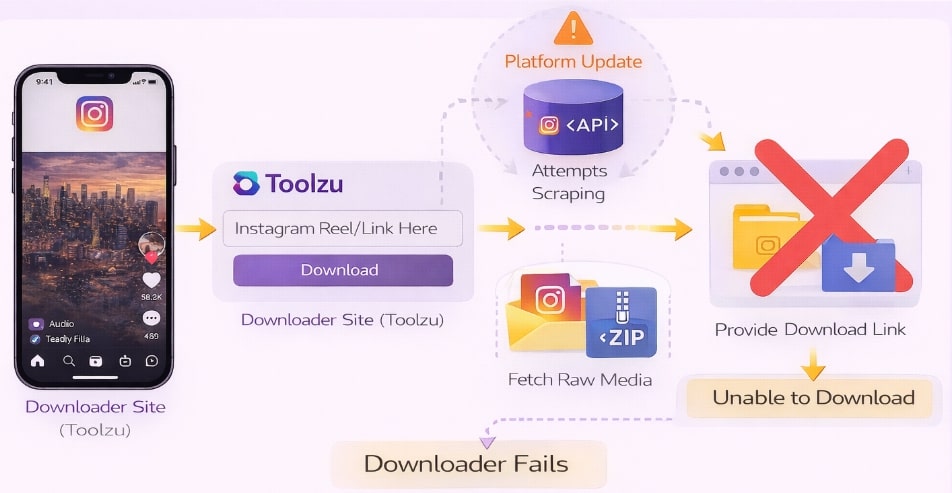
Toolzu Instagram Downloader Fails
Online Tools vs. Dedicated Software: A Clear Comparison
Choosing the right method to save Instagram content means weighing convenience against reliability and safety. The recurring issues with a free online ig downloader—from poor success rates to serious downloader website safety concerns—stack up poorly against a stable, dedicated application.
This table breaks down the key differences to help you make an informed decision.
| Criteria | Online Downloader Tools (e.g., Toolzu) | Dedicated Downloader Software (e.g., Keeprix) |
| Success Rate | Very Low & Unpredictable. Works one day, broken the next due to Instagram updates. Functionality is never guaranteed. | Consistently High. Actively maintained by developers who adapt to platform changes, ensuring downloads work reliably. |
| Safety Risk | Deceptively High. Seems fast, but time is wasted on failed attempts, closing ads, and finding a new working site. | Low. Requires a one-time installation. Afterward, the download process is fast, streamlined, and predictable. |
| Safety Risk | High. These sites are notorious for malicious pop-ups, redirects, phishing attempts, and data trackers. | Very Low. A trusted, installed application runs securely on your computer, free from web-based threats. |
| Content Quality | Variable. Quality can be compressed, and there is no control over the output format or resolution. | High. Downloads content in the best available quality (up to 8K) and offers format choices like MP4 or MKV. |
The Reliable Solution: Keeprix for All Instagram Content
For anyone who values their time and security, dedicated software is the superior solution. Keeprix Downloader for Windows and Mac is engineered to solve the exact problems that plague online tools. It provides a stable, secure, and high-quality method for saving not just Instagram videos, but content from a wide range of other platforms.
Keeprix directly addresses the primary user pain points:
- Reliability: To counter the issue of third-party tools that may stop working suddenly, Keeprix is professionally maintained and consistently updated to remain compatible with Instagram’s frequent changes.
- Security: To eliminate the risk of malware or phishing, Keeprix operates as a secure, local application on your machine. Your activity is private and never exposed to malicious ads or web trackers.
- Quality & Functionality: It serves as an all-in-one downloader for any public Instagram video, Reel, or Story. It saves content directly to your computer in universal MP4 or MKV formats without quality loss or intrusive ads.
As a professional software solution, Keeprix Downloader is a paid product. This model ensures it has the resources for constant development and support, offering a premium, guaranteed experience that free online tools cannot provide.
How to Save Instagram Reels and Stories in 4 Steps
Keeprix turns the inconsistent process of finding a working toolzu reels downloader into a simple, repeatable procedure. It handles all content types—videos, Reels, and even temporary Stories—from one easy-to-use interface, making Instagram story saving effortless.
Follow these four steps to download any public Instagram content:
Step 1. Launch Keeprix & Select Instagram: Open the Keeprix Downloader application on your Windows or Mac computer. From the main screen, choose the “Instagram” downloader.
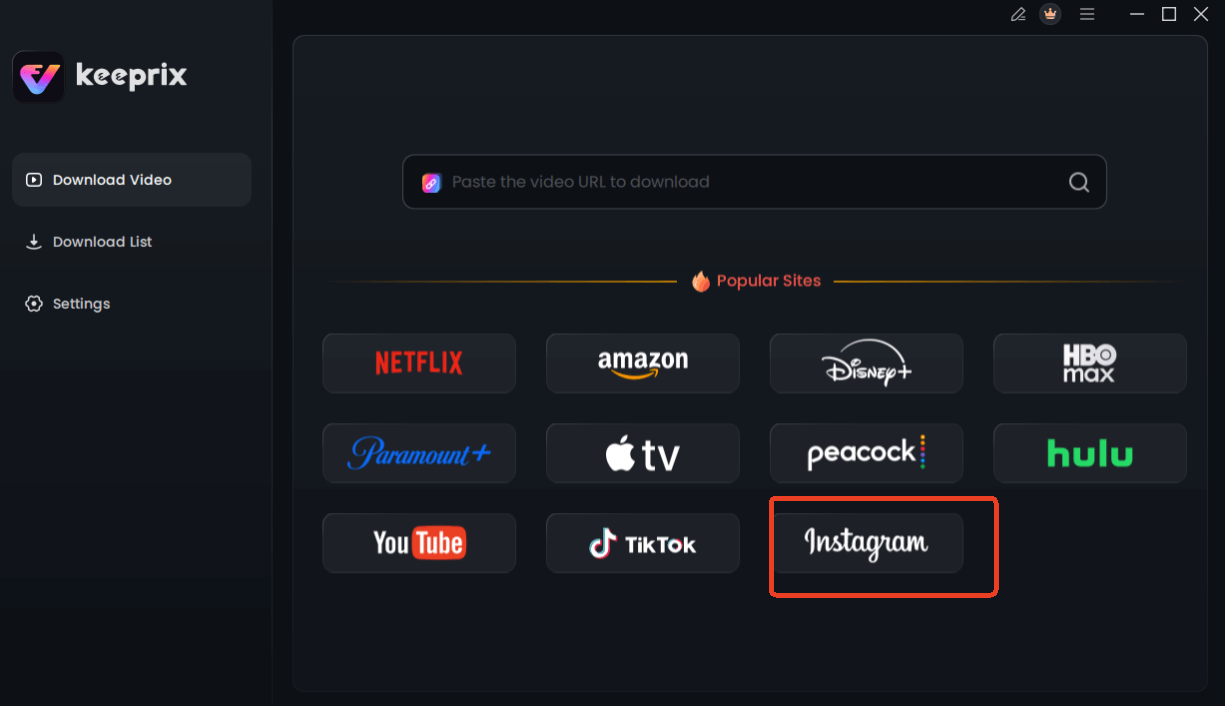
Choose Instagram in Keeprix Downloader
Step 2. Copy the Instagram URL: In a web browser or the Instagram app, navigate to the Reel, Story, or video you want to save. Click the three-dot menu icon and select “Copy Link.”
Step 3. Paste the Link in Keeprix: Return to Keeprix. The application will often detect the link in your clipboard automatically. If not, paste the URL into the input field at the top of the screen.
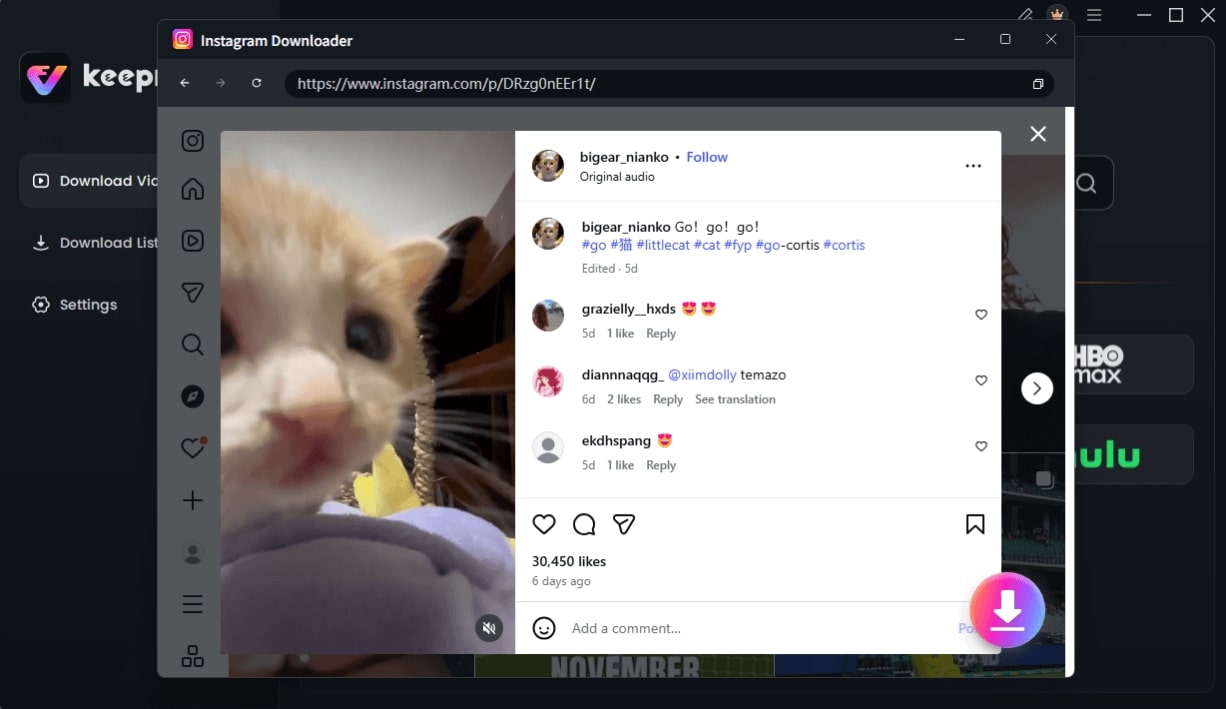
Choose Instagram Video and Click Download
Step 4. Analyze and Download: Click the “Analyze” button. Keeprix will process the link and present you with video details and quality options. Choose your preferred format (e.g., MP4) and resolution, then click “Download” to save the file to your computer.
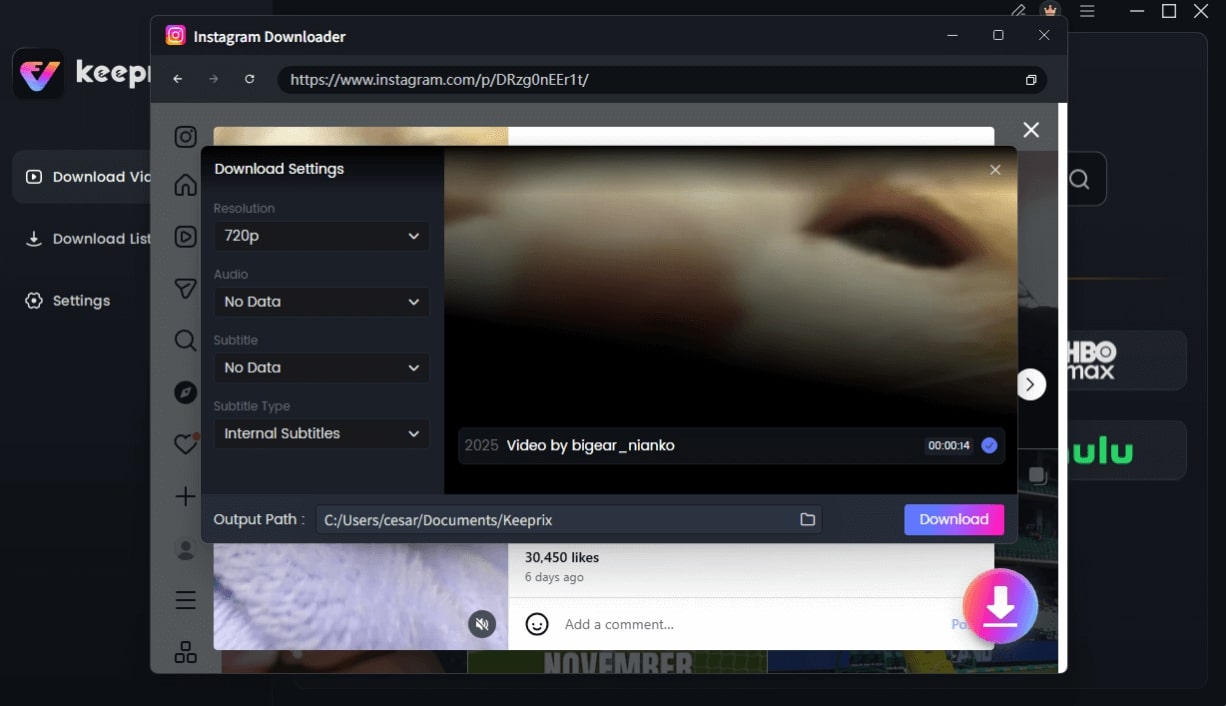
Configure Instagram Download Settings
Understanding the Risks: Legal and Safety Concerns
Before using any downloader, it’s crucial to understand the legal and security implications. Using third-party tools to download content exists in a legal gray area, and your responsibility depends on what you download and how you use it.
Copyright and Personal Use
Saving your own Instagram content for archival purposes is perfectly acceptable. However, downloading videos or images created by others is subject to copyright law. Re-uploading, distributing, or using someone else’s content for commercial purposes without their explicit permission is a copyright violation. While the risk for saving a video for personal, offline viewing is low, you should always respect the creator’s rights and assume all content is protected.
Security and Privacy Risks of Online Tools
Pasting an Instagram link into an unknown online ig downloader exposes you to significant security threats. These free websites are often funded by aggressive ad networks that can trigger:
- Malware: Malicious ads or redirects that attempt to install viruses or unwanted software on your device.
- Phishing: Deceptive pop-ups designed to trick you into revealing personal information like passwords or financial details.
- Data Tracking: Hidden trackers that monitor your browsing activity across the web.
A locally installed application from a reputable developer like Keeprix bypasses these web-based threats entirely, ensuring your downloads are safe and your data remains private.
FAQs
Q1. What is a Toolzu Instagram downloader?
The term “Toolzu Instagram downloader” refers to a category of free, browser-based websites that claim to save media from Instagram. They are not official or affiliated with Instagram and operate by scraping public data from URLs, which makes them inherently unstable.
Q2. Does a Toolzu reels downloader actually work?
Sometimes, but it is highly inconsistent. The ability of an online tool to complete an Instagram Reels download depends entirely on whether Instagram has recently updated its code. Success is never guaranteed, and functionality can break at any moment.
Q3. Is it safe to use a Toolzu IG downloader?
No, it is not considered safe. Using any free online ig downloader carries significant risks. Downloader website safety is a major concern, as these sites often host aggressive ads that can lead to malware, phishing scams, and unwanted data tracking.
Q4. Can I handle a Toolzu Instagram stories download?
While some sites advertise the ability for Instagram story saving, it is even less reliable than downloading Reels or videos. Instagram Stories have a 24-hour lifespan and unique URL structures, making them especially difficult for unofficial scraping tools to capture consistently.
Q5. Do these tools remove Instagram watermarks?
This is a common misconception. Instagram Reels and videos do not have embedded visual watermarks like TikTok videos do. The creator’s username is part of the app’s overlay, not the video file itself. Any downloader simply saves the raw video file as it exists on Instagram’s servers, which is naturally clean.
Q6. Is it legal to download Instagram videos?
Downloading your own content for a personal backup is fine. Downloading copyrighted videos from other creators for personal, offline viewing falls into a legal gray area. However, redistributing, modifying, or monetizing that content without permission is a copyright infringement.
Q7. Why do online downloaders stop working?
They stop working because their entire method relies on a fragile connection to Instagram’s site structure. As soon as Instagram updates its code to improve security or prevent scraping—which it does regularly—all of these unofficial tools break simultaneously.
Conclusion
The frustrating search for a working toolzu Instagram doesn’t have to be your routine. The constant cycle of failed downloads, intrusive ads, and security worries is a direct result of how these free online tools are designed. By choosing a dedicated, professionally maintained solution, you can permanently solve the problem. Keeprix Downloader offers a secure, reliable, and high-quality method to save the Instagram content you need without risk. You can regain control over your downloads and save valuable time.
Ready for a download tool that just works? Learn more about Keeprix Downloader and see how it provides a safe and consistent experience.