Snaptik Instagram Without Watermark? Snaptik Insta Alternative

Yes, you can use Snaptik-branded web tools to download Instagram reels and videos, although the original “Snaptik” brand is primarily known as a TikTok downloader. Because Snaptik became so popular for saving watermark-free videos, many users now search for it as a generic term when looking for an Instagram downloader. Recognizing this demand, several web-based platforms have launched “Snaptik for Instagram” pages.
However, these are typically basic web scripts that function exactly like other online downloaders. While they offer a fast, free way to save a quick video without watermarks, consulting a general video download guide reveals that these browser-based tools often comes with hidden frustrations, such as stability issues and sketchy ad networks.
Part 1: Why Free Online Instagram Downloaders Keep Breaking (and Hidden Risks)
If you have ever tried to save an Instagram reel online, you likely know the frustration of a broken workflow. Relying solely on free web-based downloader scripts can be highly inconsistent. Before you make an online downloader your primary tool, consider these common pain points:
- Ad-Heavy Interfaces and Fake Buttons: Many free web tools rely heavily on aggressive advertising. You are often forced to navigate through confusing, fake “Download Now” buttons that trigger random pop-ups rather than downloading your video.
- Frequent API Breakages: Instagram frequently updates its platform API. When this happens, web-based scripts usually break, leaving you with error messages or endless loading screens until the tool’s developer finally updates the code.
- No Batch Downloading: Online downloaders are designed for single-link pasting. If you want to back up a dozen videos or prepare a full watchlist for a trip, you have to copy, paste, and download each link one by one.
- Privacy and Security Concerns: Constantly clicking through sketchy pop-ups and redirects to reach your file can be a privacy risk, especially on mobile devices where it is easy to tap the wrong banner accidentally.
Part 2: Web Tools vs. Desktop Software: Which Should You Choose?
Choosing between a basic web script and stable desktop software depends entirely on your downloading habits.
| Feature | Web Tools (e.g., Snapinsta, FastDL) | Desktop Software (e.g., Keeprix) |
|---|---|---|
| Best For | Quick, single-video downloads on a phone. | Batch downloading and building an offline library on a PC/Mac. |
| Ease of Use | Paste one link at a time. | Add multiple links to a queue for automatic processing. |
| Ad Presence | Heavy pop-ups and redirect ads. | Clean, ad-free user interface. |
| Batch Capability | No batch support. | Yes, download multiple videos or watchlists at once. |
| Platform Stability | Frequently goes down during Instagram updates. | Highly stable desktop application with reliable updates. |
Part 3: Top Free Web-Based Snaptik Instagram Downloader Alternatives
If you are on a mobile device and just need to save one video quickly, there are several popular web-based alternatives to Snaptik. Tools like Snapinsta and FastDL dominate the search results because they offer quick fixes without requiring software installation.
3.1 Snapinsta
* Pros: Highly accessible on any browser; requires no installation; saves Instagram videos and reels quickly.
* Cons: Heavily ad-supported interface where users frequently have to dodge fake “Play” or “Download” buttons disguised as banner ads; prone to occasional downtime when Instagram updates; completely lacks batch download capabilities.
3.2 FastDL
* Pros: Simple, minimalist web interface; decent processing speed for individual links.
* Cons: Still requires you to paste URLs one by one; clicking to start a download can trigger sudden, full-screen redirect ads that are incredibly frustrating to close on a small mobile screen.
While these tools are perfectly fine for a one-off download, they quickly become tedious if you want to save multiple videos for offline viewing, editing, or reference. If you need something more robust for your Mac or Windows PC, you might read through downloader review pages to find a dedicated desktop alternative.
Part 4: The Stable Desktop Alternative to Snaptik Instagram Downloade
For users frustrated by ad-heavy interfaces, fake download buttons, and unreliable web scripts, the Keeprix Video Downloader provides a stable desktop alternative. It allows you to turn accessible Instagram videos into flexible offline MP4 or MKV files, letting you build a personal media library without dealing with sketchy pop-ups.
Unlike web downloaders that limit you to pasting one link at a time, Keeprix is built for batch downloading. You can queue up entire watchlists of reels, tutorials, or reference videos and let the software process them simultaneously. This is ideal for preparing content before a flight, commuting, or simply organizing useful videos.
Note that Keeprix respects platform rules: you must have legitimate access to the Instagram video (either public or accessible through your own account) in order to download it.
How to Save High-Quality Instagram Videos to MP4/MKV with Keeprix
Moving from a clunky web browser script to a dedicated desktop app makes saving videos significantly easier. Here is how you can use Keeprix to batch download your favorite Instagram content safely:
Step 1: Download and Install Keeprix: Install the software on your Windows (10/11) or Mac (macOS 11+) computer. The trial version allows you to download up to 2 full videos so you can test the workflow.
Step 2: Locate Your Content via the Built-in Browser: Instead of copying and pasting links back and forth, use Keeprix’s built-in browser to log in to your Instagram account safely. You can navigate your feed, saved posts, or specific profiles to find the reels and videos you want directly inside the app.
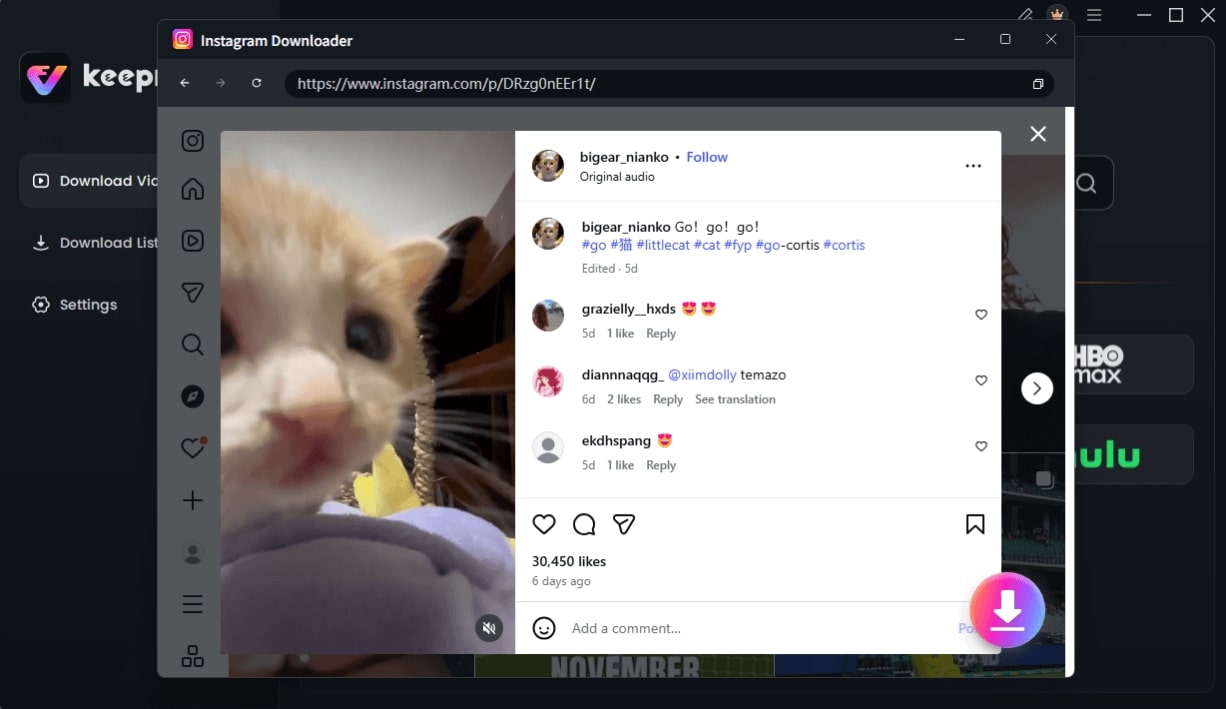
Choose Instagram Video and Click Download
Step 3: Choose your preferred output format. Keeprix supports up to 4K resolution when that source quality is available on Instagram, ensuring your offline library looks crisp on any device.
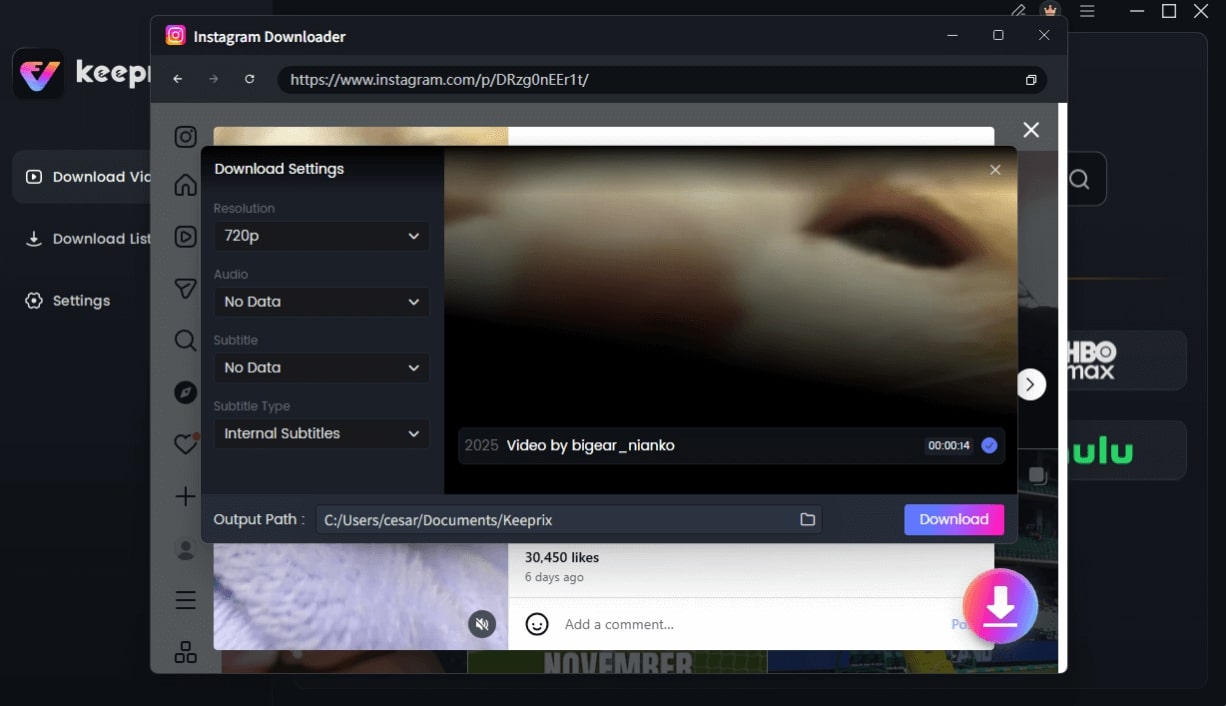
Configure Instagram Download Settings
Once downloaded, organize, rename, or transfer your local files to your phone, tablet, or external drive for easy offline viewing without expiry limits.
You might like: 5 Best Paramount Plus Downloaders for PC/Mac
Frequently Asked Questions
What is ‘Snaptik Instagram’?
‘Snaptik Instagram’ is a popular search term people use when looking for a tool to download videos from Instagram. Snaptik is primarily known as a TikTok downloader, but users often search for it or similar tools to see if they work for Instagram, highlighting the general need for an Instagram Reels download solution.
How can I download Instagram reels without watermarks?
You can download high-quality, watermark-free Instagram reels by using a reliable desktop tool like Keeprix, which can save videos in up to 4K resolution (as long as that source quality is available on the original post).
Can I batch download multiple Instagram videos at once?
Yes, but generally not with free online web tools, which require you to paste links one by one. To batch download multiple videos, you will need a dedicated desktop software like Keeprix that supports queuing.
Are online Instagram video downloaders safe to use?
While the downloads themselves are usually just standard video files, the web pages hosting these tools often rely on aggressive ad networks. Clicking fake “Download” buttons or hidden pop-ups can expose your device to redirects and privacy risks.
Can I download private Instagram videos?
You can only download videos that you have legitimate permission to view. You must have access to the video via your own Instagram account; downloading tools do not bypass privacy permissions, and understanding how to download protected videos correctly means playing by platform rules.
Does Keeprix support Mac?
Yes, Keeprix is fully compatible with macOS 11 (Big Sur) and above, as well as Windows 10 and 11.
Final Verdict
Choosing the right tool comes down to how often you save videos and where you watch them. If you only need a quick, one-off download on your mobile phone and don’t mind navigating through a few ad pop-ups, free web scripts like Snapinsta are perfectly adequate.
However, if you are looking to download multiple videos at once, demand high reliability, and want to completely avoid sketchy browser ads, desktop software is the clear winner. Keeprix stands out as the ideal desktop choice for turning accessible Instagram videos into a well-organized local MP4 or MKV library. Try Keeprix first on Windows or Mac and see if its stable, batch-downloading capabilities fit your personal offline workflow.

Snaptik Instagram Downloader Alternative
- Download streaming videos on Windows & Mac.
- No restriction on the downloaded videos.
- Support downloading from Netflix, Amazon Prime and more.
- Up to 4K/8K videos without any hassle.