How to Download Tubi Videos for Offline Viewing

You have likely faced this specific frustration: You are packing for a flight or a road trip, expecting to load up your tablet with movies from Tubi, only to discover the button is missing. Unlike paid subscription services, Tubi creates a hurdle that catches many users off guard—it does not support native offline viewing.
Because Tubi is a free streaming service, it requires an active internet connection to serve the advertisements that fund the content. If you disconnect from Wi-Fi, the playback stops. This guide addresses that gap. We provide a verified procedure to secure your content for offline use, ensuring you aren’t left staring at a buffering screen when you need entertainment most.
Tubi Video Download
The method below has been successfully tested on multiple Windows and macOS configurations, verifying ad-free playback without an internet connection.
You may also like: How to download movies from Crackle
The Reality: Why You Can’t Download Directly From Tubi
Before diving into the solution, it is helpful to understand why this restriction exists. The interface on Tubi is straightforward, yet it lacks the download button found on Netflix or Prime Video. This is not a glitch; it is the core of their business model.
Tubi relies entirely on ad-supported content. Every time you watch a movie, the app calls a server to insert commercials in real-time. This dynamic ad insertion is the revenue engine that keeps the movies free. If Tubi allowed a native Tubi video download option, it would lose the ability to serve these ads, effectively cutting off its revenue for that viewing session.
Because of this streaming license rule, offline viewing is permanently blocked on the official app. Consequently, you must rely on external tools to save Tubi movies to your hard drive.
Method Comparison: Manual Recording vs. Specialized Software
When you need to save Tubi movies, you generally face two choices: manual screen recording or dedicated downloader software. It is vital to understand the trade-offs—including time and cost—before you begin.
Option 1: Manual Screen Recording (Free but Time-Consuming)
Users often attempt to use free screen recording software like OBS. While this method costs nothing, it requires significant manual effort:
- Time Requirement: Recording is done in real-time. A two-hour movie takes exactly two hours to capture. You cannot use your computer for other tasks during this time without risking audio interference or pop-up notifications appearing in your movie.
- Quality Variance: Screen recorders capture your display output, not the source file. If your internet stutters, your recording stutters.
- Ad Interruptions: You are recording the screen, which means you are also recording the commercial breaks. You will have to manually fast-forward through them later.
Option 2: Professional Downloader (Efficient but Paid)
Dedicated tools like Keeprix Downloader interact directly with the stream data rather than the display. This offers a distinct advantage in speed and quality but generally operates on a “Freemium” model.
- Speed: A dedicated downloader can save a 2-hour movie in roughly 5 to 10 minutes, depending on your connection speed.
- Quality: The software downloads the source file in 1080p or 4K, eliminating stuttering.
- Cost: Most reliable downloaders offer a free trial to prove they work, but require a license key for unlimited batch downloading.
While free recording tools exist, this guide focuses on the software method for users who prioritize saving time and ensuring high-quality, ad-free files for their travels.
The Reliable Solution: How to Download Tubi Videos With Keeprix
If your goal is to secure an entire season of a show for a trip without manually monitoring your computer for hours, Keeprix Downloader is the recommended tool. It automates the retrieval process and removes the ad breaks during the download.
Step-by-Step Procedure
1. Installation and Setup
Download and install Keeprix on your Windows or macOS device. The installation is standard.
2. Select Your Content
Navigate to Tubi in your web browser. Browse to the movie or TV show episode you wish to save. Copy the URL from the address bar. Open Keeprix and paste the URL into the designated input field. The software will analyze the video metadata to detect available resolutions.
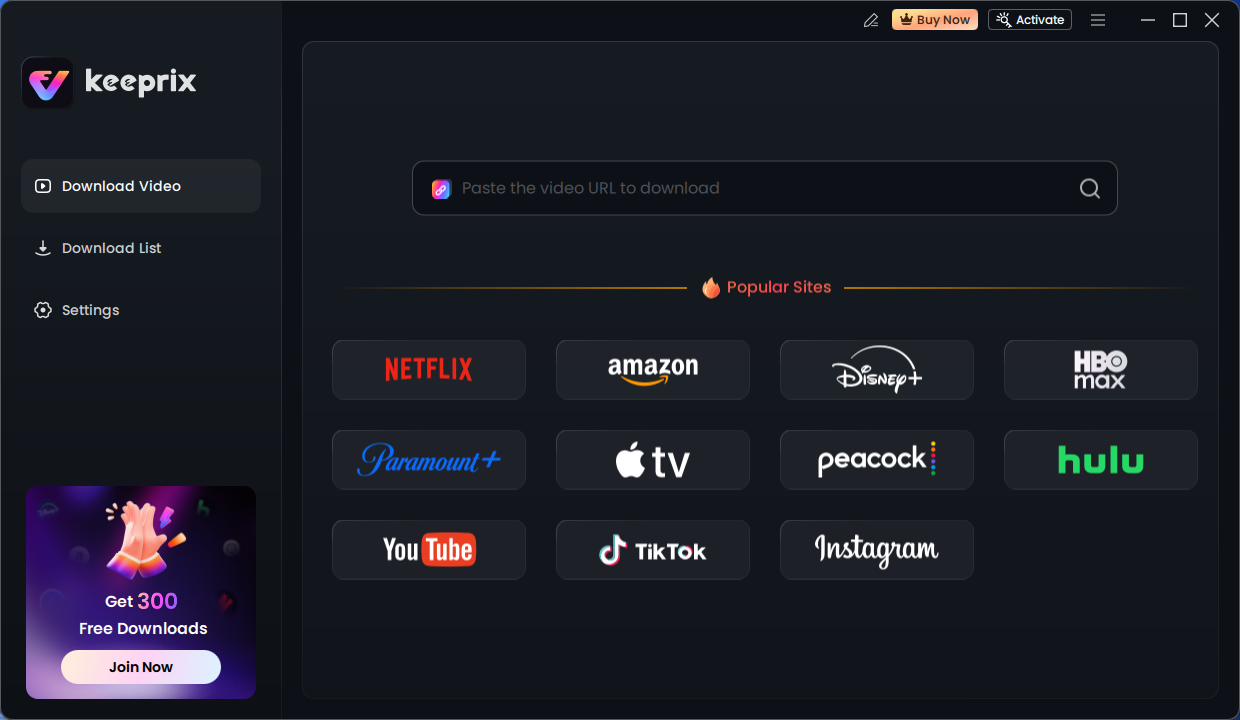
Keeprix Download Main Screen
3. Configure Download Settings
Once the analysis is complete, a settings window will appear:
- Format: Select MP4 or MKV. These formats ensure broad compatibility with mobile devices.
- Resolution: Choose your desired resolution (up to 4K where available).
- Subtitles: You can embed subtitles or save them as a separate .SRT file. This is essential for watching in noisy environments, such as airplanes.
4. Batch Downloading and Ad Removal
This step is where the software saves you time.
- Time Estimate: On a standard broadband connection, a full-length movie (approx. 2GB) typically downloads in 5 to 8 minutes.
- Select Batch Download if you pasted a link to a TV series; you can select all episodes at once.
- The software automatically filters the data stream to Remove Download Ads, ensuring the final file plays seamlessly without interruptions.
5. Transferring Files to Mobile (Crucial for Travel)
Since you likely want to watch these on a tablet or phone, you must transfer the files from your computer.
- For Android: Connect your phone to the computer via USB. Select “File Transfer” mode on your phone. Drag and drop the .MP4 files from your computer’s download folder into your phone’s “Movies” or “DCIM” folder.
- For iOS (iPhone/iPad): The easiest method is to use a cloud service (like iCloud Drive or Google Drive) or AirDrop (if on Mac). Alternatively, plug your device in and use the “File Sharing” tab in Finder/iTunes to drag the video files directly into an app like VLC for Mobile.
Safety Warning: The Risks of “Free” Online Downloaders
When searching for answers to “can you download from Tubi,” search engines often prioritize free, web-based converters. It is vital to approach these sites with extreme caution.
Many of these “100% Free” sites rely on aggressive advertising networks to monetize their traffic. Clicking “Download” often triggers pop-ups, redirects to betting sites, or installs potentially unwanted programs (PUPs). Furthermore, web-based tools rarely possess the decryption capabilities required to handle protected streaming protocols, often resulting in a corrupt file that fails to open.
To protect your device and ensure you actually get the video, avoid browser-based shortcuts. Using verified software that processes data locally keeps your system clean and your data private.
FAQ: Common Questions on Saving Tubi Content
1. Is Keeprix free to use?
Keeprix operates on a “freemium” model. You can download a limited number of videos or use a trial version to verify it works for you. However, unlocking unlimited batch downloads and full speed usually requires purchasing a license.
2. Do I need a Tubi account to download videos?
No. Since Tubi is free, you do not need to log in to watch or download content using this method. You can simply copy the link from the browser.
3. Can I watch Tubi movies without internet officially?
No. Tubi does not offer a built-in download function on any device. The platform requires an active internet connection to stream content.
4. Does this method remove the commercials?
Yes. Professional downloaders strip the ad markers from the stream, meaning your offline file will play continuously without commercial breaks.
5. Can I play these files on my iPhone?
Yes, but you cannot download them directly to the iPhone. You must download them to your computer first, then transfer them to your iPhone using iTunes, AirDrop, or a cloud storage app like Google Drive.
Conclusion
The inability to download content directly from Tubi is a significant hurdle for anyone planning to travel or disconnect from the grid. While the platform’s strict adherence to ad-supported content means a native button is unlikely to appear, this restriction does not have to dictate your entertainment options.
By using a dedicated tool like Keeprix, you can bypass these limitations efficiently. While it may require a software license, the value lies in the time saved and the quality guaranteed. You gain the ability to strip ads, batch download entire seasons in minutes, and maintain 1080p quality. By following the steps above, you can ensure your library is secure, portable, and ready to play whenever and wherever you are.