How to Download Movies on Crackle for Offline Viewing

For anyone who relies on streaming entertainment, specifically the free movie watcher persona like Jason, there is a distinct moment of frustration that occurs right before a trip. You have your bags packed and your laptop ready, planning to watch a few classics on Crackle during a long flight. You assume, quite reasonably, that you can simply download Crackle movies just as you do on premium platforms like Netflix or Disney+.
The reality hits hard when you open the interface: there is no download button. Facing a disconnected device when you need entertainment most can be a significant obstacle, turning a six-hour flight into a tedious ordeal.
This guide addresses that exact limitation. If you are looking for how to download movies on Crackle, standard browsing will unfortunately result in frustration because the official platform does not support it. We will navigate past the Crackle app limitations and explore the available methods—both free and paid—to secure Crackle offline download files for your travels.
How to Download Movies on Crackle
The Reality: Can You Download Movies from Crackle?
Let’s answer the most pressing question immediately: Can you download movies from Crackle directly through their website or app? The definitive answer is no.
Unlike subscription-based services that allow you to save content for later, Crackle is a free streaming service that operates on an ad-supported model. This model requires a constant internet connection to serve commercials during playback. These ads are the platform’s primary revenue source. If you were offline, the app couldn’t load the latest ads, and Crackle wouldn’t make money.
Because of these offline viewing restrictions, searching for a native download button is futile. You will not find one on the desktop site or the mobile application. This limitation is a common source of confusion for users who expect a premium experience without the premium price tag.
The Workarounds: Hard vs. Easy
Since the official platform blocks offline viewing to protect its ad inventory, the only way to watch Crackle content without an internet connection is to use third-party software. You essentially have two choices:
- Screen Recording (Free, but manual): Capturing the playback in real-time.
- Professional Downloaders (Paid, but automated): Extracting the file directly from the server.
Both methods work, but they offer vastly different experiences in terms of quality and convenience.
Method Comparison: Screen Recording vs. Professional Downloaders
Before selecting a tool, it is vital to weigh the “cost” of your entertainment. You can pay with your time and patience (Screen Recording), or you can pay with money (Professional Downloader).
Screen Recording: The Free (Manual) Method
If you are strictly budget-conscious and refuse to spend money on software, screen recording is your only option. Software like OBS Studio is free and can capture your screen. However, based on our testing, this method comes with significant friction points regarding ad-supported movies.
- Time Cost: You must play the entire movie in real-time. A two-hour movie takes two hours to record. You cannot use your computer for anything else during this time, or the windows will appear in the recording.
- Ad Intrusions: Since you are recording the screen, every commercial break is baked into your final video file. When you watch it later, you will have to manually fast-forward through the ads.
- Audio Desync: This was the biggest issue in our tests. When we attempted to screen record the series Sherlock, the audio began to lag by about 3 seconds after the second ad break. This “drift” makes the content almost unwatchable.
- Quality Risks: System notifications, mouse cursors, or buffering wheels will be permanently recorded into the footage.
Professional Downloaders: The Automated Method
Professional solutions like Keeprix operate differently. They access the server directly to extract the video file.
- Ad Removal: These tools intelligently strip out commercials, leaving you with a seamless movie file.
- Efficiency: Downloads occur faster than real-time. In our tests, a 90-minute movie downloaded in approximately 12 minutes on a standard Wi-Fi connection.
- Quality Assurance: The software pulls the raw video stream (up to 1080p), ensuring the output is not affected by your screen resolution or internet lag.
If your goal is to have a clean, watchable file without ads required during playback, a professional downloader is the superior choice, albeit a paid one.
| Feature | Screen Recording (Manual) | Crackle Downloader (Automated) |
| Cost | Free ($0) | Paid License (Free Trial available) |
| Ad Removal | No (Ads recorded permanently) | Yes (Automatic removal) |
| Video Quality | Dependent on screen res/buffering | Up to 1080p Source Quality |
| Time Required | Real-time (2 hours for a 2-hour movie) | High Speed (Approx. 12 mins) |
| Sync Issues | High risk of audio drift | Perfect Sync |
| File Type | Huge, uncompressed video files | Optimized MP4 / MKV |
Solution: How to Save Crackle Movies with Keeprix Downloader
For users like Jason, who discovered the hard way that Crackle does not offer offline downloads, Keeprix Downloader provides the necessary technical bridge.
Transparency Note: Keeprix is professional software. While it offers a trial version, fully unlocking the features requires a license. We recommend this tool not because it is free, but because it reliably solves the technical hurdles that free browser extensions cannot.
Is It Worth the Cost?
As a “Free Movie Watcher,” paying for software might seem counterintuitive. However, consider the economics of your trip:
- Option A: Rent 3 movies on Amazon Prime at $3.99 each = $11.97.
- Option B: Buy a monthly license for a downloader = Similar cost, but you get unlimited downloads for any movie or show on Crackle (and other supported sites) for the entire month.
If you are a frequent traveler, the software pays for itself after just a few downloaded movies.
Step-by-Step Procedure
Step 1. Download and install Keeprix Downloader on your computer. Both Windows and Mac are supported.
Step 2. On the main interface, paste your Crackle video link directly. Keeprix will help you check the video profile and download information.
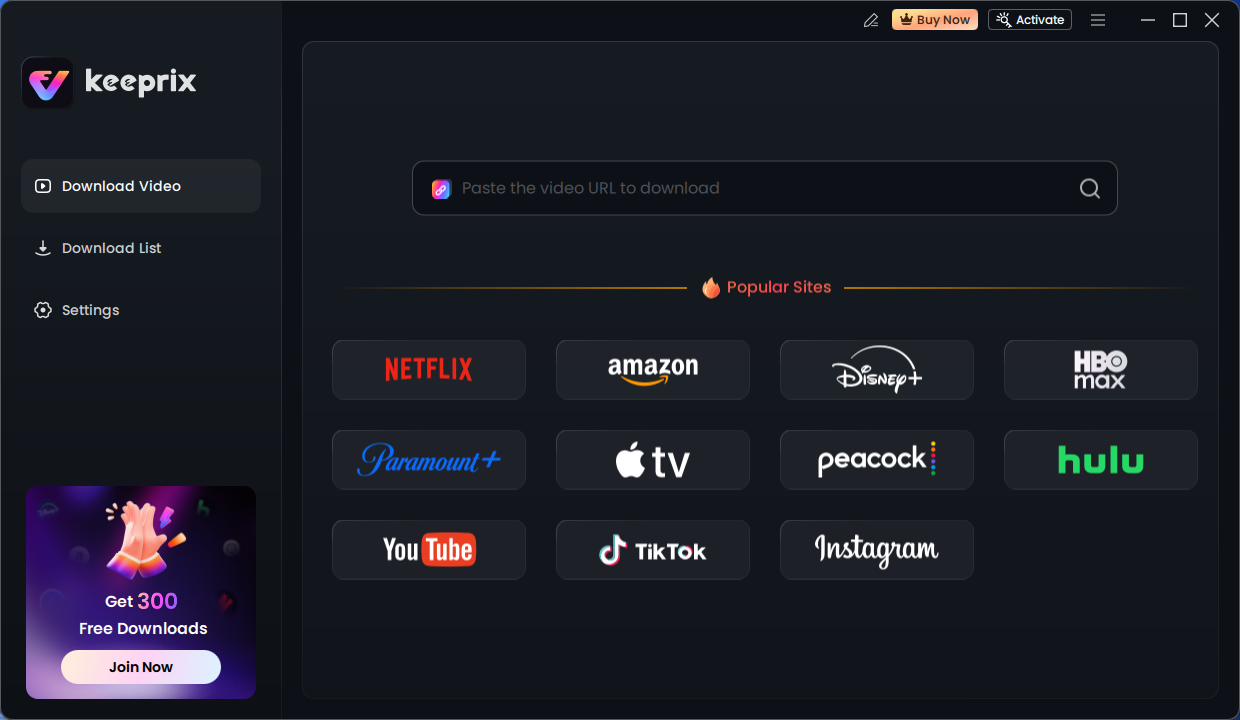
Keeprix Download Main Screen
Step 3. Confirm your download settings:
- Video: Select 1080p for the best balance of quality and file size for desktop viewing.
- Audio: Ensure you select the primary audio track (usually AAC or AC3).
- Subtitles: You can choose to embed subtitles or save them as a separate .SRT file.
- Output Path: Set the output path as your local folder, or download videos to an external hard drive.
Step 4. Click the download button. The software will bypass the streaming rights restrictions to create a local copy. Once finished, the file will appear in your output folder, usually as an MP4.
Why Crackle Restricts Downloads (The Ad-Revenue Loop)
It helps to understand why Crackle makes this so difficult. It isn’t just to be difficult; it is about survival. Crackle relies entirely on advertising revenue.
When you stream a movie, the player “pings” the ad server every 15 minutes to insert a new commercial. This is the Ad-Supported Revenue Loop.
- Streaming: The player talks to the ad server -> Ads play -> Crackle gets paid.
- Downloading: The file is on your hard drive -> No connection to ad server -> Ads cannot play -> Crackle makes $0.
The Failure of Free Online Converters
This economic model is enforced by Digital Rights Management (DRM). This is why you should be wary of websites claiming to be a free Crackle downloader. Most free online converters fail because they cannot decrypt this DRM. They might identify the video, but when you download the file, you will likely end up with a 0kb file, a black screen, or a corrupted data error. Tools that do not account for these streaming rights protocols are incapable of reassembling the encrypted video and audio streams into a coherent file.
Safety Warning: Avoiding Malware in Free Downloaders
When you encounter the offline viewing restrictions on Crackle, the temptation to search for a free Crackle downloader is high. However, this is where many users compromise their digital safety.
Because maintaining code that can bypass DRM requires significant developer resources and constant updates, legitimate developers cannot offer this service for free without a catch. If the product is free, your data is often the price.
Red Flags to Watch For
- Browser Hijackers: Many free extensions will alter your default search engine or homepage in exchange for their service.
- Bundled Software: Free installers often include hidden programs (bloatware) that slow down your computer or track your browsing habits.
- Phishing Pop-ups: Sites that claim to convert video links often bombard you with aggressive pop-ups asking for personal information or claiming your device is infected.
Stick to reputable, paid software solutions or the manual screen recording method to ensure that your quest for a movie does not result in a compromised operating system.
Crackle Offline Viewing FAQ
Here are the quick answers regarding how to download movies on Crackle to save you time.
1. Does Crackle allow offline viewing natively?
No. Crackle requires an active internet connection to stream content and ads. There is no offline mode in their official app.
2. Can I watch Crackle movies without internet?
Only if you use third-party software (like Keeprix or a screen recorder) to save the file locally before you lose connection.
3. Why are most free downloaders unsafe?
Real DRM removal requires complex coding. Free tools often monetize by bundling malware, tracking your data, or showing aggressive ads.
4. Does the downloaded file have ads?
It depends on how you save the videos. If you use a screen recorder: Yes, the ads are recorded. If you use a professional downloader like Keeprix: No, the software removes ads during the download process.
5. Is it illegal to download these movies?
Downloading copyright-protected content breaches Crackle’s Terms of Service. However, under Fair Use in many jurisdictions, recording content for personal, non-commercial, time-shifted viewing (like recording a show on a VCR/DVR) is generally tolerated, though laws vary by country. Always use these tools for personal viewing only.
Conclusion
The realization that Crackle does not offer offline downloads doesn’t have to ruin your travel plans. While the platform’s strict adherence to an ad-supported model creates a barrier for users like Jason, you have options. You can choose the free route of screen recording, accepting the time cost and potential quality issues. Or, you can opt for a professional tool like Keeprix Downloader, which offers a reliable, safe way to regain control over your entertainment—albeit for the price of a few rentals.
By solving the Crackle download option problem with the right tool for your budget, you eliminate the frustration of ads required during playback and ensure you have high-quality entertainment ready, regardless of your internet connection. Don’t let a lack of Wi-Fi leave you staring at a blank screen. Choose the method that respects your time and budget, and secure your movie library before your next trip.