How to Watch Apple TV+ on Android Devices: Step-by-Step Guide

| Quick Navigation |
| This article explains how to watch Apple TV+ on Android devices with the official app. It guides you through installing the app on phones, tablets, and Android TV platforms effortlessly. For users who want to view videos offline, Keeprix Video Downloader offers a flexible solution for saving videos. Steps to download and manage content are clearly laid out, ensuring smooth streaming experiences. |
Watching Apple TV+ on Android is confusing for many users looking for options. Many users have shared mixed reviews of Apple TV+, especially on Reddit. One user mentioned subscribing to the service but struggling to find an Android app. They rely only on the Chrome browser with limited options. This sparked curiosity among Android users, asking, “Can you download Apple TV on Android and enjoy offline viewing?” This guide clarifies official and third-party solutions for streaming Apple TV+ on Android.
Watch Apple TV on Android
Part 1. Can You Download Apple TV+ on Android?
Yes. You can download Apple TV+ on Android. Android users will now be able to install the official Apple TV app. The latest update in 2025 finally allows streaming Apple TV+ shows and movies on Android phones. When someone asks, “Can you download Apple TV on Android?” you can get it directly from the Google Play Store.
The official app is compatible with recent Android phones and tablets with Android 10 or higher. Previously, Apple TV+ was limited to smart TVs, but support now includes Android mobiles and tablets. You can stream Apple TV+ Originals and track your progress to manage all this with your Apple ID.
Part 2. How to Download Apple TV+ on Android Phones and Tablets
The Apple TV Android app allows one to stream all their favorite Apple TV+ shows. It also includes your purchased movies and offers smooth streaming on most devices. Many users still ask, “Can you download Apple TV on Android?” and yes, easily from the Play Store. The app also supports Family Sharing for different users in one home. Please follow these steps to learn how to download the app:
Step 1. Navigate to the “Play Store” app to search for the “Apple TV” app and press the “Install” button.
Step 2. After installing it, open the app and use your Apple Account to view all the content.
Part 3. How to Watch Apple TV+ on Android TV/Google TV
Watching Apple TV+ on Android TV or Google TV gives a true big-screen experience. The app lets you stream Apple Originals or rent movies and access your full library easily. People wonder, “Can you download Apple TV on Android?” and yes, it works perfectly here too. You can use your remote to search and play shows, plus enjoy high video quality features. Take guidance from the steps to watch Apple TV content:
Step 1. Go to the “Apps” tab on your Android/Google TV and access the “Search” bar.
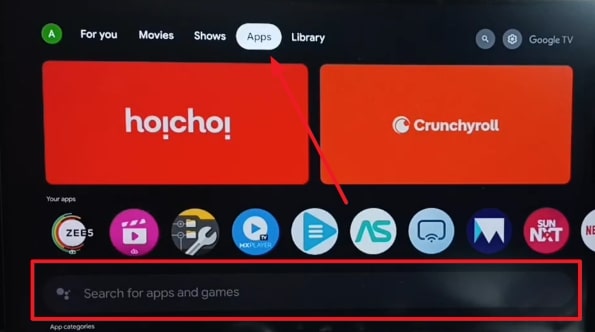
Search For Apps and Games
Step 2. Type “Apple TV” in the given bar and search for it.
Step 3. When the app appears, opt for the “Apple TV” app.
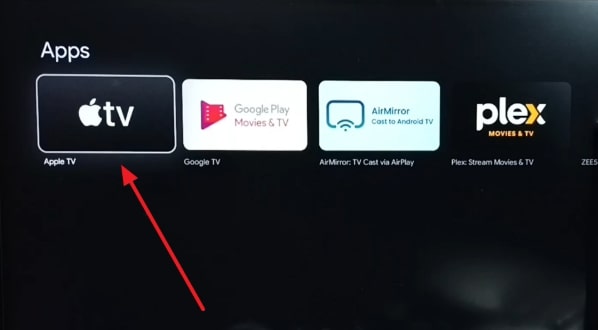
Choose Apple TV Option
Step 4. Click the “Install” button to install the app on your television. After downloading, open the app to sign in and watch your favorite content.
Part 4. Bonus Tip. Watch Apple TV+ Videos on Android Without Installing the App
Sometimes users want to watch Apple TV+ videos on Android without installing the app. This is where Keeprix Video Downloader becomes a helpful and practical choice for many users. It lets you save Apple TV+ videos directly to your computer for smooth offline playback anytime. When people ask, “can you download Apple TV on Android?” Keeprix offers another smart alternative for flexible viewing. You can choose from various video format, like MP4 or MKV, so that they will be compatible with more devices.
The tool also provides 13 audio languages for listening to playbacks in your language. You are also able to opt for the video resolution, like 1080p, depending on the size of your screen. In addition, Keeprix offers subtitle settings where users can pick internal or external subtitle types. It supports more than 13 subtitle languages to ensure global accessibility for all viewers.
Key Features
- Video Previews: Preview videos before downloading to ensure correct selections and quality.
- Fast Downloading: Uses advanced technology to speed up downloads for an effortless experience.
- Codec Options: Pick H264 or H265 codecs for balancing quality and computer compatibility.
- Batch Downloads: Download entire video collections at once, saving time for movie marathons.
- Video Analysis: Automatic detection and analysis of video links make downloads easy.
Comprehensive Guide to Apple TV+ Videos on Your Computer via Keeprix
Step 1. Download and start Keeprix on your desktop to head to the “Apple TV” category from the dashboard.
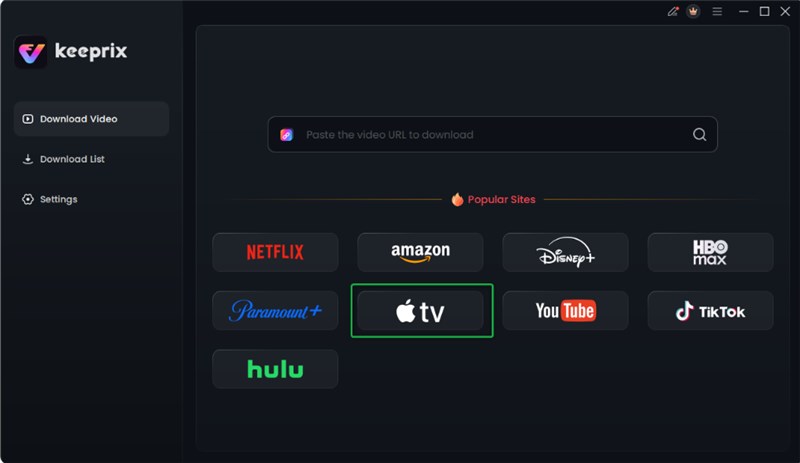
Choose Apple TV Platform
Step 2. Use your Apple ID details to sign in and unlock your streaming library.

Log in Apple TV Account
Step 3. Scroll through your available titles to select your favorite movie or show and click the “Download” button.
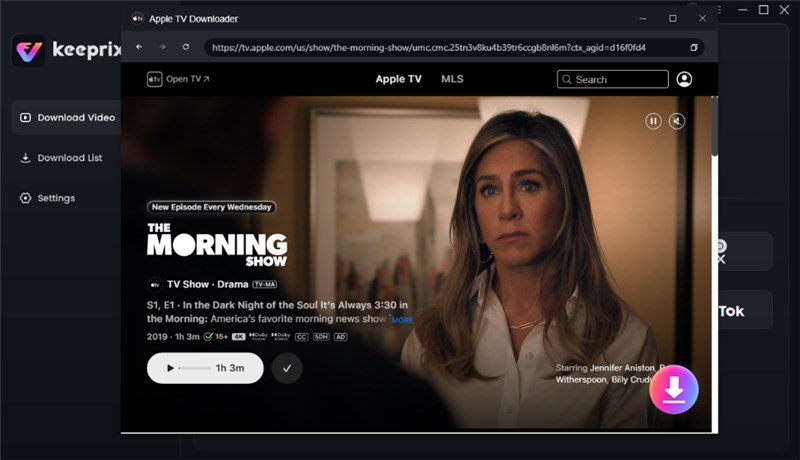
Click the Download Button
Step 4. Select your favorite video resolution, audio language, and type of subtitle (internal or external) of the video. Next, select your File Save Location and download. Your download will start. Wait for the download and access your downloads in the Download List menu.

Apple TV Video Download Completed
Part 5. FAQs
Q1. Can I use Apple TV without an iPhone?
Yes, you can stream Apple TV+ content without owning an iPhone device. It works standalone with its own remote on many smart TVs and devices. You can also access Apple TV+ through Android devices, smart TVs, or web browsers easily.
Q2. Can you download Apple TV on Android TV?
You can download the official Apple TV app directly on Android TV devices. It’s available through the native app store on Android TV and Google TV. You can stream Apple Originals and sync your watchlist across multiple connected devices.
Q3. Why is Apple TV not working with Samsung TV?
Apple TV would not run on a Samsung TV when the software and app are not compatible. The app may also crash or break down due to issues with the network or firmware. Ensure your Samsung Smart Hub and TV software are updated to restore normal Apple TV functionality.
Q4. How much is Apple TV on Android?
The Apple TV+ subscription on Android costs $12.99 per month as of 2025. A free trial is available before the monthly payment requirement begins on Android devices. You can also opt for an annual plan costing $99, saving more than $50 yearly.
Conclusion
To sum up, watching Apple TV+ on Android devices has become simpler with official app support. You can stream shows and Originals smoothly on phones, tablets, and TVs. Many users still ask, “can you download Apple TV on Android,” and now the process is easy and convenient. For extra flexibility, consider Keeprix Video Downloader to save videos offline anytime. Download Keeprix Video Downloader now to enjoy watching Apple TV+ content without interruptions.