Can You Watch Apple TV Offline? Mac & PC Guide

Can You Watch Apple TV Offline?
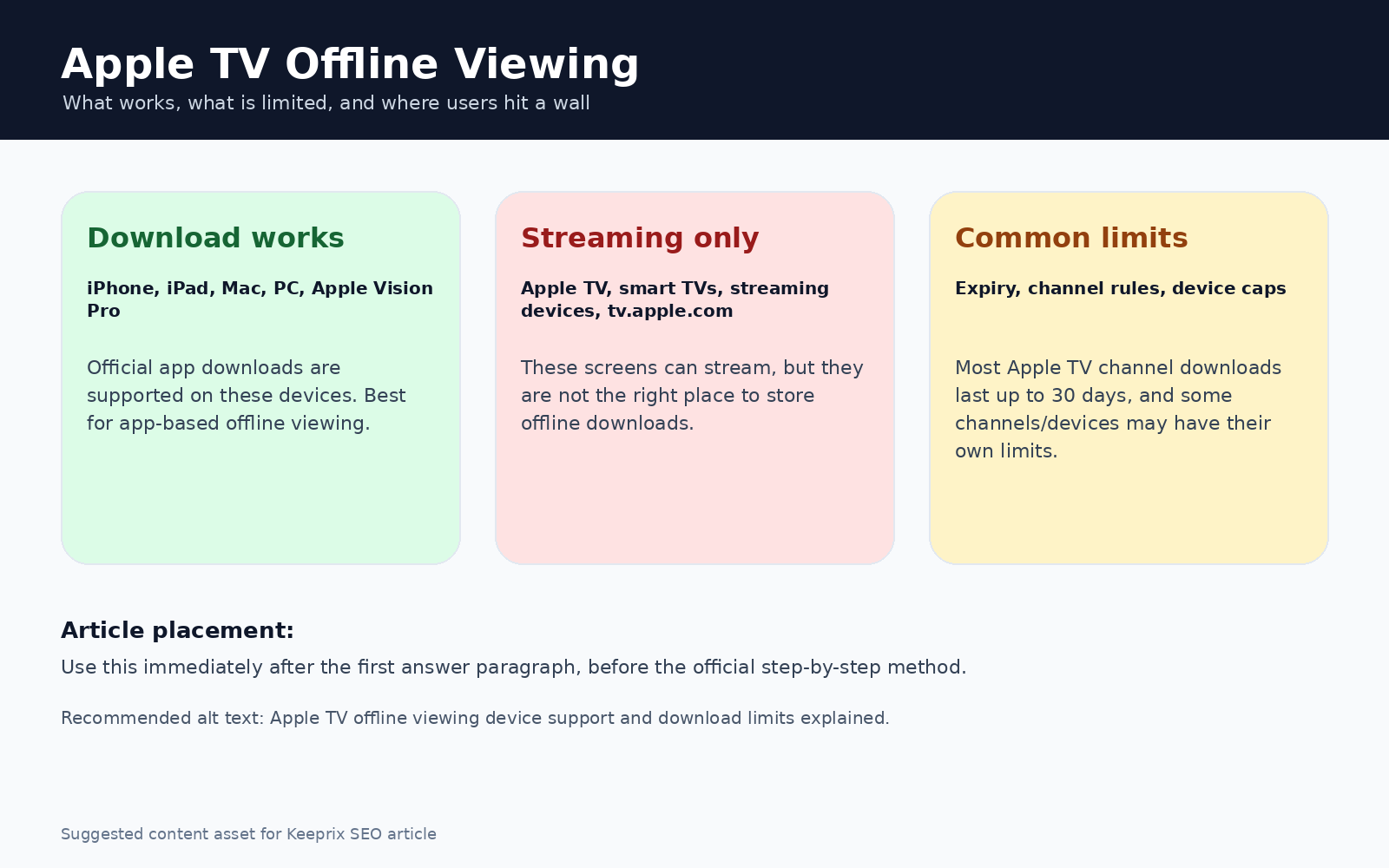
Yes, you can watch Apple TV+ offline officially, but there is a strict limitation: downloads are only available through the native Apple TV app on supported iOS, iPadOS, and Mac devices. If you are trying to download shows using a web browser, it is not supported. You cannot save offline videos directly from the website.
This article covers exactly how the official downloading process works, the hidden ecosystem limitations you might run into, and a flexible local-file alternative for those who need to watch on a Windows PC or transfer files to a USB drive.

Can You Watch Apple TV Offline
Why You Can’t Download from the Apple TV Website
It is incredibly common to waste time scouring the Apple TV+ website for a missing download button. If you are logged into tv.apple.com on your PC or laptop browser, you will not find one.
Apple restricts offline viewing strictly to its native app ecosystem to maintain security over its streams. This means you must have the Apple TV app installed to save anything.
Because Apple does not offer a native, fully-featured offline viewing app for Windows PCs or older non-Apple devices, browser users are completely stranded if they want to watch shows without the internet. You simply cannot force your browser to cache or download entire episodes officially.
Understanding Official Apple TV Download Limits
If you have a supported Apple device, saving an episode is simple: open the native Apple TV app, navigate to the show or movie you want, and tap the download cloud icon next to the title.
However, even if you own a Mac, iPhone, or iPad and use this official method, Apple’s offline downloads come with several standard ecosystem restrictions. Before you fill up your device’s storage, keep these limits in mind as you learn how to download DRM protected videos:
- Downloads expire: Saved videos typically expire after 30 days, and sometimes sooner depending on the title. Once you press play, you usually only have 48 hours to finish watching.
- Active subscription required: If your subscription ends, your downloaded library becomes unplayable immediately.
- Locked to the Apple ecosystem: Official downloads are encrypted. You cannot pull the video file out of the Apple TV app.
- No external flexibility: Because the files are locked, you cannot transfer these downloaded shows to a USB flash drive, back them up on an external hard drive, or play them in standard media players like VLC.
If you just need a couple of episodes for a quick flight on your iPad, this official method is perfectly fine. But if you need to manage your own files or watch on unsupported devices, this app-only lock leaves a massive gap in your workflow.
Apple TV Offline Devices
You might like: Can You Watch Disney Plus Offline on All Devices?
Can You Download Apple TV+ Shows on iPhone & iPad?
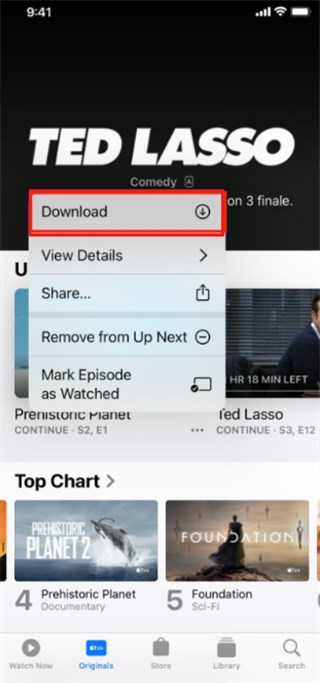
It is also completely possible to download Apple TV+ shows on iPhones and iPads. The application allows people to browse, search, and download content to entertain themselves offline.
Step 1. Access the app’s main screen to view available Apple Originals and tap “Three Dots” on your preferred show.
Step 2. Tap the “Download” option on the upcoming prompt to start the downloading process.
Download Apple TV Shows on iPhone
Can You Download Apple TV+ Shows on Mac?
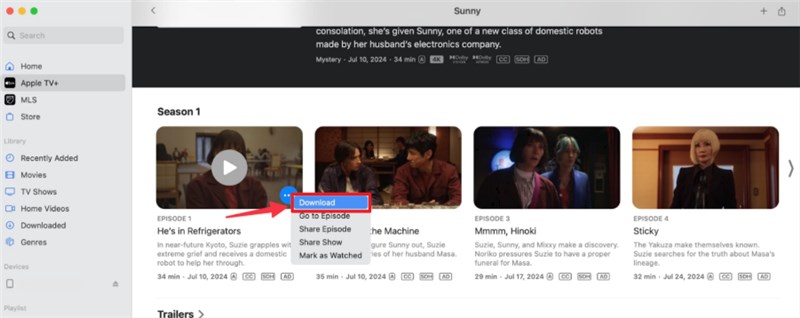
The shows on the Apple TV+ can be downloaded on macOS 10.15 Catalina and onward in the Apple TV app. Users can easily browse Apple Originals to select desired titles and download them for offline playback. Once saved, the downloaded shows remain accessible in the Library section without requiring an internet connection.
Step 1. Browse through the available Apple Originals and select the movie or episode by clicking the “Three Dots” icon.
Step 2. Press the “Download” button on the following pop-up to start downloading it instantly.
Download Apple TV Shows on Mac
On Windows, you can watch Apple TV+ online via the Microsoft Store app, but the download feature isn’t available.
How to Save Apple TV+ Videos for Windows/Mac/USB
When you realize that the official app won’t let you watch on a Windows PC, Mac or transfer shows to a USB drive, you need a different workflow. This is where transitioning from app-only viewing to file-based freedom becomes incredibly useful.
If you already have valid account access to the streaming videos, Keeprix Video Downloader offers a practical local-file alternative. Keeprix helps you turn accessible Apple TV+ videos into standard MP4 or MKV files for personal offline viewing management.
By saving episodes as local MP4 files, you solve the cross-device problem entirely. The downloads will not expire after 30 days, and you can freely watch them on Windows laptops, play them through VLC, or store them on a USB drive to plug into a smart TV. Keeprix can even download videos up to 4K, provided that the source quality is available on your account.
Steps to Download Apple TV Shows as MP4 Files with Keeprix
If you are preparing for a long trip or facing poor internet, you can use the batch download feature to queue up a full season of a show at once, rather than doing it episode by episode.
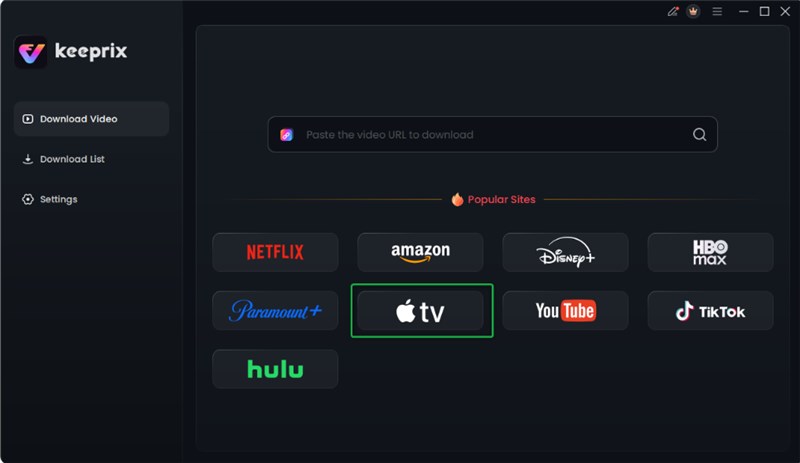
Step 1. Install and launch the Keeprix on your PC and pick “Apple TV” as your source.
Choose Apple TV Platform
Step 2. Sign in with your Apple ID on the next screen to access the content and unlock your media library.

Log in Apple TV Account
Step 3. Browse and select your favorite movie or show, and click the “Download” option to proceed.
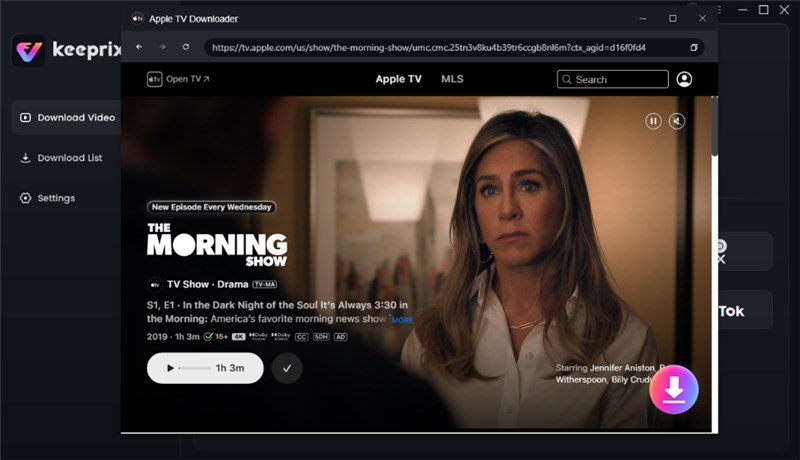
Click Download Button
Step 4. Adjust the resolution and other preferences before hitting the “Download” button.

Apple TV Video Download Completed
You might like: Top 5 Hulu Video Downloader for Mac in 2026
Official App vs. Local MP4: Which Method Fits Your Trip?
Not everyone needs a dedicated downloader, but understanding the tradeoffs can save you frustration before you travel. Here is how the official Apple TV app compares to building a local MP4 library with Keeprix:
|
Feature |
Official Apple TV App |
Keeprix Local MP4 Workflow |
|
Supported Devices |
iOS, iPadOS, Mac |
Windows, Mac |
|
Playback Flexibility |
App-only viewing |
VLC, standard media players, USB drives, smart TVs |
|
Expiration |
Typically expires in 30 days (or 48 hours after starting) |
Permanent personal local storage |
|
Best Fit Scenario |
A quick weekend trip watching on an iPhone or iPad |
Long-term storage, family road trips, or Windows PC users |
The Verdict: If you just need a temporary download for a short flight and already use an iPad, the official method is perfectly fine. However, if you are traveling with a Windows laptop, want to load movies onto a USB drive for a hotel TV, or simply hate dealing with expiring downloads, the Keeprix workflow is the better fit.
Troubleshooting Missing or Unplayable Apple TV Downloads
If you open your iPad mid-flight and discover your Apple TV shows are missing or refuse to play, it is rarely a glitch with your device.
- Symptom: Your downloaded show disappeared or shows an expiration warning.
Cause: This is Apple’s DRM working exactly as intended. The 30-day storage limit or the 48-hour playback window has passed.
Next Action: You must connect to Wi-Fi, delete the expired download, and re-download the video to refresh the DRM license.
- Symptom: A new download immediately fails or stalls.
Cause: You may have hit your device storage limit, or you have reached Apple’s simultaneous download limit across multiple devices sharing the same Apple ID.
Next Action: Check your device storage settings, delete old episodes, or remove downloaded content from your other Apple devices.
Because relying solely on the official app requires a strict connection timeline and constant background check-ins, troubleshooting mid-trip without Wi-Fi is incredibly frustrating. This is why file-based MP4/MKV workflows provide much better peace of mind.
FAQs about Watching Apple TV Offline
Q1. What content can I download from Apple TV+?
You can download Apple Originals and TV series included in your active subscription from Apple TV+, including dramas and comedies, limited and special series. Some content from Apple TV channels is also downloadable, depending on each channel’s set restrictions.
Q2. How to access and manage your downloads of Apple TV+?
To access and manage your downloads of Apple TV+, sign in with your account details in the app on a compatible device. The Library tab contains all downloaded shows and events of the Apple TV+ app. From there, you can manage or delete shows and movies anytime easily.
Q3. Can I really keep Apple TV+ downloaded videos forever?
Officially, downloaded videos cannot be stored since they expire within 30 days. However, you can utilize Keeprix Downloader to store Apple TV+ downloads locally offline.
Q4. Can you watch rented movies offline on Apple TV+?
You can watch rented movies offline as long as you download them in advance. You have 30 days to start watching after renting, and once playback begins, you must finish within 48 hours.
Q5. Is there any way to download videos from Apple TV+ to a hard drive or USB drive?
Not officially. The Apple TV app locks the encrypted files to the device they were downloaded on. To put an episode on a USB drive, you must use an MP4 exporter tool to save the video as a standard local file first.
Conclusion
Watching Apple TV+ offline is possible, but it comes with many limits. To enjoy true flexibility, Apple TV+ downloaders like Keeprix Video Downloader let you save Apple TV shows as high-quality MP4 files that work on any device. Get Keeprix Video Downloader to easily save Apple TV+ shows for offline viewing and enjoy them whenever you want.