How to Quickly Fix Netflix Not Working on Xfinity

The fastest way to fix Netflix freezing or black screen on your Xfinity box is to use the Xfinity voice remote and say “Reset Netflix”. If you do not have a voice remote, press the “A” button on your remote to access the Help menu, then select “Clear Locally Stored Data”.
1. Why Does Netflix Keep Crashing on Xfinity X1?
If Netflix keeps crashing back to live TV or freezing on the loading screen, it’s not your fault—it’s your hardware. Older Xfinity X1 boxes inherently lack the memory to run modern streaming apps. When the app demands too much RAM, it simply crashes.
In fact, Comcast confirms older RNG150 devices are entirely incompatible with Netflix. Because this is a hard physical limit, standard troubleshooting only buys you temporary relief until the memory fills up again.
2. 3 Ways to Reset the Netflix App on Xfinity
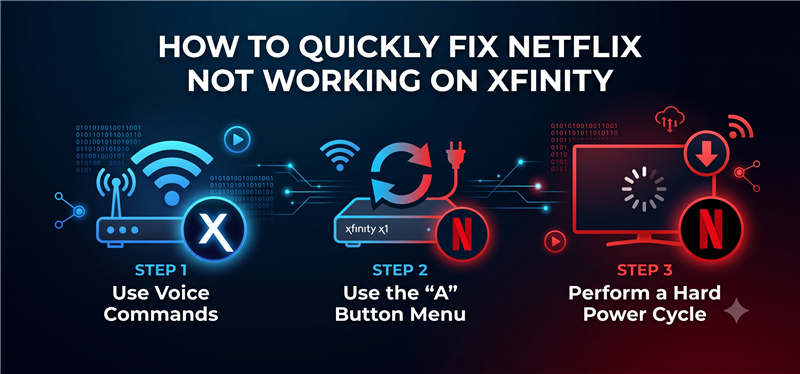
When the Netflix app becomes unresponsive, you will need to force a reset to clear the system memory. Here are 3 ways to manually clear locally stored data on Xfinity X1:
- Use Voice Commands (The easiest method): Press and hold the microphone button on your Xfinity remote and clearly say “Reset Netflix”. Follow the on-screen prompt to confirm the reset.
- Use the “A” Button Menu: Press the “A” button on your remote to open the Help menu. Scroll to the Troubleshooting section, choose “Reset Netflix” or “Clear Locally Stored Data”, and confirm.
- Perform a Hard Power Cycle: If the screen remains black and the remote is unresponsive, unplug the power cord from the back of your Xfinity box. Wait 30 seconds, then plug it back in.
Warning: Restarting the main X1 box by unplugging it will disrupt live TV viewing and interrupt any ongoing DVR recordings for the entire household. Additionally, all 3 of these methods will require you to re-enter your Netflix email and password once the app reboots.
3. The Problem with Constant Cable Box Resets
Daily manual resets are a frustrating chore, and waiting on a new Comcast box is a hassle. Between disrupted viewing and re-entering passwords with a terrible remote, a buggy cable box ruins your relaxation. You deserve a better way to watch.
Because of this workflow gap, many users are shifting to a broader strategy: preparing offline video files on a desktop computer to serve as a reliable fallback plan. Understanding how to download Netflix videos for offline playback can save your movie night when the cable box app is completely unusable.
4. The Ultimate Plan: Watch Offline with Keeprix
When your Xfinity app is completely unreliable, Keeprix Video Downloader provides a practical desktop alternative that moves you from frustrating app-only viewing to file-based freedom. Keeprix is a video downloader for PC and Mac that helps you save the Netflix videos you can already access as local MP4 or MKV files.
Keeprix does not interact with or fix the Xfinity box itself. Instead, it bypasses the buggy cable box entirely by allowing you to download videos up to 1080p (depending on source quality and your account) directly to your computer.
Here is how to set up your offline backup plan:
Keeprix Video Downloader
Download streaming videos from Netflix and more. Enjoy seamless offline watching on Windows and Mac.
Step 1: Download ans install Keeprix. Open Keeprix on your PC or Mac. Choose Netflix.
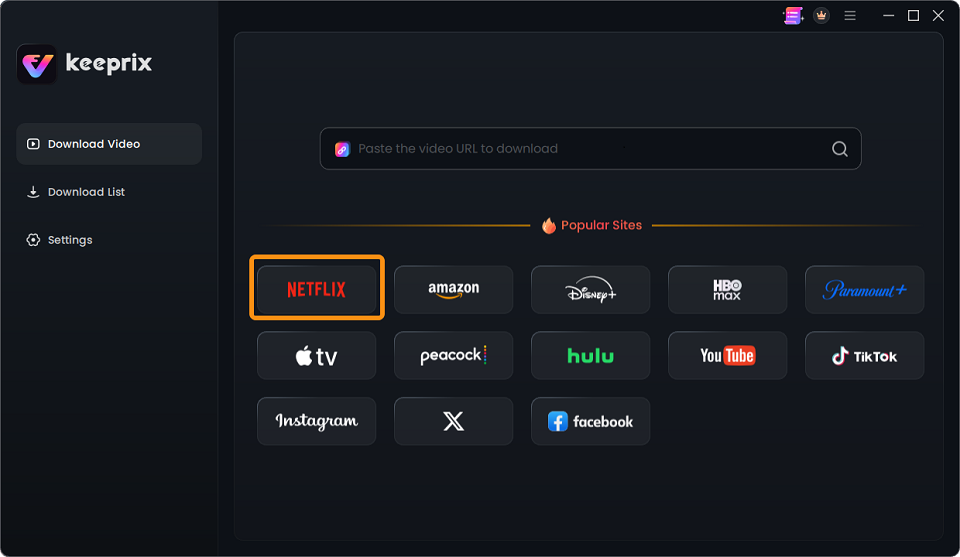
Choose Netflix
Step 2: Use the built-in browser to log into your Netflix account.
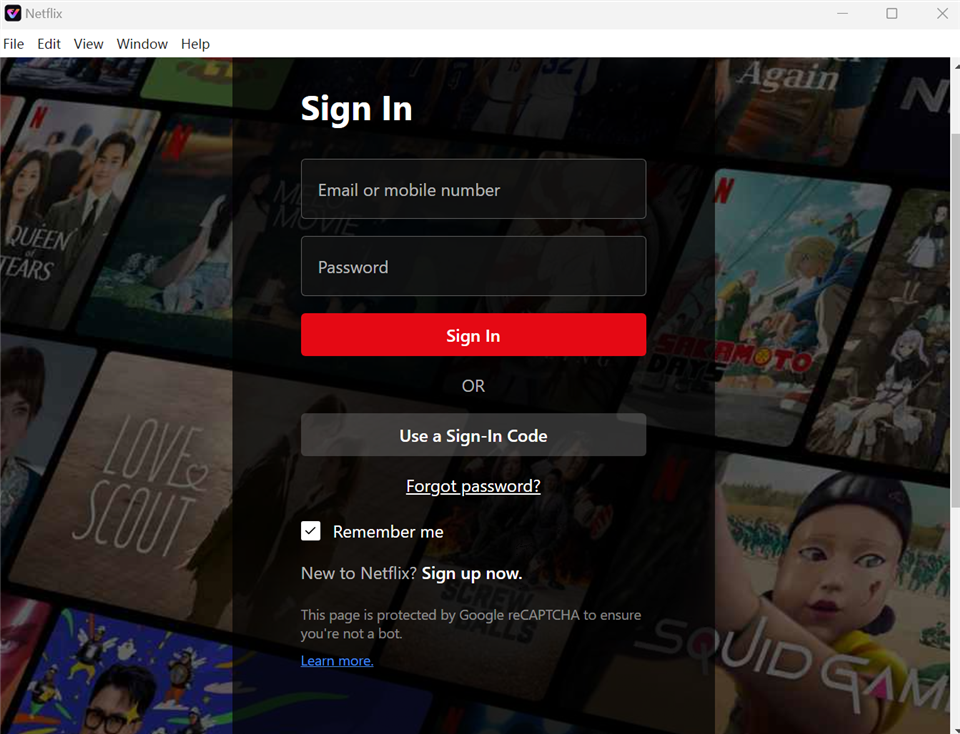
Sign In to Your Netflix Account
Step 3: Select the movie or series you want to watch and choose your preferred format (MP4 or MKV).
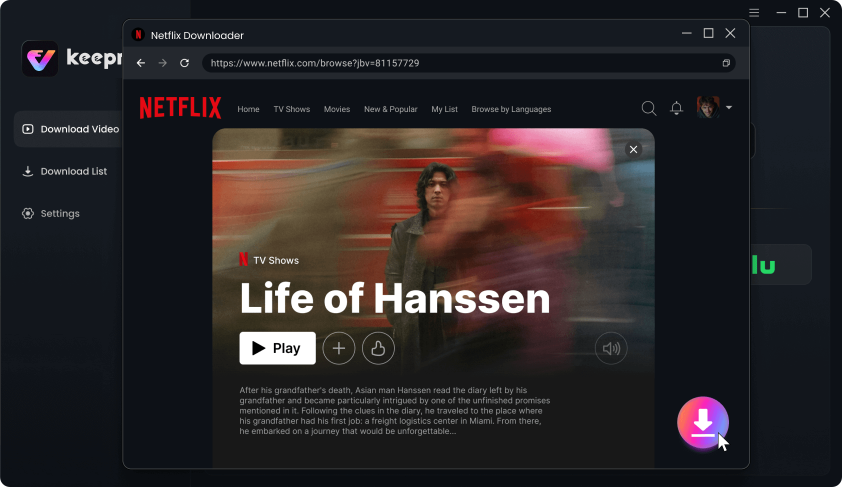
Download Movies You Want on Netflix
Step 4: Choose your preferred available audio and subtitle tracks, and select MP4 or MKV as the output format. Start the batch download to save multiple episodes without relying on the Xfinity app.
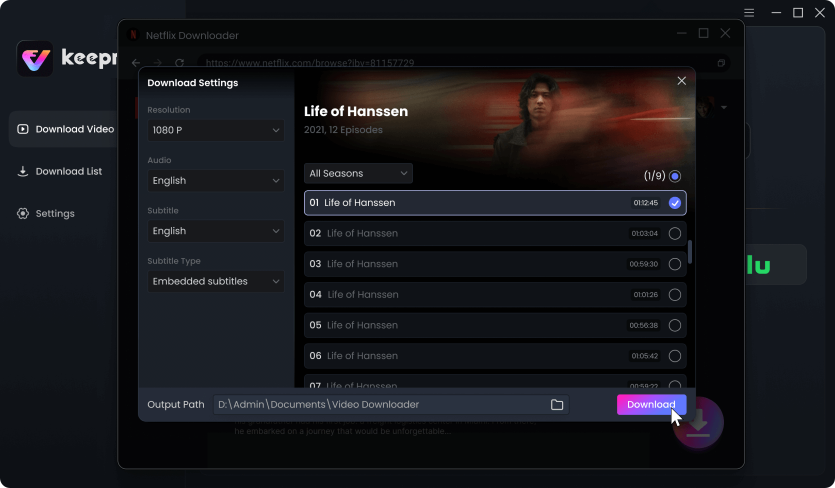
Customize Download Setting
Step 5: Watch the saved files smoothly on your computer, or transfer them to a USB flash drive and plug it directly into your Smart TV. This lets you watch on the big screen you actually use, completely bypassing the buggy X1 cable box.
5. Why a Local Media Library Beats a Buggy App
Building a personal offline media library gives you control over your viewing experience, especially when streaming hardware struggles. Here is how a local MP4/MKV file workflow compares to relying solely on the Xfinity app:
| Feature | Xfinity X1 Netflix App | Keeprix Local Media Library (MP4/MKV) |
|---|---|---|
| Playback Stability | Frequent crashes, freezing, and black screens due to limited hardware memory. | Smooth playback on compatible laptops, tablets, or external media players. |
| Internet Requirement | Requires an active, stable internet connection at all times. | 100% offline viewing once the video is downloaded. |
| Hardware Dependency | Tied strictly to the Comcast cable box and your living room TV. | Watch on the screen you actually use; no cable box required. |
| Portability | Cannot be moved. Viewing is disrupted if the main box restarts. | Easily transfer files to a USB drive, laptop, or phone for uninterrupted viewing. |
6. Frequently Asked Questions
Why does Netflix keep crashing on my X1 box?
Older Xfinity X1 boxes often lack the system memory needed to run modern streaming apps, causing the app to freeze and crash back to live TV when memory runs out.
How do I clear locally stored data on Xfinity X1?
Press the “A” button on your Xfinity remote, navigate to the Help menu, and select “Clear Locally Stored Data” or “Reset Netflix”. This clears the app cache and often resolves immediate freezing.
Why does the screen go black when I open Netflix on Xfinity?
A black screen usually means the app has stalled during the loading process due to corrupted cache data or insufficient cable box memory.
Do I need a new cable box to watch Netflix smoothly?
Yes, requesting a newer X1 or Flex box from Comcast is often the only permanent hardware fix, as older models like the RNG150 are officially unsupported for the Netflix app.
Can I watch downloaded Netflix shows on my TV without the X1 app?
Yes. By saving your accessible Netflix shows as MP4 or MKV files using a desktop tool like Keeprix, you can transfer those files to a USB flash drive or cast them from your laptop to your smart TV, completely bypassing the X1 box.
The Bottom Line:
Tired of Netflix crashing on your older Xfinity box? While waiting for a Comcast hardware upgrade, don’t let constant resets ruin your movie night. Use Keeprix to download your favorite Netflix shows directly as MP4 or MKV files. Try Keeprix today and build a reliable offline library you can watch anytime, without relying on buggy hardware.

Keeprix Video Downloader
- Download Netflix videos on Windows & Mac.
- Save streaming videos as local MP4/MKV files.
- Batch download streaming videos and TV series.
- Watch videos offline, no ads, no interruption.