5 Best Paramount Plus Downloaders for PC/Mac

Finding the best Paramount Plus downloader is not simply about choosing the tool that advertises the highest resolution. You also need to consider the operating system, output format, subtitle support, batch features, free-trial limits, and whether the program downloads a video directly or records it while it plays.
This guide compares five Paramount Plus video downloaders for Windows and Mac: Keeprix, StreamFab, KeepStreams, Audials One, and CleverGet. The specifications and prices below were checked in September 2026.

Which Paramount Plus Downloader Should You Choose?
- Best overall option: Keeprix, 3 free downloads before paying.
- Best for advanced download settings: StreamFab.
- Best for automatic episode downloads: KeepStreams.
- Best browser-recording alternative: Audials One.
- Best lower-cost 1080p option: CleverGet.
Disclosure: Keeprix is our product. To keep this comparison useful, we distinguish public product specifications from vendor advertising claims and clearly identify features we have not independently benchmarked.
Paramount Plus Downloader Comparison
| Tools | Maximum Quality | Batch and Subtitles | Price Checked in Sep. 2026 | Best For |
| Keeprix | Up to 4K in the U.S. | Batch downloads, subtitle and audio-track selection | $49.99/month, $99.99/year, or $159.99 lifetime | Testing 3 full downloads |
| StreamFab | Up to 4K | Batch downloads, SRT or remuxed subtitles | $59.99/month or $109.99 lifetime | Advanced output controls |
| KeepStreams | Up to 4K, HDR10+ | Batch downloads, subtitles, audio selection | $34.99/month or approximately $99.99 for a promotional lifetime plan | Multiple episodes |
| Audials One | Up to Full HD recording | Batch recording | Starting at approximately $49.90; verify the current store price | Users who prefer recording |
| CleverGet | Up to 1080p | Batch season downloads | Approximately $41.96/year or $69.96 for a promotional lifetime plan | A lower-cost 1080p downloader |
Prices, promotions, trial restrictions, and supported resolutions may change. “Up to” does not mean every Paramount+ title will be available at that quality. Actual results depend on the title, region, account access, source quality, software version, and technical compatibility.
1. Keeprix Paramount Plus Downloader: Best Overall
Keeprix is a direct Paramount Plus downloader for Windows and Mac. It saves supported Paramount+ shows and movies as local MP4 or MKV files and supports batch processing, subtitle selection, and multiple audio tracks.
Users can download 3 full Paramount+ videos for free before purchasing. This makes it possible to inspect the completed files, test playback on another device, check subtitle synchronization, and evaluate the available video quality.
Keeprix supports Paramount+ downloads in up to 4K in the United States when the original title and source provide that quality. The actual resolution can vary by title, account, region, and software compatibility.
Keeprix Key Specifications
- Operating systems: Windows 10+ and macOS 12+
- Output formats: MP4 and MKV
- Maximum advertised quality: Up to 4K in the U.S. when available
- Free trial: 3 full Paramount+ downloads
- Batch downloads: Yes
- Subtitle and audio-track selection: Yes
- Monthly plan: $49.99
- Annual plan: $99.99
- Lifetime plan: $159.99
Pros
- Allows three complete Paramount+ downloads during the free trial.
- Supports both Windows and Mac.
- Saves videos as widely compatible MP4 or MKV files.
- Can process multiple episodes in a batch.
- Provides subtitle and audio-language options.
- Offers up to 4K Paramount+ output in supported U.S. cases.
Cons
- 4K support is currently limited to supported U.S. content and is not available for every title.
- Successful downloads still depend on title availability and technical compatibility.
Best For
Keeprix is best suited to Windows or Mac users who want to test 3 complete Paramount+ downloads before choosing a paid plan.
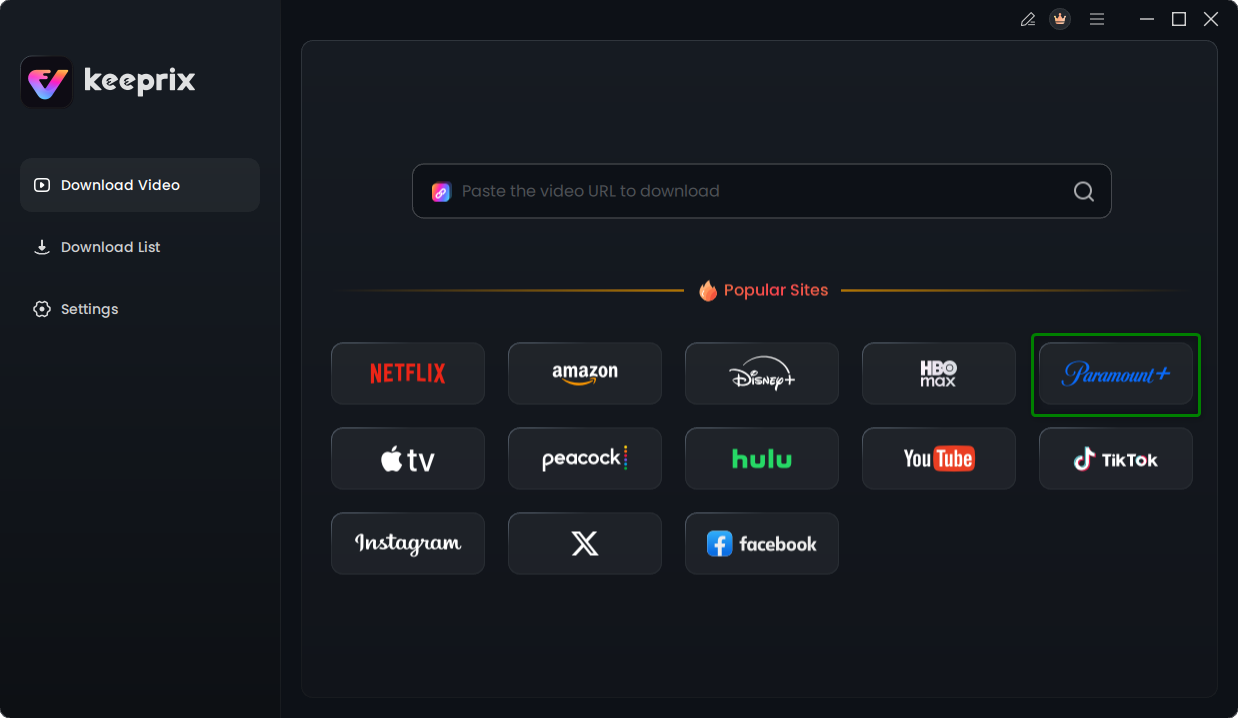
Step 1: Download and install the software on your Windows or Mac computer. Choose Paramount+ platform.
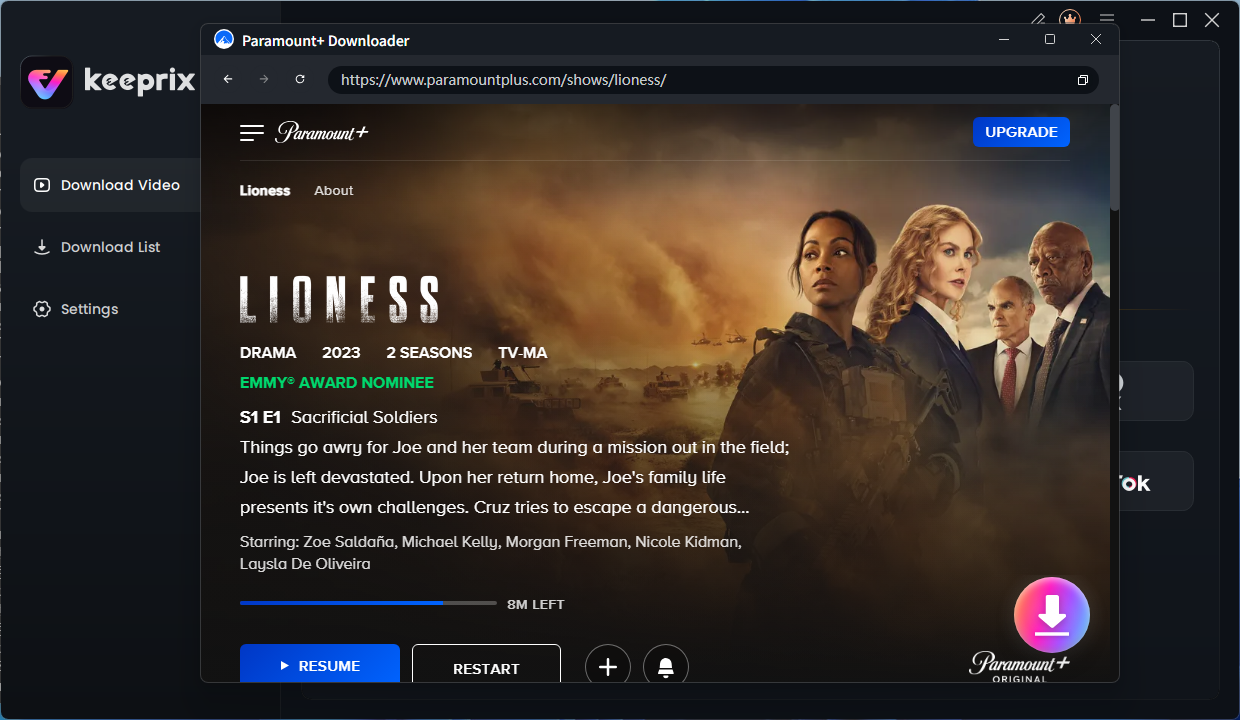
Step 2: Open the software and use the built-in browser to navigate to Paramount+. Log into your supported account. Select the show or movie you want to save. Click the Download button.
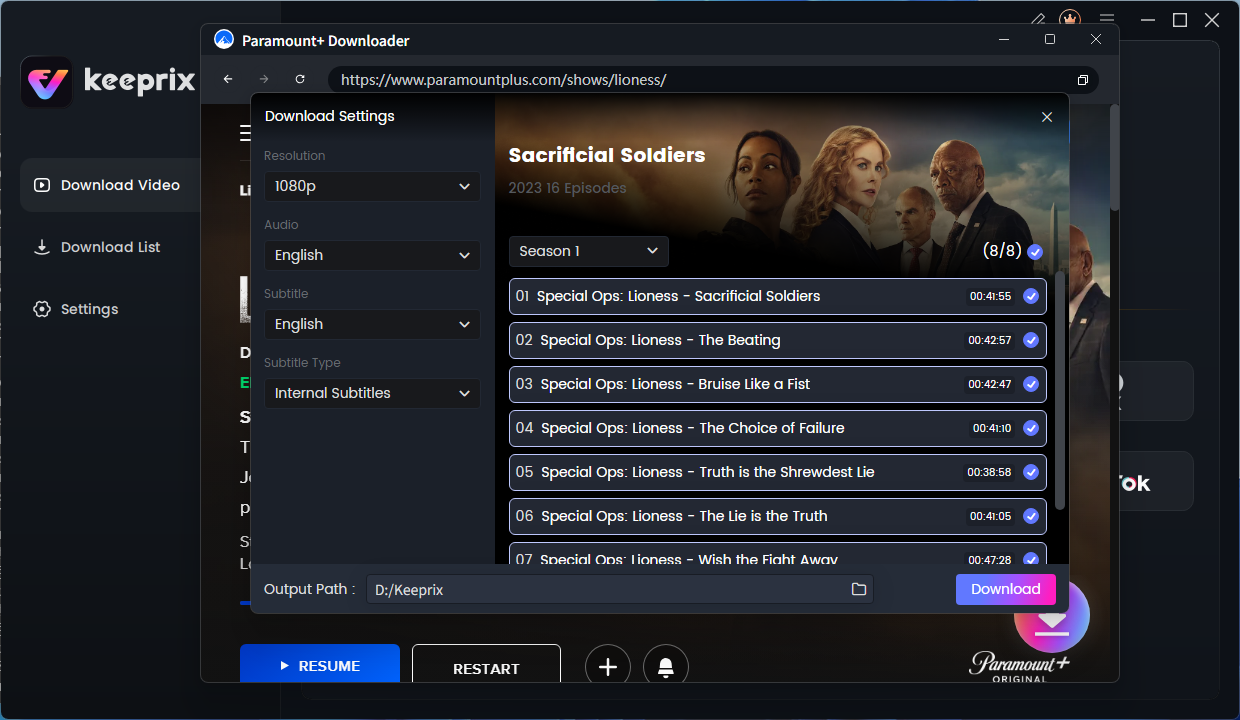
Step 3: Choose your preferred output format (MP4 or MKV), resolution (up to 4K), and any available subtitles or audio tracks you want to keep. You can also use the batch download feature to queue up multiple episodes for an entire season at once.
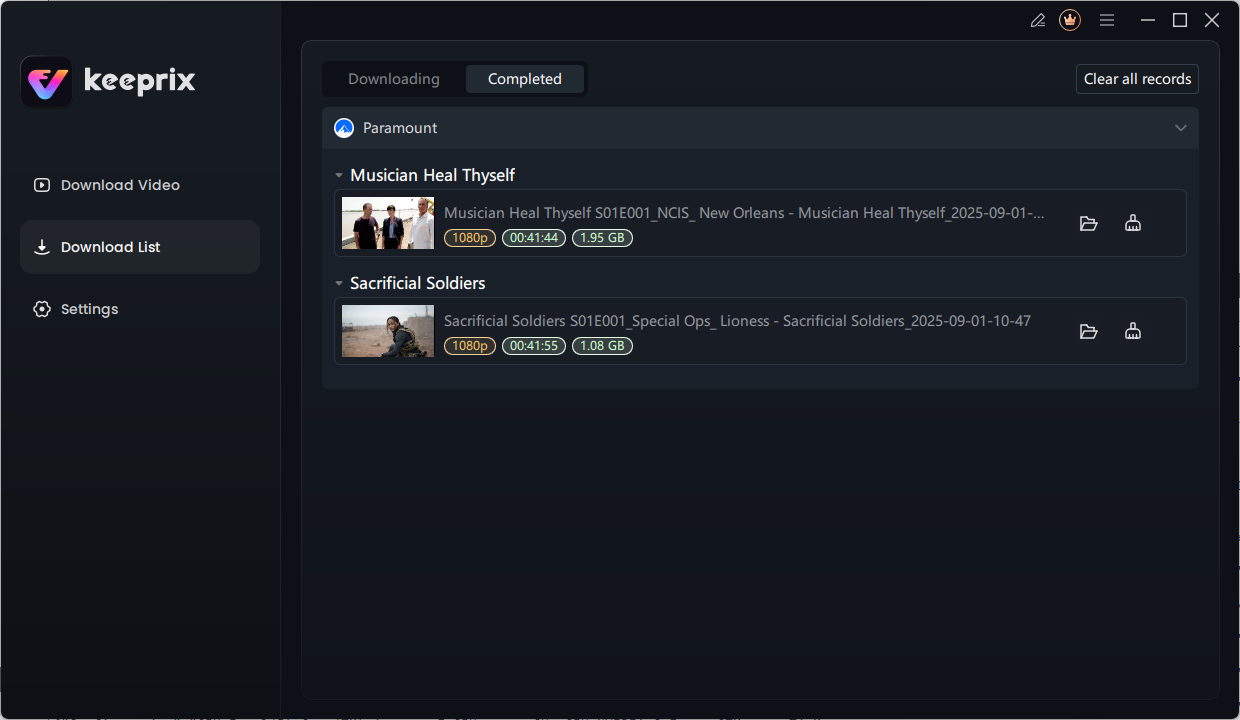
Step 4: Once download is completed you’ll see videos in your local folder.
2. StreamFab Paramount Plus Downloader: Best for Advanced Settings
StreamFab is a direct downloader available for Windows and macOS. It provides more detailed output controls than many basic downloading tools, including codec options, subtitle handling, scheduled episode downloads, and batch processing.
The software supports MP4 and MKV output and advertises video quality of up to 4K in supported situations. Its availability still depends on the source title, account, region, and current software support.
StreamFab also applies download quotas. Its public product information lists limits of up to 100 downloads per day and 700 per week, which should be sufficient for most individual users but may matter when downloading a large library.
StreamFab Key Specifications
- Operating systems: Windows 10/11 and macOS 12 or later
- Output formats: MP4 and MKV
- Maximum advertised quality: Up to 4K on supported content
- Trial: 30 days and up to 3 videos per supported streaming service
- Batch downloads: Yes
- Subtitle options: SRT files or subtitles remuxed into the video
- Scheduled episode downloads: Yes
- Monthly plan: Approximately $59.99
- Lifetime plan: Approximately $109.99
Pros
- Provides extensive video, audio, codec, and subtitle settings.
- Supports automatic detection of newly released episodes.
- Works on both Windows and macOS.
- Offers batch downloads and standard MP4/MKV output.
Cons
- The number of available settings may feel complicated to first-time users.
- The free trial has a limited total number of downloads.
- Advertised maximum quality is not guaranteed for every Paramount+ title.
- Daily and weekly download quotas apply.
Best For
StreamFab is better suited to experienced users who want more control over codecs, subtitles, audio tracks, and scheduled downloads.
3. KeepStreams for Paramount Plus: Best for Series Automation
KeepStreams is another direct Paramount+ downloader for Windows and Mac. Its strongest feature is automation: the software can detect episodes, download multiple videos together, and monitor selected series for newly available content.
The vendor advertises support for up to 4K, HDR10+, Dolby Vision, and advanced audio in supported situations. These results are source-dependent and should be confirmed with the trial before purchasing. KeepStreams also advertises download speeds of up to 10 times faster, but this is a vendor claim rather than a result from a standardized test shared by all five tools.
KeepStreams Key Specifications
- Operating systems: Windows 10/11 and macOS 12 or later
- Output formats: MP4 and MKV
- Maximum advertised quality: Up to 4K on supported content
- Batch downloads: Yes
- Automatic episode detection: Yes
- Subtitle and audio-track selection: Yes
- Free trial: Available, but the current Paramount+ quota is not clearly displayed
- Monthly plan: Approximately $34.99
- Promotional lifetime plan: Approximately $99.99
Pros
- Useful batch and automatic episode-download features.
- Supports Windows and Mac.
- Provides MP4/MKV output and subtitle options.
- Advertises high-resolution and advanced audio support.
Cons
- The exact Paramount+ free-trial allowance is not clearly presented on the current product page.
- High-resolution, HDR, audio, and speed claims depend on the source and should be tested.
- Promotional pricing can change without notice.
Best For
KeepStreams is most suitable for users who frequently download complete seasons or want the software to detect newly released episodes.
4. Audials One: Best Paramount+ Recording Alternative
Audials One differs from the other products in this comparison because it records Paramount+ playback through a supported web browser instead of working as a conventional direct downloader.
This approach may appeal to users who prefer a browser-recording workflow or need a general streaming recorder that works with multiple services. Audials advertises Full HD recording and speeds of up to four times normal playback under supported conditions.
Because the software records the stream, the process can take longer than a direct download and may use more computer resources. Audials One is also limited to Windows, so it is not suitable for Mac users.
Audials One Key Specifications
- Method: Browser-based recording
- Operating system: Windows
- Supported browsers: Chrome, Firefox, and Edge
- Maximum advertised quality: Full HD
- Formats: MP4, MKV, AVI, WebM, and additional formats
- Recording speed: Up to 4x under supported conditions, according to the vendor
- Demo: Available; restrictions may depend on the version
- Starting price: Approximately $49.90
Pros
- Offers an alternative to direct video downloading.
- Supports several output formats.
- Can record from supported browsers.
- Includes additional media-recording and conversion tools.
Cons
- Available only for Windows.
- Recording can be slower and more resource-intensive than direct downloading.
- Subtitle and audio results may depend on the recording setup.
- It may include more tools than users need for Paramount+ alone.
Best For
Audials One is appropriate for Windows users who prefer recording playback and want a broader streaming-recording suite.
5. CleverGet Paramount Plus Downloader: Best Lower-Cost 1080p Option
CleverGet is a direct Paramount Plus video downloader for Windows and Mac. It supports MP4 and MKV output, downloads multiple episodes together, and can save subtitles as separate SRT or SUP files.
Its advertised maximum Paramount+ resolution is 1080p, so it does not compete directly with tools advertising up to 4K. However, the promotional lifetime price is lower than several alternatives in this comparison, which may make it attractive to users who are satisfied with Full HD output.
CleverGet Key Specifications
- Operating systems: Windows and macOS
- Output formats: MP4 and MKV
- Maximum advertised quality: Up to 1080p
- Batch season downloads: Yes
- Subtitle formats: SRT and SUP
- Audio-track selection: Yes
- Free trial: Available; the exact current Paramount+ quota is not clearly stated
- Annual promotional plan: Approximately $41.96
- Lifetime promotional plan: Approximately $69.96
Pros
- Works on Windows and Mac.
- Supports standard MP4 and MKV formats.
- Can download multiple episodes and save separate subtitle files.
- Has a relatively affordable promotional lifetime price.
Cons
- Maximum advertised resolution is 1080p rather than 4K.
- The exact free-trial quota is not clearly stated.
- Promotional prices may change.
Best For
CleverGet is a practical choice for users who prioritize 1080p output and a lower promotional lifetime price over 4K availability.
Direct Downloader vs. Screen Recorder: What Is the Difference?
| Feature | Direct Paramount+ Downloader | Screen or Browser Recorder |
| How it works | Saves it as a local video file | Captures the video while it plays |
| Typical speed | Usually faster than real-time playback | May require real-time or accelerated playback |
| Computer usage | Usually lower during processing | May use more CPU and memory while recording |
| Subtitle | May save separate or embedded subtitle tracks | Depends on the selected recording method |
| Best for | Batch downloads, series, and MP4/MKV files | Users who prefer capturing browser playback |
Keeprix, StreamFab, KeepStreams, and CleverGet use a direct-downloader workflow. Audials One is primarily a streaming recorder. The better method depends on whether you prioritize faster batch processing or a browser-based recording process.
Want to Test Full Paramount+ Downloads Before Paying?
Keeprix lets you download three 3 Paramount+ videos for free. You can use the trial to check the available resolution, MP4/MKV output, subtitles, audio tracks, and playback compatibility before selecting a paid plan.

Keeprix Video Downloader
- Download Paramount+ videos on Windows & Mac.
- Save streaming videos as local MP4/MKV files.
- Batch download streaming videos and TV series.
- Watch videos offline, no ads, no interruption.
If you need detailed instructions, see how to download Paramount Plus shows on Windows and Mac. If the official Paramount+ download feature is unavailable or stops working, use the fixes in Paramount Plus downloads not working before trying an alternative workflow.
Frequently Asked Questions
Q1: Can I download Paramount Plus videos on a PC or Mac?
Official offline-download availability depends on the Paramount+ plan, device, app, title, and region. Desktop downloaders such as Keeprix, StreamFab, KeepStreams, and CleverGet provide a separate workflow for saving supported videos as local files on Windows or Mac.
Q2: Can a Paramount Plus downloader save videos in 4K?
Some products advertise Paramount+ downloads in up to 4K. Keeprix currently supports up to 4K for supported Paramount+ content in the United States. Actual availability varies by title, source quality, region, account access, and technical compatibility.
Q3: Can I save Paramount Plus videos as MP4 files?
Yes. Keeprix, StreamFab, KeepStreams, and CleverGet support MP4 output. MP4 is usually the most convenient option for playback across computers, phones, tablets, TVs, and media players.
Q4: Is there a free Paramount Plus downloader?
The tools in this comparison are primarily paid products, but several provide free trials. Keeprix allows three complete Paramount+ video downloads for free. Other tools may restrict the number, duration, quality, or features available in their trials.
Q5:Will downloaded Paramount+ videos expire?
Videos downloaded through the official Paramount+ app may be affected by the platform’s offline-viewing rules. Supported videos saved as local MP4 or MKV files through a desktop downloader are not managed by the Paramount+ app’s download timer.
Q6: Is it legal to download Paramount Plus videos?
Copyright and platform rules vary by country and use case. These tools should be used only for personal, non-commercial offline viewing of content you are authorized to access. Do not redistribute, upload, resell, or commercially use downloaded videos, and follow applicable laws and the platform’s terms.
Final Verdict
Before paying for any software, test it with a full Paramount+ title available through your own account. Check the actual resolution, subtitles, audio, download stability, and file compatibility rather than choosing solely from advertised specifications.
Keeprix Video Downloader
Download streaming videos from Paramount+ as MP4/MKV. Enjoy seamless offline watching on Windows and Mac.