How to Download Hannibal All 3 Seasons to Watch Offline

The 2013–2015 TV series Hannibal has three seasons and 39 episodes, following FBI profiler Will Graham and psychiatrist Hannibal Lecter. As of November, 2026, all three seasons are available on Netflix in the US, while Prime Video US also lists the complete series.
This guide focuses on Bryan Fuller’s TV series starring Mads Mikkelsen and Hugh Dancy, not the standalone 2001 film. Below, you can check where to stream Hannibal, whether official offline downloads are available, and how to download supported episodes as local MP4 or MKV files when you already have valid access.

Hannibal series: quick facts
| Detail | Information |
| Series | Hannibal |
| Original run | 2013–2015 |
| Seasons | 3 |
| Episodes | 39, with 13 episodes in each season |
| Creator | Bryan Fuller |
| Main cast | Mads Mikkelsen, Hugh Dancy and Laurence Fishburne |
| Current US streaming options | Netflix and Prime Video, as checked on November 19, 2026 |
Where can you watch Hannibal online?
The services carrying Hannibal depend on your country. Before subscribing or preparing offline downloads, search for the series inside the service available in your region.
| Service | Current availability | Official offline option |
| Netflix US | All three seasons are currently streaming | Available only if the Download icon appears on a supported device |
| Prime Video US | All three seasons are currently listed; the required subscription or channel may vary | Available when the title page provides a download option |
| Other countries | Catalogs vary by country and may change without notice | Depends on the local service, plan, title and device |
| Digital purchase | Purchase options may be available through services such as Amazon Video | Subject to the store’s device and download rules |
Netflix confirmed in July 2026 that all three seasons had returned to its US catalog. Prime Video also currently displays three seasons, although access may be included with Prime, supplied through an additional channel or offered separately depending on the region.
Do not assume that a result shown in Google is available through your account. Open the title page in your local Netflix or Prime Video app and confirm the season list, subscription requirement, audio languages and subtitles before downloading.
Can you officially download Hannibal to watch offline?
Possibly, but availability must be checked on the title page. A service may offer Hannibal for streaming without allowing that particular title to be downloaded.
Download Hannibal with the Netflix app
If the Download icon appears beside an episode or season, Netflix allows you to save it temporarily within the Netflix app. Official Netflix downloads are currently supported on:
- Android phones and tablets.
- iPhone and iPad.
- Amazon Fire tablets.
- Chromebooks with the Google Play Store installed.
Netflix does not currently provide official offline downloads on Windows or macOS. Downloads also remain inside the Netflix app and are not ordinary MP4 files that can be copied to another device.
Ad-free Netflix plans can have up to 100 active downloads per device, based on the devices included in the plan. Ad-supported plans are limited to 15 downloads per device per calendar month. Individual titles can have additional availability or annual download limits.
Download Hannibal with the Prime Video app
Prime Video supports official downloads through its compatible apps on Fire tablets, iOS, Android, macOS and Windows 10/11. The title page indicates whether a particular season or episode can be downloaded.
For many subscription titles, Prime Video generally gives you 30 days to start watching a download and 48 hours to finish after playback begins. These periods can vary by title, country and type of access. See the complete Prime Video download limits before preparing the series for a trip.
Official download or local MP4/MKV file: what is the difference?
Official downloads are convenient when you only need temporary offline access in the original app. A local MP4 or MKV file serves a different purpose: it can be managed in an ordinary folder and opened with a compatible media player.
| Feature | Official app download | Local MP4/MKV file |
| Playback | Inside the original streaming app | In a compatible media player |
| Supported devices | Limited to devices supported by the service | Depends on the file format, codec and player |
| Transfer to another device | Not provided as a normal transferable video file | Can be copied when the destination device supports the file |
| Availability period | Controlled by the service, account and title | Not controlled by the official app’s offline timer |
| Internet connection | May require periodic account or license verification | Not required for local playback after a successful download |
Official downloads are the simplest choice for short-term mobile viewing. A local-file workflow is more suitable when you need to organize episodes on a Windows or Mac computer, use a compatible media player or prepare files for another supported device.
How to download Hannibal episodes as MP4 or MKV
Keeprix Video Downloader is a desktop application for Windows 10/11 and macOS 12 or later. It can download supported videos that you can already access through your own streaming accounts and save them as local MP4 or MKV files for personal, non-commercial offline viewing.
Keeprix supports Netflix and Prime Video, so you can choose the service that currently carries Hannibal in your region. Availability still depends on the title, account, subscription, region, source quality and technical compatibility.
For Netflix and Prime Video, the available quality can reach up to 1080p when supported by the source. Keeprix can also retain the available audio tracks and subtitles and supports batch selection for compatible episodes.
Step 1: Download and install Keeprix Video Downloader on your Windows or Mac computer.
Keeprix Video Downloader
Download supported videos from streaming sites as MP4 or MKV for personal offline viewing.
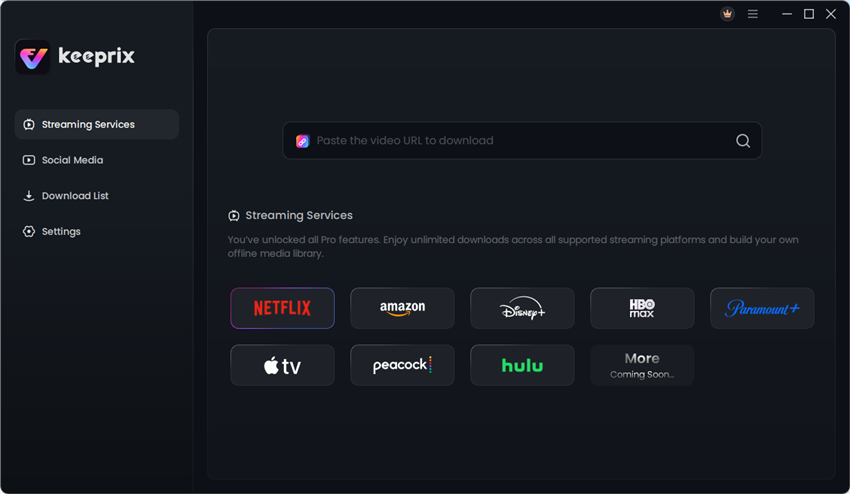
Step 2: Open Keeprix, choose the supported streaming platform, and sign in with your own valid account.
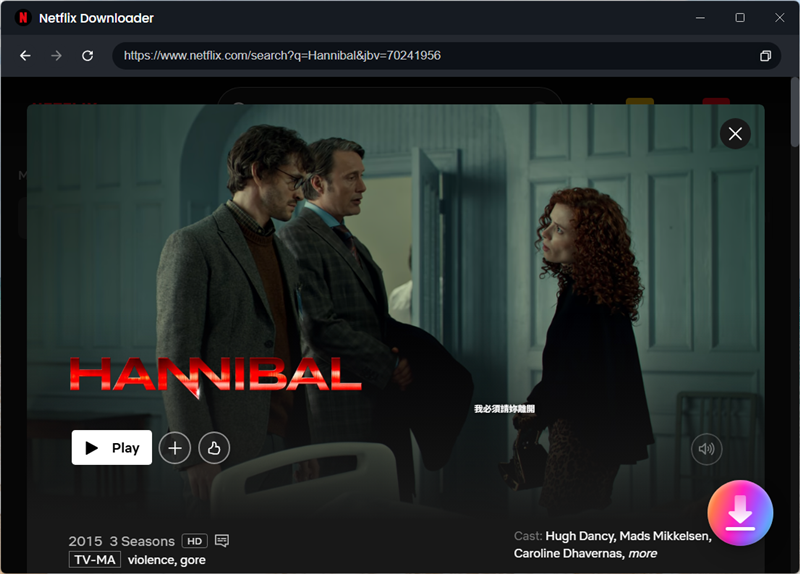
Step 3: Search for the movie, series, or episode you want to download, open its detail page, and click the Download button.
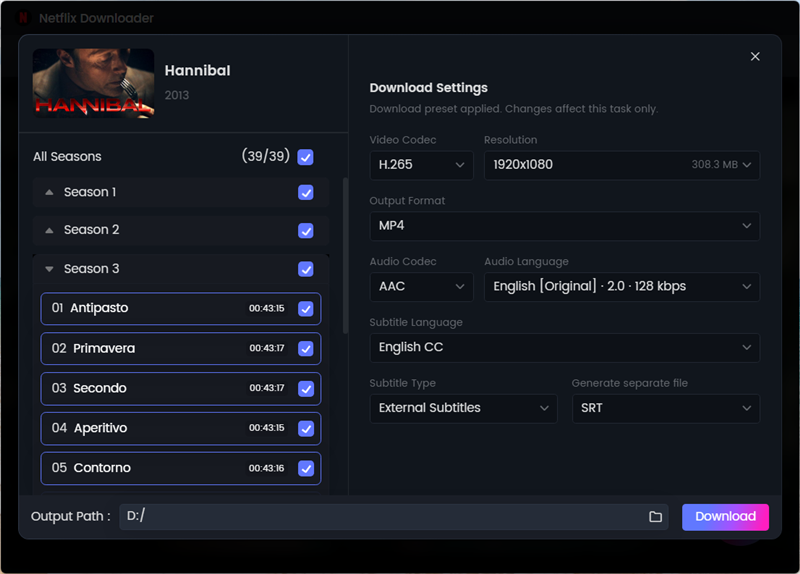
Step 4: Select MP4 or MKV, then choose the available video quality, audio track, and subtitle options. Click Download to start.
Step 5: Open the Completed list and play the downloaded video locally to check the picture, audio, and subtitles.
Should you choose MP4 or MKV for Hannibal?
MP4 is usually the most convenient choice when you want broad compatibility with laptops, tablets, smart TVs and media players. MKV is useful when you prefer a container that can handle multiple audio or subtitle tracks, provided that your destination player supports it.
| Use case | Recommended format |
| General playback across different devices | MP4 |
| Multiple audio or subtitle tracks | MKV |
| Playback from a smart TV or USB drive | Usually MP4, but check the TV’s supported codecs |
| Playback in VLC or another compatible desktop player | MP4 or MKV |
The container alone does not guarantee compatibility. Check whether the destination device supports the video and audio codecs used in the file.
How to watch downloaded Hannibal episodes offline
After checking the completed MP4 or MKV file, you can play it on the computer where it was downloaded or transfer it to a compatible device for personal offline viewing.
Before a trip, check the following:
- Play the complete test episode before leaving Wi-Fi.
- Confirm that the correct audio track and subtitles are available.
- Make sure the destination device has enough free storage.
- Verify that the media player supports MP4 or MKV and the included codecs.
- If using a USB drive, remember that FAT32 cannot store an individual file larger than 4 GB.
- Keep the files for personal use and do not redistribute or publicly share them.
For additional preparation advice, see our guide on downloading movies and shows for a flight.
Frequently asked questions
Q1. Is Hannibal currently on Netflix?
Q2. Is Hannibal available on Prime Video?
Q3. Is Hannibal still available on Hulu?
Q4. Can I download all three seasons of Hannibal officially?
Q5. Can I watch Hannibal offline on a Windows PC or Mac?
Q6. Can I try downloading a Hannibal episode for free with Keeprix?
Conclusion
Use the official app when temporary offline access is enough; if you need a supported local MP4 or MKV file on Windows or Mac, Keeprix provides a file-based workflow for videos you can already access, with quality up to 1080p when the source permits and 1 complete free trial download per supported streaming platform.

Keeprix Video Downloader
- Download supported streaming videos offline.
- Save videos as local MP4 or MKV files.
- Keep the available audio tracks and subtitles.
- Try 1 video free on each streaming platform.