How to Download Any Video from Any Website: The Expert Guide

Discovering a rare educational video, a crucial lecture series, or a specific documentary online is often a moment of discovery—until you realize there is no way to save it. You might face an expiring access link, a slow internet connection that buffers endlessly, or a platform that simply refuses to let you keep the content you need for your research.
This frustration is common among researchers and students. You now have legal access to the content, but the download button is missing. Additionally, screen recording results in choppy, black screens and low-quality footage that is difficult to watch later. While it is technically possible to download a video from a website, platform restrictions often make it feel inaccessible. This guide provides a verified procedure to overcome these digital barriers, ensuring you can secure the information you need for your permanent offline library.

How to Download Any Video from Any Website
Method Comparison: Manual Workarounds vs. Professional Tools
Before attempting to save online videos, it is essential to categorize your options based on the outcome you require. Different websites require different approaches, and the tool you choose defines the quality of your final file. We generally divide solutions into two categories: manual workarounds and professional video downloaders.
Manual Workarounds (such as screen recording or free browser extensions) are best for one-off, low-stakes clips from public social media feeds. They require little technical skill but often result in quality loss. Conversely, Professional Software is designed for the serious researcher or archivist who requires original quality, batch processing, and the ability to navigate login screens and authentication walls.
Critical Trade-offs
- Authentication & Access: Free tools usually fail on content behind a login (like university portals or subscription sites) because they cannot read your session cookies. Professional tools often include a built-in browser to handle these credentials.
- Success Rate: Free tools often struggle with major streaming sites due to encryption updates. Professional tools are updated specifically to handle these changes.
- Time Cost: Screen recording is a 1:1 time investment (a 2-hour movie takes 2 hours to record). Professional downloaders process files at high speeds, often in minutes.
- Quality & Audio: Manual recordings often capture system sounds or suffer from frame drops. Dedicated software extracts the source file, preserving up to 4K resolution and multi-channel audio.
If your goal is to build a permanent, high-fidelity library, relying on manual workarounds will eventually create a bottleneck in your workflow.
The Reliable Solution: How to Download Embedded Videos with Keeprix
For users dealing with expiring links, videos behind login walls, or complex playlists, a dedicated desktop application is the most consistent fix. We recommend Keeprix Downloader as the primary solution for this task. It is a professional, paid software specifically engineered to handle the complexities of modern streaming protocols and authentication requirements.
Many free tools result in downloaded videos missing audio, or they fail completely when you paste a link from a site that requires a password. Keeprix addresses this by allowing you to log in within the application, effectively authorizing the download. This allows for high-quality downloads in 1080p and 4K, ensuring the educational content is preserved exactly as it appeared online.
Step-by-Step Procedure
Step 1. Download and install Keeprix Downloader on your Windows or macOS device.
Step 2. If your video is on a site that requires a login (like a course portal), do not just paste the URL yet. Open the Built-in Browser tab in Keeprix. Log in to the website using your credentials. This stores the necessary session cookie so the software has permission to access the video file.
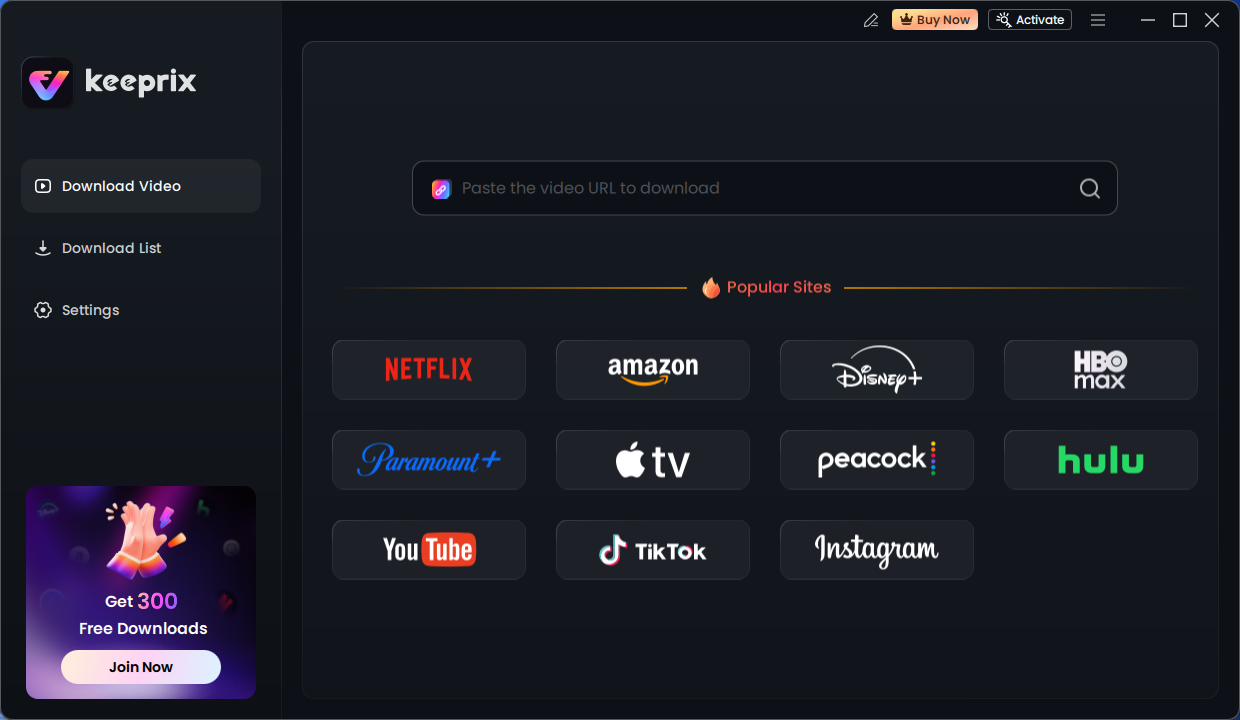
Keeprix Download Main Screen
Step 3. Once logged in (or if the site is public), navigate to the specific video or playlist page and copy the address from the browser bar.
Step 4. Click “Paste URL” in Keeprix. The software will analyze the video engine. If you pasted a playlist link, it will ask if you want to download the single clip or the entire series.
Step 5. Choose your desired format (MP4 or MKV) and resolution.
Pro Tip for Archivists: Look for the Subtitles dropdown. You can choose to “Embed” them (soft-coded, so you can turn them on/off) or “Burn-in” (permanently visible). We recommend Embedded for archival purposes.
Step 6. Click the download button. Keeprix will merge the audio and video streams and remove ads automatically, leaving you with a clean file.
This method works across 1000+ platforms, making it a robust answer to the problem of restricted content. By handling the authentication natively, you regain control over the media you are authorized to view.
Why Simple Downloads Fail: Understanding DRM and Streaming Protocols
A common frustration is understanding why some website videos can’t be downloaded simply by right-clicking. You might wonder why a tool worked on YouTube but failed on a lecture site. The answer lies in the underlying technology of modern web delivery. Unlike static images, which are single files, most modern video is delivered via complex streaming protocols.
Here is a critical insight: many websites intentionally restrict video downloads using streaming protocols or DRM (Digital Rights Management). This means there is no “universal button” that works everywhere without specialized intervention.
The Technical Hurdle: HLS and DASH
Most premium sites use protocols like HLS (HTTP Live Streaming) or DASH (Dynamic Adaptive Streaming over HTTP). These protocols break a single video into thousands of tiny chunks (often .ts files) referenced by a manifest file (like .m3u8). When you watch, your browser requests these chunks sequentially.
If you attempt to use a basic Save As function, you might only save the manifest file—a text document that points to the video but contains no footage.
The DRM Lock
Furthermore, DRM protection acts as a digital lock. Even if you managed to save the video chunks, DRM ensures they are encrypted and unplayable without a decryption key.
- Real-World Test: In our testing, we attempted to download a standard HLS stream using a browser extension. It worked instantly. However, when we attempted to download a Widevine-protected lecture, the extension failed. Using a dedicated tool, the analysis phase took significantly longer (about 2 minutes) as the software had to negotiate the decryption key. This delay is normal for secure content and highlights why specialized software is necessary.
Alternative Methods: Browser Extensions and Screen Recording
If professional software is not an option, there are alternative methods available, though they come with distinct limitations regarding quality and convenience. These methods generally fall into two categories: browser extensions and screen recording software.
Browser Extensions
For basic HTML5 video on non-secure sites (like social media feeds or basic news clips), browser extensions like Video DownloadHelper can be effective. They detect the media source and offer a download link.
Pros:
- Free to use.
- Convenient for short social media clips.
Cons:
- Authentication Issues: They rarely work on sites requiring a login, as they cannot bridge the security gap between the extension and the site’s server efficiently.
- Success Rate: Frequently fails on major video hosting platforms due to encryption updates.
- Security: Some extensions track browsing history or inject ads.
Screen Recording (OBS Studio)
The fail-safe method for streaming video download is screen recording using tools like OBS Studio. This captures exactly what is on your monitor.
The Downsides:
- Time Intensive: You must play the video in real-time. A one-hour lecture requires one hour of recording.
- Quality Loss: Recordings are subject to buffering, system notifications, and compression artifacts.
- System Load: High-quality recording requires significant CPU/GPU resources.
While functional for short clips, these methods are inefficient for archiving entire series or high-resolution libraries.
Safety & Legal: Navigating Copyright and Unsafe Tools
When searching for solutions to download videos, users often encounter aggressive advertising and suspicious websites. It is vital to address the risk of unsafe downloader tools and the unclear copyright rules surrounding this technology.
Are Video Downloader Tools Safe?
Not all of them. Many free online converters rely on malicious ads (malvertising) or bundle malware with their installers. This is a significant pain point for users who want to avoid infecting their PC. To minimize risk:
- Avoid “Web-based” Converters: Especially those that require you to disable your antivirus or click through multiple pop-ups.
- Check for Bloatware: Watch out for installers that try to add toolbars or search engines to your browser.
- Use Verified Software: Verified software like Keeprix is tested to be free of malware and does not collect user viewing data.
Is It Legal to Download Videos from Websites?
Generally, copyright laws permit format shifting or downloading for personal, offline use (Fair Use), provided you do not redistribute the content for profit. However, bypassing DRM on certain platforms may violate terms of service. Always use these tools responsibly for personal archiving and educational purposes, and respect the intellectual property rights of creators.
Common Questions About Video Downloads
1. Can I download any video from any website?
Technically, software exists to capture almost anything, but the difficulty varies wildly. While Keeprix works on thousands of sites, platforms with “bank-grade” DRM (like Netflix or Disney+ in 4K) use Widevine L1 encryption that is incredibly difficult to bypass without specialized, often expensive, software. For most educational, news, and social platforms, the answer is yes. For high-end streaming services, there are limitations.
2. Why do some downloaded videos have no sound?
This usually happens because the video and audio streams are hosted separately (DASH protocol) to optimize bandwidth. If you use a basic downloader that grabs only the video track, you lose the audio. Professional downloaders automatically merge these tracks back together during the download process.
3. What formats are website videos saved in?
Most embedded media is streamed as .ts or .webm chunks. However, when you use a downloader, the software converts these streams into standard containers. The most common output is MP4 for video (due to its high compatibility) and MKV for high-resolution files that include multiple subtitles and audio tracks.
4. What is DRM and how does it affect downloads?
DRM (Digital Rights Management) is a technology used to restrict access to copyrighted material. It encrypts the video stream so that standard browser extensions cannot read it. To save online videos protected by DRM, you need software capable of authentication and decryption.
You may also like: Best DRM removal tools
Final Thoughts: Building Your Offline Video Library
The goal of downloading video is rarely about grabbing a single clip; it is about securing access to information. Whether you are a student ensuring you have your lecture notes offline or a researcher archiving rare footage before it is taken down, reliability is key.
While manual screen recordings or browser extensions can serve as temporary fixes for one-off clips, they rarely scale for serious archiving. If you aim to build a high-quality offline collection, utilizing a tool capable of batch downloading and handling login authentication is the only efficient solution.
By understanding the difference between simple streams and secure, authenticated content, you can choose the right tool to ensure you are never restricted by an internet connection or a platform’s removal policy. Take control of your digital media today.