2 Ways to Download Tumblr Videos in 2026

Finding a rare animation, a specific fandom edit, or a piece of history on Tumblr creates an immediate instinct: save it. You rely on these archives for inspiration, reference, or nostalgia. However, realizing that Tumblr has no universal video download option is a common source of anxiety. Unlike images, which can be saved with a simple right-click, videos often feel locked behind the interface, leaving you uncertain if that content will still be there tomorrow.
Whether you are struggling to identify the video source due to complex embedding or you are tired of screen recording tools that result in quality loss after download, this guide provides clarity. We understand that pixelated captures are unacceptable for a serious archive. Below, we detail exactly how to download Tumblr videos securely, prioritizing methods that capture the original file resolution every time.

How to Download Tumblr Videos
You may also like: How to download videos with links
Method 1: The Manual Browser Inspection Trick (Free)
We believe in trying the free, built-in solution first. If you are comfortable looking under the hood of your web browser, you can often perform a Tumblr video download directly through the developer tools. This technique is ideal for single Tumblr media posts hosted natively on Tumblr servers.
While it effectively bypasses the lack of a “Save Video” button, it does require precision. Modern web standards have changed, and simply looking for a file isn’t always enough—you often need to rename it manually for it to work.
Step-by-Step Instructions (Chrome/Edge/Firefox)
Step 1. Open Developer Tools: Navigate to the Tumblr post. Right-click anywhere on the background (outside the video player) and select Inspect (or press F12 on Windows / Cmd+Option+I on Mac).
Step 2. Select the Network Tab: In the panel that opens, locate and click the tab labeled Network.
Step 3. Filter First: This is the most critical step. The Network tab floods with data instantly. To see anything clearly, look for the filter bar (usually below the main tabs) and click Media. If you don’t see “Media,” type .mp4 into the filter search box.
Step 4. Refresh and Play: With the Network tab open and filtered, refresh the page (F5 or Cmd+R). Once the page reloads, press play on the video.
Step 5. Locate the Stream: As the video buffers, a new line should appear in the Network list. It will often be a long string of random characters or simply named videoplayback.
Step 6. Open in New Tab: Right-click this URL and select Open in new tab. The video should load in a plain player window.
Step 7. Save and Rename: Right-click the video in the new tab and choose “Save Video As.”
- Crucial Step: The file may try to save without an extension. You must manually add .mp4 to the end of the filename, or the file will not play on your computer.
Troubleshooting: When the Manual Method Fails
If you follow these steps and the video does not appear, or if you encounter a URL starting with blob:, the manual method has hit a technical wall.
- The “Blob” Problem: If the URL looks like blob:https://tumblr.com/…, the video is using segmented streaming (similar to Netflix). You cannot download this by right-clicking; it is not a single file, but thousands of tiny chunks.
- The Embed Issue: If the Network tab remains empty under the “Media” filter, the video likely isn’t hosted by Tumblr at all. It is an embedded Tumblr video from YouTube or Vimeo.
In these specific cases – blobs, segmented streams, and external embeds – manual inspection will not work. You will need a specialized tool to piece the stream together.
Method 2: The Reliable Solution (Keeprix Downloader)
For the serious Content Collector, reliance on browser caches often leads to frustration when modern streaming protocols (like blob:) block your access. If the manual method above failed, or if you need to archive an entire blog efficiently, Keeprix Downloader serves as a robust solution.
While this is a paid professional tool, it addresses the technical gaps where manual inspection fails, specifically regarding externally hosted videos not downloadable via standard means.
Why Use a Professional Tool?
When you encounter a blob: URL or an embed, specialized software becomes necessary to reassemble the data stream into a playable file.
- Bypass the “Blob” Block: Keeprix automatically detects segmented streams (blobs) and stitches them into a single, high-quality MP4 file. This solves the primary issue where manual saving fails.
- Handle External Embeds: A frequent obstacle is difficulty identifying the video source. Keeprix manages link parsing for over 1,000 platforms. If a Tumblr post is actually an iframe from YouTube, the software detects the source and secures the file.
- Batch Capability: Instead of inspecting elements one by one—a slow process for archiving—you can queue multiple URLs. This feature directly solves the time constraints associated with archiving large blogs.
- Quality Assurance: To prevent pixelation, Keeprix allows you to select resolutions up to 4K, ensuring your archive maintains the fidelity of the original upload.
Procedure: Downloading with Keeprix
Step 1. Install and Launch: Open Keeprix Downloader on your PC or Mac.
Step 2. Copy the Link: Navigate to the Tumblr post (or the specific video URL) and copy it.
Step 3. Paste and Parse: Click “Paste URL” in the Keeprix interface. The tool will analyze the link to determine if it is a native file, a blob stream, or an external embed.
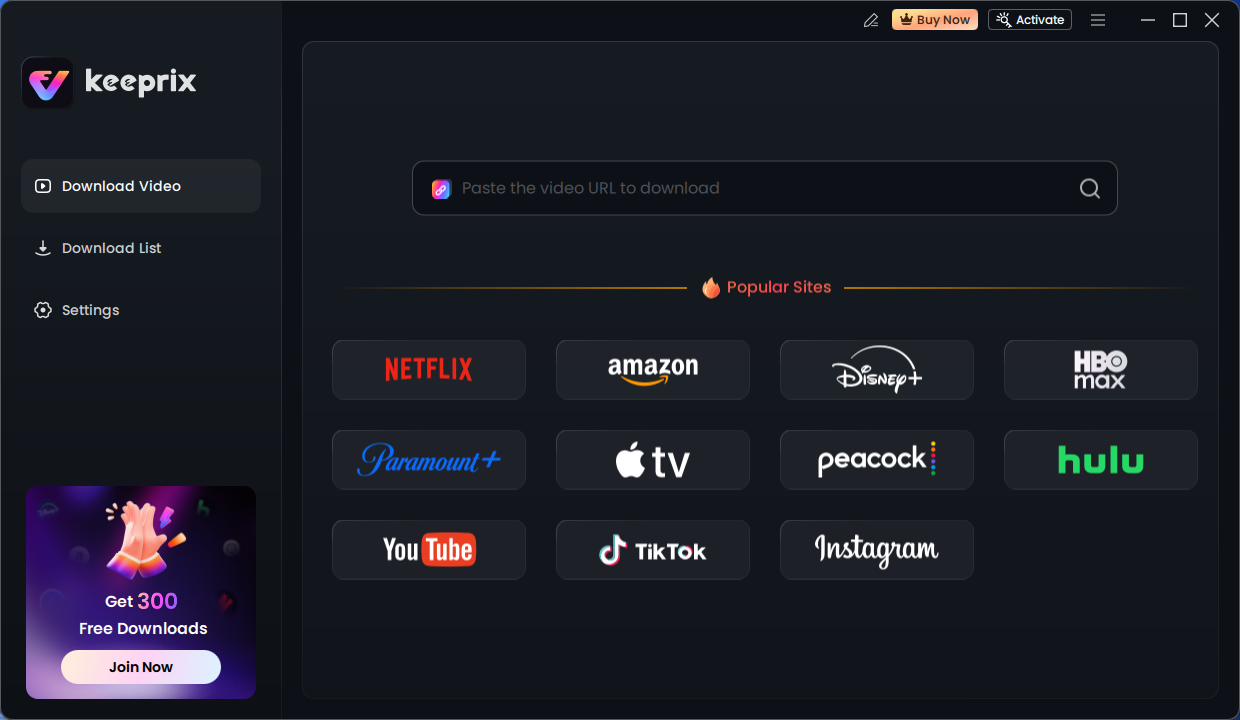
Keeprix Download Main Screen
Step 4. Select Quality: Choose your desired resolution, video format, and output path. You can also download Tumblr videos to a USB drive if you want.
Step 5. Download: Click the download button. The video is saved directly to your local drive, free of buffering issues or ads.
Understanding the Architecture: Native vs. Embedded Videos
Recognizing why a download fails is just as important as knowing how to fix it. In our testing, we found that the biggest source of confusion is the difference between a video uploaded to Tumblr and a video displayed on Tumblr.
The “Aha!” Moment
- Native Posts: The file lives on Tumblr’s servers. These usually work with the manual browser inspection method (unless they use blob streaming).
- Embedded Posts: Tumblr is acting as a window (iframe) to another site, like YouTube, Vimeo, or Twitch.
If you inspect a page and cannot find a media file, you are likely dealing with an embed. The browser sees the YouTube player, not a raw video file. In this scenario, manual inspection is useless because the file isn’t on the page you are viewing. You need a tool capable of “Cross-Platform Extraction,” which is where software like Keeprix becomes essential.
Quick Decision Guide: Which Method Fits Your Needs?
Before spending time or money, evaluate your specific situation.
Key Comparison Metrics
- Success Rate: Manual methods fail 100% of the time on blob: streams and external embeds. Professional software is designed to handle these redirects automatically.
- Time Cost: If you need to download videos from Tumblr in bulk, manual saving is prohibitively slow. Software solutions offer batch processing to mitigate this.
- Technical Difficulty: Manual inspection requires navigating developer code and renaming files. Software handles this backend work for you.
- Safety: Both methods are safe if you avoid “Online Converter” websites. Direct browser inspection eliminates the risk of drive-by downloads common on ad-supported web tools.
The Verdict: If you are comfortable with technology and only need one native video, use Method 1. If you are archiving a collection, encountering blob: errors, or dealing with embeds, Method 2 is the standard.
Navigating Third-Party Tools: Avoiding Risks and Ads
While searching for how to download Tumblr videos, you will inevitably encounter free online converter sites. Caution is advised. Many of these third-party download tools are fraught with security risks.
Common Risks to Avoid
- Malware Injection: Be wary of sites that ask you to download an .exe file or a downloader assistant just to process a link. These are often vectors for adware.
- Data Loss and Quality Drops: Online converters frequently compress video files to save bandwidth, resulting in a downloaded file that looks significantly worse than the stream you watched.
- Intrusive Advertising: Many free sites rely on aggressive pop-ups and redirects that can lead to phishing pages.
To ensure the safety of your device, we recommend sticking to verified desktop software or the manual browser inspection method detailed earlier.
FAQ: Formats, Mobile Limits, and Permissions
This section addresses frequent questions regarding file formats, mobile limitations, and permissions to help you navigate the nuances of archiving content.
Can I download Tumblr videos on mobile (iOS/Android)?
Yes. While this guide focuses on desktop archiving, mobile users have options.
- Android: Firefox for Android allows for some add-ons that can detect video streams.
- iOS (iPhone/iPad): Since iOS 13, Safari has a native Download Manager. If you can access the direct file URL (the .mp4 link), Safari can download it directly to the “Files” app without needing third-party tools like Documents by Readdle.
Why does my downloaded file have no sound?
This often happens with manual extraction. Some streaming protocols separate video and audio into two different tracks. If you download a video via inspection and it has no audio, you are likely downloading a video-only stream segment. You will need a professional downloader to merge the audio and video tracks automatically.
What is the difference between GIF and video posts?
Gif and video posts behave differently, but the line is blurring. Traditional GIFs are image files. However, many high-quality “GIFs” on Tumblr are actually short, looping MP4 videos to save bandwidth. If right-clicking “Save Image” doesn’t work, treat the “GIF” as a video and use the methods above.
Can I download my own Tumblr videos?
Absolutely. If you have lost your source files due to a hard drive failure, you can use these methods to recover your own work from your blog. For recovering an entire blog’s worth of content, the batch feature in a professional tool is significantly faster than manually inspecting every post.
Is it legal to download Tumblr videos?
Generally, downloading videos for personal offline viewing (time-shifting) or archiving your own content is accepted. However, distributing copyright-protected content without permission is illegal. Always respect the creator’s rights and permissions when you save Tumblr videos.
Conclusion
Securing your favorite content shouldn’t feel like a battle against code. Whether you are dealing with a simple native file or a complex embedded Tumblr video, the inability to save what inspires you is a solvable problem.
By distinguishing between native files and complex streams, you can stop wasting time on methods that don’t apply. For the tech-savvy user, the browser inspection method offers a free, immediate fix for simple files. However, for the dedicated Archivist who refuses to accept quality loss after download or needs to bypass the blob: restriction, Keeprix Downloader provides the necessary power. Ready to build your archive? Try the manual method for your first clip, or download Keeprix to secure your entire collection in full resolution today.