Squid Game Full-season Download: 1080P Offline Watching

Key Takeaways
- Squid Game is a Netflix-exclusive Korean thriller series available globally through the official Netflix platform, with both streaming and in-app downloads supported in many regions.
- You can download Squid Game episodes in 1080P for offline watching using the official Netflix app on supported mobile devices and tablets, subject to plan, region, and device limits.
- Third‑party Netflix video downloaders like Keeprix can convert Squid Game to MP4/MKV and remove expiry limits.
- If you cannot download Squid Game, common reasons include: unsupported device, expired downloads, plan restrictions, network issues, regional licensing, or account/device limits.
Introducing The Squid Game Shows
Squid Game is a South Korean survival drama series distributed as a Netflix Original, first released worldwide on September 17, 2021. The show quickly became Netflix’s most‑watched series, reaching number one in dozens of countries and attracting over 140 million member households.
The story follows players who accept an invitation to compete in deadly versions of children’s games for a huge cash prize, mixing social commentary with intense thriller elements. Squid Game’s success led Netflix to confirm continued expansion of the franchise, including further seasons and related content under the Squid Game umbrella.
From a viewing perspective, Squid Game is available with multiple audio languages and subtitles, including Korean original audio plus various dubs, making it accessible worldwide. When you plan a Squid Game full‑season download, you can usually select audio and subtitle options in the Netflix app before saving episodes for offline viewing.

Squid Game Shows
What Platform Is The Squid Game Show Available On?
Official availability
Squid Game is an exclusive Netflix Original series, so the legitimate way to stream or download the full season is through Netflix. On the official Squid Game title page, Netflix marks it as “Available to download” for devices and regions that support offline viewing.
You can access Squid Game via:
- Netflix mobile apps on iOS and Android smartphones.
- Netflix apps on many tablets (iPad, Android tablets, Fire tablets).
- Netflix apps on smart TVs, streaming boxes, and some consoles for streaming (often without downloads on those devices).
- Web browsers and some desktop apps for online streaming, though Windows and macOS support for downloads is limited or removed in recent updates.
Where downloads are supported
Netflix offers an in‑app download feature on supported mobile devices to save eligible titles, including Squid Game, for offline watching. You’ll see a download icon next to each episode, and in some regions you may also see a “season download” button that saves an entire season in one tap.
Key requirements for Squid Game downloads on Netflix:
- An active Netflix subscription on a plan that supports downloads (some low‑tier plans can be restricted by region).
- A compatible device running a recent version of the Netflix app, such as an iPhone, iPad, Android phone, or supported tablet.
- Sufficient storage space on your device to hold 1080P or other chosen quality files.
- Availability of Squid Game downloads in your country, as licensing can differ slightly by region.
About third‑party download platforms and tools
Besides the official Netflix apps, some third‑party tools and online services advertise Squid Game downloads in MP4 or MKV format, claiming permanent offline access and compatibility with any device. Examples include Keeprix Downloader that logs in to your Netflix account, detects Squid Game, and then saves episodes as local files.
Please note that many free download sites or unofficial streaming sites also carry high risks of malware, fake links, and low‑quality rips rather than safe, licensed downloads.
How to Download The Squid Game Shows
This section walks you through legitimate steps to download the Squid Game full season in 1080P for offline watching, plus explains what third‑party tools do in practice.
1. Download Squid Game in the Netflix app (mobile/tablet)
Step 1. Check your Netflix subscription and device
- Ensure you have an active Netflix account and you’re signed in on a compatible mobile device (iOS, Android, or supported tablet).
- Update the Netflix app to the latest version from the App Store or Google Play to access the newest download features.
Step 2. Connect to a stable Wi‑Fi network
- Connect to Wi‑Fi to avoid large mobile data usage while downloading an entire season in 1080P.
- Confirm you have enough free storage; HD episodes can be large, especially for multiple seasons and audio tracks.
Step 3. Open Squid Game in the app
- Launch the Netflix app and log in with your account credentials.
- Search for Squid Game, then select the show from the results to open its detail page.
Step 4. Choose video quality (target 1080P)
- Open the app settings and locate the “Downloads” or “Video quality” section.
- Select High or HD quality, which corresponds to higher resolutions such as 1080P if supported by your device and plan.
Step 5. Download individual episodes
- On the Squid Game episodes list, look for the download icon (downward arrow) next to each episode.
- Tap the icon for each episode you want, or tap a season download button if available to download the entire season automatically.
- Monitor progress in the “Downloads” tab to see remaining time and storage usage.
Then you can watch the downloads offline inside the Netflix app. Please note that the downloads will expire after a certain time. You will need to refresh the downloads before that if you don’t finish the offline watching.
2. Using desktop Netflix downloaders (MP4/MKV tools)
Some users look for ways to download Squid Game in MP4 or MKV format on a computer because the Windows app no longer supports new Netflix downloads, and macOS never offered native offline viewing. Keeprix Netflix downloader aims to fill this gap by logging into Netflix and saving episodes as local files.
Steps to download Squid Game with Keeprix:
Step 1. Download and install Keeprix Downloader on your Windows or Mac computer.
Step 2. Launch the software and log in to your Netflix account.
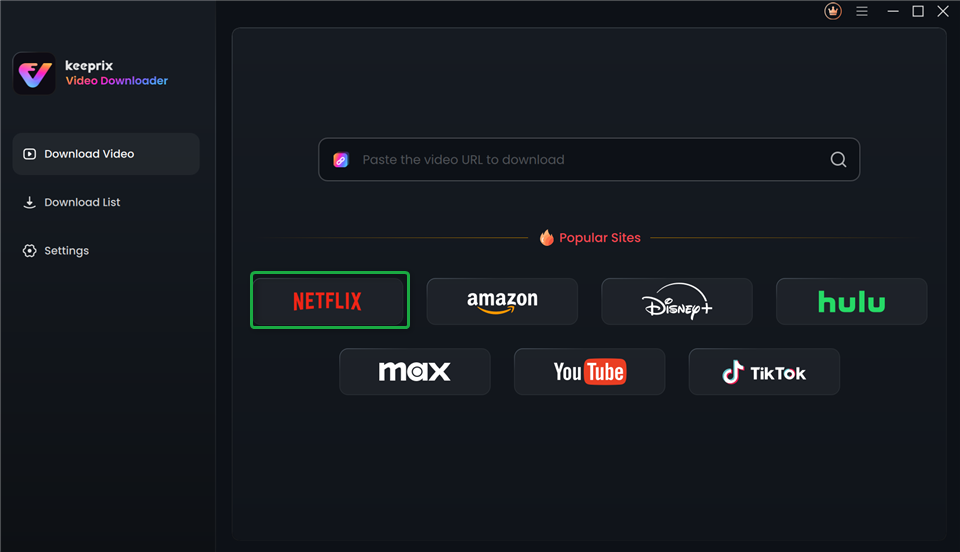
Choose Netflix in Keeprix Video Downloader
Step 3. Search for the Wednesday TV series or paste the video link directly in the built-in browser.
Step 4. Access the video profile and click the download button.
Step 5. Wait for the download process. Once finished, you can watch the Squid Game TV series offline on any media player.
Why Can’t I Download The Squid Game Shows
If “Squid Game download” is not working as expected, the cause is often one of a few common issues.
Unsupported device or platform
Netflix download limits are restricted to specific device types, mainly mobile devices and some tablets, and no longer supports new downloads on the Windows app, while macOS never had native offline downloads. If you’re trying to download Squid Game on a desktop browser, smart TV, or older app, the option may simply not exist.
In that case, Netflix will still allow streaming Squid Game online, but you must switch to a compatible phone or tablet to see the download icons. Trying to force Squid Game downloads via unofficial tools on unsupported platforms introduces legal and security risks instead of solving the core compatibility limitation.
Plan or region restrictions
Some subscription plans or regions may not support downloads, especially for lower‑tier or ad‑supported plans where offline viewing is limited. If downloads are disabled for your account type, you could see Squid Game available to stream but not see a “Download” button.
Additionally, licensing agreements differ between countries, and in rare cases certain titles may not be available for download in specific regions even if they are available to stream. Switching network locations with VPNs can create further inconsistencies or trigger account security checks.
Account, device, or storage limits
Netflix sets a maximum number of devices that can download titles simultaneously under one account, depending on your plan. If that limit is reached, additional devices trying to download Squid Game may be blocked until you remove downloads from other devices.
Downloads also require adequate free storage; if your device is low on space, Squid Game downloads will fail or stop midway with an error message. Clearing old downloads or other large files and then restarting the app can fix this issue.
Expired or removed downloads
Downloaded episodes of Squid Game can expire after a certain period or after being played, in accordance with content licensing rules. When that happens, the episode shows as expired and cannot be played offline until you re‑download it.
In rare cases, licensing changes can also cause a title to leave the catalog or lose download rights, which would prevent further offline saving even if you previously had it downloaded. Regularly refreshing your downloads and checking the title page ensures you’re aware of any status changes.
FAQs About The Squid Game Shows
1. Can you download the Squid Game shows to MP4?
Officially, you can’t export Squid Game as normal MP4 files from Netflix, only as protected offline files. Using third-party tools like Keeprix can make MP4 or MKV downloads on a computer.
2. Can I keep the Squid Game show downloads permanently?
Netflix downloads of Squid Game expire and depend on your subscription, so you cannot keep them permanently. Keerpix Netflix Downloader claims permanent files without expiring.
3. Why can’t I download the Squid Game shows on my computer?
You usually can’t download Squid Game on computers because browsers and current desktop apps don’t support offline downloads.
4. How many Squid Game shows are there?
Squid Game started as a Korean Netflix series (Season 1) and expanded into more seasons and related content. “Squid Game shows” usually refers to this main series plus its official expansions.
Conclusion
Downloading Squid Game full season in 1080P for offline watching is most easily and safely done through the official Netflix app on supported mobile and tablet devices. While third‑party tools promise Squid Game MP4 or MKV downloads and permanent storage, they come with legal, security, and account‑risk trade‑offs you should weigh carefully. To avoid errors like “Squid Game download not available,” always check your plan, region, device compatibility, storage, and download expiry status. Start by opening Netflix, searching for Squid Game, and using the built‑in download button so you can enjoy Squid Game full‑season downloads offline wherever you go.