Where to Watch Widow’s Bay: Streaming and Offline Guide

Where to Watch Widow’s Bay (Quick Answer)
As of October 15, 2026, Widow’s Bay is available in the United States with an Apple TV subscription. You can watch the series directly through the Apple TV app or supported Apple TV website, and it is also available through the Apple TV Amazon Channel inside Prime Video.
Widow’s Bay is not currently included with a standard Netflix, Hulu, Max, or Amazon Prime membership. If you choose to watch through Prime Video, you still need a separate Apple TV Channel subscription rather than a regular Prime membership.
Streaming availability can change by country and over time, so check Apple TV or your local streaming provider before subscribing.
Availability checked: October 15, 2026

Where Is Widow’s Bay Streaming in the US?
The main streaming home for Widow’s Bay is Apple TV. US viewers can access the series either directly through Apple’s service or through the Apple TV Amazon Channel.
| Streaming Option | Available? | What You Need |
| Apple TV | Yes | Apple TV subscription |
| Apple TV Amazon Channel | Yes | Separate Apple TV Channel subscription through Prime Video |
| Netflix | No | Not currently available in the US |
| Amazon Prime membership | No | Prime alone does not include the series |
| Hulu | No | Not currently available in the US |
| Max | No | Not currently available in the US |
Last checked: October 15, 2026. Streaming availability may change by region or over time.
Widow’s Bay Streaming Details
| Series | Widow’s Bay |
| Release Year | 2026 |
| Current US Streaming | Apple TV and Apple TV Amazon Channel |
| Season 1 | 10 episodes |
| Official Offline Download | Available through the Apple TV app on supported devices |
| Availability Checked | October 15, 2026 |
Is Widow’s Bay on Netflix, Prime Video, Hulu, or Max?
Widow’s Bay is not currently streaming on Netflix, Hulu, or Max in the United States.
Prime Video is slightly different. Widow’s Bay can be accessed inside Prime Video through the Apple TV Amazon Channel, but it is not included with a standard Amazon Prime membership.
In other words, having Prime alone does not give you access to Widow’s Bay. You need to subscribe separately to the Apple TV Channel through Prime Video, or subscribe to Apple TV directly.
If you already have an Apple TV subscription, watching through the Apple TV app is the most straightforward option.
Availability outside the United States may differ, so check the streaming options shown in your country before subscribing.
How to Watch Widow’s Bay Offline in the Apple TV App
If you have an active Apple TV subscription, eligible Widow’s Bay episodes can be downloaded through the Apple TV app for offline viewing on supported iPhone, iPad, Mac, and Windows PC devices.
For more general instructions, see our guide on how to download Apple TV shows.
Here is the official workflow:
- Open the Apple TV app on your supported iPhone, iPad, Mac, or Windows PC.
- Search for Widow’s Bay and open the series page.
- Select the episode or season you want to download when the download option is available.
- Choose Download and wait for the content to finish downloading before going offline.
It is best to complete your downloads before leaving home or entering an area with limited internet access.
Apple TV boxes, smart TVs, streaming devices, and browser-based viewing are primarily designed for streaming and do not provide the same offline download workflow as the supported Apple TV apps on mobile devices and computers.
The Limits of Official Apple TV Downloads
The official Apple TV app is the simplest way to watch Widow’s Bay offline, but the downloads still operate inside Apple’s app-based system.
If you are preparing to download movies or shows for a flight, keep the following limitations in mind.
Downloads can expire: Apple states that some titles downloaded through an Apple TV subscription may expire 30 days after download or 48 hours after you begin playing them, whichever happens first. Exact availability can vary, so check the expiration information shown in the Apple TV app before traveling.
Official downloads stay inside the Apple TV app: Apple TV offline downloads are designed for playback within the app rather than being exported as standard MP4 or MKV files that can be freely moved between media players.
Offline downloading is limited to supported devices: Eligible downloads are available through supported Apple TV apps on iPhone, iPad, Mac, and Windows PC. Apple TV boxes, many smart TVs, browser-based playback, and other streaming devices are intended mainly for online streaming rather than local offline downloads.
Availability can change: Download rights are tied to the availability of the title and your Apple TV subscription. A title that is removed or no longer available may not remain downloadable indefinitely.
For the latest official rules, you can also check Apple’s support page for downloading movies and TV shows.
How to Save Widow’s Bay as a Local MP4 or MKV
If you specifically need a standard local video file rather than an in-app Apple TV download, a desktop workflow such as Keeprix Apple TV Downloader provides a different option.
Keeprix is designed for Windows and Mac users who already have access to supported streaming content and want to save compatible videos as local MP4 or MKV files.
Unlike Apple TV’s in-app download system, the resulting local-file workflow is intended for playback through compatible media players rather than only inside the Apple TV app.
For supported Apple TV content, Keeprix can save available video quality up to 4K when the source quality is available. Audio tracks and subtitles can also be selected when supported by the source.
Keeprix currently allows 1 full free video download for each supported streaming platform, including Apple TV.
The basic workflow is:
- Install and open Keeprix on a Windows or Mac computer.
- Open Apple TV in the built-in browser and sign in with your own account.
- Open the Widow’s Bay episode you are allowed to access and let Keeprix analyze the available video.
- Select MP4 or MKV, along with the available audio and subtitle options, and start the download.
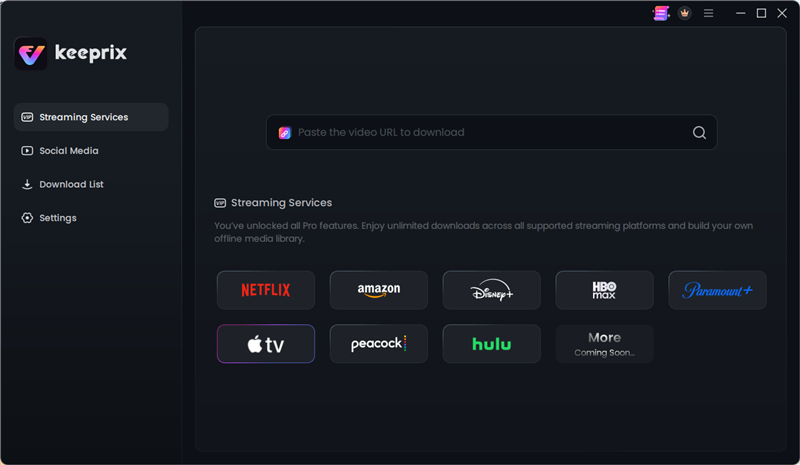
For the full step-by-step workflow and current supported features, see Keeprix Apple TV Downloader.
Apple TV App vs. Local MP4 or MKV Files
The official Apple TV app and a local-file workflow solve different problems. If the Apple TV app already meets your offline viewing needs, there is no need to use another method.
| Feature | Official Apple TV App | Keeprix Local-File Workflow |
| Output | Offline playback inside the Apple TV app | MP4 or MKV local file |
| Supported Offline Devices | Eligible iPhone, iPad, Mac, and Windows PC devices | Windows and Mac for downloading; resulting file can be used with compatible players |
| Offline Expiration | Some titles can expire according to Apple’s download rules | Local-file workflow does not use the Apple TV app’s offline expiration timer |
| Export as MP4/MKV | No | Yes |
| Season or Multiple-Episode Downloads | Supported where Apple provides the option | Batch downloading supported for compatible content |
| Smart TV Direct Download | No | Files may be transferred or played depending on the target device and supported formats |
If your goal is simply to watch Widow’s Bay offline on an iPhone, iPad, Mac, or Windows PC, Apple’s official download option is usually the easiest choice.
A local MP4 or MKV workflow is more relevant when you specifically need a standard media file outside the Apple TV app.
Frequently Asked Questions
Q1: Where can I watch Widow’s Bay?
In the United States, Widow’s Bay is currently available with an Apple TV subscription. You can watch it directly through Apple TV or through the Apple TV Amazon Channel inside Prime Video.
Q2: Is Widow’s Bay on Netflix?
No. Widow’s Bay is not currently available on Netflix in the United States.
Streaming availability can change, so check current listings if you are reading this guide at a later date.
Q3: Is Widow’s Bay included with Amazon Prime?
No. A standard Amazon Prime membership does not include Widow’s Bay.
However, the series can be watched inside Prime Video by subscribing separately to the Apple TV Amazon Channel.
Q4: Do I need an Apple TV subscription to watch Widow’s Bay?
Yes. Widow’s Bay is an Apple TV original, so you need access to an Apple TV subscription either directly through Apple or through an Apple TV channel offered by a supported third-party platform.
Q5: Can I download Widow’s Bay on a Windows PC?
Yes. Apple currently supports eligible offline downloads through the Apple TV app on Windows PC, as well as on iPhone, iPad, and Mac.
This is different from browser-based streaming, which does not provide the same offline download workflow.
Q6: Do Apple TV offline downloads expire?
Some Apple TV subscription downloads can expire 30 days after downloading or 48 hours after playback begins, whichever happens first.
The exact rule can vary by title, so check the expiration information displayed in the Apple TV app.
Q7: Can I download Widow’s Bay as an MP4?
The official Apple TV app does not export its offline downloads as standard MP4 files.
If you specifically need a local MP4 or MKV workflow for supported content, a desktop tool such as Keeprix provides a separate file-based option.
Q8: Can I watch Widow’s Bay offline without an internet connection?
Yes, if you download an eligible episode in advance through the Apple TV app on a supported device.
Complete the download before traveling and check the title’s expiration status in the app so that it remains available when you go offline.
Final Thoughts
Widow’s Bay is an Apple TV original and, in the United States, is currently available with an Apple TV subscription either directly through Apple’s service or through the Apple TV Amazon Channel.
If you simply want to stream the series or watch it offline on an eligible iPhone, iPad, Mac, or Windows PC, the official Apple TV app is the most straightforward option.
If you specifically need a standard MP4 or MKV file rather than an in-app download, Keeprix provides a separate desktop workflow for supported content.
Streaming availability and download rights can change over time, so check the current Apple TV listing and the terms that apply to your account before downloading or saving content.
Keeprix Apple TV Downloader
Save supported Apple TV videos as MP4 or MKV files for offline viewing on Windows and Mac. Try 1 full video free for Apple TV.