How to Download Apple TV Shows for Offline Viewing

Can I Download Apple TV Shows for offline viewing?
Yes, you can download Apple TV shows directly using the official Apple TV app on iPhone, iPad, and Mac. However, there is no native download button on the Apple TV web player for Windows PC users.
While the official Apple app provides a convenient way to save episodes, official downloads are locked to the Apple app ecosystem. Furthermore, offline viewing is subject to expiration rules, meaning downloaded content will not remain on your device indefinitely.
1. How to Download Apple TV Shows on Mac, iPhone, and iPad
If you are using a supported Apple device, downloading content directly through the official Apple TV app is a straightforward process. Keep in mind that this native method is only available on iOS, iPadOS, and macOS, and does not apply to Windows PC users.
Here is how to download shows and movies using the official app:
- Open the Apple TV app on your iPhone, iPad, or Mac.
- Search or browse for the movie or TV show episode you want to watch offline.
- Look for the download icon (a cloud with a downward-pointing arrow) next to the episode or movie title and tap or click it.
- Wait for the download to complete.
- To access your downloaded content, navigate to the Library tab and select Downloaded.
Note that the interface might look slightly different depending on whether you are downloading an Apple TV+ subscription streaming show or a movie you purchased or rented through iTunes, but the cloud download icon remains the same.
2. Why Do Apple TV Offline Downloads Expire or Disappear
A common frustration for users is opening the Apple TV app during a trip, only to find their downloaded show has disappeared or expired. Before you plan to watch Apple TV offline, it is important to understand that official downloads are governed by strict digital rights management (DRM) and viewing windows.
For offline rentals and most subscription content, you generally have a 30-day window to start watching a downloaded video. However, once you hit play, a 48-hour viewing window begins. If you do not finish the movie or episode within that 48-hour period, the download expires and you will need an internet connection to renew or re-download it.
Additionally, these official downloads are encrypted and locked completely within the Apple ecosystem. They are not standard media files. This creates a significant workflow gap for users who want true offline freedom: you cannot easily transfer these downloads to an external hard drive, back them up to a personal media server, or play them on third-party media players or non-Apple smart TVs.
3. Official App Downloads vs. Local MP4 Files: Which is Better
Deciding how to download Apple TV shows depends on your offline viewing needs. The official app works well for short-term viewing on Apple devices, while saving content as local MP4 or MKV files offers long-term flexibility.
| Feature | Official Apple TV App | MP4 / MKV Local Files |
|---|---|---|
| Expiration Rules | 30-day limit; expires 48 hours after starting | No expiration; permanent offline storage |
| Device Compatibility | iPhone, iPad, Mac (Apple ecosystem only) | Universal (Smart TVs, Android, Plex, any media player) |
| File Transfer | Locked to the app; cannot be moved | Supported; easily moved to USB or external hard drives |
| Windows PC Support | No native offline download option | Supported via desktop software workarounds |
If you want to build a personal media library or watch offline on a Windows laptop, you will need a third-party desktop tool to bridge the gap between app-only limits and file-based flexibility.
4. How to Download Apple TV Shows as MP4 on PC/Mac
Because Windows PC users lack a native download option—and Apple device users face strict 48-hour viewing limits—many viewers prefer to save their accessible streaming videos as flexible MP4 or MKV files. Keeprix Video Downloader is a practical desktop tool that solves both of these problems.
Keeprix works on both Windows and Mac, helping you move from app-only viewing to file-based freedom. By downloading episodes as standard MP4 or MKV files, you can organize your own personal media library, transfer videos to a USB drive, and watch offline without worrying about sudden expirations.

Download Apple TV Videos with Keeprix
- Download Apple TV series on Windows & Mac.
- Save Apple TV videos as local MP4/MKV files.
- Batch download streaming videos and TV series.
- Watch videos offline, no ads, no interruption.
Here is how to use Keeprix to download Apple TV shows:
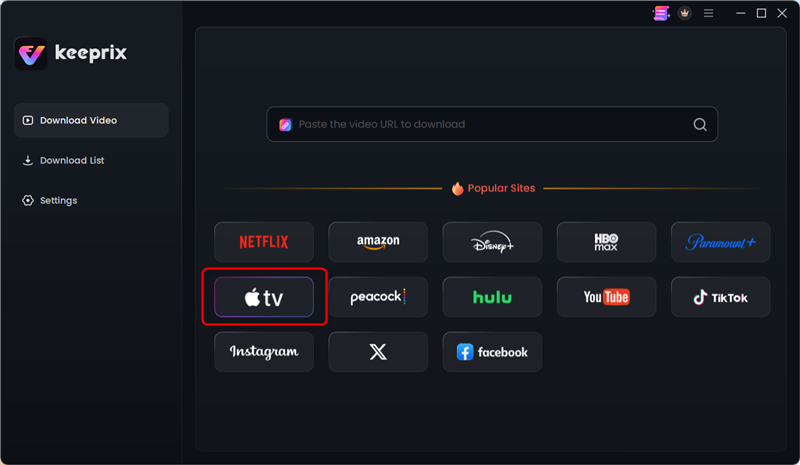
Step 1. Download and install Keeprix on your Mac computer. Open Keeprix and choose the Apple TV platform.
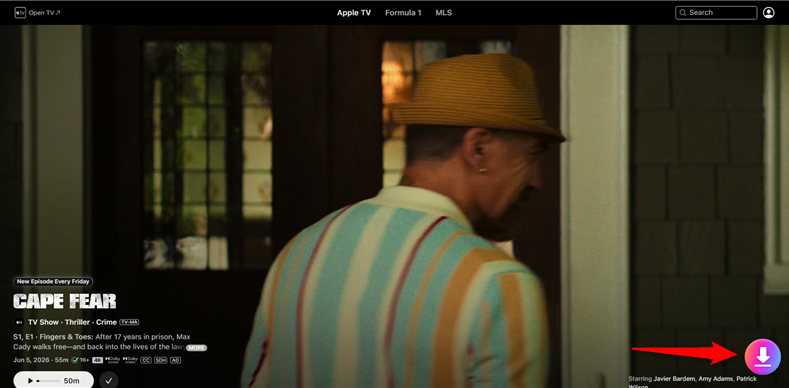
Step 2. Log into your account using the built-in browser to access your available Apple TV shows and movies. Click the Download button on the lower right corner.
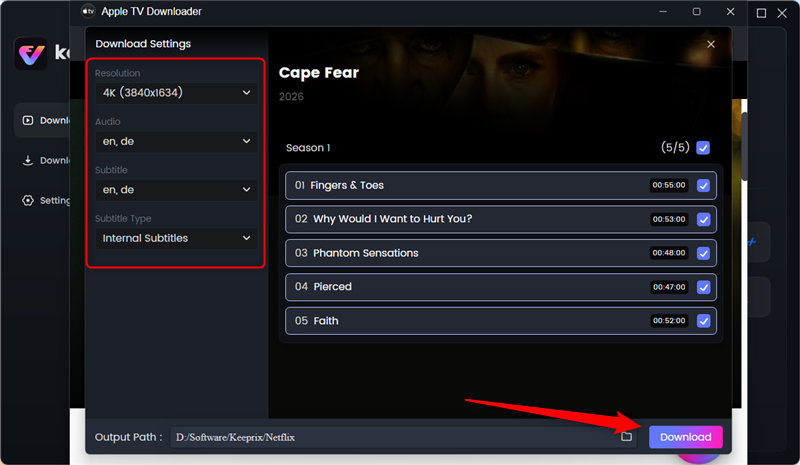
Step 3. Select your output preferences, choosing MP4 or MKV format. Keeprix supports up to 4K resolution when source quality is available. Click Download button to start.
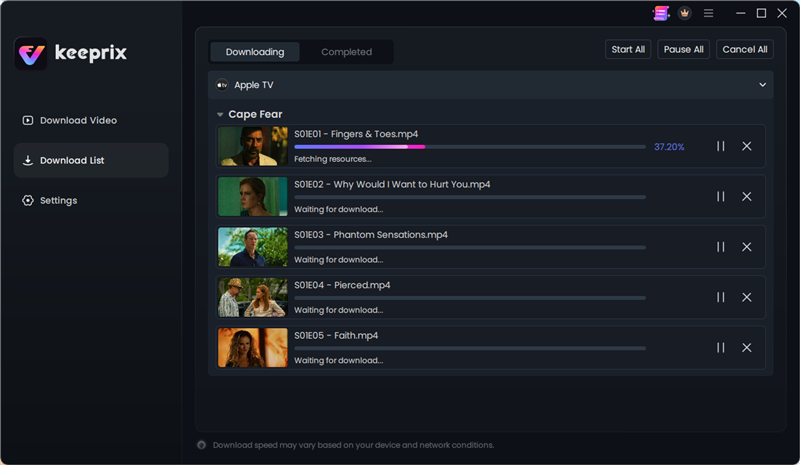
Step 4. Start the download. You can even batch download entire seasons of a show at once.
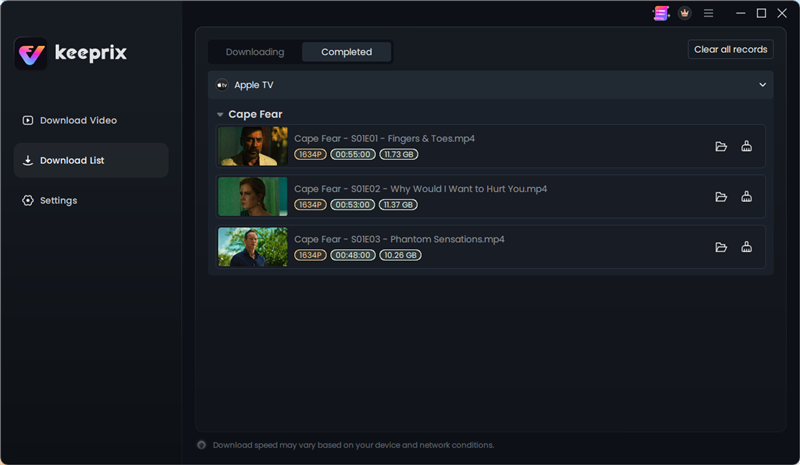
Step 5. Once finished, you can enjoy your Apple TV eposides or movies offline without worrying about managing strict app windows, allowing you to watch at your own pace.
4. Situation Guide: Which Method Should You Use?
Not sure which route to take? Here is a quick guide to help you choose the best download method based on your immediate real-life situation:
Scenario 1: You need to prepare movies before travel for a short weekend flight and are bringing your iPad.
Recommendation: The official Apple TV app is perfectly fine. As long as you watch the show within the 48-hour viewing window, the native app is the quickest and easiest choice.
Scenario 2: You want to watch offline on a Windows laptop during a long commute.
Recommendation: Use Keeprix Apple TV Downloader. Because Apple does not offer a native download button on the Windows web player, Keeprix is the best desktop alternative to get your shows offline.
Scenario 3: You want to back up purchased movies to a Plex server or external hard drive.
Recommendation: Use Keeprix. Official downloads are encrypted and locked to Apple devices. Keeprix gives you the MP4 flexibility needed to transfer and organize your personal offline library on external drives or third-party servers.
5. Frequently Asked Questions
Q1: Can I download Apple TV shows to my PC?
No, there is no official offline viewing option for the Apple TV web player on Windows. To download shows on a PC, you must use a third-party desktop tool to save the videos as local files.
Q2: Where are Apple TV downloaded files stored on Mac?
Downloaded media files on a Mac are typically stored deep in the system library, often under hidden or obscure folders. Furthermore, these files are heavily encrypted, meaning you cannot simply drag and drop them to another device to play them.
Q3: Is there a difference between downloading Apple TV+ shows and iTunes purchases?
Yes. Apple TV+ is a subscription streaming service with strict viewing windows (like the 48-hour offline expiration). iTunes purchases give you a license to own the content, though official downloads of purchased movies are still protected by Apple’s ecosystem locks and cannot be played outside authorized Apple apps without third-party file conversion.
Q4: Can I download Apple TV movies to an external hard drive?
Officially, no. The Apple TV app does not allow you to export encrypted downloads to external storage for playback elsewhere. To save movies to a USB or hard drive, you need to use a local-file downloader to convert accessible videos into MP4 or MKV format first.
Q5: Can I watch downloaded Apple TV shows on a non-Apple smart TV?
Only if you are using an external media tool with converted MP4s. Official Apple TV app downloads are device-locked and will not play directly from a thumb drive plugged into a standard smart TV.
Q6: Do Apple TV offline downloads expire?
Yes. Most Apple TV subscription downloads expire 30 days after downloading if left untouched, or 48 hours after you first hit play.
The Bottom Line
If you want to move from app-only limitations to true file-based flexibility, you need a desktop alternative. Keeprix is an ideal “Stream to File” solution that allows you to save accessible Apple TV shows as standard MP4 or MKV files. By removing the worry of download expiration, Keeprix helps you build a flexible personal offline library that you can watch on the screen you actually use.
Ready to prepare your watchlist without restrictions? Try Keeprix today to start saving your videos locally.
Keeprix Video Downloader
Download streaming videos from Apple TV up to 4K clarity. Enjoy seamless offline watching on Windows and Mac .