How to Download Instagram Videos to MP4: The Quality-First Guide for 2026

It’s a familiar frustration: you find a method to download Instagram videos to MP4 for a project or offline viewing, only to discover the saved file is a blurry, pixelated shadow of the original. Worse yet, sometimes the audio is missing or completely out of sync. This quality loss isn’t your fault; it’s a technical side effect of how many free tools operate.
Many users also grapple with the confusion between Instagram’s in-app “Save” feature—which only bookmarks content within the app—and actually downloading a physical file to their device. Add the real risk of unsafe websites cluttered with aggressive ads and potential malware, and the simple task becomes a major headache. You need a method that is safe, reliable, and, most importantly, preserves the video’s original clarity. This guide delivers on that promise.
Download Instagram Videos to MP4
Two Reliable Paths to Download Instagram Videos
When it comes to saving Instagram videos, your choice boils down to what you value most: ultimate quality and security, or quick, occasional convenience. Instead of claiming one method is universally “best,” we’ll guide you through two distinct approaches.
- Dedicated Desktop Software: The most reliable option for anyone who frequently needs high-quality, watermark-free videos. It offers the best quality and a secure, ad-free environment.
- Reputable Online Tools: A workable solution for a quick, one-off download directly on your phone or computer, as long as you understand and accept the trade-offs in quality and security.
Let’s explore each path so you can choose the right one for your needs.
Option 1: The Quality-First Method with Desktop Software
For users who prioritize video quality, security, and efficiency, the most effective solution is a dedicated desktop application. After extensive testing, a tool like Keeprix Video Downloader stands out because it is built to solve the most common frustrations: poor quality, audio sync issues, and security risks.
Unlike browser-based tools, Keeprix provides a secure, controlled environment on your Windows or Mac computer. Its main advantage is the ability to download Instagram videos—including Reels, multi-clip Stories, and posts—in up to 1080p Full HD. It captures the source video stream directly, which avoids the destructive re-encoding process that causes blurriness and audio problems.
Because it’s a local application, it eliminates the threat of malicious pop-ups and invasive trackers common on free downloader websites. This makes it an ideal solution for professionals, content creators, and anyone who needs a dependable Instagram MP4 downloader that consistently delivers clean, high-fidelity video files.
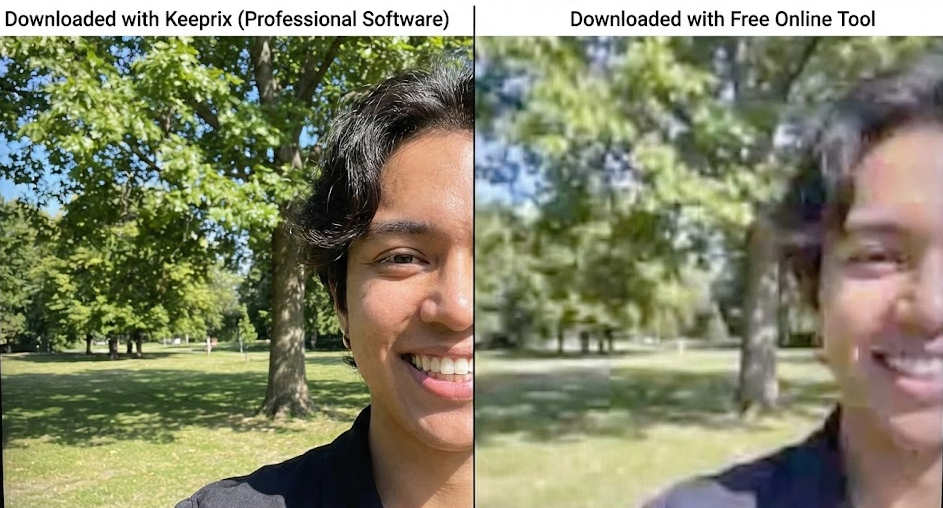
Keeprix VS Free Online Tool
Step-by-Step: Your Guide to a Flawless MP4 Download
Using dedicated software like Keeprix removes the guesswork and delivers a successful outcome every time. Follow these four steps to save any public Instagram video directly to your computer.
1. Copy the Instagram Video URL
First, open the Instagram app on your phone or the website on your computer. Navigate to the video, Reel, or Story you wish to download. Tap the three-dot menu icon (●●●) or the paper airplane (share) icon and select “Copy Link.” The URL is now on your clipboard.
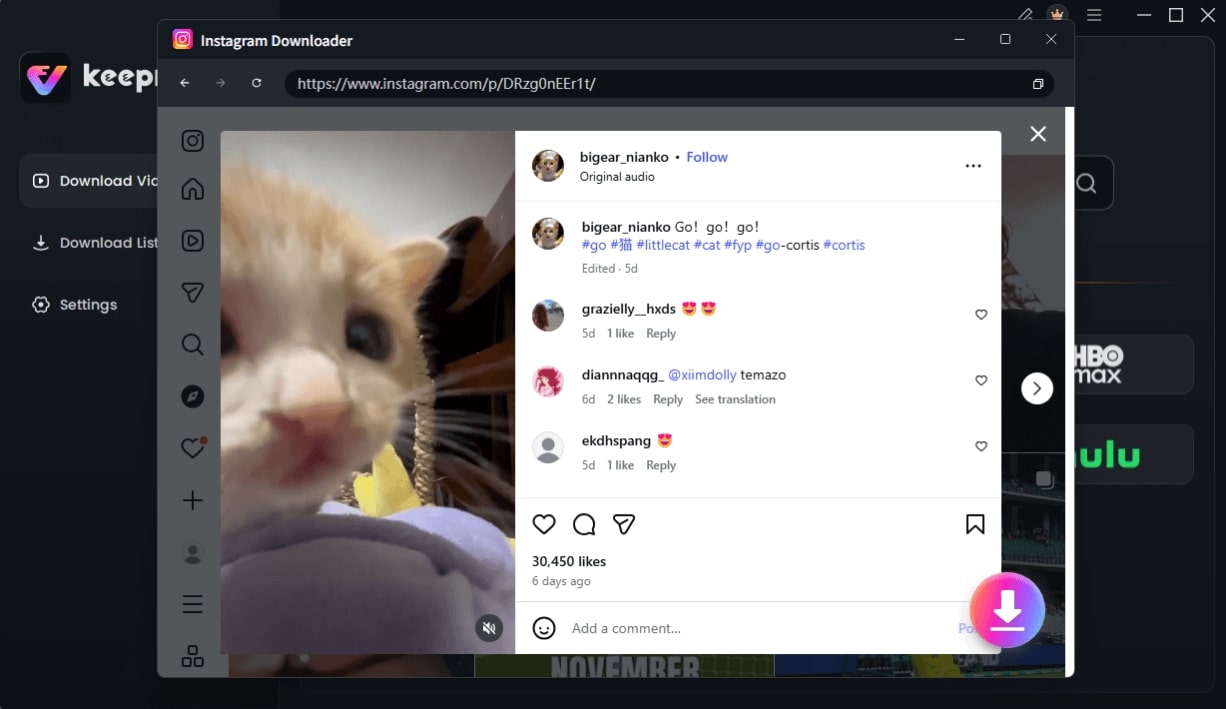
Choose Instagram Video and Click Download
2. Paste the Link into Keeprix
Next, open the Keeprix Video Downloader application on your computer. The software features a clean interface with a clear input field. Click the “Paste & Analyze” button, and the application will automatically grab the URL from your clipboard and begin analyzing the video source.
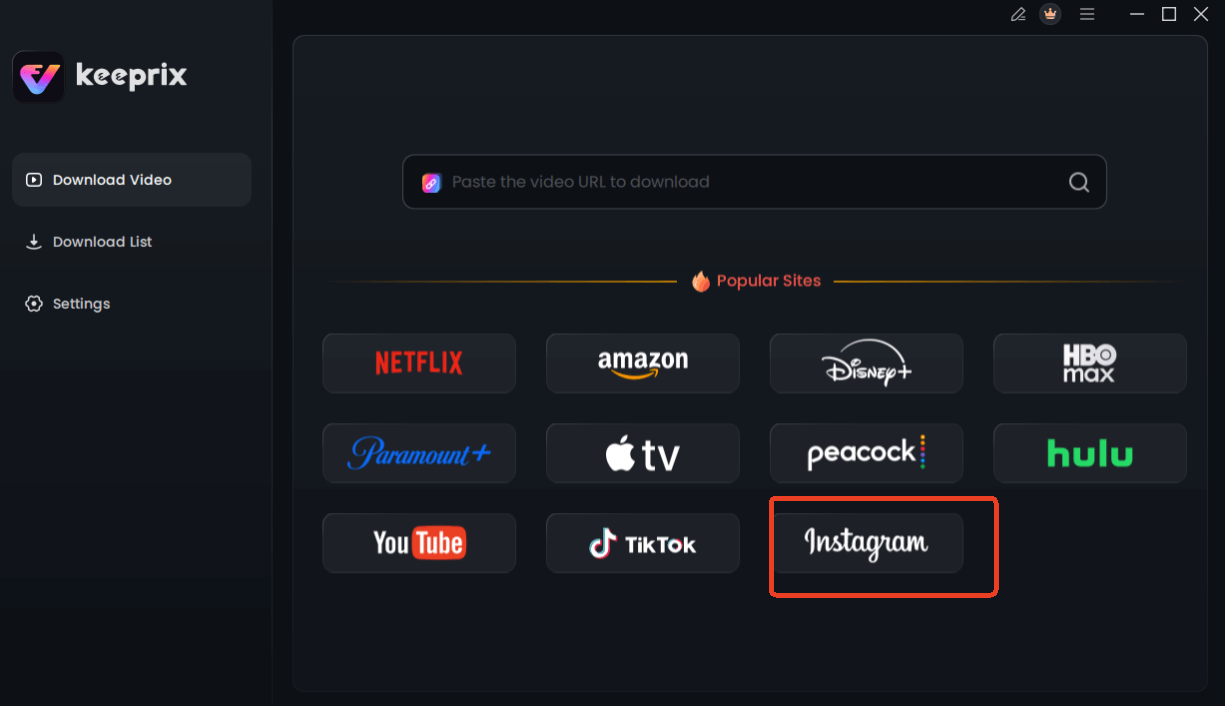
Choose Instagram in Keeprix Downloader
3. Choose MP4 and Set Your Quality
Once the analysis is complete, Keeprix presents you with download options. This is where you can confirm the output format is MP4 and see a list of available resolutions. For the best result, select the highest quality available (often 1080p), which reflects the original upload.
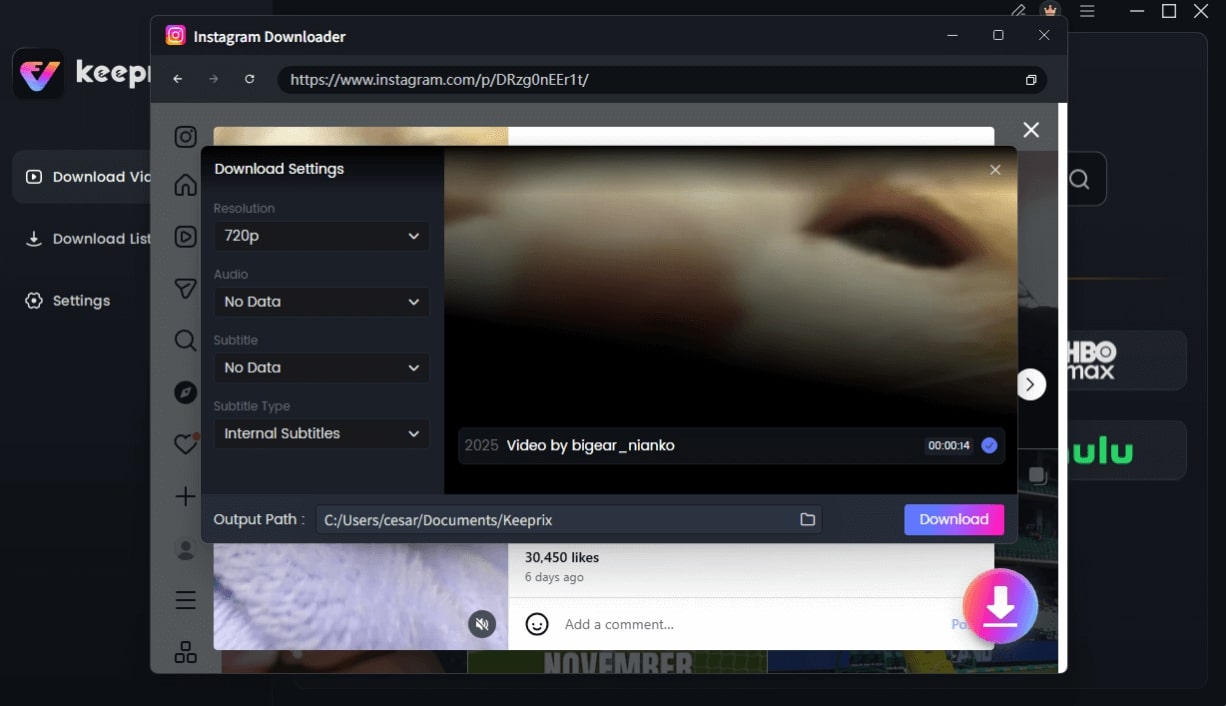
Configure Instagram Download Settings
4. Download Your Video
Finally, click the “Download” button. The software will save the video to your designated folder. When finished, you will have a high-quality, watermark-free MP4 video format file with perfectly synced audio, ready for any use.
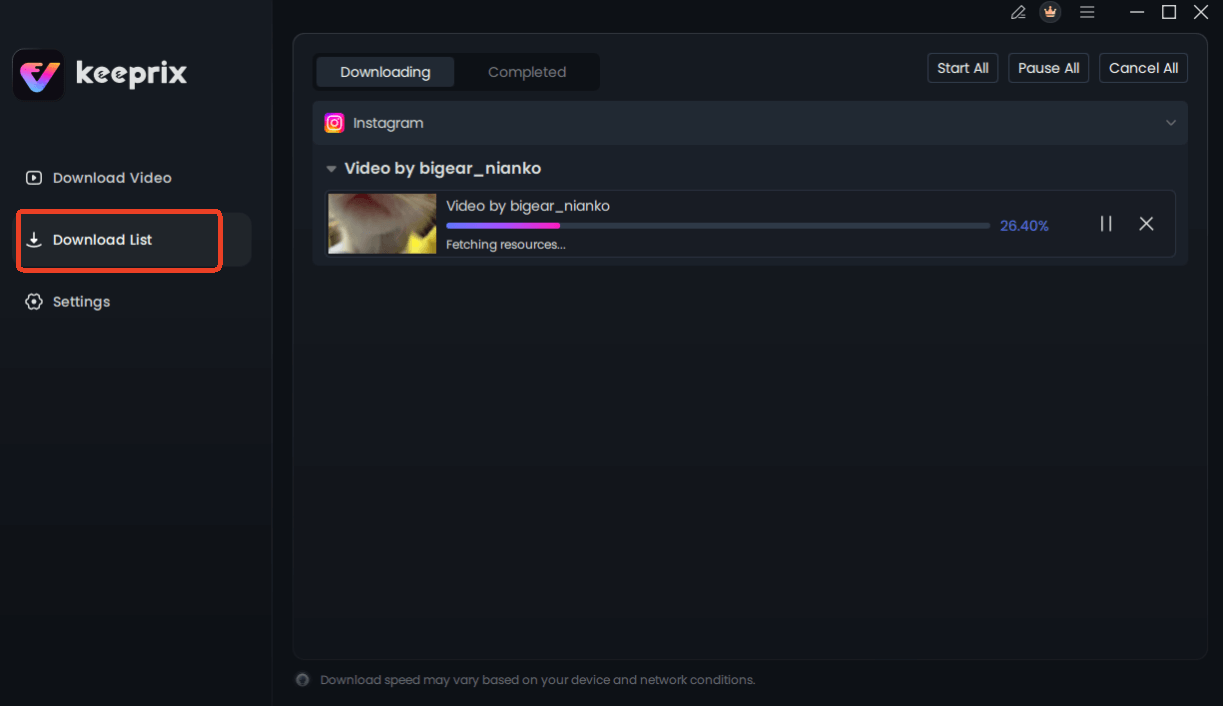
Downloading Instagram Videos
Option 2: The Convenient Method with an Online Tool
If you only need a single video for a non-critical purpose, and you’re willing to accept a potential drop in quality, a free online tool can be a practical choice. A service like iGram is a popular example. The process is simple: you paste the link on their website and download the file directly in your browser, on either desktop or mobile.
However, this convenience comes with significant trade-offs that you should be aware of.
Free online downloaders are often supported by aggressive advertising. Be prepared for pop-ups and redirect links. Never enter your Instagram password or any personal information into these sites. A reputable tool will only ever ask for the public URL of the video.
Comparison: Desktop Software vs. Online Tools
The choice is less about “paid vs. free” and more about “reliable vs. unpredictable.” To help you decide, here is a direct comparison based on our tests:
| Feature | Keeprix Downloader (Desktop) | Typical Free Online Tools |
| Final Quality | Source Quality (Up to 1080p) | Often Lower (Re-encoded) |
| Audio Sync | High & Consistent | Variable; may be missing or out of sync |
| Multi-Clip Stories | Stitches all clips into one MP4 | Often fails after the first clip |
| Time & Efficiency | No Ads, Batch Processing | Slow, Ad-supported, Single Downloads |
| Safety Risk | Low (Local & Secure) | High (Pop-ups, Trackers, Malware Risk) |
For Content Creators: How to Download Your Own Instagram Videos
If you’re a content creator looking to back up your own work, you have an official, built-in option: Instagram’s “Download Your Information” tool. This feature allows you to request a complete archive of your account data, including your photos and videos.
How to Use It:
- Go to your Instagram Profile > Settings > Your Activity.
- Scroll down and tap “Download Your Information.”
- You can request a complete copy or select specific types of information (like “Videos”).
- Instagram will compile the files and email you a download link, which can take up to 48 hours.
Pros and Cons:
- Pro: It’s the official and most secure method to get all your content at once.
- Con: It’s very slow. You can’t just grab one specific video quickly.
- Con: The files are often not in a user-friendly format. Videos might be organized by date in complex folders, making it hard to find what you need.
For quickly saving a high-quality MP4 of a single post you’ve made, using a dedicated third-party tool is often far more efficient.
The Technical Reason Your Instagram Downloads Look Blurry
Many users who try to save Instagram videos as MP4 discover the final file is blurry and the audio is off. This common frustration stems from a technical process called re-encoding.
Choosing a tool that saves the original stream is the only way to guarantee the downloaded file matches the quality of the video you see in the app.
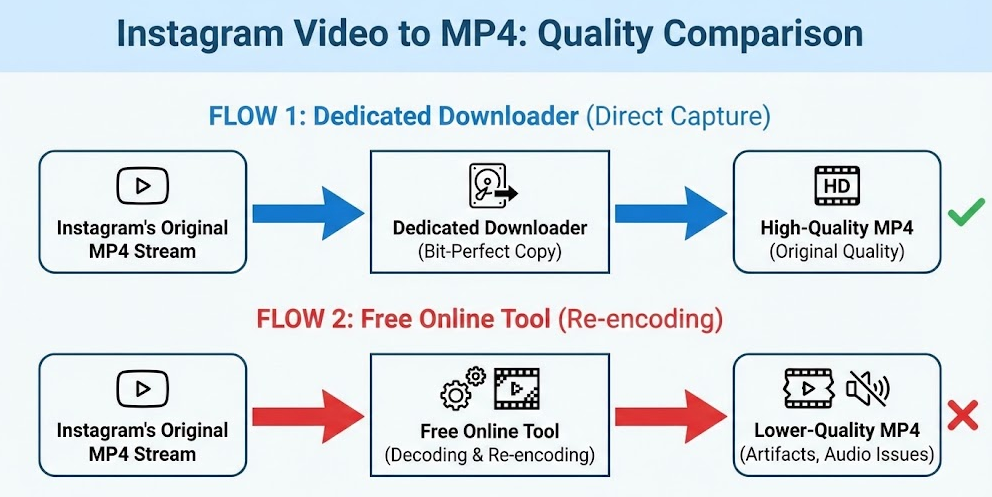
Instagram Video to MP4- Quality Comparison
Your Questions About Instagram Video Downloads Answered
Can Instagram videos be downloaded as MP4?
Yes, they can. Because Instagram already uses an MP4-based format, a capable downloader can save the video in its native format without a lossy conversion process.
Why are my downloaded Instagram videos low quality?
The most common cause is the downloader tool re-encoding the video instead of saving the original stream. This destructive process introduces data loss, reducing visual clarity. Using a high-quality tool that avoids re-encoding is essential.
Why is the audio missing or out of sync in my downloaded video?
This is a frequent failure point for less-sophisticated tools. They struggle to capture and properly merge the separate video and audio streams that Instagram provides. A reliable downloader is engineered to handle this correctly, ensuring the final MP4 has perfectly synced audio.
Can I convert Reels to MP4?
Absolutely. The methods in this guide work for all public Instagram video formats, including Reels, in-feed video posts, and Stories. A well-built Instagram MP4 downloader can process URLs from any of these content types.
Are Instagram MP4 downloader tools safe?
Safety varies. Reputable desktop software is generally much safer than free web tools, which often rely on aggressive ads and pop-ups that can pose security risks. Always choose a trusted tool and never provide your Instagram login credentials.
Can I download private Instagram videos as MP4?
No. Download tools can only access public content. There is no legitimate or safe way to download videos from private accounts you do not follow. The distinction between public vs private posts is a core privacy feature, and attempting to bypass it violates Instagram’s terms of service.
The Clear Choice for High-Quality Instagram Downloads
Navigating the world of third-party downloaders no longer has to be a gamble. You can finally avoid the frustration of pixelated results and the security risks of unreliable websites. The key is understanding the difference between tools that simply save the original video stream and those that destructively re-encode it.
For users who demand consistent quality, reliability, and security, a dedicated solution like Keeprix Video Downloader is the clear winner. It provides a predictable, safe, and efficient method for saving any public Instagram video as a pristine MP4 file. For a quick, one-off download where quality is less of a concern, a reputable online tool can suffice. By choosing the right approach for your needs, you put yourself back in control, ensuring your downloaded content is always ready for offline viewing, creative projects, or archival.