How to Download a Video from Instagram on Mac: The Latest Guide

You’re scrolling through Instagram on your MacBook and find an excellent tutorial video you want to keep. Instinctively, you look for a download button, but there isn’t one. This frustration is common and directly addresses why you searched for how to download a video from Instagram on Mac. Many users, just like Lucas in our case study, discover that Instagram’s desktop experience lacks a simple download feature, leaving them searching for a reliable workaround.
This guide provides a clear, tested procedure for Mac users who need to save Instagram videos on their MacBook for offline access or personal use. We cut through the confusion and risks of unsafe tools to give you the most dependable methods available for an Instagram video download on macOS.
How to Download a Video from Instgram on Mac
Also Read: How to Download an Instagram Video on PC
Understanding the Difference: ‘Saving’ vs. ‘Downloading’ on Mac
The most common point of confusion for Mac users is the difference between Instagram’s ‘Save’ feature and the act of downloading. When you click the bookmark icon to ‘Save’ a post, you are not creating a local video file on your computer. You are simply creating an in-app bookmark. This saved post remains on Instagram’s servers, requires an internet connection to view, and will not appear in your Mac’s Finder.
A ‘download,’ on the other hand, is the process of transferring the video file from Instagram’s server directly to your MacBook’s storage. This creates a standalone MP4 or MKV file that you can watch offline, edit, or archive permanently.
Here is a critical insight: Instagram intentionally restricts direct downloading from its desktop website. This is not an oversight; it’s a platform policy designed to protect creator content and prevent large-scale, automated content scraping. By limiting users to in-app streaming and bookmarking, Instagram maintains control over its ecosystem. This is why third-party tools are necessary to bridge the gap.
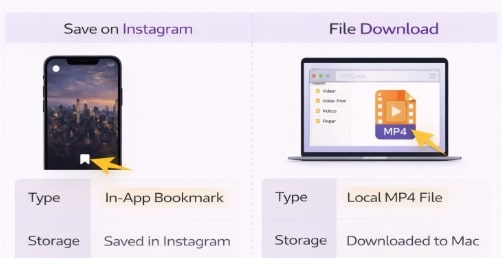
Instagram Save and File Download
Comparing Your Options: Online Tools vs. Dedicated Mac Software
When you need to perform an Instagram video download on macOS, you have two primary types of tools at your disposal: free online websites and dedicated Mac software. Making an informed choice depends on your priorities, as each approach presents a different set of trade-offs.
Here’s a direct comparison to help you decide:
| Feature | Free Online Tools | Dedicated Mac Software |
| Success Rate | Inconsistent. It often breaks when Instagram updates its platform, leading to failed downloads. | High. Regularly updated by developers to maintain compatibility and ensure reliability. |
| Time Cost | Tedious. Requires copying and pasting links for each video individually. Not ideal for multiple files. | Efficient. Often supports batch downloading, allowing you to queue up several videos at once. |
| Safety Risk | High. Frequently supported by aggressive pop-ups and misleading links that can lead to malware. | Low. Operates in a controlled, secure environment on your computer without third-party ads. |
| Privacy | Questionable. Unclear how your data and the links you paste are handled or tracked | High. Processes downloads locally on your Mac, protecting your privacy. |
For users who prioritize reliability, efficiency, and security, dedicated software is the superior option for any Instagram downloader for Mac.
The Best Way to Download an Instagram Video on Mac
After testing various solutions, the most consistent and secure method is using dedicated software. Our top recommendation is Keeprix Downloader, a premium tool designed specifically for this purpose. It directly resolves the main obstacles Mac users face, from the lack of a native download function to the security risks of untrustworthy websites.
Keeprix provides a simple interface that creates a real MP4 file in your Finder, eliminating the confusion between ‘saving’ and ‘downloading’. Most importantly, as a secure, locally installed application, it protects you from the privacy risks associated with unsafe online tools.
Step-by-Step Procedure to Save Instagram Videos on MacBook:
Step 1. Copy the Video URL: Navigate to the Instagram video in your Mac’s web browser and copy its full URL from the address bar.
Step 2. Paste the URL in Keeprix: Open the Keeprix Downloader application. The software has a built-in browser, making it easy to navigate, or you can simply click the ‘Paste URL’ button to have the link automatically analyzed.
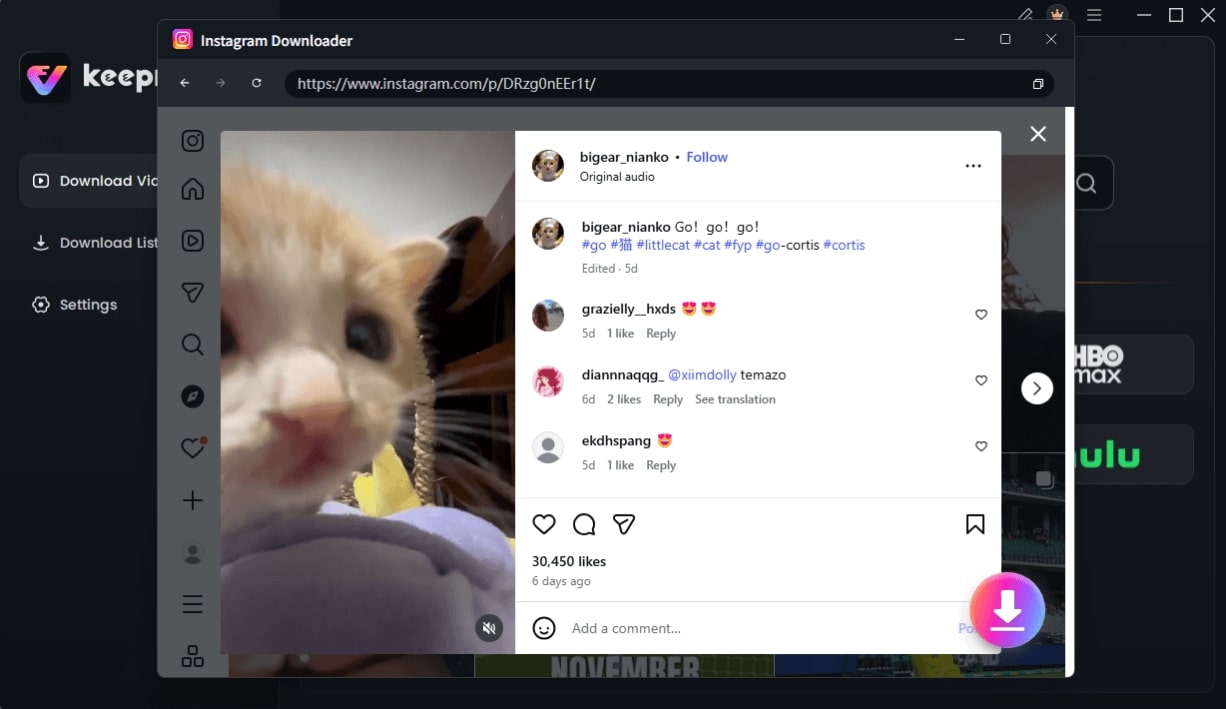
Choose Instagram Video and Click Download
Step 3. Choose Your Quality: After analysis, Keeprix will present you with options for video quality (e.g., 720p, 1080p). Select the resolution you need for your project or archive.
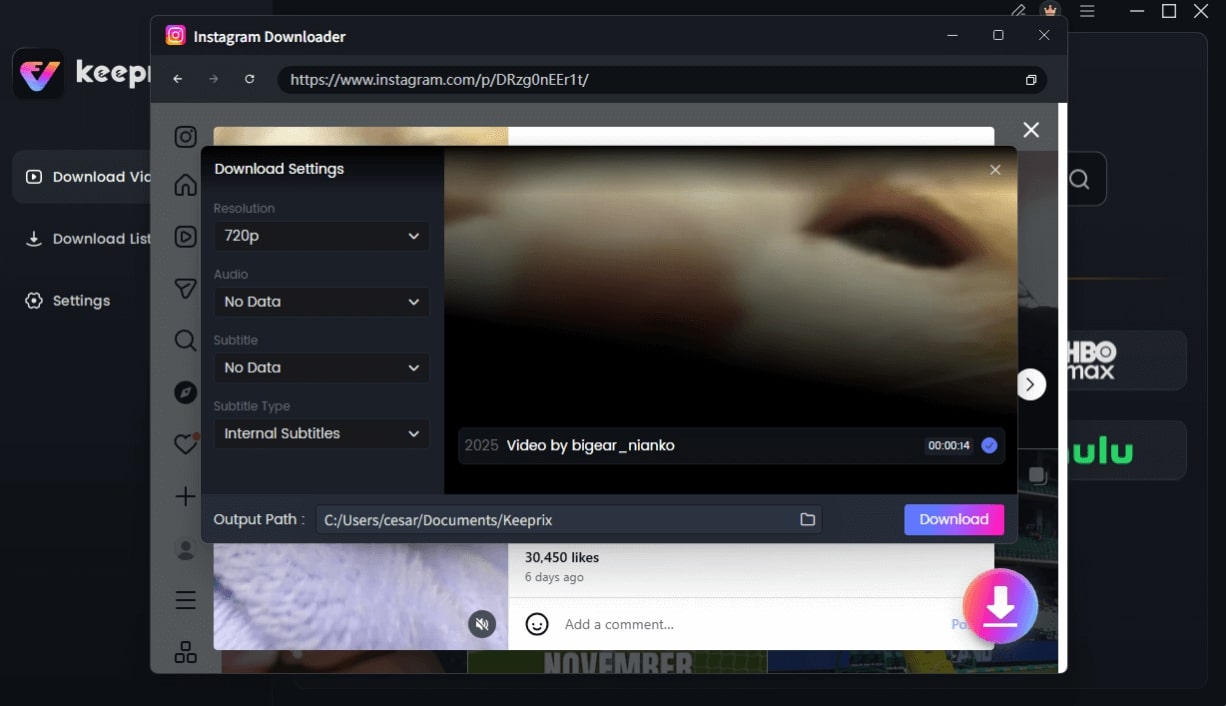
Configure Instagram Download Settings
Step 4. Start the Download: Click the ‘Download’ button. The application will process the video and save it directly to your specified folder on your Mac, ad-free and ready for offline viewing.
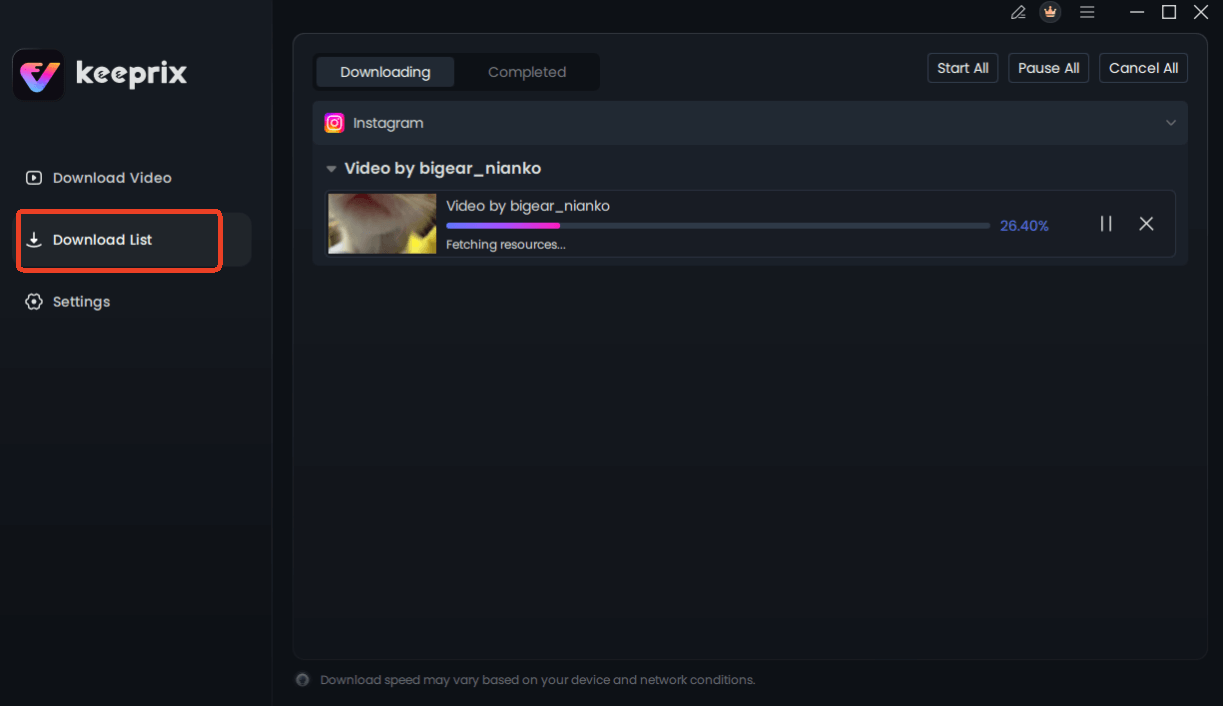
Downloading Instagram Videos
This straightforward process is how you can finally get that tutorial video saved as a permanent file on your MacBook, ready whenever you need it.
How to Download Your Own Instagram Videos on a MacBook
If your goal is only to save videos that you have personally posted to your own Instagram account, you do not need a third-party tool. Instagram provides an official, built-in feature to download an archive of all your data, including every video you’ve ever posted. This is the correct method for creating a personal backup.
This procedure is ideal for archival purposes but is not suitable for downloading videos from other users’ accounts. The process can take some time, as Instagram needs to compile your data before sending you a download link.
Steps to Request Your Instagram Data Archive:
Step 1. Log in to your Instagram account in a web browser on your Mac.
Step 2. Click the More menu (three horizontal lines) in the bottom-left corner.
Step 3. Select Your Activity from the menu.
Step 4. Choose Download your information.
Step 5. You may be asked to re-enter your password for security. Then, click Request Download.
Instagram will prepare your file and email you a link when it is ready. This can take up to 14 days, but for most accounts, it is much faster. Once you receive the link, you can download a ZIP file containing all your media to your Mac. For more tips on managing your online data, check out our guide on digital privacy.
Safety Warning: The Risks of Free Online Instagram Downloaders
When you search for an Instagram downloader for Mac, you will encounter dozens of free, web-based tools. It is critical to approach these sites with caution, as many present significant security risks. These services are free because they often generate revenue through methods that can compromise your privacy and your Mac’s security.
Here are the red flags to watch for:
- Aggressive Pop-Ups and Redirects: If a site bombards you with pop-up windows or automatically redirects you to other pages, close it immediately. These are often gateways for malicious scripts.
- Requests to Install Extensions: A legitimate downloader should not require you to install a browser extension, which can track your browsing activity.
- Deceptive Download Buttons: Many sites feature multiple “Download” buttons, where most are ads designed to trick you into installing unwanted software.
- Vague Privacy Policies: If you cannot easily find or understand how a site handles your data, it’s best to assume your privacy is not protected. You can learn more about protecting your computer in our Mac security essentials guide.
Because these risks are so prevalent, using a vetted, dedicated software application is a much safer alternative. It processes downloads locally on your machine without exposing you to the unpredictable and often unsafe environment of free online tools.
Frequently Asked Questions
Q1. Can I download Instagram videos on Mac?
Yes, you can download Instagram videos on a Mac, but not directly through Instagram’s website. You must use a third-party solution, such as dedicated software like Keeprix Downloader. For your own content, you can use Instagram’s built-in ‘Download Your Information’ feature.
Q2. Why doesn’t Instagram allow downloads on Mac?
Instagram restricts direct downloads on its desktop platform primarily to prevent unauthorized mass content scraping and to protect the copyright of its creators. This policy encourages users to engage with content within the Instagram ecosystem.
Q3. What is the difference between ‘save’ and ‘download’ on Instagram?
‘Saving’ an Instagram post is like creating an in-app bookmark—the content stays on Instagram’s servers and requires an internet connection to view. ‘Downloading’ creates a physical MP4 file on your Mac’s hard drive that you can access offline at any time.
Q4. Are Instagram video downloader sites safe on Mac?
Many free online downloader sites are not safe. They often contain malicious ads, pop-ups, and trackers that can compromise your Mac’s security and your personal privacy. Using a reputable, dedicated software application is a much safer method.
Q5. Does Instagram notify users when their videos are downloaded?
No, Instagram does not notify a user when their video is downloaded using a third-party tool. These tools access the publicly available video file and save a copy, a process that occurs entirely outside of Instagram’s notification system.
Q6. How can I keep Instagram videos legally on Mac?
Downloading Instagram videos for your own personal, offline viewing is generally considered acceptable. However, it is against Instagram’s terms of service and may infringe on copyright if you republish, distribute, or monetize someone else’s content without their explicit permission. Always credit the original creator and request permission for any use beyond personal archiving.
Conclusion: Take Control of Your Media Library
The inability to download Instagram videos on Mac is a deliberate platform limitation, not a technical oversight. This leaves you with a choice: navigate the unreliable and risky world of free online tools or opt for a secure, efficient, and dedicated solution. A tool like Keeprix Downloader removes the guesswork and security concerns, providing a direct procedure to save the content you need.
Instead of facing continued frustration, you can solve this problem permanently. Regain control over your media, build your offline library, and ensure you always have access to important videos without risk. To see how simple the process is, explore the features of Keeprix or try the free version today. If you’re managing content across multiple platforms, our guide to downloading YouTube videos might also be helpful.