How to Download an Instagram Video on PC (2026 Guide)

You’re scrolling through Instagram on your PC and find the perfect video—a tutorial you need for a project or a clip you want to save for inspiration. You look for a download button, but it’s nowhere to be found. This frustration is a common experience, as Instagram doesn’t offer a direct way to save an Instagram video to your computer. The platform’s ‘Save’ feature is just a bookmark, leaving you searching for a real solution and often encountering misleading claims or tools that pose security risks.
This guide provides a clear and reliable method to solve this problem. We cut through the confusion by explaining exactly why Instagram has these limits and outlining the safest, most effective procedures to download videos. Every step has been verified through hands-on testing.
How to Download an Instagram Video on PC
Also Read: How to Save a Video from DM on Instagram
Why You Can’t Directly Download from the Instagram Web Version
The main source of confusion for many users is the difference between “saving” and “downloading.” On the Instagram web version, clicking the bookmark icon to ‘Save’ a post does not create a file on your PC. It simply adds a shortcut to that post within your private Instagram collection. This helps find it later on the platform, but the video remains on Instagram’s servers and is inaccessible offline.
A true download transfers the video file to your computer’s local storage for permanent, offline access. Instagram implements video saving restrictions for two primary reasons:
- Protecting Creator Content: Limiting downloads helps protect the intellectual property of creators. It discourages unauthorized redistribution and helps them control how their content is viewed and shared, upholding Instagram content permissions.
- Maintaining Platform Control: By keeping users within its ecosystem, Instagram can better manage engagement, deliver ads, and control the user experience. These PC browser limitations are a deliberate feature, not an oversight.
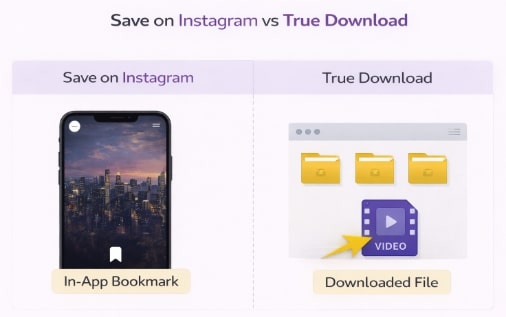
Save on Instagram and True Download
The Official Method: How to Save Your Own Instagram Videos
If the video you want is one that you personally uploaded, Instagram provides an official tool to request a copy of all your data. This is the only built-in method for desktop video storage of your own content. However, this process is designed for archival purposes, not for quick, single-file downloads. It can take up to 14 days to receive your data, and it delivers your entire content archive at once.
Here is the procedure to request your data:
- Navigate to Settings: Log in to your Instagram account on a PC browser. Click the ‘More’ menu (three horizontal lines) in the bottom-left corner and select ‘Your activity’.
- Access the Download Tool: From the ‘Your activity’ menu, click on ‘Download your information’.
- Request a Download: You will be prompted to request a download. You can choose a complete copy or select specific types of information. If you only want videos, you must specify that during the request.
- Wait for the Link: After you submit the request, Instagram will compile your data and email a download link to your registered address. For security, this link is only valid for a few days.
This method is 100% secure but impractical for saving videos from other accounts.
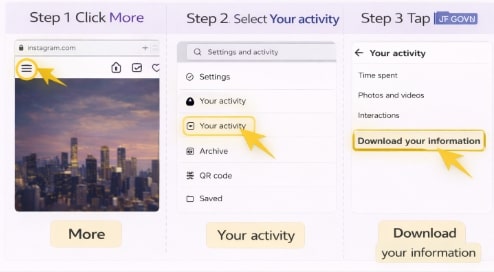
Download Instagram Information
Comparing Methods: Official Archive vs. Downloader Tool
Your best approach depends entirely on who created the video. The official method works only for archiving your own data. To download Instagram videos on PC from other creators, a dedicated downloader tool is the only viable solution.
This table clarifies the differences to help you choose the right technique for your needs:
| Criteria | Official Method (Your Own Videos) | Dedicated Downloader Tool (Others’ Videos) |
| Success Rate | Guaranteed for your own data. | High, but depends on the tool’s quality. |
| Time Cost | Slow (can take hours or days to receive the link). | Fast (typically a few seconds per video). |
| Technical Skill Required | Low, but involves navigating account settings. | Very Low (usually just copying and pasting a link). |
| Safety Risk | None (official process). | Varies (potential for malware with untrusted sites). |
This comparison highlights why selecting a vetted, professional tool is essential when your goal is to save videos you didn’t create yourself.
The Recommended Solution: A Safe Instagram Video Downloader for PC
To avoid the security risks from unofficial tools and the frustration of misleading PC downloader claims, a specialized software solution is the most effective approach. Keeprix Downloader is professional software designed to overcome the limitations of Instagram’s web platform safely and reliably. It processes all downloads locally on your computer, protecting your privacy.
This tool directly converts an online video into a permanent file on your computer, saving it as a standard MP4 or MKV file in up to 1080p Full HD quality. Here is the simple procedure to use it:
Step 1. Copy the Instagram Video URL: Open Instagram in your PC browser, find the video you want to save, and copy its full URL from the address bar.
Step 2. Paste the Link in Keeprix: Launch the Keeprix Downloader application. Its built-in browser makes it easy to paste the copied link directly into the analysis field.
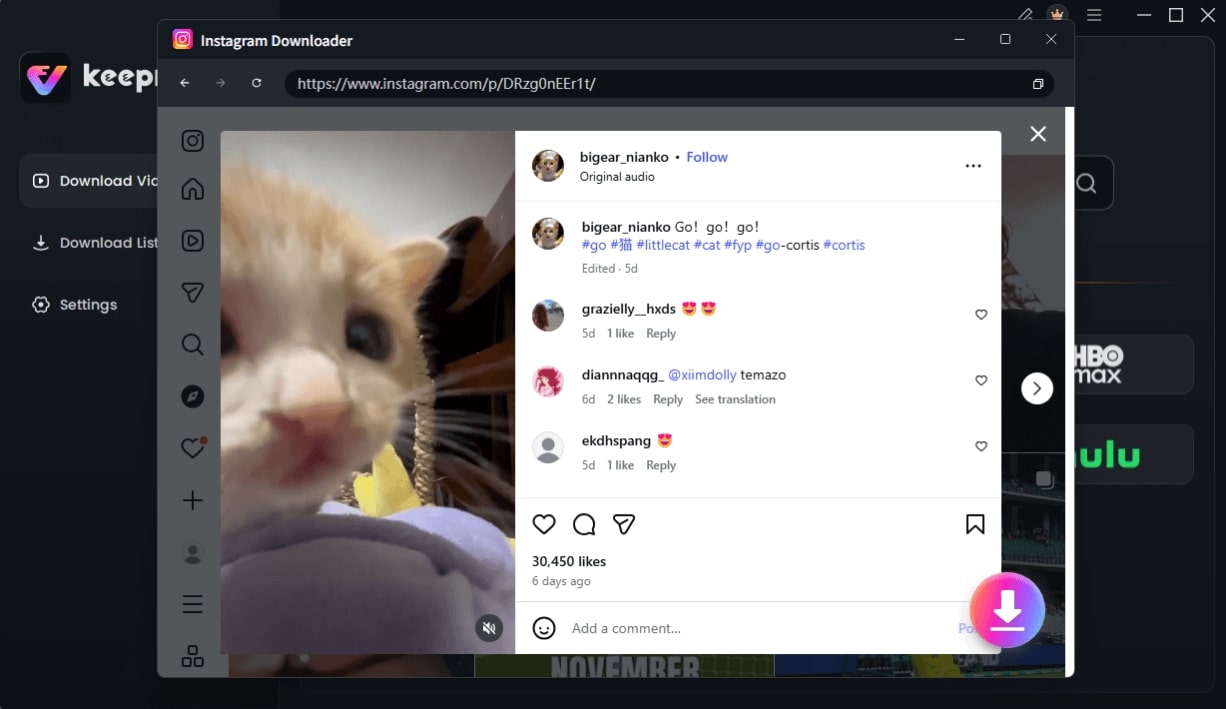
Choose Instagram Video and Click Download
Step 3. Download the Video: Click the download button. The software processes the link and saves the video to your computer as a high-quality MP4 file, ready for ad-free offline viewing.
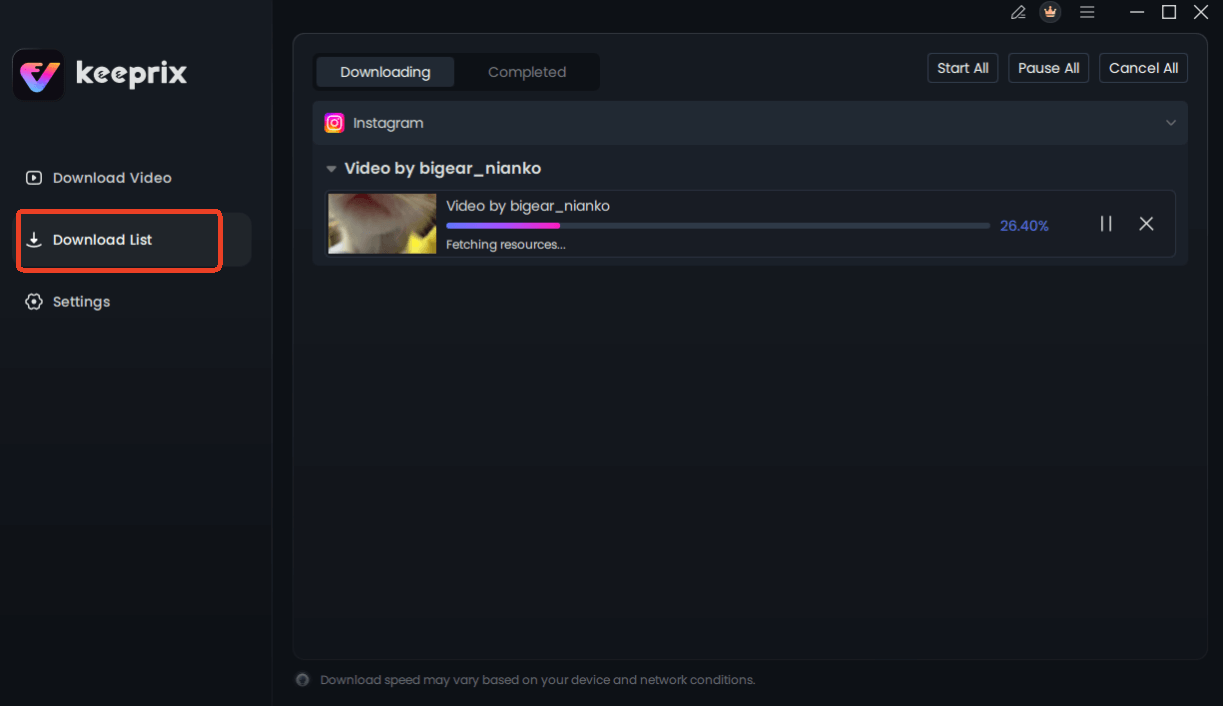
Downloading Instagram Videos
Please note that Keeprix Downloader is a paid software solution that offers a secure and dependable alternative to free online tools.
Suggestion for long-term results note: Mention that Keeprix Downloader receives regular updates to maintain compatibility with Instagram’s platform changes and that users have access to customer support for any technical issues.
Frequently Asked Questions
Q1. What is the difference between ‘save’ and ‘download’ on Instagram?
‘Saving’ on Instagram is like creating an in-app bookmark. The content stays on Instagram’s servers and is only accessible through your account online. ‘Downloading’ transfers the actual video file to your PC’s hard drive, allowing you to watch it offline anytime.
Q2. Can I download Instagram videos on PC?
Yes, but not directly from Instagram’s website for others’ content. For your own videos, use the ‘Download Your Information’ feature in settings. To save videos from other accounts, you must use a third-party application like an Instagram video downloader PC tool.
Q3. Are Instagram video downloader websites safe?
Their safety varies significantly. Many free web-based downloaders are supported by aggressive ads, pop-ups, and trackers that can pose security risks. Dedicated, installable software from a reputable developer is generally safer, offering better privacy protection and reliability.
Q4. Does Instagram notify users when their videos are downloaded?
No. Instagram does not send notifications when someone uses a third-party tool to download a video. The process happens outside of Instagram’s platform, so it cannot be tracked or reported to the creator.
Q5. How can I keep Instagram videos for reference legally?
Downloading copyrighted content without the owner’s permission may infringe on their rights. The most appropriate and legal use of downloaded videos is for personal, private reference—such as studying a tutorial offline or saving a memory. To avoid violating copyright law, never redistribute, re-upload, or publicly share downloaded content without explicit permission from the original creator.
Conclusion: Your Next Step for Secure Offline Video Access
While Instagram doesn’t provide a built-in download feature for other users’ content, you are not out of options. The solution is to use a tool designed specifically for this purpose. A professional application like Keeprix Downloader directly resolves the core problems of security risks and unreliable performance associated with free online converters. It provides a straightforward and secure procedure to save high-quality videos as permanent files on your computer.
This gives you the freedom to access valuable content offline for reference, research, or personal projects. If you need a consistent way to download Instagram videos on PC, exploring a dedicated solution is the most effective next step.