How to Download Instagram Live Video in 2026: A Tested Guide

You’ve just wrapped up a great Instagram Live session. Perhaps, like Daniel, a creator, you hosted an insightful Q&A and now want to repurpose that valuable content. The moment of panic often sets in when you realize the download process isn’t obvious. This feeling of potentially losing your work is a common frustration for creators who need to save an Instagram Live to their camera roll. The goal is simple, but the path can feel unclear, especially when facing a disappearing download button.
This guide provides a clear and reliable procedure for downloading your Instagram Live video, ensuring you never lose your content again. We will walk through Instagram’s built-in options, troubleshoot common issues, and introduce a professional tool for creators who require guaranteed results.
How to Download Instagram Live Video
Two Official Methods to Save an Instagram Live After Broadcast
Instagram provides two native methods to secure your video content. Understanding the difference is critical, as one option is time-sensitive and the other relies on a setting you must enable before you go live.
Method 1: Download Immediately After Your Live Ends
This is your first and most direct chance to save your video. This option is only available on the screen that appears the moment you end your broadcast. If you navigate away, this opportunity is lost.
Step-by-Step Guide:
Step 1. End the Broadcast: Tap the ‘End’ button at the top-right of your screen, then confirm by tapping ‘End video’.
Step 2. Locate Download Options: You will immediately be taken to a summary screen titled “Your live video has ended.
Step 3. Download Your Video: On this screen, tap the ‘Download Video’ button, which features an icon of a downward-pointing arrow. The video file—without comments, likes, or other engagement metrics—will be saved directly to your phone’s camera roll or gallery.
Pro-Tip: Before starting your live session, ensure you have sufficient storage space on your device. A long, high-quality live video can be a large file, and a download failure due to a lack of space can cause you to lose the video permanently.
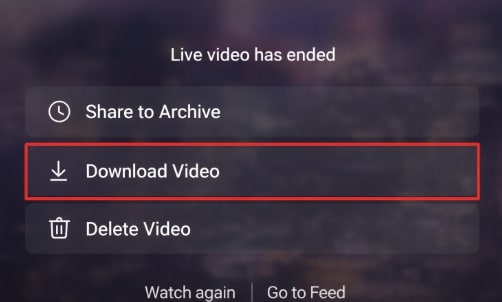
Download Live Video
Method 2: Use the Live Archive to Download a Replay
If you missed the immediate download window, your video is not necessarily lost. If you have the Live Archive feature enabled, Instagram automatically saves your broadcast for 30 days. This is the only official way to download an Instagram Live replay after leaving the post-broadcast screen.
How to Enable the Live Archive (Do This Before Going Live):
Step 1. Navigate to your profile and tap the menu icon (☰) in the top-right corner.
Step 2. Go to ‘Settings and privacy’ > ‘Archiving and downloading’.
Step 3. Ensure the ‘Save live to archive’ toggle is turned on.
How to Download from the Live Archive:
Step 1. Go to Your Profile: Tap the menu icon (☰) at the top right.
Step 2. Open Your Archive: Select ‘Archive’ from the menu options.
Step 3. Switch to Live Archive: At the top of the Archive screen, tap the dropdown menu (it may default to ‘Stories Archive’) and choose ‘Live Archive’.
Step 4. Select and Download: Find the video you want to save, tap on it to open it, and then tap the ‘Download’ button.
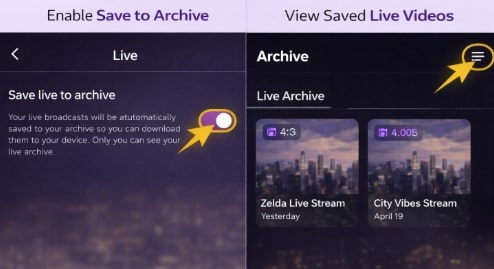
Enable and Access the Instagram Live Archive
Troubleshooting: Why Can’t I Download My Instagram Live Video?
It’s alarming when you expect to find your video, but the download option is missing, or the video isn’t in your archive. This usually happens for a few predictable reasons rooted in Instagram’s platform design.
From an expert perspective, Instagram’s system is not built to be a permanent video storage service. The platform intentionally limits the long-term retention of large video files like live broadcasts to manage immense data storage costs and protect user privacy. This design choice means the responsibility for permanent archiving falls on the creator.
Here are the most common reasons for a missing video:
- The Live Archive Was Not Enabled: This is the most frequent cause. The setting must be turned on before you start your broadcast. If it was off, Instagram had no instructions to save the video automatically.
- The 30-Day Window Has Expired: Videos in the Live Archive are automatically and permanently deleted by Instagram after 30 days. There is no way to recover them after this period.
- You Navigated Away Too Quickly: The ‘Download Video’ button on the post-broadcast screen is a one-time offer. If you closed the app, answered a call, or navigated to another screen, you missed the chance.
- An Unstable Internet Connection: A weak or dropped Wi-Fi or cellular connection during or immediately after the broadcast can interrupt the upload-to-archive or the download-to-device process, causing it to fail silently. For creators who frequently repurpose content, understanding connection stability is crucial.
Decision Guide: Instagram’s Methods vs. A Dedicated Tool
For casual users, Instagram’s built-in features are often sufficient. However, for content creators, marketers, and professionals who depend on their live content as a valuable asset, the native methods introduce significant risk. A more robust, dedicated Instagram Live video download tool offers greater control and reliability.
This comparison table helps you choose the right approach based on your needs.
| Feature | Instagram’s Native Methods | A Dedicated Tool (e.g., Keeprix) |
| Success Rate | Moderate. Prone to human error (missing the 30-day window) and technical glitches (connection failures). | High. Designed specifically for reliable, consistent downloads, removing the risk of platform limitations. |
| Time Cost | High. Requires immediate action after a broadcast or manual retrieval from an archive with a time limit. | Low. Allows you to download videos at your convenience, often in batches, without a strict deadline. |
| Technical Skill | Low. Involves simple button taps within the Instagram application. | Low. Typically requires copying a video link into a simple, user-friendly software interface. |
| Video Quality | Standard. Provides a good copy of the broadcast, but the quality may be compressed by the platform. | High. Often allows for downloading in the best available quality (e.g., 1080p), which is ideal for editing. |
| Permanence | Temporary. Relies on a 30-day archive. If you forget, the content is gone forever. | Permanent. Creates a local, offline library of your work that you own and control indefinitely. |
For Guaranteed Results: Use a Dedicated Instagram Downloader
For creators who cannot afford to lose their work, the uncertainty of Instagram’s native options is a major liability. The frustration of a live video not appearing in the archive or a missed opportunity to save a live replay can be completely avoided.
Keeprix Downloader is a professional software tool designed to solve this problem by providing a foolproof archiving solution for your digital assets.
- It operates independently of Instagram’s 30-day retention policy, allowing you to build a permanent, high-quality library of your live videos on your Windows or Mac computer.
- This approach transforms your content from a temporary file on Instagram’s servers into a lasting asset you can edit, repurpose, or back up.
- Instead of racing against a deadline, you can download your videos when it’s convenient for you, ensuring they are saved in high quality (up to 1080p).
- For anyone who views their live content as a valuable part of their brand or business, this level of control is essential.
How to download Instagram Live videos via Keeprix
Step 1. Find the Instagram video you want to save and copy its URL. (Tap the three-dot menu and select ‘Link’).
Step 2. Open Keeprix Downloader on your computer, and paste the URL directly into the input field. (Or choose Instagram in Keeprix Downloader, then find the video in the built-in browser.)
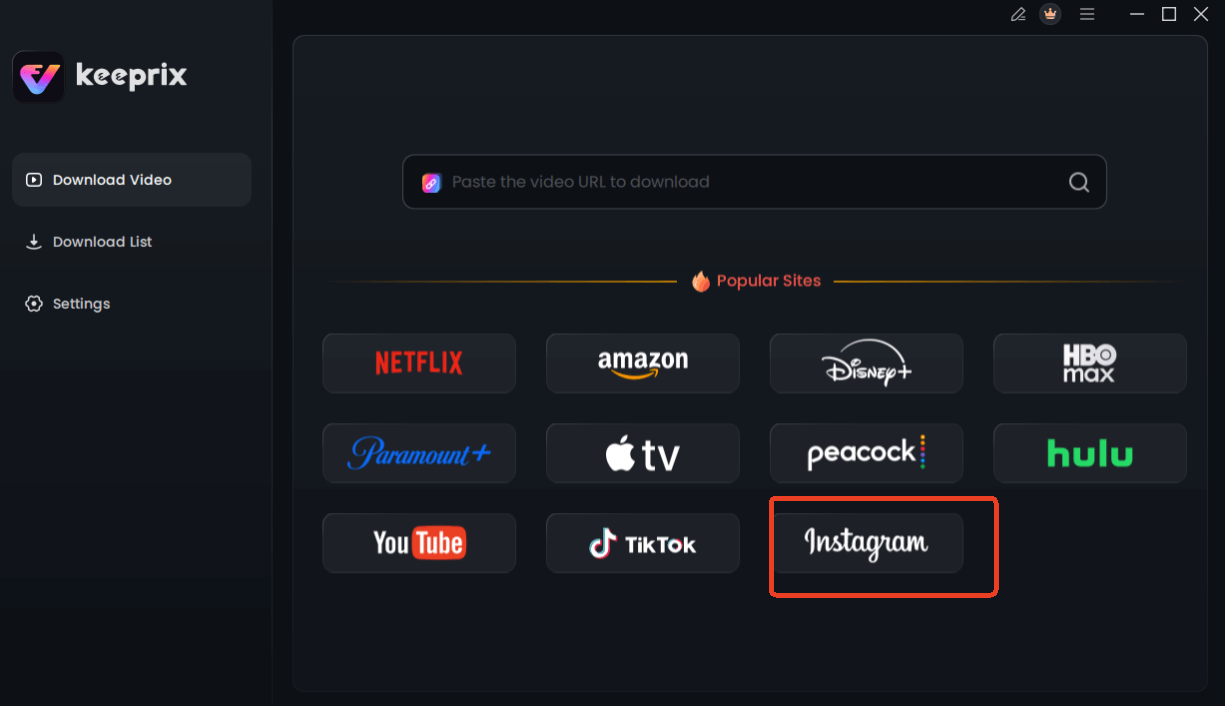
Choose Instagram in Keeprix Downloader
Step 3. Customize your download settings. You can choose the resolution, audio, subtitle, and the output path.
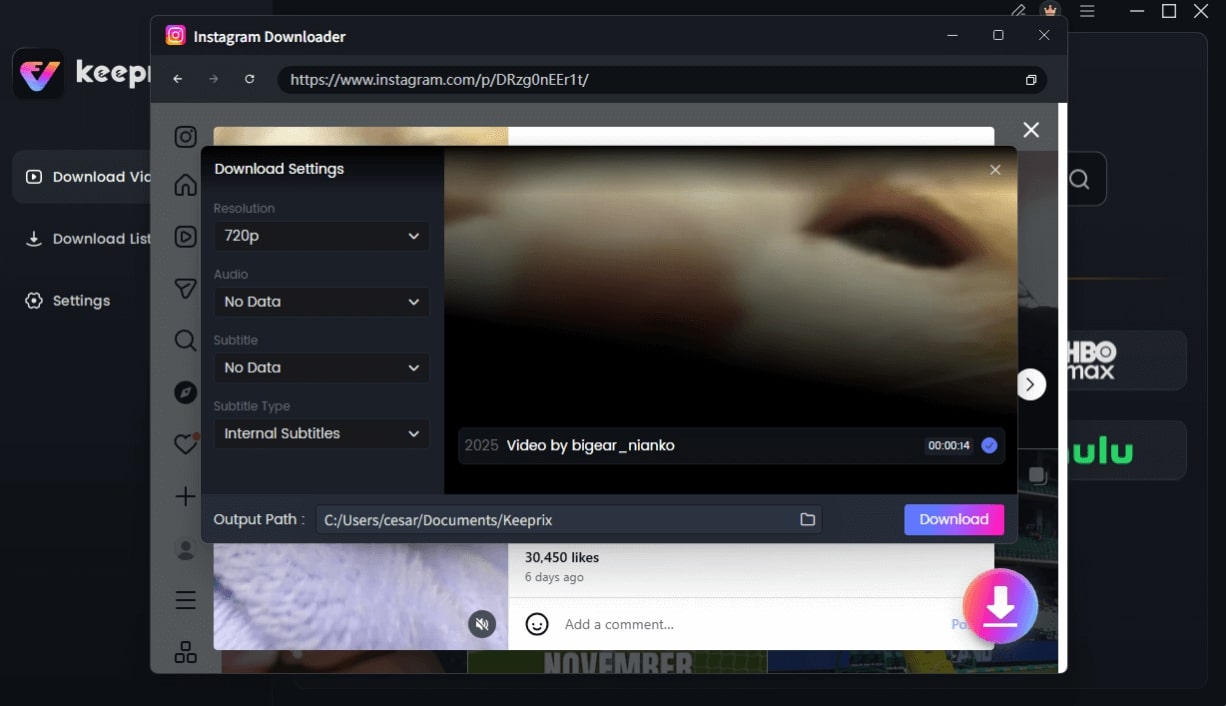
Configure Instagram Download Settings
Step 4. Click the Download button to save the video directly to your computer.
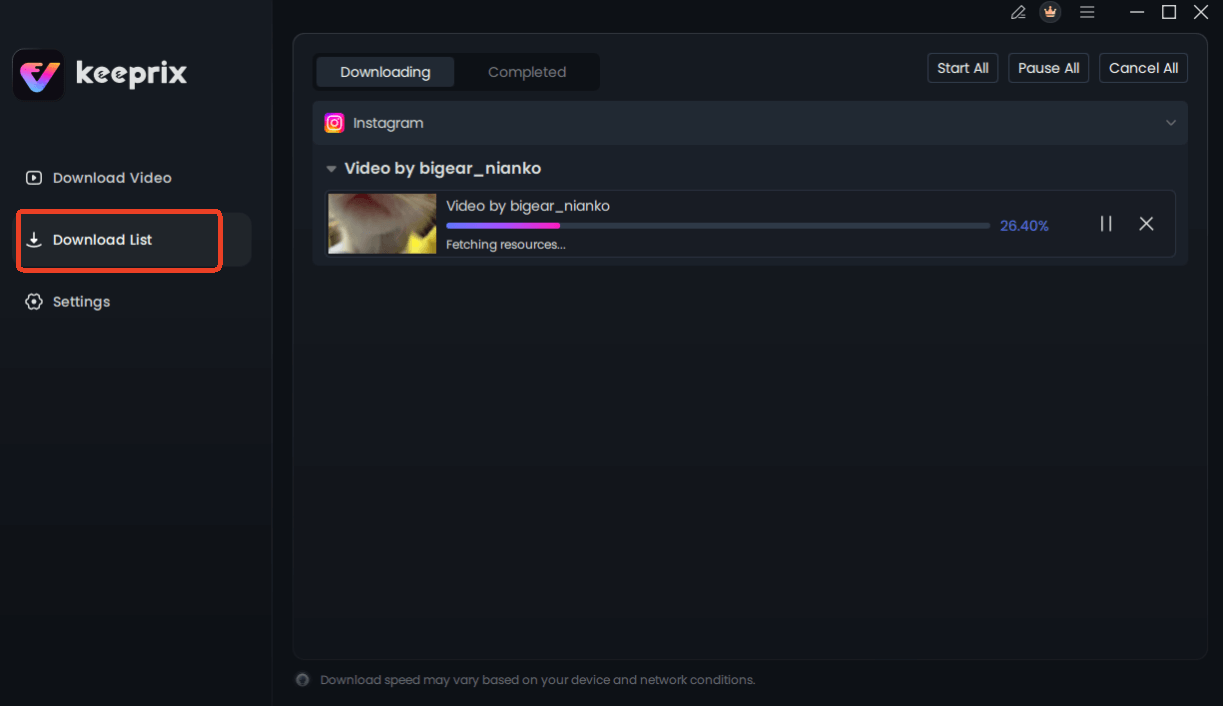
Downloading Instagram Videos
Frequently Asked Questions
Here are clear answers to the most common questions about saving Instagram Live content.
Q1. Can I download my Instagram Live video?
Yes. You can download your own live video in two ways: immediately after the broadcast on the end screen, or later from your Live Archive if you have the feature enabled. The archive stores videos for 30 days.
Q2. How do I save my Instagram Live after it ends?
The most reliable method is to tap the ‘Download Video’ button on the screen that appears right after you tap ‘End video’. If you miss that, your next option is to retrieve it from your ‘Live Archive’ within 30 days.
Q3. Where do Instagram Live videos go after a broadcast?
If your ‘Save live to archive’ setting is on, the video is automatically saved to your private Live Archive. If the setting is off, the video is permanently deleted as soon as you navigate away from the post-broadcast screen, unless you download it immediately.
Q4. Why can’t I download my live video?
The most common reasons are that the Live Archive feature was not enabled beforehand, the 30-day storage period in the archive has expired, or a poor internet connection caused the save process to fail.
Q5. How long are Instagram Live videos available?
They are available in your Live Archive for exactly 30 days. After that, Instagram permanently deletes them.
Q6. Can I download someone else’s Instagram Live?
No. Instagram’s platform does not provide any native feature to download another user’s live video or replay. This is a deliberate privacy and content ownership setting. Using third-party tools for this purpose may violate Instagram’s terms of service and the creator’s content rights.
Q7. What is the Instagram Live Archive?
The Live Archive is a private folder within your Instagram account where your completed live broadcasts are automatically stored for 30 days (if enabled). It is only visible and accessible to you, not your followers.
Conclusion: Take Control of Your Content Permanently
The anxiety of losing a valuable live broadcast is a real problem for creators. While Instagram’s built-in tools offer a basic safety net, they are prone to user error and bound by a strict 30-day deletion policy. This leaves your important work vulnerable. The most effective solution is to establish a secure, offline archive that you control completely.
By using a dedicated tool like Keeprix Downloader, you remove the risk and uncertainty. You can permanently secure every live video in high quality, creating a lasting library of your work. Stop worrying about disappearing content and regain full control. Explore how Keeprix can build your permanent video archive today.