How to Download a Reel Without a Watermark: Full Guide

You found the perfect Reel and want to share it, but downloading it adds a distracting watermark. This common frustration often leads to searching for a way to download an Instagram Reel without a watermark, only to find a maze of questionable websites and confusing advice. Many of these third-party tools make bold claims but expose you to security risks or simply don’t work. The confusion between saving your own content and downloading others’ Reels only adds to the problem.
This guide is different. It’s based on direct testing of every common method to give you clear, actionable answers. We’ll show you the only official way to save your own original video files without branding, explain why the Instagram Reels watermark exists, and provide a secure, reliable tool for downloading any Reel you need.
Download Reel Without Watermark
The Official Method: Save Your Own Reels with No Watermark
If you’re a content creator, Instagram provides one official, built-in method to get a clean copy of your work: save the Reel before you post it. This is a critical distinction, as downloading a Reel after it goes live will always include the watermark. Saving the draft preserves your original video file in its highest quality.
This technique is designed to give you a local backup and only works for content you’ve created within the Instagram app.
Step-by-Step Guide to Saving Your Draft
Step 1. Create Your Reel: Open the Instagram app and build your Reel. Record your clips, upload footage, and add your preferred audio, effects, and text.
Step 2. Proceed to the Edit Screen: Once you are satisfied with your edits, tap the ‘Next’ button to advance to the final screen before posting.
Step 3. Find the ‘Save’ Icon: On this final screen, before writing your caption or tapping ‘Share’, look for a download icon (it’s an arrow pointing down into a tray). Tap this icon.
Step 4. Check Your Device’s Gallery: The video will process for a moment and then save directly to your phone’s camera roll or gallery. This saved file is a clean copy, free of any Instagram branding.
Also Read: How to Save a Video from DM on Instagram
Remember, this procedure is proactive. It does not work for Reels that are already live on your profile.
Why Does Instagram Add a Watermark to Reels?
It’s easy to see the watermark as an inconvenience, but from Instagram’s perspective, it’s a necessary feature. When you download a published Reel, the platform intentionally adds its logo and the creator’s username to ensure proper content attribution.
This system serves two primary functions:
- Protects Creator Credit: The watermark ensures the original creator’s username stays attached to their work, no matter where the video is shared. This helps them retain credit and directs viewers back to their profile.
- Promotes the Platform: The Instagram logo serves as branding, encouraging people who see the video on other platforms to check out Reels.
This process is a core part of how Instagram manages its content ecosystem and upholds its platform copyright rules. When you use a third-party tool to remove the watermark from Instagram Reels, you are bypassing this built-in attribution system. Understanding this context is key to sharing content responsibly.
How to Choose a Downloader: Free Online Tools vs. Professional Software
For Reels that aren’t your own, you must turn to third-party solutions. Your options fall into two main categories: free, web-based downloaders and professional desktop software. The right choice depends on your priorities for safety, quality, and reliability.
Free online tools are tempting because they are accessible, but they come with significant trade-offs and risks. Let’s compare the two approaches.
Comparison: Free vs. Professional Download Tools:
| Feature | Free Online Tools | Professional Software (e.g., Keeprix) |
| Success Rate | Inconsistent. Often breaks when Instagram updates its platform. | High. Regularly updated to maintain compatibility. |
| Safety Risk | High. Many sites contain malware, intrusive pop-ups, or phishing schemes. | Low. Operates locally on your computer, avoiding browser-based threats. |
| Video Quality | Variable. Often compressed and may not support HD downloads. | High. Downloads videos in their original or best available resolution. |
| User Experience | Poor. Typically filled with ads, redirects, and confusing interfaces. | Excellent. Clean, ad-free interface designed for ease of use. |
| Batch Downloads | Not supported. You must download Reels one by one. | Supported. Allows you to download multiple videos at once, saving time. |
Free tools might suffice for a single, low-stakes download if you’re willing to navigate the risks. However, for anyone who needs consistent, high-quality results without compromising their security, a professional tool is the superior and safer option.
The Best Way to Download Any Instagram Reel Without a Watermark
After extensive testing, we recommend Keeprix Downloader as the most reliable and secure solution. As a dedicated desktop application for Windows and Mac, it provides a safe and efficient alternative to unpredictable web-based tools. It completely avoids the main user pain point of potential malware from downloader sites by processing everything locally on your computer.
Keeprix ensures a high-quality, Instagram reel watermark-free download, saving videos in their original resolution up to 1080p. It is a premium software designed for users who value performance and security. A key feature is its batch-processing capability, which lets you download entire playlists or multiple individual Reels at once.
How to Download a Reel with Keeprix
Step 1. Copy the Reel URL: Open the Instagram app or website and navigate to the Reel you want to download. Click the three-dots icon and select ‘Copy Link’.
Step 2. Paste the Link in Keeprix: Launch Keeprix Downloader on your computer. Paste the link into the analysis field.
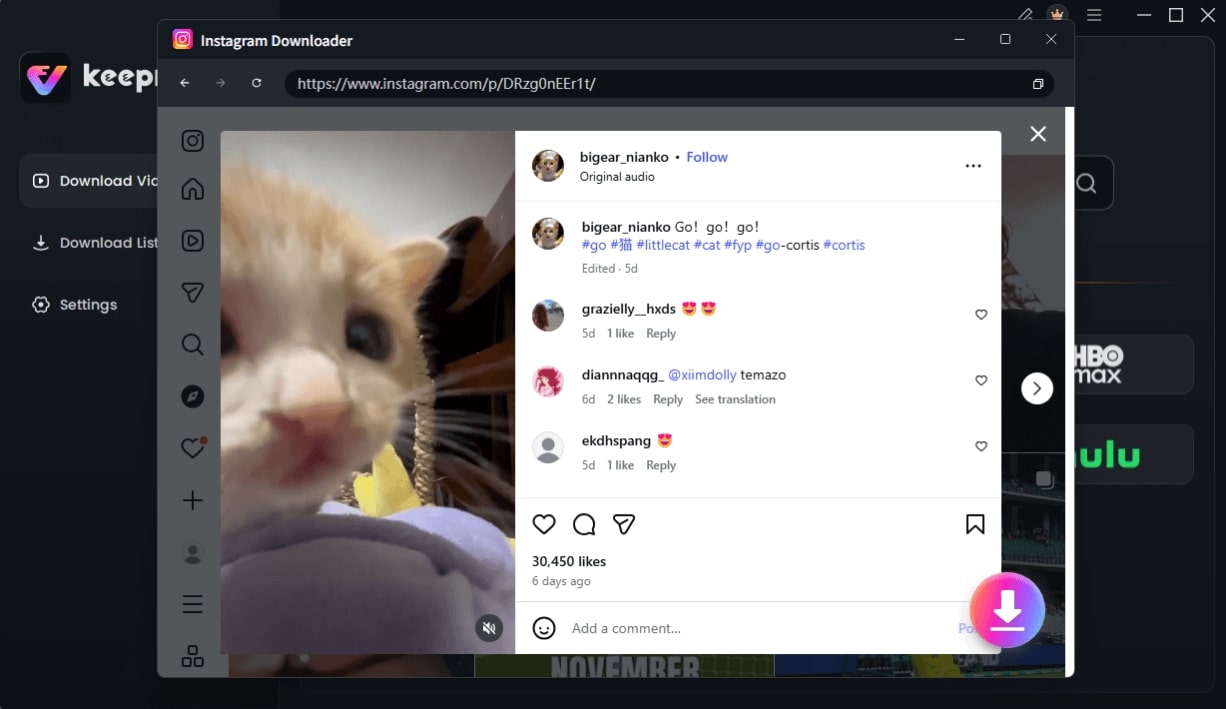
Choose Instagram Video and Click Download
Step 3. Choose Your Quality: The software will analyze the link and present you with available quality options. Select your preferred resolution.
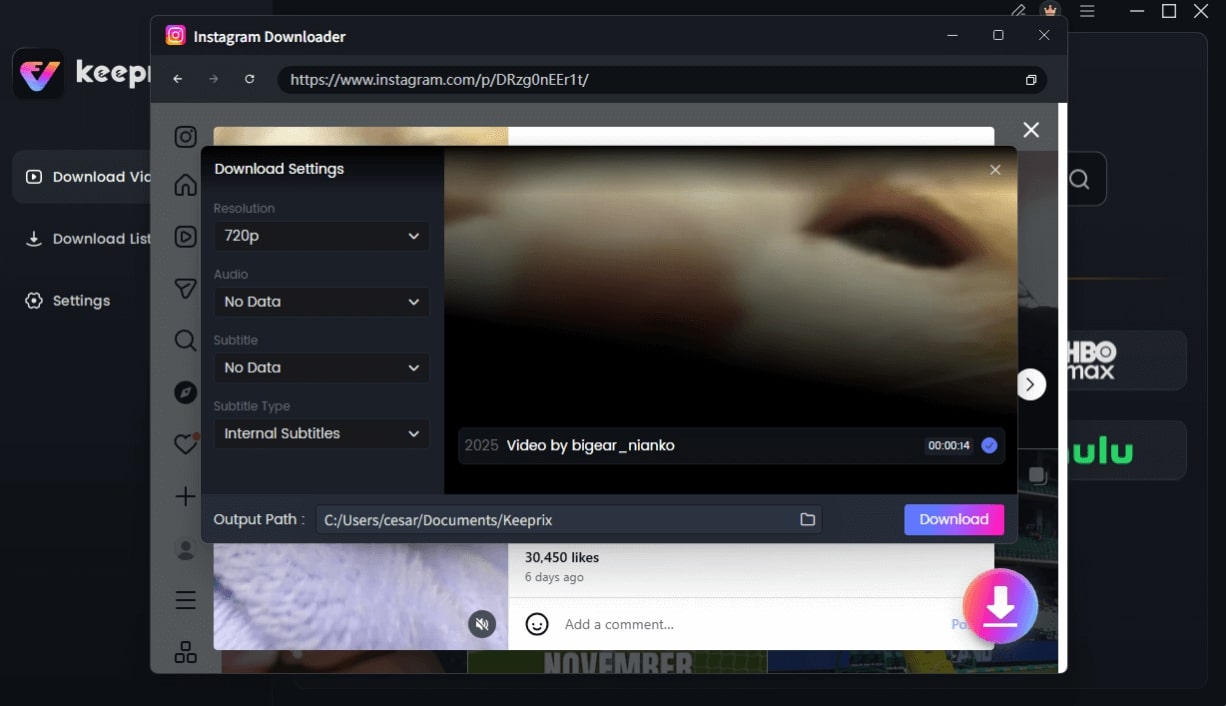
Configure Instagram Download Settings
Step 4. Download the Video: Click the ‘Download’ button. The video will be saved directly to your designated folder, completely clean and without a watermark.
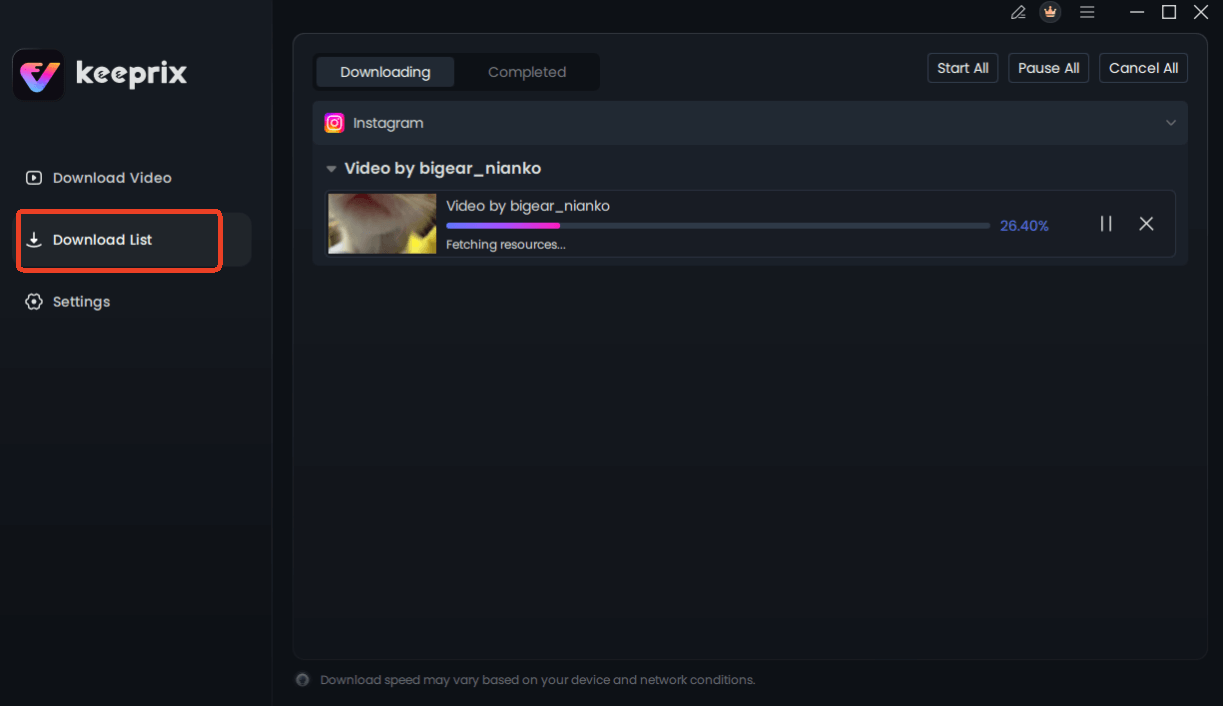
Downloading Instagram Videos
Is It Safe and Legal to Remove an Instagram Reel Watermark?
This question has two parts: the safety of the tools and the legality of the action.
- Safety: From a security standpoint, most free “no watermark reel downloaders” are not safe. These websites are often funded by aggressive advertising networks that use pop-ups and redirects, which can lead to malware infections or phishing attempts. Using a vetted desktop application like Keeprix is fundamentally safer because it insulates you from these browser-based risks.
- Legality: The legal aspect is more nuanced. The original video is the creator’s intellectual property. Removing the watermark erases the built-in content attribution, which can violate Instagram’s terms of service and, in some situations, may constitute copyright infringement. While downloading a video for personal, private viewing is generally a low-risk activity, republishing that content on your own profile or another platform without the watermark and without giving explicit credit to the original creator can have consequences.
Always prioritize downloading your own original video files. If you download another creator’s content, the most responsible action is to provide clear, visible credit in your caption.
Frequently Asked Questions
Here are direct answers to the most common questions about downloading Instagram Reels.
Q1. Can I download Reels without a watermark?
Yes, but the correct method depends on who created the Reel. For your own content, you can save the draft from the editor before posting it to get a watermark-free version. To download someone else’s Reel without a watermark, you must use a reliable third-party tool, as Instagram’s built-in download function always adds one.
Q2. Does Instagram notify users when their Reels are downloaded?
No. Instagram does not send a notification to a creator when you use the native ‘Download’ feature, screen-record their Reel, or use a third-party service. The process is anonymous.
Q3. What is the difference between ‘Save’ and ‘Download’ on Instagram?
Saving a Reel bookmarks it to a private collection inside your Instagram account, allowing you to watch it later within the app. It does not store the video file on your device. Downloading uses the share menu’s function to save a copy of the video file to your phone’s gallery, and this version will always include the watermark.
Q4. Are no-watermark Reel downloaders safe?
Many are not. Free, web-based downloaders often pose security risks, including malware and phishing, through aggressive ads and redirects. A dedicated, installable desktop application from a reputable source is a much safer alternative.
Q5. Is it legal to remove a Reel watermark?
For personal use, it’s a gray area but generally low-risk. However, if you republish the content without the watermark, you are removing the creator’s attribution. This can violate Instagram’s terms of service and potentially infringe on the creator’s copyright. Always give credit if you repost content that isn’t yours.
Conclusion
Navigating the world of online video tools can be frustrating, especially when your goal is simply to get a clean copy of a Reel. The uncertainty over unsafe websites and the nuances of content copyright only make it more complex. Instead of relying on inconsistent and risky free tools, you can solve the problem permanently with a secure and reliable solution. A professional tool puts you in control, allowing you to quickly and safely download high-quality, watermark-free Reels whenever you need them.
For a dependable method that respects your privacy and delivers consistent results, try Keeprix Downloader. It provides a straightforward, ad-free experience so you can save the content you need in minutes, without any risk.