Is There a True Instagram Video Downloader for 4K? The Reality & Solution (2026 Guide)

If you are searching for an Instagram video downloader 4k, you likely want to preserve the visual fidelity of a Reel exactly as you saw it on your screen. Perhaps you need a high-definition reference for a creative project, or you simply want to archive a memory without it turning into a blurry mess. However, most users encounter a frustrating reality: after trying half a dozen free online tools, the result is often a pixelated, washed-out file that lacks the sharpness of the original playback.
This is a common technical barrier. Users hoping to save Instagram videos in 4k frequently find that tools claiming “4K support” are simply upscaling low-quality footage, leaving you with digital noise rather than detail. To solve this, you need a method that bypasses the standard web compression and retrieves the original source file directly from the server. This guide explains exactly why these quality drops happen and how to secure the highest quality download possible.
Instagram Video Downloader for 4K
Decision Guide: Online Converters vs. Professional Software
Before selecting a tool to download Instagram videos 4k, it is critical to evaluate the trade-offs between free online converters and professional software solutions. While browser-based tools offer immediate access without installation, they often present significant quality limitations that explain the “washed-out” look many users experience.
Free Online Converters: The Economics of Compression
Most web-based downloaders rely on server-side scripts. Because these websites pay for the bandwidth used to transfer files to you, they have a financial incentive to reduce file sizes. Often, they will transcode a high-quality 50MB video stream down to a 10MB file before sending it to you. This “bitrate crushing” is why the video looks blocky, even if the resolution technically says 1080p.
Crucially, third-party downloader claims regarding 4K resolution on these sites are often misleading. Lacking the ability to decrypt the high-quality app stream, they typically scrape the lower-quality web preview version and artificially upscale it. This results in a larger file size with no increase in visual detail—essentially “empty” data.
Professional Software Solutions: Why Local Processing Matters
Desktop applications utilize “local processing,” which simply means the software runs on your computer rather than a remote server. This distinction is vital for quality for two reasons:
- No Bandwidth Cap: Since the software downloads the file directly to your hard drive, the developer doesn’t pay for bandwidth. There is no incentive for them to compress your file.
- App Simulation: Advanced desktop tools can simulate a mobile device connection. This allows them to request the higher-bitrate video stream intended for the Instagram mobile app, rather than the lower-quality stream intended for a web browser.
Strategic Comparison Table
| Feature | Free Online Converters | Professional Software (Keeprix) |
| Stream Quality | Variable (Often Capped/Compressed) | Consistent (Retrieves Source) |
| Bitrate Average | ~1,200 kbps (Lower fidelity) | ~4,500 kbps (High fidelity) |
| Batch Downloading | No (Manual link entry required) | Yes (Download entire profiles) |
| Security | Risk of malvertising/pop-ups | Ad-free, local engine |
| Requirement | None (Browser-based) | Requires Installation |
The Reliable Solution: How to Download Instagram Videos in Maximum Quality
For the user who requires a dependable method to archive footage without data loss, we recommend the Keeprix Video Downloader. Unlike browser-based tools that often re-compress files to save server costs, Keeprix is designed to fetch the high-quality video download directly from the source.
Keeprix addresses several specific pain points associated with Instagram 4K video download attempts:
-
- Preserving Original Bitrate: By acting as a direct client, it grabs the raw .mp4 file stored on Instagram’s Content Delivery Network (CDN), bypassing the “web view” compression.
- Removing Restrictions: It resolves issues with regional blocks or expiration dates, allowing you to keep videos permanently.
- Ad-Free Experience: The software manages the download process without the intrusive pop-ups common on free converter sites.
How to use Keeprix for Best Results:
- Install & Launch: Open Keeprix Video Downloader on your Windows or Mac device.
- Paste the Link: Copy the URL of the Instagram video you wish to save.
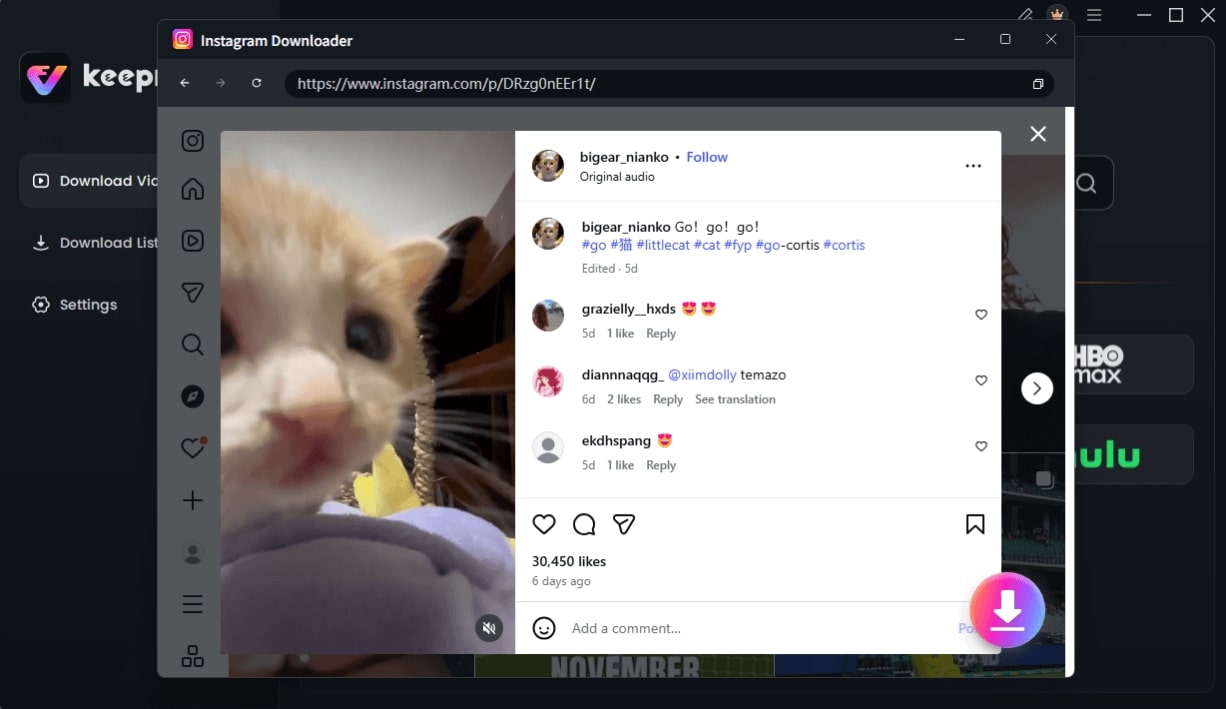
Choose Instagram Video and Click Download
- Select “Best Available”: The software will analyze the video options. Note that while Keeprix supports up to 8K for platforms like YouTube, Instagram does not host 8K files. For Instagram, selecting “Best Quality” ensures you get the source file (typically high-bitrate 1080p), which is the maximum fidelity the platform allows.
- Download: Click download. The engine processes the file locally, ensuring privacy and speed.
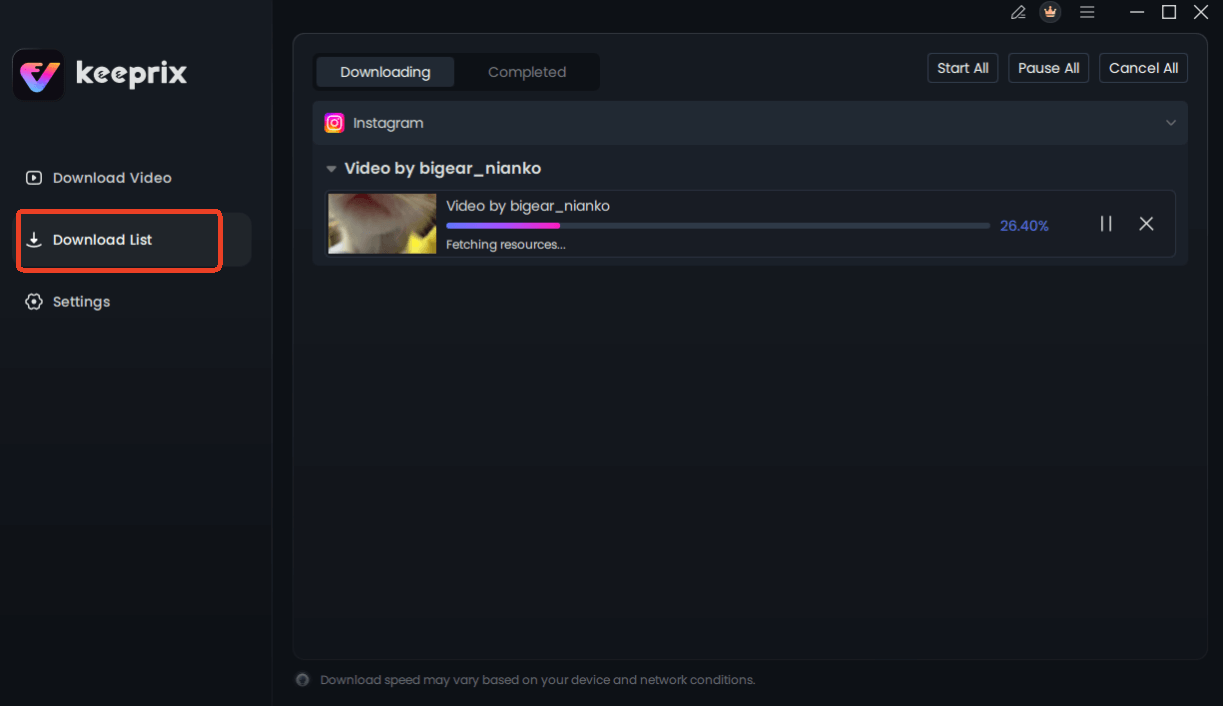
Downloading Instagram Videos
Technical Deep Dive: Does Instagram Actually Support 4K Video Uploads?
A major source of confusion in this space is the technical limitation of the platform itself. While users frequently search for Instagram video downloader 4k tools, it is crucial to understand Instagram video compression protocols to set realistic expectations.
Instagram rarely hosts native 4K video. Even if a creator records and uploads in 4K, Instagram’s compression algorithm typically downscales the video to 1080p (1080 x 1920 for Reels) to optimize server storage and mobile streaming speeds.
The “Resolution Funnel” Explained
When a video travels from a creator’s camera to your hard drive, it passes through a funnel that reduces quality at each step:
- Source Upload (4K/8K): The creator uploads a pristine file.
- Server Compression (1080p): Instagram encodes the file to H.264 at 1080p with a variable bitrate to save data. This is the “Source” file available for download.
- Viewer App (Variable): Depending on your connection, the app might stream a 720p version to your phone to prevent buffering.
- Web Downloader Output (Compressed): Many online tools grab an even lower quality version or re-compress the file to save their own bandwidth.
Therefore, when you see an Instagram downloader high-quality tool advertising “4K Downloads,” one of two things is happening:
- True Source Retrieval (The Goal): The tool fetches the file from Step 2 (Server Compression). This is the best possible quality available to the public.
- Artificial Upscaling (The Trap): The tool downloads the file and artificially stretches it to 4K resolution. This increases the file size significantly without adding any real detail, often resulting in a “soft” image.
To truly save Instagram videos in 4k—or rather, the max quality available—you must use a tool that retrieves the file from Step 2 exactly as it sits on the server.
Why Most “High Quality” Online Downloaders Fail
The primary obstacle most users face is not just finding a tool, but finding one that prioritizes file integrity over speed or ad revenue. Many users attempting to save Instagram videos in 4k via free web portals encounter failures where the download link simply refuses to generate, or the file looks significantly worse than the preview.
This failure rate is often due to third-party downloader claims that do not match their technical capabilities. Browser-based downloaders generally lack the sophisticated decryption keys required to bypass Instagram’s evolving API restrictions. Consequently, they resort to screen-scraping techniques.
Common issues with online scrapers include:
- Bitrate Crushing: Reducing a 5Mbps stream to 1Mbps. This creates “artifacting,” where complex scenes (like running water or confetti) become blocky.
- Malware Risks: “Download” buttons that trigger redirects to unrelated sites.
- Format Lock: Forcing users into obscure file formats rather than standard MP4.
For users seeking a high-quality Instagram downloader solution, relying on these unstable web-based interfaces usually results in wasted time and potential security vulnerabilities rather than a usable high-definition video file.
Verifying Quality: How to Check Resolution and Bitrate
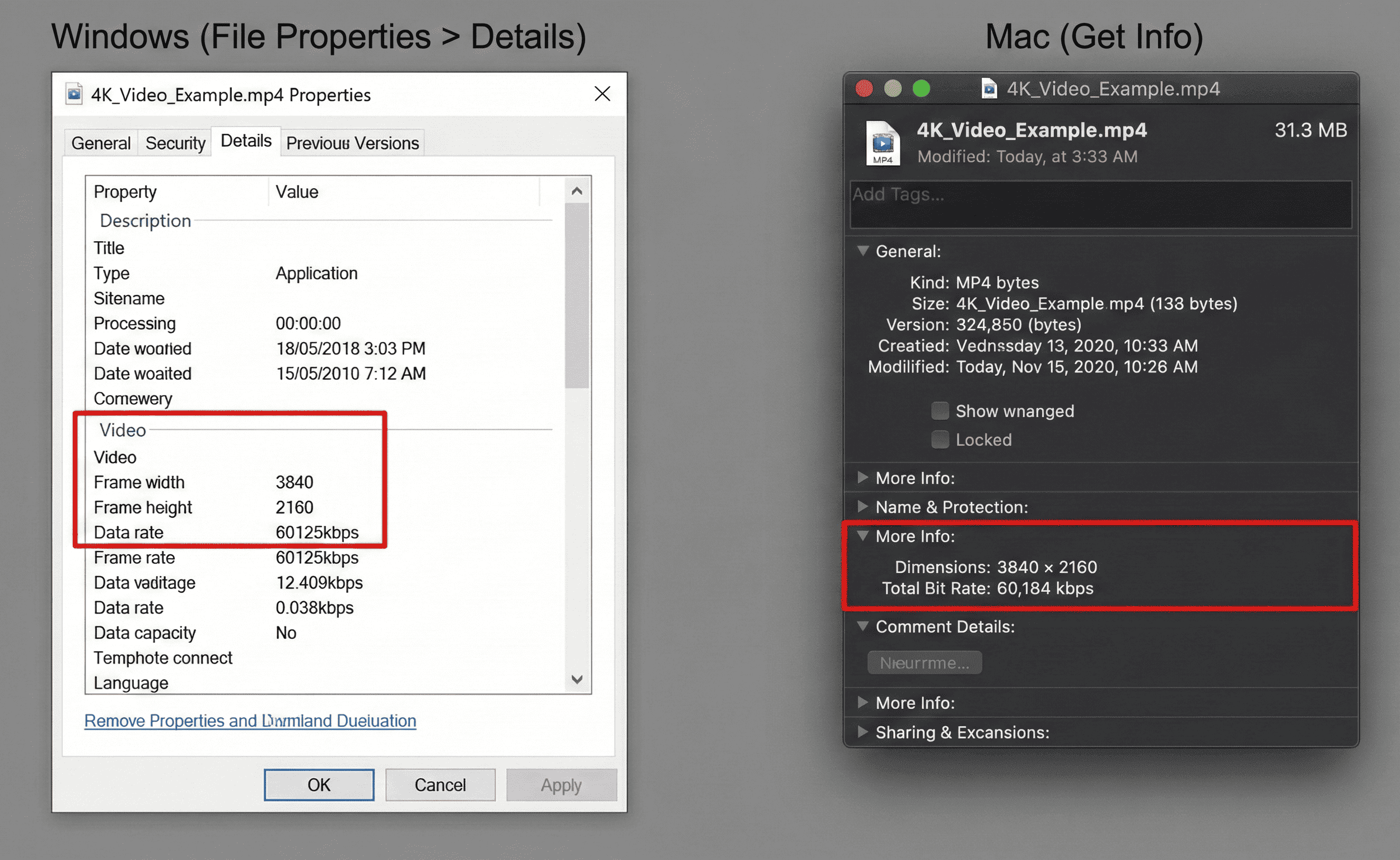
Once you have performed an Instagram 4K video download, it is essential to verify that you have actually received a high-fidelity file and not an upscaled copy. Trusting the file name is not enough; you must inspect the file’s internal properties.
Here is a procedure to check the original video quality on your computer:
For Windows Users:
- Right-click the downloaded video file.
- Select Properties from the context menu.
- Click the Details tab.
- Scroll down to the Video section. Look for “Frame width” and “Frame height” (Resolution) and “Data rate” (Bitrate).
For Mac Users:
- Right-click (or Control-click) the video file.
- Select Get Info.
- Expand the More Info section to view dimensions and codecs.
By checking these metrics, you can distinguish between a tool that delivers the raw source file and one that uses 4k video resolution as a marketing gimmick without providing the actual visual data.
How to Check 4k Video Resolution
Frequently Asked Questions About Instagram Video Quality
Can Instagram videos be downloaded in 4K?
Generally, no. While you can use an Instagram video downloader 4k tool, the resulting file will usually be 1080p because Instagram compresses uploads to this resolution. However, professional tools can retrieve the highest bitrate version available on the server, ensuring you get the best quality possible.
Why are downloaded Instagram videos not 4K?
Blurriness often results from aggressive Instagram video compression or using a free online tool that re-compresses the file to save bandwidth. To avoid this, use software that downloads the original source file directly.
Is there any way to get higher quality than what the app shows?
Sometimes, yes. The Instagram app adapts quality based on your internet connection. A specialized downloader bypasses this connection check and fetches the maximum quality file stored on Instagram’s servers, which may be sharper than what you viewed on your phone during a slow connection.
Are the 4K downloader claims real?
Most are misleading. If a tool claims to save Instagram videos in 4k, verify if it is downloading a native 4K file or simply upscaling a 1080p video. True 4K downloads are only possible if the platform hosts a 4K source file, which is currently rare for Instagram.
Does Instagram compress all videos?
Yes. Regardless of the upload quality, Instagram applies compression to standardize playback across devices. The key to a high-quality video download is retrieving the file before it undergoes further compression by a low-quality downloader tool.
How can I check the original video resolution?
Use the file properties method outlined in the “Verifying Quality” section above. Look specifically for the “Frame Height” and “Data Rate.”
Conclusion
The search for a true Instagram video downloader 4k often reveals a complex reality: while the platform itself limits resolution, your choice of tool determines whether you get a pristine source file or a degraded copy. You shouldn’t have to tolerate compression artifacts or risk your device’s safety on ad-heavy websites just to archive content you love.
Keeprix Video Downloader offers the control and reliability that quality-focused users demand. By simulating a native app connection and fetching the highest available bitrate directly from the server, it ensures your offline library looks as good as the original creator intended—without the “bitrate crushing” typical of web converters. Stop gambling with online tools that compromise quality. Download Keeprix today to secure your video collection in its best possible form.