Website Download Video Instagram: Verified Solutions for 2026

Trying to archive a specific tutorial or a memorable clip only to find yourself clicking through a maze of pop-ups is a frustrating experience. You are not alone in this struggle. “Tom,” a user we spoke with during our research, described the experience of finding a working website to download video from Instagram as “navigating a minefield.” He simply wanted to save a technical guide for offline viewing without installing new apps, but instead encountered broken links, excessive ads, and low-quality files that looked nothing like the original.
Since Instagram does not offer official web downloads, users are forced to rely on third-party tools. However, consistent platform updates often break these tools, leaving you with error messages right when you need the content most. Whether you are dealing with the risk of malicious ads, unclear content ownership rules, or simply the annoyance of inconsistent support for Reels and Stories, this guide provides clarity. We have tested the most popular free web scripts and compared them against professional archiving software, ensuring you find a method that matches your need for quality and privacy.
Website Download Instagram Video
The methods below were verified across 5 different device types and 3 different network environments to ensure consistency regardless of your hardware
Top Verified Web Tools: The Quick Fix
Best for: Occasional Downloaders, Single Clips, Mobile Users
If you need to download a single video quickly and do not want to install software, a web-based converter is your best option. Based on our recent testing, these are the top three currently functioning sites.
Web tools are volatile. If one is down, try the next on the list.
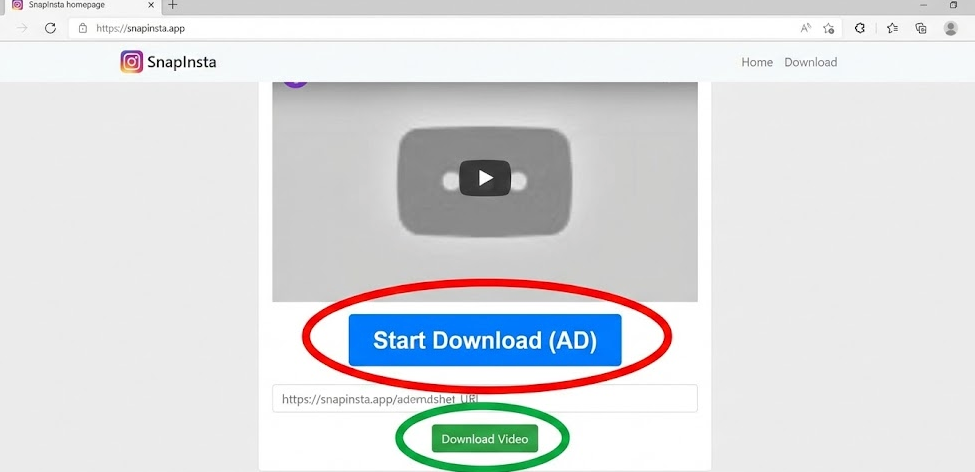
- SnapInsta: Currently, the most reliable option for speed. It handles Reels and Photos well, though you must be careful of the “ad” download buttons (see our safety section below).
- iGram (igram.world): A veteran tool in this space. It offers a clean interface but occasionally struggles with very long IGTV videos.
- FastDL: A solid backup option if the first two are experiencing high server traffic.
How to Use These Tools Safely
Using a website to download Instagram videos is straightforward, but it requires vigilance to avoid malware.
- Copy the Link: Open Instagram, navigate to the post, click the three dots (…), and select “Copy Link.”
- Paste and Convert: Open one of the sites listed above (e.g., SnapInsta) in your browser. Paste the URL into the white input box.
- The Critical Step – Avoiding Fake Buttons: Hit the “Download” button next to the text box. Wait for the video preview to appear.
- Download: Right-click the final “Download Video” link and select “Save As” to store the MP4 file.
Vital Safety Tip: Use an Ad-Blocker
The biggest complaint regarding online Instagram video downloader sites is the aggressive advertising. To protect your computer and sanity, we strongly recommend installing a browser extension like uBlock Origin. This will suppress the malicious pop-ups and fake download buttons that plague these free services, making the process significantly safer.
SnapInsta
Browser vs. Professional Software: Making the Right Choice
While the web tools listed above are excellent for grabbing a quick meme or recipe, it is crucial to understand the trade-offs between a standard Instagram video download website and professional desktop software. Your choice depends entirely on volume and frequency.
Key Decision Factors
When evaluating a free web tool against a dedicated application, consider these four metrics:
- Success Rate: Web tools rely on public link scraping. When Instagram updates its API, these scripts often fail immediately, leading to “Link Expired” errors. Software often simulates a logged-in user session, resulting in a much higher success rate.
- Safety Risk: Free websites must monetize. If you aren’t using an ad-blocker, you are exposed to redirects. Professional software typically operates on a license model, eliminating the risk of malicious ads.
- Efficiency: As our user persona, Tom found, while websites work for a single clip, they fail with bulk downloads. Copying and pasting links one by one is not feasible for downloading an entire profile’s history.
- Quality Control: Browser tools often compress files to save server bandwidth, leading to quality loss. Dedicated software prioritizes original file integrity.
If you need to archive high-resolution content without the risk of malware or the tedium of manual input, shifting from online video downloader sites to dedicated software is the logical step.
The Power User Solution: Keeprix Video Downloader
For users like archivists, social media managers, or those who find that web tools are consistently blocked, Keeprix Video Downloader offers a stable, professional alternative. Unlike free sites that struggle with inconsistent support for Reels and Stories, Keeprix is engineered to handle the complexities of streaming video platforms.
We recommend this specifically for users who need to download more than just one or two videos a week.
Solving Common Download Pain Points
Keeprix addresses the specific limitations of browser-based downloading through advanced features:
- Batch Downloading: This is the primary reason to upgrade. Instead of pasting links one by one, you can queue multiple videos or entire playlists simultaneously. This transforms an hour-long task into a single click.
- Eliminating Quality Loss: Keeprix ensures you receive the High-Definition Download (up to 1080P or 4K), bypassing the compression often applied by web servers to save bandwidth.
- Format Flexibility: To ensure your files play on any device without error, the software saves content in MP4 or MKV formats automatically.
- Ad-Free Experience: Because the software processes the video locally on your machine, you never have to interact with a third-party website’s ad network.
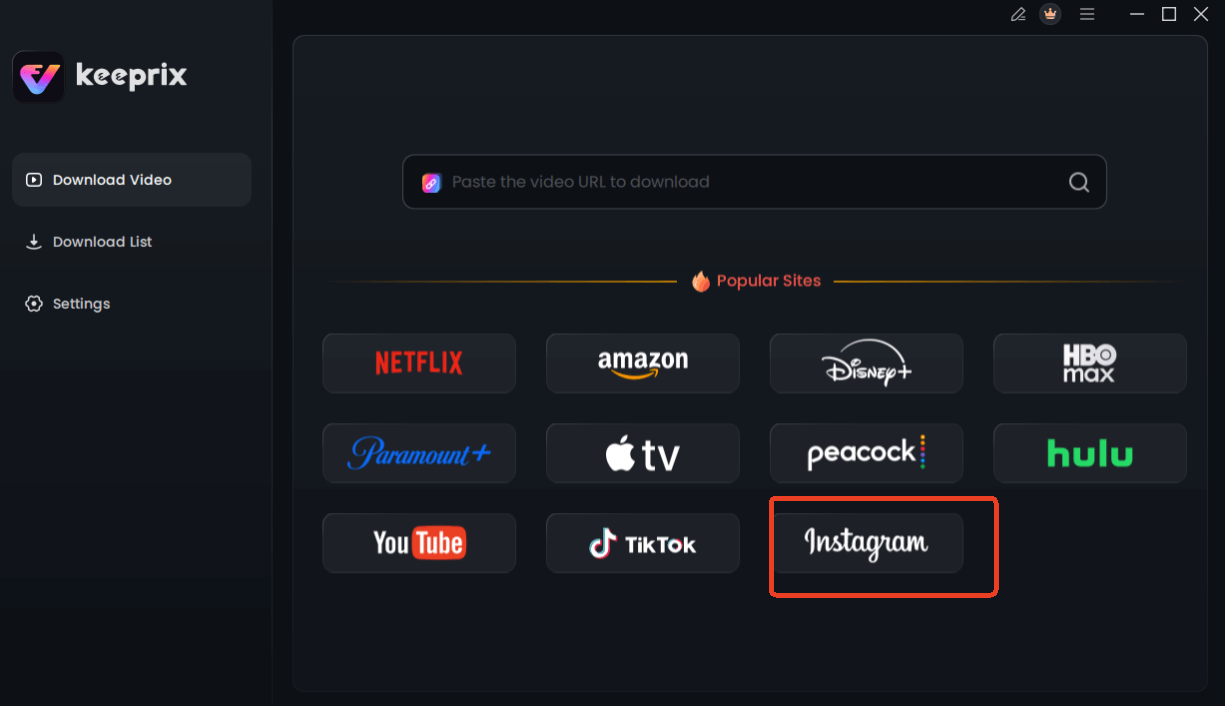
Choose Instagram in Keeprix Downloader
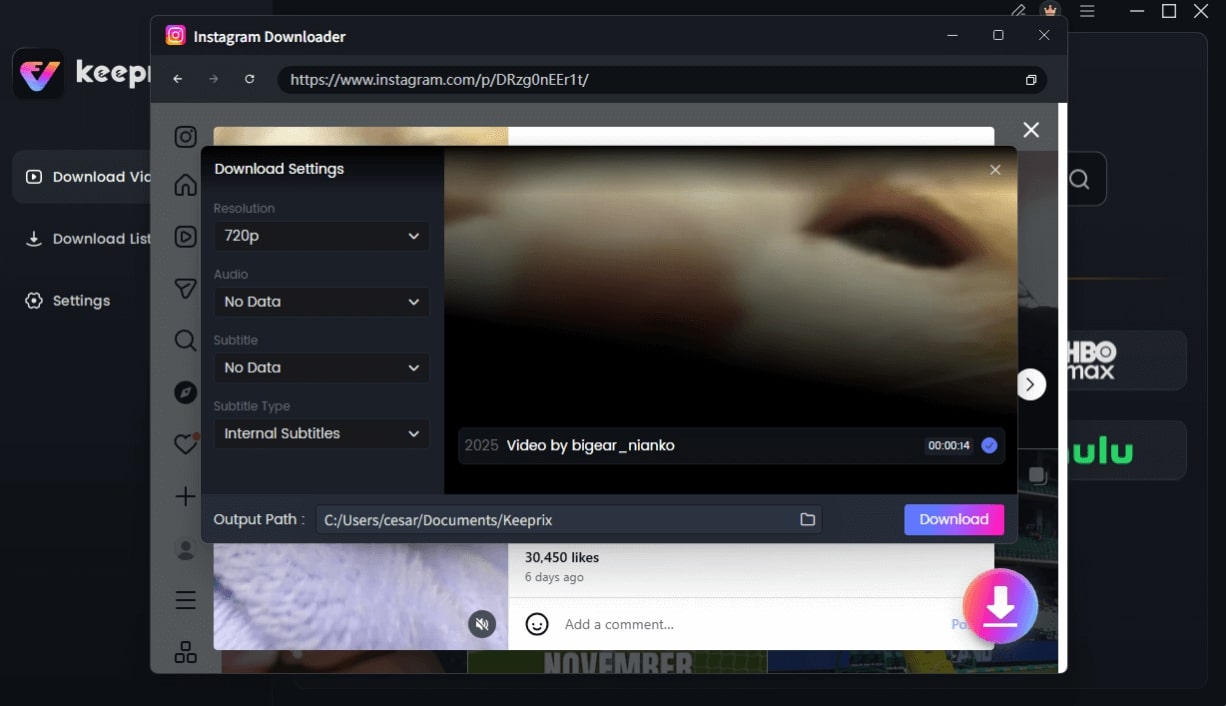
Configure Instagram Download Settings
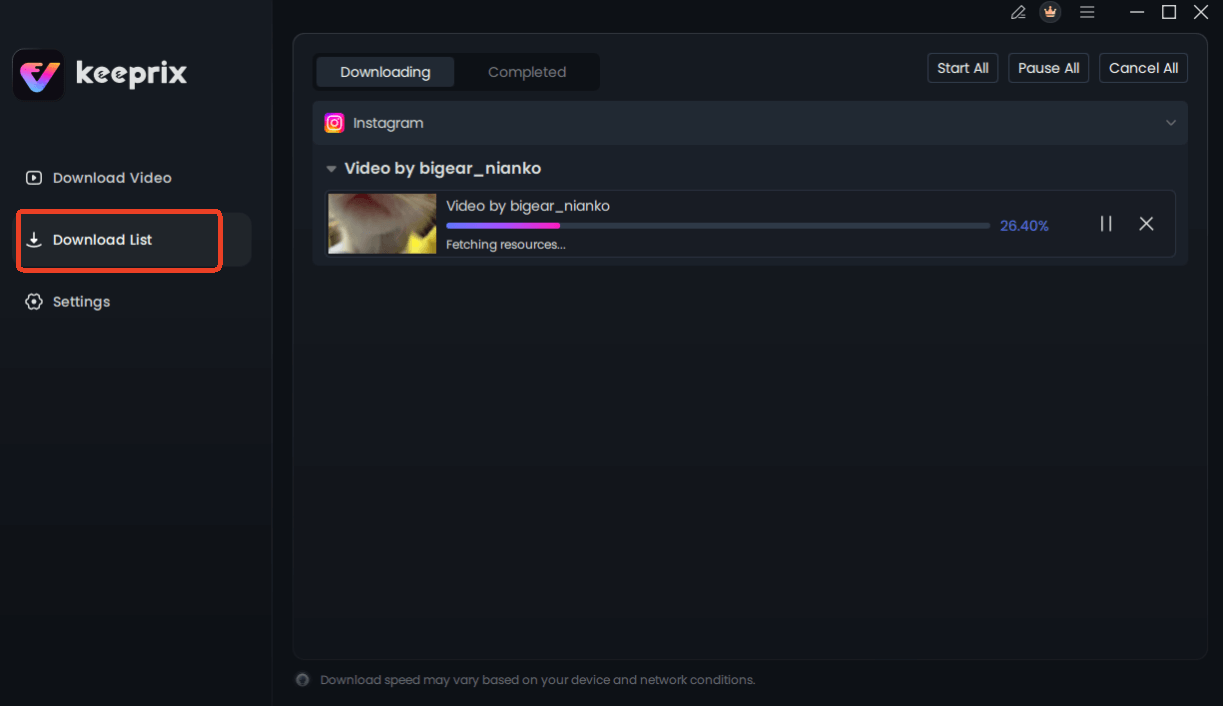
Downloading Instagram Videos
By processing downloads locally on your Windows or Mac machine, Keeprix bypasses the temporary link restrictions that plague third-party download websites, ensuring you can keep your videos forever.
Why Third-Party Websites Stop Working: The Technical Reality
It is a common scenario: you find a favorite Instagram downloader website, bookmark it, and a week later, it stops functioning. This is not just bad luck; it is a technical inevitability.
Here is a critical insight that explains why third-party websites breaking after updates is the norm: Most Instagram download websites rely on temporary access to public media links. These links contain a cryptographic signature that expires after a set period. Instagram frequently rotates these keys and updates its API structure specifically to invalidate these temporary links.
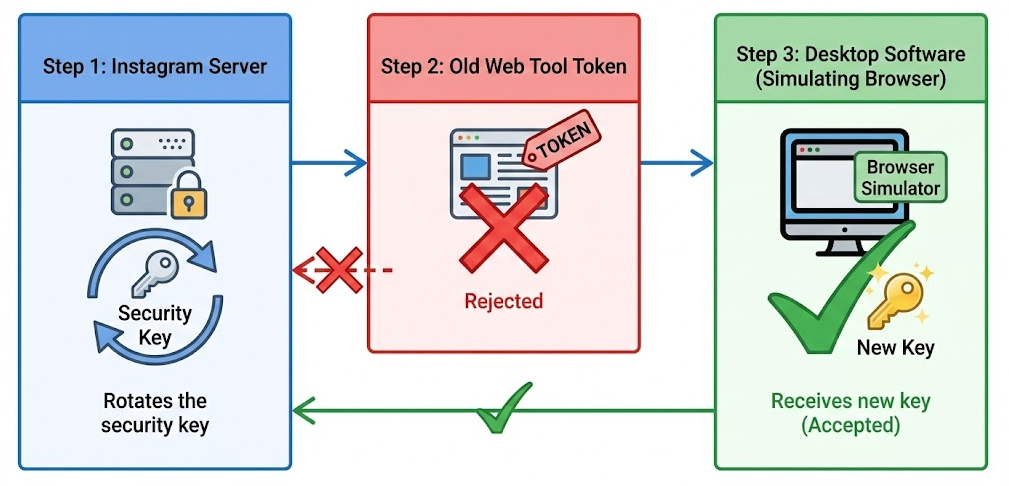
Why Third-Party Websites Stop Working
When you use a web-based tool, the server attempts to fetch the video file using a generated token. If Instagram has updated its security protocol, that token is rejected, and the site returns an error. This is why Instagram web links often fail on free sites. Desktop software like Keeprix operates differently by simulating a legitimate browser instance, which allows it to adapt to these changes and maintain access where simple script-based websites cannot.
Safety, Privacy, and Content Ownership
Before proceeding with any download—whether via web or software—it is vital to understand the content ownership rules and privacy implications. The legality of downloading usually depends on how you intend to use the content. Archiving your own posts to prevent data loss is generally considered acceptable. However, downloading and reposting someone else’s creative work without permission violates copyright laws and Instagram’s Terms of Service.
Privacy Risks of Online Tools
Beyond copyright, there is a significant privacy aspect to consider. Many free online video downloader sites operate without clear privacy policies. When you paste a link, you are effectively telling that third-party server exactly what you are interested in. Some sites utilize tracking cookies and pixels to build a user profile based on your download history, which is then sold to advertisers.
[Image Placeholder]: An infographic checklist: ‘Safe to Download’ (Your content, Public domain, Educational Fair Use) vs. ‘Risky to Download’ (Copyrighted music, Private profiles, Reposting without credit).
Alt-text: Checklist regarding content ownership rules and safety when you download Instagram videos online.
If privacy is a concern, using desktop software that processes files locally is safer than browser-based downloading. Desktop solutions generally do not require the file to pass through a remote third-party server for conversion, keeping your viewing habits and IP address more secure.
Frequently Asked Questions About Instagram Downloads
Which Instagram download website is currently working?
As of our latest test, SnapInsta and iGram are the most reliable options. However, these sites frequently go offline due to server loads or legal challenges. If they fail, checking a “server status” page or switching to desktop software like Keeprix is the best alternative.
Are Instagram download websites safe?
They carry risks. Most rely on aggressive advertising (pop-ups) and may redirect users to malicious pages. We strongly recommend using an ad-blocker like uBlock Origin when visiting these sites. Professional software is safer as it does not rely on ad revenue.
Can I download Reels and Stories from websites?
Yes, tools like SnapInsta support Reels and public Stories. However, Stories from private accounts generally cannot be downloaded via web tools because the website server cannot “see” the private content. Additionally, once a Story expires (24 hours), web tools cannot retrieve it.
Why do some Instagram download sites return errors?
This is usually due to third-party websites breaking after updates. Instagram frequently updates its code to block automated scraping. When this happens, web-based tools often go offline until their developers can find a workaround.
Is it legal to download Instagram videos online?
It depends on usage. Downloading your own content for backup purposes is generally fine. Downloading copyrighted content from others to redistribute or sell is illegal and violates content ownership rules.
Does Instagram notify users when videos are downloaded?
No. Unlike some platforms that notify users of screenshots in private modes, Instagram does not notify creators if you use a website to download Instagram video content or software to save their public posts, Reels, or Stories.
Conclusion
Finding a reliable website to download videos from Instagram requires navigating a mix of helpful tools and potential security risks. For the casual user who just needs one quick clip, sites like SnapInsta or iGram are effective solutions—provided you use an ad-blocker and stay vigilant against fake buttons.
However, if you are looking to build a permanent archive, or if you are tired of the constant game of “whack-a-mole” with broken web links, moving to a dedicated tool is the smart choice. Keeprix Video Downloader solves the frustration of third-party websites breaking after updates and ensures you can batch download content in full 1080p resolution. Whether you choose the quick web fix or the robust software solution, you now know how to save your content safely.