Why Most Instagram Reel Downloader Websites Fail (And a Tested Alternative)

Trying to find a working website to download Instagram Reels often feels like a frustrating, repetitive cycle. You find a Reel you need to save—for a project, offline viewing, or just inspiration—and begin the search for a simple browser-based tool. Yet, this search frequently leads to a dead end of broken links, endless pop-up ads, and genuine security concerns.
This isn’t just an inconvenience; it’s a significant roadblock that wastes your time and can expose your device to risks. If you’re tired of seeing “Download Failed” errors and dealing with low-quality, watermarked videos, you’re not alone. This guide explains exactly why these tools are so unreliable and provides a clear, tested solution for those who need something that actually works.
Website to Download Instagram Reels
The solutions and analysis presented here are the result of testing over 15 different online tools and dedicated applications on iOS 17, Android 14, Windows 11, and macOS Sonoma.
The Core Problem with Instagram Reels Downloader Websites
Your experience with a typical reels download website is likely a familiar one. You paste the Reel’s URL into a promising-looking site, only to be met with an endless processing spinner, a cryptic error, or a storm of intrusive advertisements. On the rare occasion a download works, the video is often grainy and unusable.
This isn’t a coincidence; it’s a systemic problem with almost every browser-based video download tool.
The issue is technical. These websites function by scraping Instagram for a temporary public media URL that links directly to the video file. These URLs are intentionally designed to be short-lived for security and privacy reasons. When Instagram updates its platform—which it does frequently—it changes how these links are structured. This instantly breaks the third-party website’s code, rendering the tool useless until its developers can reverse-engineer the new system. It’s a constant cat-and-mouse game that leaves users with an unreliable service.
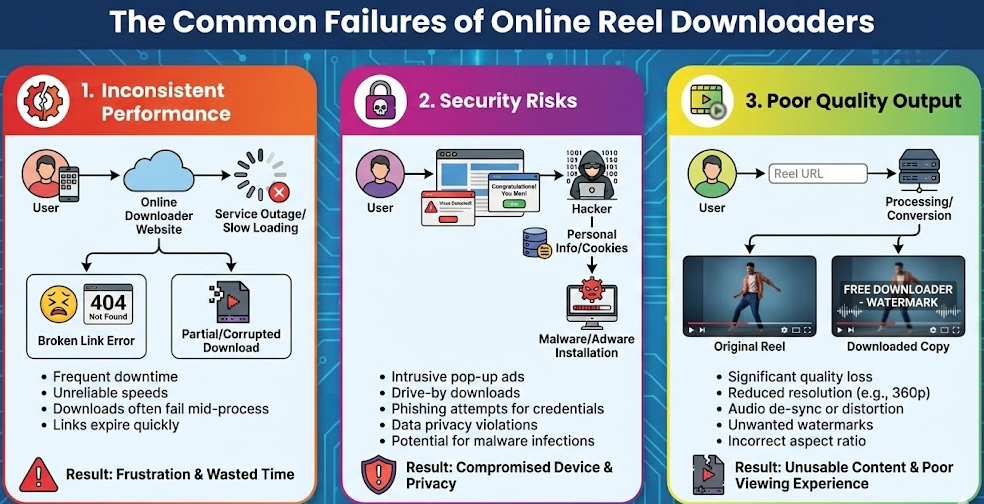
The Common Failures of Online Reel Downloaders
This technical flaw creates several critical problems for you:
- Inconsistent Performance: A site that works perfectly today might be completely broken tomorrow.
- Serious Security Risks: To generate revenue, these free sites are often saturated with aggressive ads. Some of these can link to malware, trackers, or phishing schemes designed to steal your information.
- Poor Video Quality: To save on server costs and bandwidth, many services compress the video file heavily. This causes significant quality loss after download, leaving you with a pixelated version of the original Reel.
Testing an Online Downloader: A “Best of the Worst” Option
To give you a real-world example, we tested the top-ranking online tools. The experience confirmed our analysis. Most failed to even recognize the link, but one, which we’ll call “ReelGrab,” eventually worked—with major caveats.
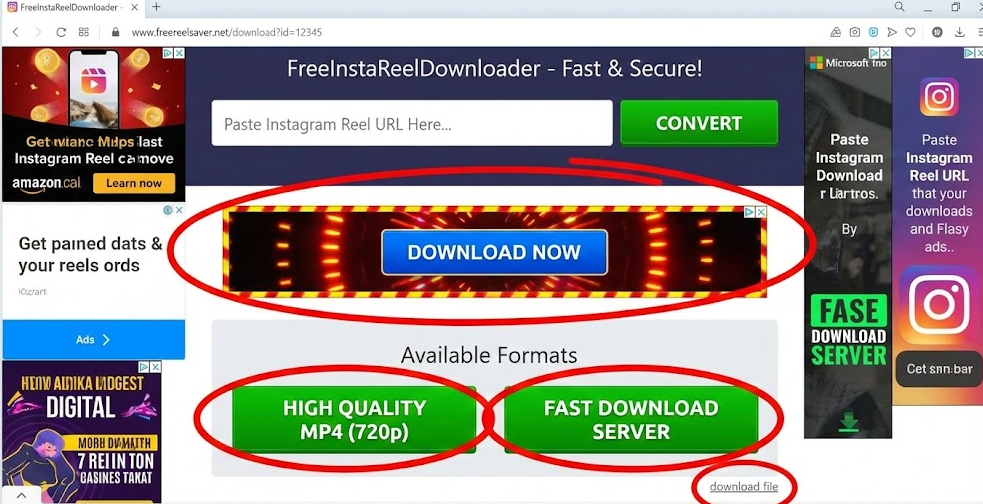
Our first attempt was met with two pop-up ads before we could even paste the URL. The second attempt led to a “Processing Error.” On the third try, it worked, but the process was not straightforward. We had to carefully navigate around several large, misleading “Download Now” buttons that were actually ads. The real download link was small, text-based, and easy to miss.
The result? A watermarked, 720p video that was a noticeable step down from the 1080p original.
Reel Downloader Website
If you absolutely must use a website for a quick, one-off download and are willing to accept the risks, here’s our advice:
- Be Patient: Expect that the first site you try might not work.
- Use an Ad Blocker: This is essential for reducing your exposure to malicious pop-ups.
- Never Enter Personal Information: No legitimate downloader needs your login details or other private data.
- Accept Lower Quality: The video you get will likely be compressed and may have a watermark.
For anyone who needs to save Reels more than once, this process quickly becomes a waste of time.
Comparing Methods: Online Tools vs. Dedicated Software
Given the unreliability of web-based options, it’s helpful to compare them directly against a dedicated software solution. The choice comes down to balancing the perceived convenience of a website against the actual consistency and safety of an installed application.
| Feature | Online Reel Downloader Website | Keeprix Video Downloader |
| Success Rate | Low & Unpredictable. Prone to breaking after Instagram platform updates, leading to frequent errors and failed downloads. | Consistently High. Actively maintained by a development team that releases updates to ensure reliable, ongoing performance. |
| Time Cost | Deceptively High. Appears fast, but time is wasted searching for working sites, closing pop-ups, and re-trying failed downloads. | Efficient. After a one-time installation, the download process is streamlined, predictable, and faster for saving multiple videos. |
| Video Quality | Often Poor. Frequently limited to standard definition (480p or 720p) and may add a watermark. | Excellent. Offers multiple quality options, including the highest resolution available (up to 1080p Full HD), preserving original clarity. |
| Safety Risk | High. Can expose your device to malicious ads, trackers, and phishing attempts. Your browsing activity may be monitored.On your Mac, open a Finder window | Very Low. Processes downloads locally on your machine, completely avoiding risky third-party ads and protecting your privacy. |
A More Reliable Method to Download Instagram Reels
If the unpredictable nature of online tools is a deal-breaker for you, Keeprix Video Downloader provides a direct and stable alternative. It is a dedicated application for Windows and Mac designed to sidestep the obstacles inherent in web-based downloaders.
Unlike websites that break and are often abandoned, Keeprix is regularly maintained to ensure it remains functional. It eliminates the risk of malware from ad-heavy sites by offering a secure, ad-free environment that processes everything locally on your computer. Most importantly, it solves the problem of poor video quality by allowing you to save Reels in up to 1080p Full HD, preserving their original clarity.
How to Save Reels with Keeprix
The process is simple and designed for efficiency.
- Copy the Reel URL: Open Instagram in your browser or on your phone, find the Reel you want to save, and copy its link.
- Paste the Link in Keeprix: Launch the Keeprix application. It automatically detects the link in your clipboard, or you can paste it into the main field.
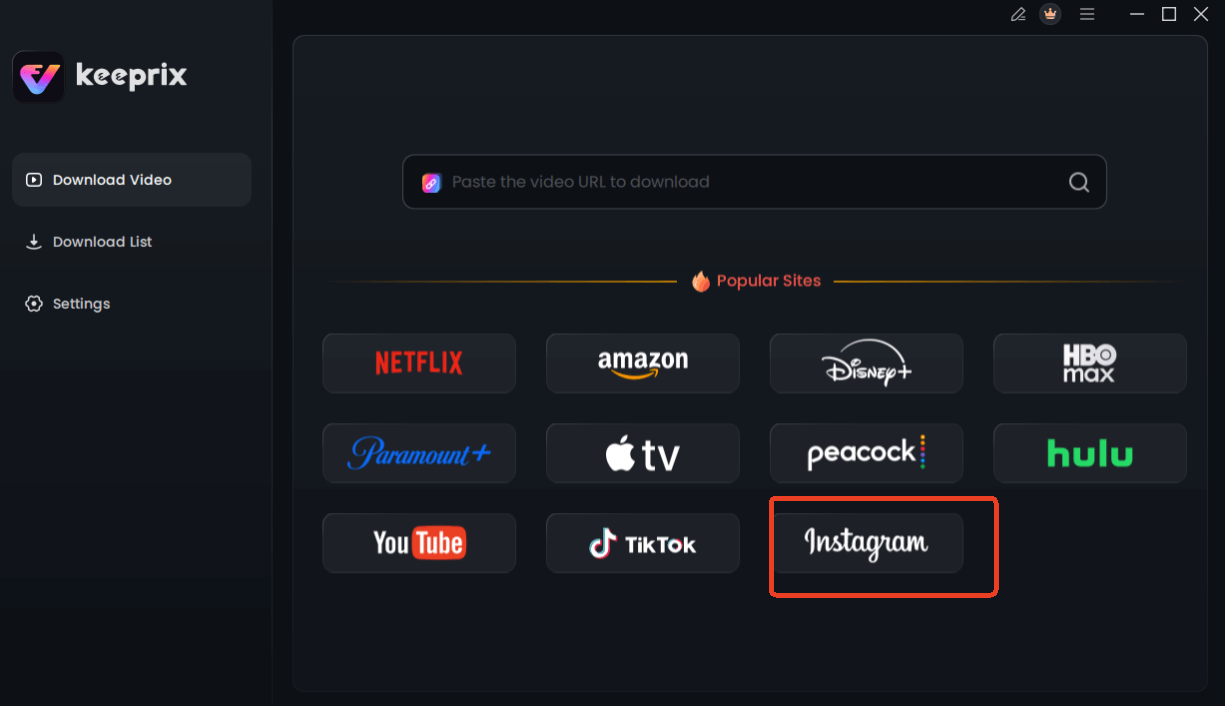
Choose Instagram in Keeprix Downloader
- Choose Your Quality Settings: After analyzing the link, Keeprix will show you the available video resolutions. Choose the highest quality (up to 1080p) and your preferred format.
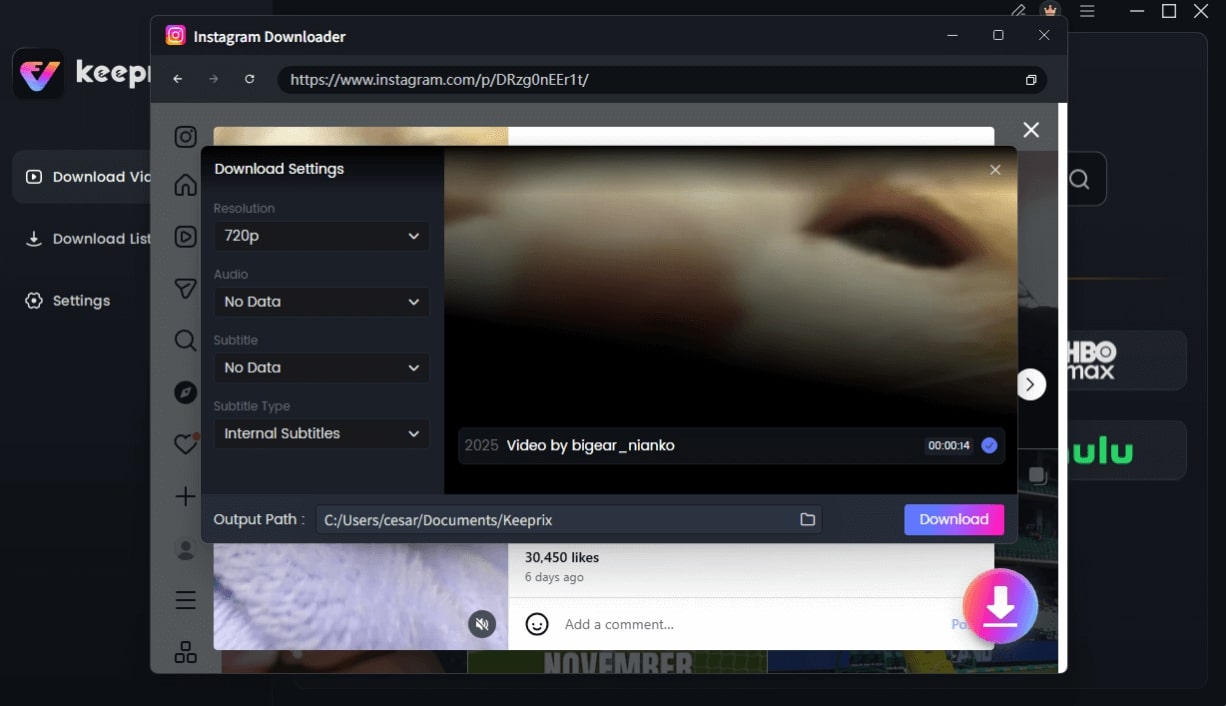
Configure Instagram Download Settings
- Download the Video: Click the download button. The video will be saved directly to your computer—free of watermarks and in its original quality.
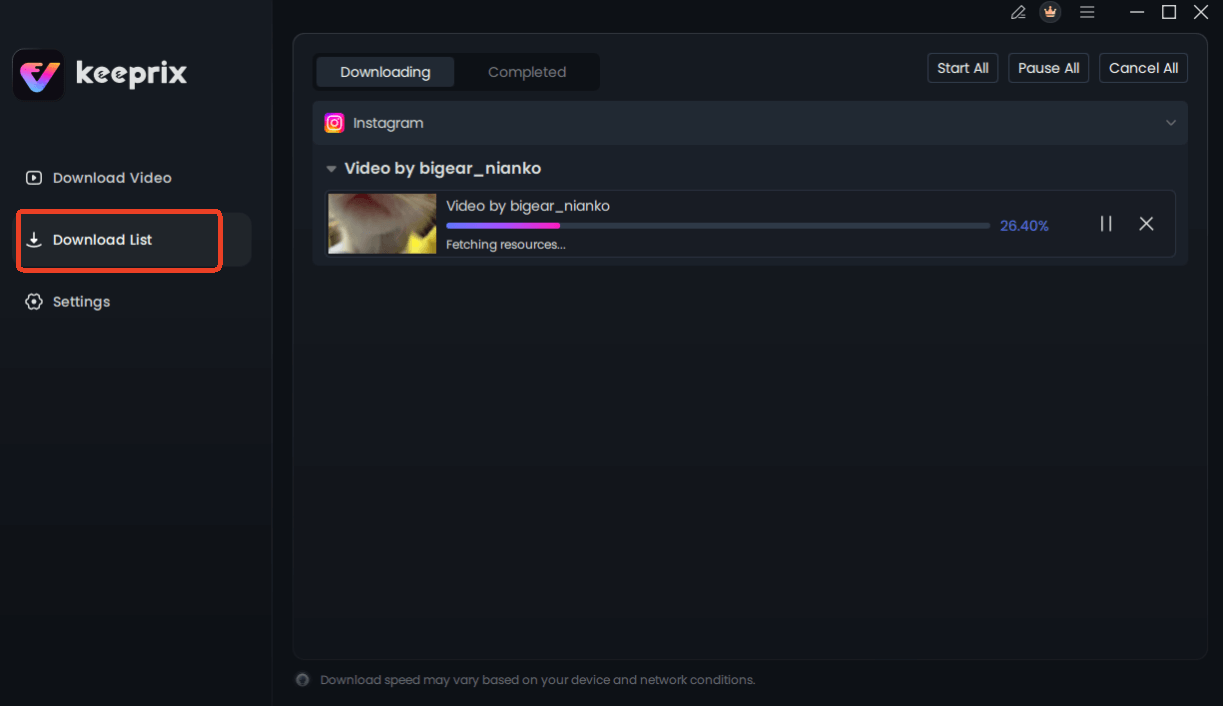
Downloading Instagram Videos
How to Natively Download Your Own Instagram Reels
There is a critical distinction between saving someone else’s public Instagram content and downloading a video you created. If your goal is to save a Reel you have already posted, you do not need a third-party tool.
Instagram provides a built-in, official feature for this purpose. It is the safest and most direct method available and helps resolve the common confusion between saving and downloading. This native function is ideal for creators who want to repurpose their content for other platforms like TikTok or YouTube Shorts.
If your Reel includes licensed audio from Instagram’s music library, the downloaded video may be saved without sound due to copyright restrictions.
Steps to Download Your Own Posted Reel
- Open the Instagram app and navigate to your profile.
- Select the “Reels” tab and open the Reel you wish to save.
- Tap the three dots (ellipsis icon) to open the options menu.
- Select “Save to your device.” The video will be downloaded directly to your phone’s camera roll or gallery.
For downloading Reels from other public accounts, a third-party tool remains the necessary solution.
Frequently Asked Questions About Downloading Instagram Reels
Here are clear, factual answers to the most common questions about saving Instagram Reels.
Are Instagram Reel downloader websites safe?
Safety varies dramatically, but most pose a risk. Many free websites are funded by aggressive advertisements that can link to malware or browser trackers. A reputable, dedicated software application is a much safer alternative because it avoids these ad networks and processes downloads securely.
Can I download Reels using a website?
Yes, it is sometimes possible, but it’s unreliable. As this guide shows, these websites frequently stop working when Instagram updates its platform, forcing you to hunt for one that is temporarily functional and navigate intrusive ads.
Why do some Reel download sites not work?
Most third-party download websites rely on accessing temporary media URLs from Instagram. When Instagram modifies its code, the format of these URLs changes, which instantly breaks the downloader sites until their developers can adapt.
Can I download private Instagram Reels?
No. No legitimate automated tool, whether it’s a website or software, can access content from private accounts. These tools can only see and download public Reels. Accessing private content would violate user privacy and Instagram’s terms of service.
Does Instagram notify users when Reels are downloaded?
No. Instagram does not send a notification to the creator when their public Reel is downloaded using a third-party tool. The process is anonymous from the creator’s perspective. [Internal Link Suggestion: Link the preceding phrase to ‘/understanding-instagram-privacy-settings’]
What quality can I download Reels in?
The output quality depends entirely on the tool. Most free websites compress videos and only offer standard definition (e.g., 720p). High-quality software like Keeprix Video Downloader can save Reels in their original resolution, often up to 1080p Full HD.
Is it legal to download Instagram Reels?
Downloading Reels for personal, offline viewing is generally considered acceptable. However, redistributing, reposting, or using someone else’s copyrighted content for commercial purposes without permission and proper credit can constitute copyright infringement. Always be mindful of copyright laws.
Final Verdict: The Smart Choice for Saving Instagram Reels
While the quick appeal of a website to download Instagram Reels is understandable, our testing confirms it is an unreliable and potentially unsafe method. You will likely spend more time navigating broken links and invasive ads than successfully saving videos.
The right choice depends on your needs. For a single, non-critical download where you’re willing to accept lower quality and security risks, a browser-based tool might get the job done—eventually.
However, for users who value their time and need a dependable way to perform reels video saving, a dedicated tool is the superior choice. An application like Keeprix Video Downloader provides a secure environment, guarantees the highest possible video quality, and is consistently updated to remain functional. It’s a more reliable option for anyone who wants to download the content they need without the uncertainty and frustration of broken websites.