How Many Devices Can Stream HBO Max Simultaneously? 2025 Answer

| Quick Overview |
| Find out how many devices can stream HBO Max simultaneously in 2025. Learn the latest streaming limits, profile rules, login behavior, and how to enjoy unlimited Max offline downloads using Keeprix HBO Max Downloader. |
If you have ever shared your streaming account with family or friends, you might have thought the same thing that a Reddit user recently asked:
How many people can use the same HBO Max app to watch something without hitting the limit? Are there limits on logged-in devices or only on simultaneous streams?
HBO Max (currently Max) is the main streaming service of Warner Bros. Discovery, featuring HBO originals, blockbuster movies, and a huge content library. We will tell you in this article how many people can watch Max simultaneously, how profiles work, how many devices you can stay logged in on, and the rules you need to know to avoid annoying “too many streams” errors.

How Many People Can Watch Max at Conce
Part 1. How Many People Can Watch HBO Max at Once?
Depending on your subscription plan, only a certain number of people can stream Max (previously HBO Max) at the same time. The restrictions are as follows:
- With the Ads plan: 2 simultaneous streams are allowed
- Ad-Free (standard) plan: 2 simultaneous streams are allowed
- Ultimate Ad Free plan: 4 simultaneous streams are allowed
Remember that these are streaming limits, not login limits. Max does not strictly limit how many devices can stay logged into your account. However, if too many devices try to play videos at the same time, you’ll see a message like: “You’re streaming on too many devices.”
Part 2. How Many Profiles Can I Have on HBO Max?
Max allows you to have multiple profiles, so everyone using the same account can have their own viewing history, recommendations, and personalized settings. This feature is incredibly convenient for families sharing a subscription account.
On a single Max account, it is possible to have up to 5 different profiles. These profiles can consist of adult profiles and Kid profiles, thus enabling parents to set parental controls, content ratings, and PIN protection for their children.
Each profile has its own watchlist and recommendations, but profiles do not increase your simultaneous streaming limit. They’re only for personalization, not additional streams.
Part 3. How to Manage or Remove Devices from Your HBO Max Account
If you share your Max account with family or friends, it may come a time when you want to check the devices that are logged in, especially if you start receiving errors like “too many devices” streaming. Max allows users to easily manage or remove devices from their account.
The steps for managing devices on Max are:
Step 1. Open Your Account Settings
Head over to Max through a browser or the mobile app, log in, and access your Profile. After that, go to Settings and choose Manage Devices.
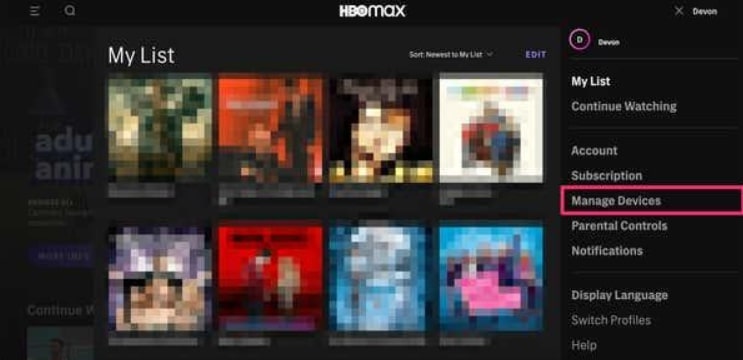
Choose Manage Devices
Step 2. Get the List of All Devices That are Logged
Information regarding the devices logged (signed in) in your Max account will be available to you. Such information is device names, recent activity, and in some cases, locations.
Step 3. Sign Out Specific Devices
If there is a device that you do not recognize, or you just want to free up some space, you can click on the Sign Out or Sign All Devices Out option next to that device.
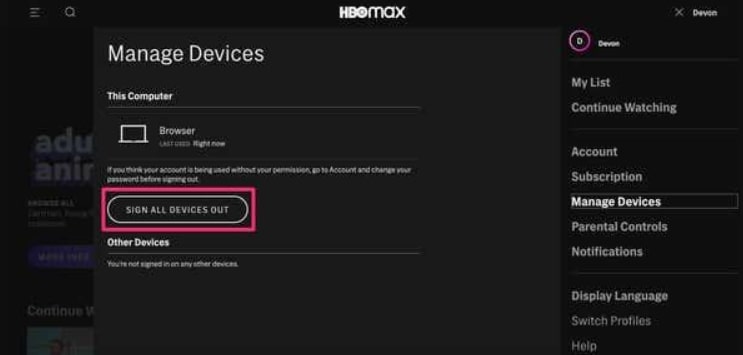
Sign All Devices Out
Part 4. Recommend: Watch HBO Max Videos Offline without Device Limits
Max does allow downloads with some plans, but the restrictions can be quite irritating: downloads will expire, storage space is limited, and saving videos on your computer is not allowed. Additionally, each plan has strict limits on the number of titles that can be downloaded simultaneously. If you desire absolute freedom to watch HBO Max content offline, without limitations from devices, download quotas, or expiration dates, then a third-party downloader is the solution that can assist you.
That’s why Keeprix Downloader becomes a powerful solution. Keeprix enables Windows and Mac users to download Max movies and shows in MP4/MKV formats with no expiration, no device limits, and no regional restrictions.
Key Features
- Save HBO Max videos to Mac or Windows.
- No expiration dates, giving you permanent access to your downloaded video library.
- High-quality MP4/MKV output.
- Batch downloads without quota limitations.
- Enjoy totally ad-free.
- Audio and subtitles can be selected from 13 different languages.
Steps to Save HBO Max Videos with Keeprix
Step 1. Get Keeprix Downloader installed on your Windows or Mac computer. Then launch it.
Step 2. In the main menu, choose HBO Max from the list.
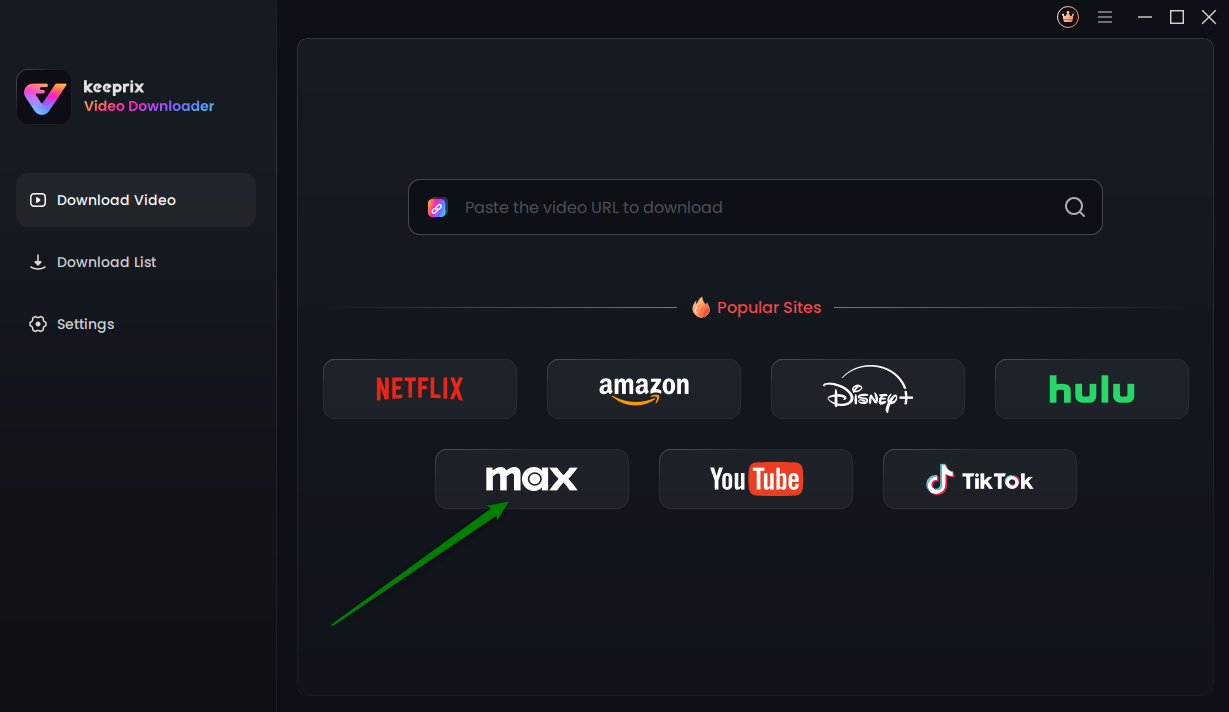
Choose Max in Keeprix Video Downloader
Step 3. Sign in to your Max account. Then search for the movie or series you want to download.
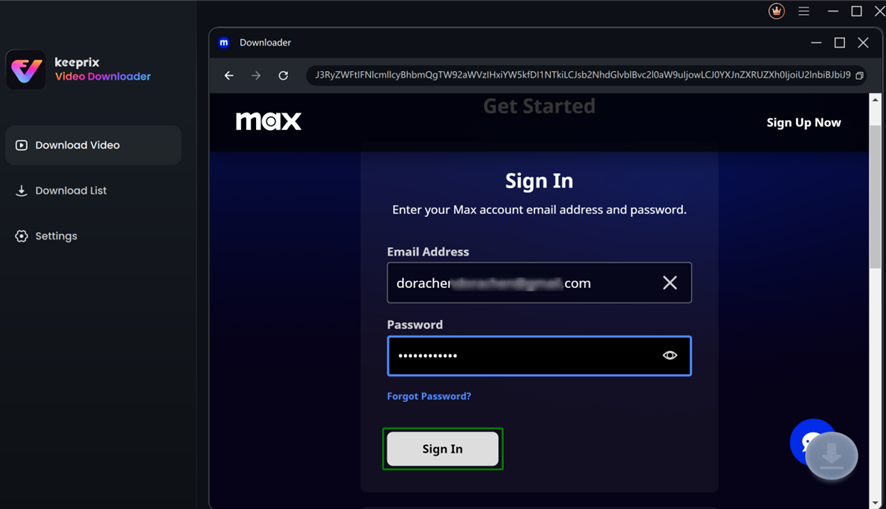
Sign in Max Account
Step 4. You can click the Download button on the page, then configure your download preference: the video quality, output format (MP4/MKV), audio language, and subtitles.

Configure Download Settings in Keeprix for Max
Step 5. Press the Download button again and leave it to Keeprix to download the file directly to your computer.

Downloading Max Videos
Part 5. FAQs
Q1. Can you watch HBO Max in two different houses?
Max is designed for people who live in the same household. Sharing outside your home may still work, but if the system detects frequent usage from different households, warnings may appear.
Q2. Is HBO Max cracking down on sharing?
HBO Max has started tracking account sharing in a more detailed manner, especially the sharing that happens between different households. The implication of this is that you are still allowed to share the account with the members of your family, but if you are extensively using the account outside your home, you may receive a warning or be blocked.
Q3. Can you watch an HBO Max movie with a friend at the same time?
Yes, if your subscription allows it. The standard plan allows 2 streaming sessions to run at the same time, so you and your friend can watch together without interruptions. Ultimate Ad Free provides the possibility of up to 4 simultaneous streams; thus, bigger families or groups of friends can use it easily.
Conclusion
HBO Max allows you to watch content on different devices, make as many as five profiles, and share your account with people within the streaming limits of your plan. Knowing these regulations helps avoid “too many devices” error messages and ensures family and friends have a pleasant, uninterrupted viewing experience.
If you want a way to enjoy your favorite HBO Max movies and shows offline without expiration, device limits, streaming restrictions, or ads, Keeprix Downloader offers the ideal long-term solution for unlimited offline viewing on any device.