How Long Do Netflix Downloads Last? (2026 Travel Survival Guide)

Quick answer: Netflix downloads do not have one universal expiration period. According to Netflix’s current expiration guidance, each downloaded title expires after a certain amount of time. The Netflix app shows an expiration notice when a deadline applies, and some titles can be downloaded or renewed only a limited number of times.
To avoid losing access before a trip, check the title in My Netflix > Downloads while you are online. If a download already says Expired, delete it and download it again if the title is still available and your account is eligible to redownload it.
Check how long a Netflix download remains available in the app.
Important: Do not rely on a blanket “30-day” or “48-hour” rule for every movie and episode. Netflix’s current help pages describe expiration as title-specific rather than publishing one duration that applies to the entire catalog. The timer displayed in your app is the most relevant deadline for that download.
How to Check When a Netflix Download Expires
Netflix does not provide a single account-wide expiration date. Check each downloaded title in the app:
- Connect your device to the internet and open the latest version of the Netflix app.
- Go to My Netflix > Downloads. On a Chromebook, open Downloads.
- Select the downloaded movie or show.
- Look for an expiration message or status beside the title or episode.
- If the title is close to expiring, finish it first or plan to delete and redownload it before going offline.
If no countdown is displayed, that does not mean the download will never expire. It only means the app is not currently showing an imminent deadline for that title.
Why Do Netflix Downloads Expire?
A downloaded Netflix title is still governed by the service’s catalog, your plan, your account status, and the rights attached to that title. These are the main reasons a saved movie or episode may stop working:
| Reason | What Happens | What You Can Do |
| Title-specific expiration | The download reaches the expiration time assigned to that movie or episode. | Delete it and download it again while connected to the internet, if redownloading is available. |
| Title leaves Netflix | A movie or show that is no longer available on Netflix cannot be renewed or downloaded again. | Check whether the title is still in the Netflix catalog for your region. |
| Annual download or renewal limit | Some titles can be downloaded or renewed only a limited number of times due to studio and licensing agreements. | Watch online or wait until Netflix allows another download. Netflix does not publish one numeric limit for all titles. |
| Account cancellation | Downloads on the device are deleted when the Netflix account is canceled. | After restarting the membership, download the titles again. |
| App data or app removal | Clearing Netflix app data or uninstalling the app can remove locally stored downloads. | Avoid clearing or reinstalling the app before travel unless troubleshooting requires it. |
How to Fix a Netflix Download That Says Expired
Netflix’s current support steps generally require deleting the expired copy and downloading the title again. You need an internet connection, and the title must still be downloadable.
On an Android Phone or Tablet
- Open Netflix and tap Downloads.
- Select the movie or show with the expired download.
- Tap the download status icon beside the title.
- Tap Delete Download.
- Return to the title page and download it again.
On an iPhone or iPad
- First open Settings > General > Date & Time and make sure Set Automatically is enabled.
- Open Netflix and go to Downloads.
- Tap the download status icon beside the expired title.
- Choose Delete Download, then return to the title page and download it again.
On an Amazon Fire Tablet
- Open Netflix and tap Downloads.
- Select the affected movie or show.
- Tap the download status icon, then choose Delete Download.
- Go back to the title and download it again.
If the title no longer appears in Netflix or no longer has a Download button, you cannot renew the saved copy. If Netflix displays a specific error code instead, search that exact code in the Netflix Help Center because the solution may be different from a standard expiration.
What Does the Exclamation Mark on a Netflix Download Mean?
An exclamation mark or warning icon means the download needs attention, but it does not always identify the same problem. Open the title or tap its status icon to read the exact message.
- Expired: Delete the expired copy and download it again if the title is still available.
- Download failed: Check your connection, free storage, Netflix app version, and the error code shown.
- Download Max Reached: Your plan’s monthly download allowance may have been reached, or your device may already hold the maximum number of active downloads.
- Title unavailable: The movie or show may have left Netflix or may not be downloadable in your region.
Current Netflix Download Limits by Plan
Expiration and download limits are separate. A title can expire even when you have not reached your plan limit, and reaching a plan limit can prevent a new download even when your existing downloads are still valid. Netflix lists its general offline rules in its official download guide.
| Limit | Current Netflix Rule |
| Active downloads on eligible ad-free plans | Up to 100 active downloads at a time per device, based on the number of download devices included in the plan. |
| Ad-supported plans | 15 total downloads per device per calendar month. The allowance resets on the first day of each calendar month. |
| Title-specific annual limits | Some movies and shows have a separate limit on how many times they can be downloaded or renewed. Netflix does not publish one number for all titles. |
| Account cancellation | Downloads stored on the device are deleted. They must be downloaded again if the membership is restarted. |
For a fuller explanation of device, plan, and title-level restrictions, see this Netflix download limit guide.
Which Devices Support Official Netflix Downloads?
According to Netflix’s current help documentation, official offline downloads require the latest Netflix app on a supported device:
- Android phone or tablet
- iPhone or iPad
- Amazon Fire tablet
- Google Chromebook with the Google Play Store installed
Windows and Mac: Netflix’s official download feature is not available in the current Windows app, in desktop browsers, or on macOS. Official downloads also remain on the device and inside the Netflix app used to save them.
How Smart Downloads Affect Saved Episodes
Download Next Episode can automatically delete a watched episode and download the next one when your device reconnects to Wi-Fi. This is useful for ongoing series, but it can make an episode seem to have disappeared when the feature is working as designed.
If you want to keep specific episodes on the device until you remove them manually, review the Smart Downloads settings under My Netflix > Menu > App Settings > Smart Downloads. Download Next Episode is not available on ad-supported Netflix plans.
Pre-Travel Checklist for Netflix Downloads
- Download shortly before departure: This reduces the chance that a title-specific timer expires during the trip.
- Check every title while online: Open the Downloads area and look for an expiration notice or warning icon.
- Confirm the right profile and account: Stay signed in to the account used for the downloads.
- Avoid clearing app data or reinstalling Netflix: Either action can remove downloads from the device.
- Review Smart Downloads: Turn automatic episode management off if you do not want watched episodes replaced.
- Leave enough storage: Low storage can prevent additional episodes from downloading successfully.
- Open Netflix once before going offline: Let the app refresh your account and download status while a reliable connection is available.
Need Netflix Videos as Local Files on Windows or Mac?
The official Netflix method works only on supported mobile devices and Chromebooks, and its downloads remain inside the Netflix app. If you need a desktop workflow for videos you can already access, Keeprix Video Downloader can save supported Netflix videos as local MP4 or MKV files on Windows 10/11 or macOS 12 and later.
Local files are easier to organize, transfer, back up, and play with compatible media players. Netflix downloads support up to 1080p when that quality is available from the source, and available audio and subtitle tracks can be selected when supported. You can download 1 full Netflix video free to test the workflow. Actual availability can depend on the title, account, plan, region, source quality, and technical compatibility.
Keeprix Video Downloader
Save supported Netflix videos you can access as MP4 or MKV files for personal offline viewing on Windows or Mac. Try 1 full Netflix video free.
How to Save a Supported Netflix Video with Keeprix
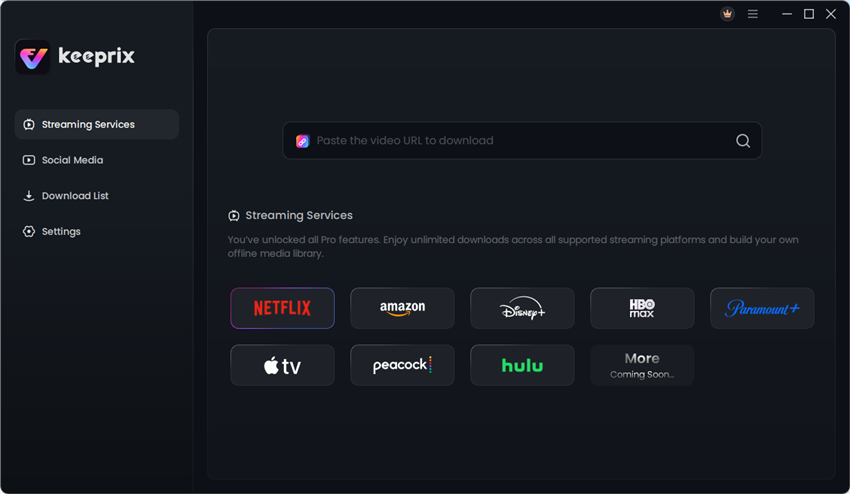
Step 1. Download and launch Keeprix Video Downloader, then choose Netflix. You can also paste the link to a supported Netflix movie or show into the search box.
Step 2. Sign in to your Netflix account through the built-in browser so Keeprix can access the videos available to your account.
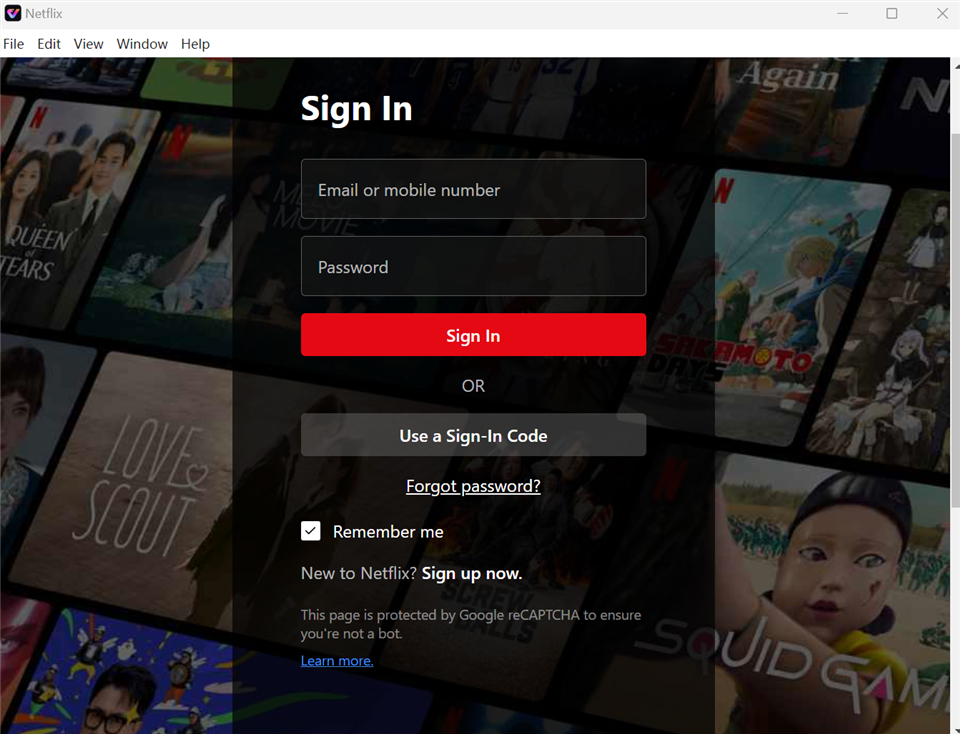
Sign in to the Netflix account that has access to the video.
Step 3. Open the movie or show you want to save. For a series, select the episodes you need, then click the download icon.
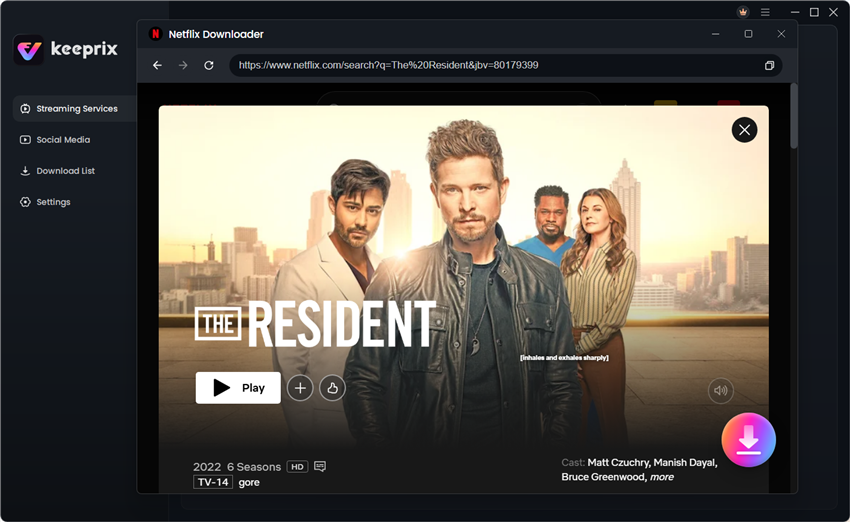
Select the supported Netflix movie or episodes you want to save.
Step 4. Choose MP4 or MKV, available video quality up to 1080p, audio, subtitles, and the output folder. Available options depend on the source title and account access. Click Download to continue.
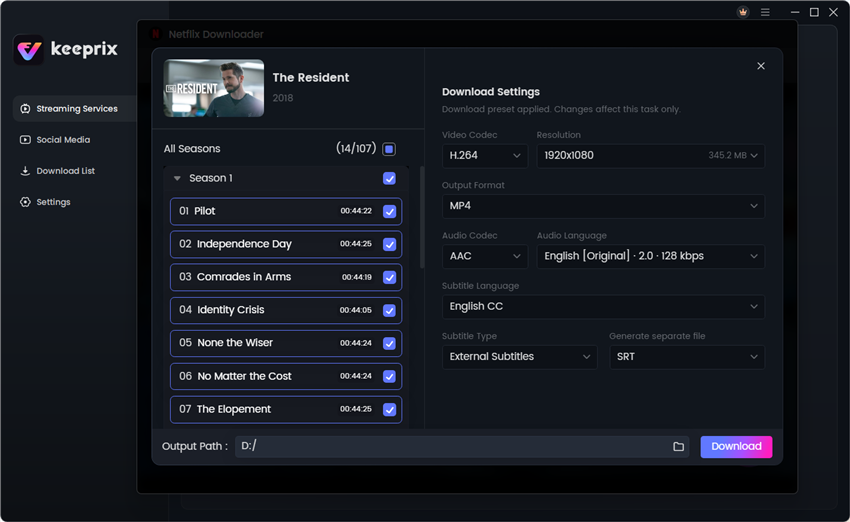
Choose the available video, audio, subtitle, and output settings.
Step 5. When the download finishes, open the output folder and play the local file with a compatible media player.
Frequently Asked Questions
Do Netflix downloads expire if I have not watched them?
Yes. Netflix says downloaded movies and shows expire after a period of time, even if they have not been watched. The duration can vary by title, so check the download in the app instead of assuming one universal deadline.
Does every Netflix download expire 48 hours after I press Play?
No universal 48-hour rule is published for every Netflix title. A shorter timer may apply to a particular download, but the deadline shown in your Netflix app is the one to follow.
Can I renew an expired Netflix download?
If the title is still available and you have not reached a title-specific limit, delete the expired copy and download it again while connected to the internet. A movie or show that has left Netflix cannot be renewed or downloaded again.
Why does my Netflix download show an exclamation mark?
The warning icon can indicate an expired download, a failed download, a plan limit, or another error. Tap the icon and read the exact message before deleting anything.
Do Netflix downloads remain after I cancel my account?
No. Netflix states that downloads on the device are deleted when the account is canceled. If you restart the membership, you will need to download the titles again.
Can I officially download Netflix movies on Windows or Mac?
No. Netflix’s current official download feature is limited to supported Android devices, iPhone and iPad, Fire tablets, and Chromebooks with Google Play. Keeprix provides a separate desktop workflow for saving supported videos you can access as MP4 or MKV files on Windows or macOS 12 and later.
Conclusion
How long a Netflix download lasts depends on the individual title rather than one fixed rule for the entire service. Check the deadline inside the Netflix app, redownload expired titles while online, and remember that catalog availability, renewal limits, your plan, and your account status can all affect offline access.
For official mobile downloads, reviewing each title before a trip is the safest approach. If you need supported Netflix videos as local MP4 or MKV files on a computer, Keeprix offers a Windows and Mac workflow with 1 full Netflix video available as a free download.

Keeprix Video Downloader
- Save supported Netflix videos on Windows or macOS.
- Export videos as MP4 or MKV for easier offline playback.
- Select available audio and subtitle tracks when supported.
- Download Netflix videos up to 1080p when source available.