How to Download Crunchyroll Episodes for Offline Viewing

Want to download Crunchyroll episodes for offline viewing? Crunchyroll lets you save selected shows in its official app on supported devices. This is helpful for flights, commutes, and places with weak Wi-Fi.
But there are limits. Official downloads stay inside the Crunchyroll app. They may expire, and desktop users do not get the same download option in a browser. This guide explains the official method first. Then it shows what PC and Mac users can do if they need a more flexible offline viewing option.

How to Download from Crunchyroll
Quick Answer: Can You Download Crunchyroll Episodes?
Yes, but only on supported devices. Crunchyroll lets users download selected episodes in the official app for offline viewing. On mobile, downloaded episodes are found under My Lists > Downloads. On Nintendo Switch, downloads are found in the App Menu > Downloads.
Also Read: Watch Spider-Noir in Color or Black and White?
Crunchyroll Download Options: App vs. Desktop Software
Before we dive into the steps, it is critical to understand that Crunchyroll’s offline download methods differ drastically depending on your device. You have two paths: Official App Downloads vs. Desktop Offline Viewing.
There are two ways users usually think about Crunchyroll downloads:
- The first is the official app download. It is simple and works on supported devices. But the video stays inside the Crunchyroll app.
- The second is desktop offline viewing. This is for users who want to manage anime on a Windows PC or Mac. Keeprix is preparing support for this use case, so users can save selected episodes for personal offline viewing once Crunchyroll support is available.
| Feature | Official Mobile App | Keeprix Downloader (Desktop) |
| Platform | iOS & Android Only | Windows & macOS |
| File Type | Encrypted Cache (In-App) | MP4 / MKV (Open Format) |
| Expiration | 7 Days (48 hrs after play) | Never (Permanent) |
| Audio/Subtitles | Pre-selected in Settings | Selectable (Multi-language) |
| Cost | Included in Mega/Ultimate Fan | Requires Software License |
Method 1: The Official Way (Mobile & Tablet)
Most users simply want to use the features they already pay for. If you have a smartphone or tablet, the Crunchyroll download option is built directly into the app. This is the safest and easiest way to watch anime on the go.
Step 1: Check Your Subscription
Offline viewing is a premium feature. It is not available on the free tier or the basic “Fan” tier. You must be subscribed to:
- Mega Fan: Supports offline viewing on up to 4 devices.
- Ultimate Fan: Supports offline viewing on up to 6 devices.
Step 2: Adjust Your Quality Settings
Before downloading, save yourself storage space headaches by configuring your quality settings.
- Open the Crunchyroll App.
- Go to Account -> Offline Viewing.
- Select Download Quality.
- High: Best for tablets/larger screens (consumes ~1.5GB per hour).
- Medium/Low: Best for phones (consumes significantly less space).
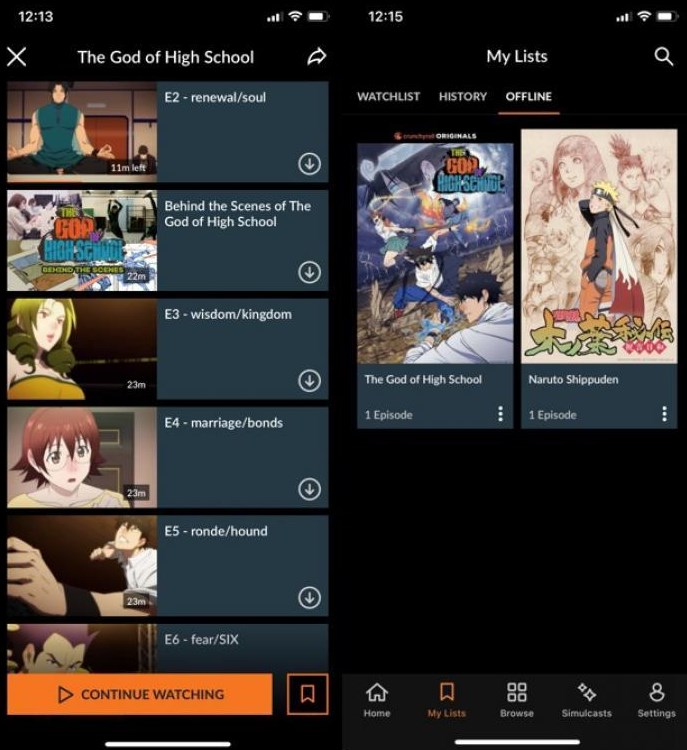
Download from Crunchyroll App
Step 3: Saving Episodes
- Locate Your Series: Navigate to the anime you wish to watch.
- Find the Icon: Look for the “Sync/Download” arrow icon (a downward-facing arrow) next to the specific episode title. If you want to grab the whole season, look for the “Sync All” button at the top of the episode list.
- Start the Process: Tap the icon. The progress circle will indicate the status.
- Access Offline: Once complete, navigate to the “My Lists” tab and select “Offline” to view your saved content.
Note: These files are encrypted. You cannot move them to an SD card to play on a different device. They must be watched inside the Crunchyroll app.
Method 2: The Desktop Workaround (Windows/Mac)
Can You Download Crunchyroll Episodes on PC or Mac?
Crunchyroll does not offer a normal download button for saving episodes as local video files on a PC or Mac. You can stream Crunchyroll in a browser, but official offline downloads are designed for supported app devices.
This is where desktop users often need another option. Keeprix is preparing Crunchyroll support for users who want to save selected anime episodes for personal offline viewing on Windows or Mac.
We have tested Keeprix Downloader for this purpose. It effectively bridges the gap, allowing you to save content as local MP4 files.

Keeprix Video Downloader
- Save accessible straming movies, episodes as MP4 or MKV files.
- Batch download episodes or full seasons when source supported.
- 3 Free downloads for each streaming platform like Netflix.
- 100% free for all social platforms like YouTube, Instagram.
2.1 Step-by-Step Procedure to Download Crunchyroll Episodes
- Install and Open: Launch Keeprix Downloader on your computer.
- The Login Step (Critical): Keeprix needs to access the video stream just like your browser does. Locate the built-in browser tab within Keeprix and access the Crunchyroll website. Log in with your premium credentials.
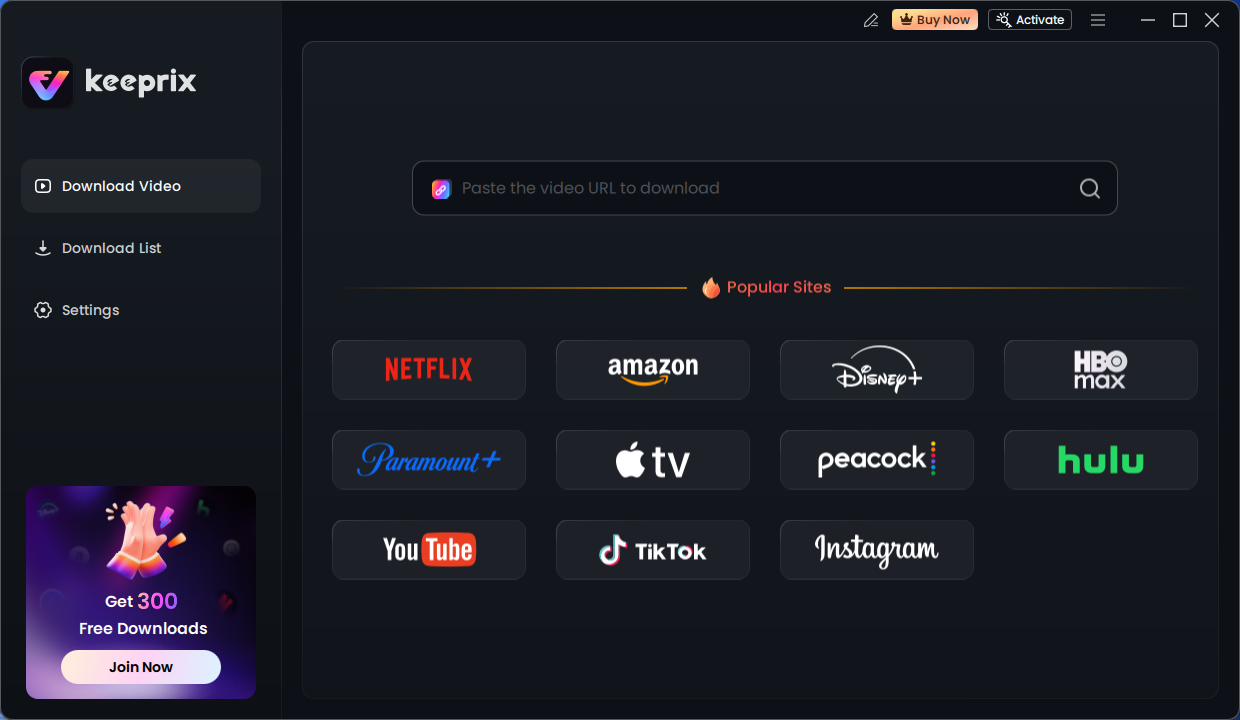
Keeprix Download Main Screen
Why is this necessary? The software cannot download premium content (1080p, ad-free) without verifying that you are a paying subscriber.
- Navigate to the Video: Once logged in via the tool, search for the series you want to save. Play the video.
- Configure Audio and Subtitles: This is the most important step for anime fans. A pop-up window will appear asking for download preferences.
- Audio: Ensure you select the correct track.
- Subtitles: Select “English.” You can usually choose between “Remux into file” (soft subs you can toggle on/off) or “Burn-in” (permanently written on the video). We recommend Remux for better quality.
- Initiate Batch Download: You can select a single episode or check the box for “Select All” to download the entire season at once. Click “Download Now.”
Can You Download Crunchyroll Episodes to MP4?
Not with the official Crunchyroll app. Official downloads stay inside the app. They are not saved as regular MP4 files that you can move, copy, or play in another media player. Once get Keeprix, users will have a more flexible way to save selected episodes in common video formats for personal offline viewing.
2.2 Is Using Third-Party Downloaders Safe?
This is the “elephant in the room.” Officially, Crunchyroll’s Terms of Service prohibit the use of unauthorized tools to capture streams.
- The Risk: While extremely rare for individual users, there is a theoretical risk of account suspension for violating TOS.
- The Reality: Many users utilize these tools for archiving purposes—saving shows they love in case they are removed from the platform due to licensing expiration.
- Our Advice: Use this method responsibly for personal offline viewing only. Do not distribute or upload the downloaded files to other sites, as that constitutes piracy.
Understanding Restrictions: Why Downloads Expire or Fail
Users often ask why the desktop experience is so restricted compared to mobile. The reason is Digital Rights Management (DRM).
Rights holders for DRM-protected anime enforce strict security requirements. Mobile operating systems (iOS and Android) provide “sandboxed” environments. This means the Crunchyroll app can save a file to your phone that can only be read by the app. It prevents you from copying that file to a USB drive or emailing it to a friend.
Desktop browsers (such as Chrome and Firefox) cannot provide the same level of file system security. If Crunchyroll allowed browser downloads, the files could be easily copied and pirated, violating their licensing agreements with Japanese studios.
The Expiration Countdown (Mobile Only)
Even on mobile, your downloads are merely “rentals.” They follow these rules:
- 7-Day Window: Unplayed downloads expire 7 days after saving.
- 48-Hour Playback Window: The moment you press “Play,” a 48-hour timer starts. You must finish the episode within this window.
If a download expires, you do not need to re-download the file. Simply connect your device to the internet and open the app; the license will renew automatically.
| Need | Official Crunchyroll Downloads | Keeprix Crunchyroll Support |
|---|---|---|
| Offline viewing | Yes, on supported app devices | Windows and Mac |
| PC download | Not available as a normal local file | desktop support |
| Mac download | Not available as a normal local file | desktop support |
| MP4 / MKV output | Not supported by the official app | output format options |
| USB drive | Not supported as a transferable video file | Possible after saving as a local file |
| Subtitles | Managed inside the Crunchyroll app | More flexible subtitle options when available |
| Audio tracks | Managed inside the Crunchyroll app | More flexible audio options when available |
| Download expiration | Downloads may expire | Designed for personal offline viewing |
| Best for | Simple mobile offline viewing | Desktop anime library management |
| Usage reminder | Follow Crunchyroll’s app rules | For private, non-commercial use only |
Troubleshooting: Why Can’t I Download Crunchyroll Episodes?
If the Download button is missing or the download fails, check these points first:
– Your plan may not include offline viewing.
– Your device may not support Crunchyroll downloads.
– The title may not be available for offline viewing.
– Your app may need an update.
– Your device may not have enough storage.
– Your download may be paused because Wi-Fi or cellular download settings are off.
Conclusion
Crunchyroll’s official download feature is the easiest choice if you watch anime on a supported phone, tablet, or Nintendo Switch. It works well for short trips, commutes, and mobile offline viewing.
But it does not solve every use case. PC and Mac users still do not get normal local video files, MP4 output, or USB-friendly downloads. Keeprix is preparing Crunchyroll support to give anime fans a more flexible desktop option for personal offline viewing.