Peacock Downloads Not Working? The Complete Fix for Desktop and Mobile Users (2026)

Imagine sitting down for a long flight, eager to watch the episodes you diligently saved the night before, only to be met with a playback error or a missing file. For “Olivia,” a frequent traveler we spoke with, this wasn’t just a technical glitch; it was the start of a ten-hour flight with zero entertainment. She had prepared, but when she opened her laptop, she realized that Peacock downloads not working isn’t just an error code—it’s a significant disruption to your plans.
If you are staring at a blank screen, a greyed-out button, or a library that has suddenly vanished, you are likely facing the same obstacle. Whether you are dealing with Peacock downloads failing, content that expires too quickly, or simply the realization that you can’t download on Peacock to your computer, the confusion often stems from complex licensing rules rather than simple bugs.
This guide clarifies exactly why these failures happen and categorizes the solutions into two distinct paths: fixing the official mobile app for phone/tablet users, and securing content on a laptop for those who need a bigger screen.
Peacock Downloads Not Working
The Desktop Reality Check: Why You Can’t Download on PC
The most common source of confusion users face is trying to locate the download feature on a laptop. It is crucial to clarify this immediately to save you time: Peacock’s native download function is strictly mobile-only.
If you are searching for a download arrow on your Chrome, Edge, or Safari browser, it does not exist. NBCUniversal limits the official “offline viewing” feature to the Android and iOS apps. For desktop users, the official method provides no solution. If you need to watch on a laptop, you must skip down to the “Desktop Workaround” section later in this guide.
However, if you are on a mobile device and the feature is still failing, the issue lies within your subscription plan or app data.
Mobile Troubleshooting: Why the Download Button is Missing
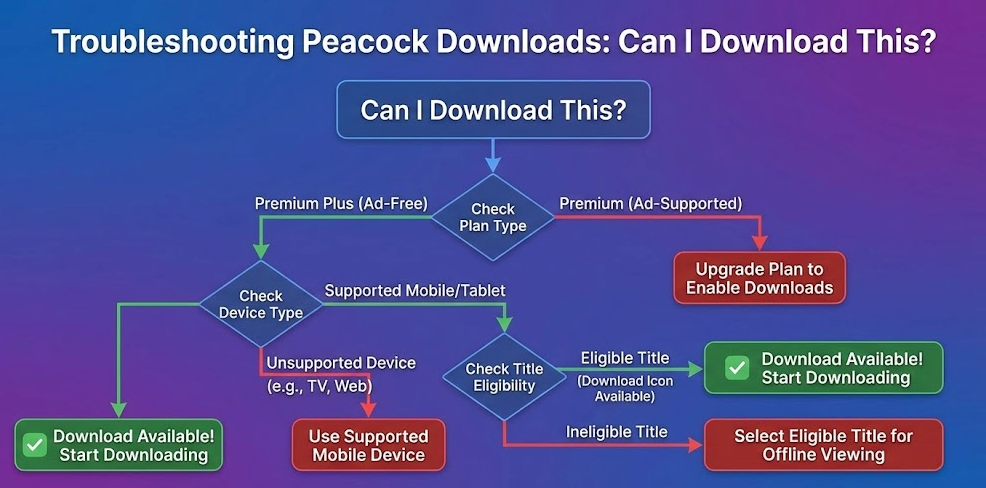
If you are strictly using the mobile app on an iPad, iPhone, or Android tablet and you cannot find the download button, the issue is almost certainly your subscription tier.
Expert analysis suggests that most peacock download issues are caused by plan restrictions or expired licenses rather than technical bugs.
The Premium vs. Premium Plus Distinction
Peacock enforces a strict hierarchy for offline access. Knowing what to look for in the interface will tell you if you are on the wrong plan:
- Premium (Ad-Supported): This plan does not allow downloads.
- – What you will see: When you tap on a movie or show, the interface will show buttons for “Watch Now” or “Add to Watchlist” (+), but the download arrow will be completely absent. It does not appear greyed out; it simply isn’t there. Many users assume the app is glitching, but this is the intended design.
- Premium Plus (Mostly Ad-Free): This is the only tier that supports native offline viewing.
- – What you will see: A downward arrow icon will appear next to eligible episodes or movies.
If you recently downgraded your plan from Plus to Premium, any existing downloads on your tablet or phone will immediately lock or vanish.
Licensing “Blackouts”
Even on the highest plan, not all titles are eligible. Licensing agreements with third-party studios (such as Universal or Lionsgate) often prohibit offline caching. This means specific movies may never offer a download option regardless of your subscription status. This explains why you might see a peacock app download error on one movie but not another within the same genre.
Can I Download This?
Why Mobile Downloads Expire or Get Stuck
When relying on the native app, users frequently encounter the download expired Peacock notification. This is not a glitch; it is a feature of the digital rights management (DRM) system designed to protect copyright. Understanding the specific timeline of these rules helps explain why your content becomes unplayable.
The “Countdown Clock” Explained
- The 30-Day Rule: Once you successfully download a title, it remains on your device storage for up to 30 days. If you do not watch it within this window, it is automatically deleted or locked to free up licensing seats.
- The 48-Hour Window: This is where most users get stuck. The moment you press “Play” on a downloaded item—even for a second—a 48-hour timer begins. If you do not finish the movie or episode within that timeframe, it expires and requires an internet connection to renew the license.
If you are traveling for longer than 48 hours without reliable internet, relying on native downloads is risky.
Clearing App Cache (Not Browser Cache)
If your downloads are failing at 99% or refusing to start, “stale” data in the app is often the culprit. Unlike streaming on a laptop, clearing your browser cache will do nothing here. You must clear the Peacock App data.
- For Android Users: Go to Settings > Apps > Peacock > Storage & Cache. Tap Clear Cache. This refreshes the app without deleting your downloads. If problems persist, tap Clear Data (this will log you out and delete downloads).
- For iOS (iPhone/iPad) Users: Apple does not allow you to clear the cache directly. Instead, go to Settings > General > iPhone/iPad Storage > Peacock.
- – Select Offload App: This deletes the app executable but keeps your documents and data. Reinstall the app to see if the error resolves.
- – Select Delete App: If “Offload” fails, delete the app entirely and reinstall. This gives you a fresh start but removes all saved content.
Managing Storage Space
High-quality video files consume significant data. Storage space filling up is a common cause for partial downloads or failures where the progress bar hangs.
- Check Available Space: Ensure you have at least 2-3 GB of free space for a standard movie in 1080p.
- Lower Download Quality: Inside the Peacock App, go to Account > Settings > Download Quality and switch from “High” to “Standard” to save space and speed up downloads.
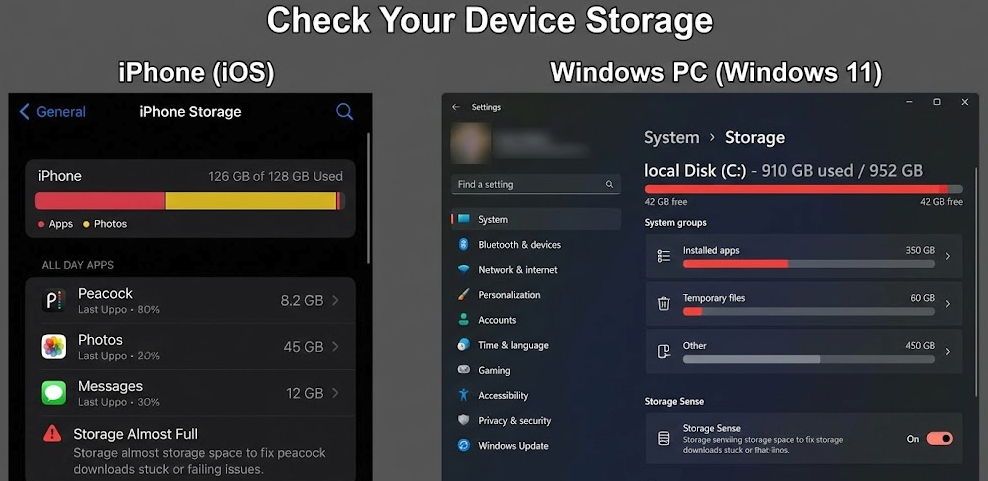
The Storage settings menu on an iPhone and a Windows PC
The Desktop Solution: How to Download on Windows and Mac
If the mobile restrictions described above do not fit your needs—perhaps you need to watch on a laptop screen, or you cannot risk the 48-hour expiration timer mid-flight—you will need a different approach.
Since Peacock does not support desktop downloads, the only reliable workaround is using third-party media software. We have tested Keeprix Video Downloader for this purpose.
Important Distinction: Unlike browser extensions which are often free but unreliable, Keeprix is a dedicated software tool. It is generally a paid product (often with a limited free trial), but it offers capabilities the native app cannot match. It bridges the gap by streaming the content internally and saving it as a clean video file.
Comparison of Offline Methods
| Feature | Native Peacock App (Mobile Only) | Keeprix Video Downloader (Desktop) |
| Device Support | iOS & Android Only | Windows & macOS |
| Expiration Limits | Expires 48 hours after playing | No Expiration (Permanent) |
| Viewing Limit | Watch within 30 days of download | Unlimited access |
| Cost | Included in Premium Plus | Paid Software License |
| File Type | Encrypted offline content (Hidden) | MP4 / MKV (Standard video files) |
If your goal is to watch movies on a larger laptop screen without worrying about subscription download limits or expiring licenses, investing in desktop software is currently the only viable method.
Step-by-Step Desktop Download Procedure
Follow this procedure to secure offline viewing of Peacock content on your laptop:
- Install the Software: Download and launch Keeprix for Windows or Mac. Select “Peacock” from the VIP Services menu to open the built-in browser.
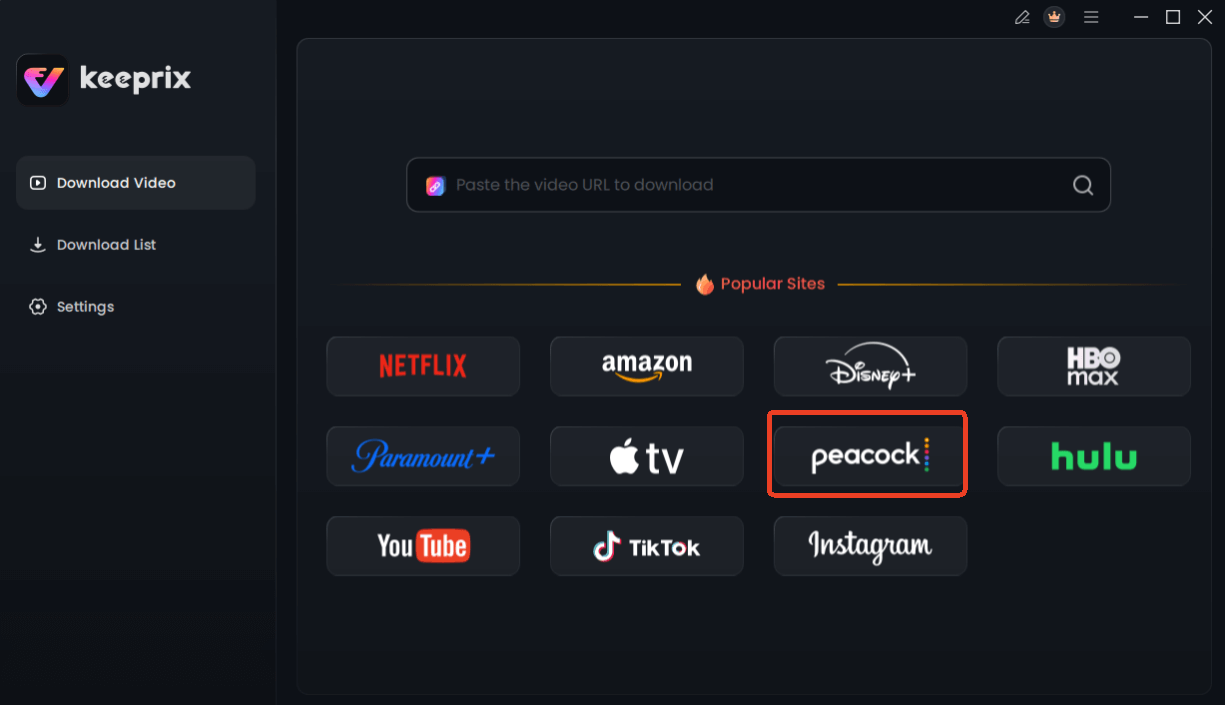
Choose Peacock in Keeprix Downloader
- Log In Securely: Sign in to your Peacock account. Navigate to the specific movie or episode you wish to save.
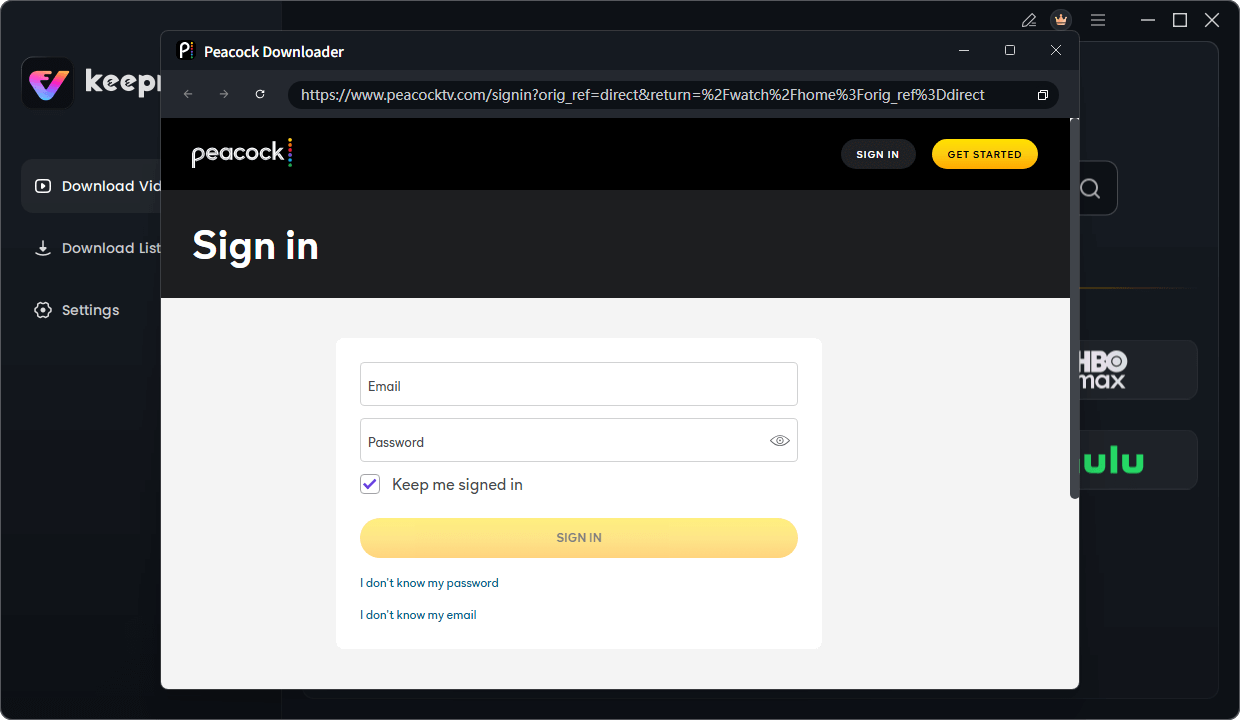
Sign in Your Peacock Account
- Analyze the Stream: Click the “Download” button. The software will automatically analyze the video data to detect available resolutions and audio tracks.
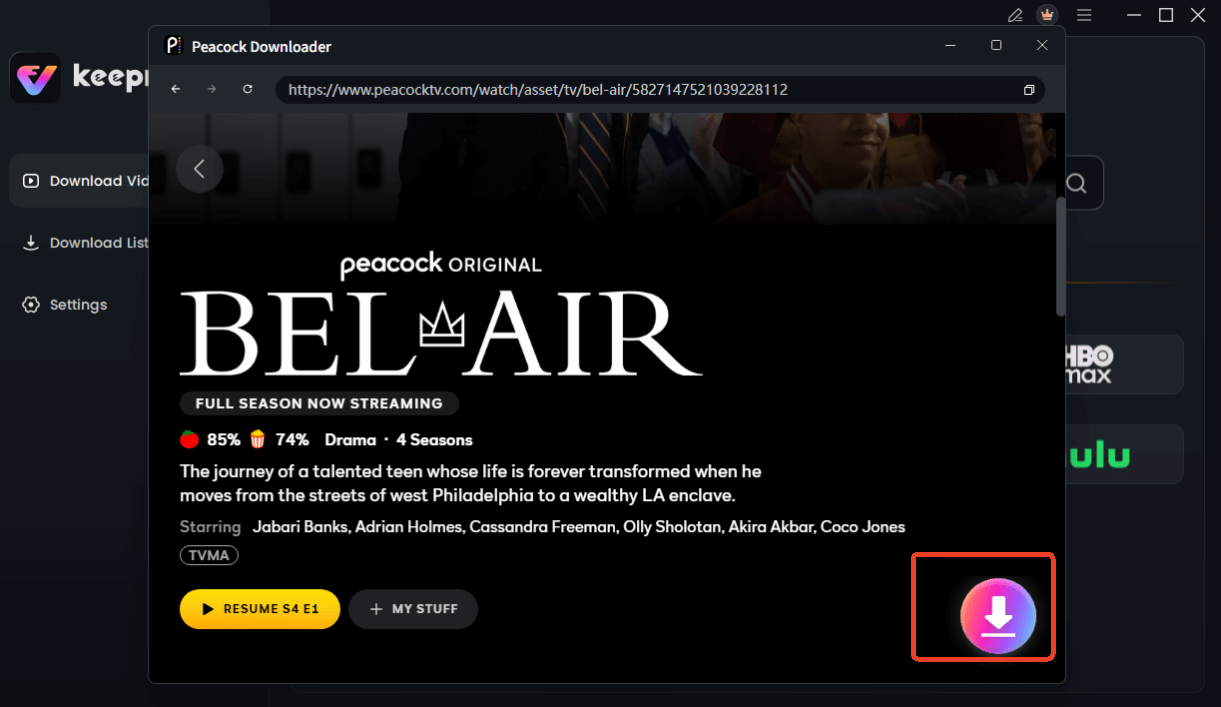
Choose Peacock Video to Download
- Customize Your File: Select your preferred resolution (up to 1080p is recommended for laptops) and choose your subtitle language.
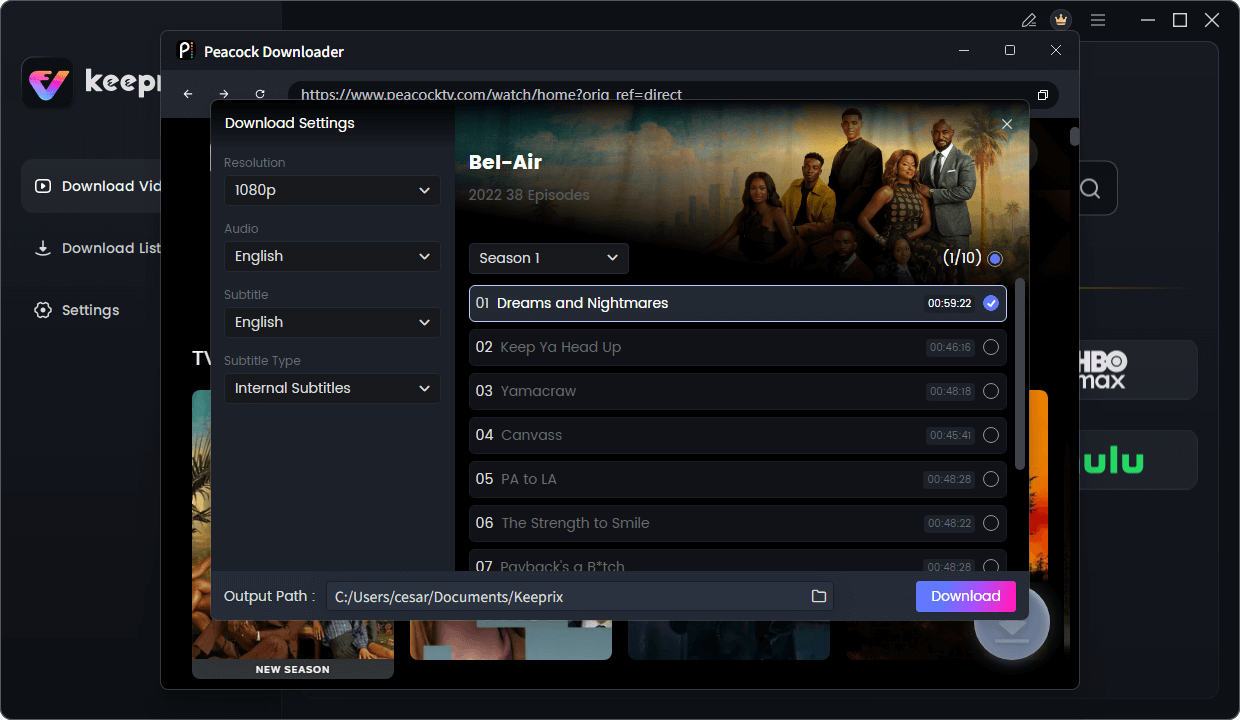
Configure Peacock Download Settings
- Initiate the Transfer: Click “Download Now” to save the file to your local drive.
Why This Solves Specific User Frustrations
This approach directly addresses the pain points that the native app cannot:
- Solves “downloads expiring too quickly”: Since the output is a standard MP4, there is no “48-hour watch window.” The file remains on your hard drive until you choose to delete it.
- Solves “offline playback not working”: Native files often fail to decrypt if the app hasn’t “phoned home” to the internet recently. A standard video file requires no internet validation to play.
- Solves “confusion about ads”: The tool automatically filters out commercials, ensuring an uninterrupted experience even if you are on an ad-supported tier.
Frequently Asked Questions About Peacock Offline Viewing
Why are my Peacock downloads not working?
This generally occurs due to three reasons: you are attempting to download on a desktop device (which is not supported natively), your device storage is full, or your subscription tier (Premium) does not include offline viewing privileges.
Why can’t I download shows on Peacock?
If the download button is missing, you likely have the “Premium” plan. You must upgrade to “Premium Plus” to unlock offline capabilities on the mobile app. Additionally, specific titles may be restricted due to licensing rights.
How long do Peacock downloads last?
Native downloads typically remain on your device for 30 days. However, once you start watching a video, it expires in 48 hours. Using a tool like Keeprix eliminates these time limits.
Why did my Peacock downloads expire?
Downloads expire if they exceed the 30-day storage limit or the 48-hour viewing window after playback begins. They will also expire instantly if your subscription lapses or if the content leaves the Peacock library.
Can I download Peacock shows on multiple devices?
Yes, but with limits. You can typically download content on up to 25 items across all authorized mobile devices. Desktop downloads via third-party software do not count toward this limit.
Why is the download button missing on Peacock?
Aside from plan restrictions, some specific titles are excluded from offline viewing due to licensing agreements with the content owners. If you are on a computer, the button is missing because desktop browsers do not support downloads.
Conclusion
Facing a blank screen when you expect entertainment is a modern frustration we all want to avoid. While peacock downloads not working is frequently caused by the platform’s restrictive mobile-only policy and aggressive expiration timers, you are not without options.
For casual viewing on a phone or tablet, upgrading to Premium Plus and keeping your app cache clean is the official path. Be mindful of the 48-hour window once you press play. However, for users like Olivia who need reliability on a laptop for long journeys, or for those who want to build a permanent library without subscription download limits, the native app falls short.
We recommend Keeprix Video Downloader as the most robust solution for desktop users who are willing to invest in a paid tool for permanent access. It eliminates the anxiety of expiring files and ensures your content is ready exactly when you need it. By securing your media as permanent MP4 files, you regain control over your offline viewing experience, ensuring that your next flight is filled with entertainment, not troubleshooting.