Peacock Download Mac: The Complete Guide for 2026

You’re preparing for a long trip and open your MacBook to download a few episodes of your favorite show, only to find that the download button is missing. This frustrating experience, where your Mac feels limited by a simple software gap, is a common reality for Peacock users. The core problem is clear: Peacock does not offer a native Mac app or an offline download feature for its web player, restricting you to streaming only when you have an internet connection.
This guide provides the direct solution. It acknowledges that the ideal, official download button doesn’t exist on Mac. Instead of offering false hope, we explain the technical reasons behind this restriction and walk you through a reliable, tested procedure to save your content anywhere, anytime.

Download Peacock on Mac
Can Peacock Support Mac and Limitations?
Let’s address the main question immediately: you cannot officially download Peacock shows on a Mac. There is no Peacock Mac app available on the App Store, and the Peacock web player, which is used in browsers like Safari, Chrome, or Firefox, does not support offline viewing.
This is a key difference in Peacock macOS support compared to its mobile counterparts. The Peacock apps for iPhone, iPad, and Android devices allow subscribers on eligible plans to download content. This gap between mobile and desktop features is the primary source of the offline viewing limitations Mac users face.
This leaves you with two options for watching Peacock content without an active internet connection:
- The Official Mobile Method: Use the Peacock app on a compatible iPhone or iPad to download shows. This works perfectly, but restricts you to watching on a smaller screen.
- The Mac-Based Solution: Use a specialized third-party software tool designed to record and save streaming video directly to your Mac’s hard drive as a permanent file.
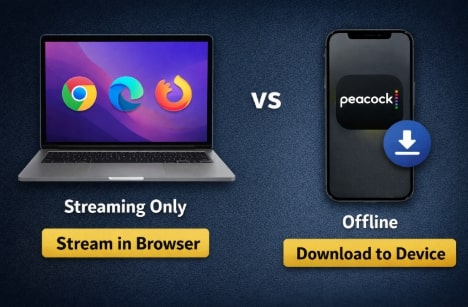
Peacock on Devices
Browser Streaming vs. A Dedicated Downloader: A Comparison for Mac Users
Choosing how to watch Peacock on your Mac depends on whether offline access is a necessity. While official browser streaming on Mac is simple for home viewing, a dedicated downloader offers a fundamentally different capability. This table breaks down the trade-offs.
| Feature | Browser Streaming (Official Method) | Dedicated Downloader (Third-Party Tool) |
| Offline Access | None; requires a constant internet connection. | Yes, saves permanent MP4/MKV files for local playback. |
| Video Quality | Up to 1080p/4K, dependent on your plan and connection speed. | Up to 1080p, saved in consistent, high-quality resolution. |
| Ad Removal | Requires upgrading to the Premium Plus plan. | Yes, ads are automatically removed during the download process. |
| Content Permanence | Temporary; content can be removed from the service at any time. | Permanent: your saved video files never expire or disappear. |
| Safety Risk | Low, you are using the official and secure Peacock website. | Low, provided you use a reputable and well-maintained paid tool. |
This comparison clarifies that if your goal is to build an offline library of your favorite shows to watch on your MacBook, a dedicated downloader is the most effective solution.
How to Download Peacock Videos on MacBook: A Step-by-Step Method
After testing several tools, we found that a professional application like Keeprix Downloader provides the most reliable way to get Peacock videos to download on your MacBook. While other options exist, such as Audials One, we preferred Keeprix for its clean, straightforward Mac interface and consistent performance. This type of software is designed to handle DRM-protected streaming, the core technology that prevents direct downloads. It saves videos as standard MP4 files, giving you the offline capability you need.
A well-supported, paid application ensures it remains updated, secure, and free from the risks associated with free online tools.
- No Expiration: Because the files are saved locally on your hard drive, they never expire. The 30-day and 48-hour timers are completely removed.
- No Quantity Caps: The 25-item limit is eliminated. Your only restriction is the amount of storage space on your computer.
- Guaranteed Ad-Free: The software automatically strips all advertisements from the video during the download process, ensuring an uninterrupted viewing experience.
- Total Device Freedom: Once a show is saved as an MP4 file, you can transfer it to any phone, tablet, USB drive, or media player you own, breaking free from Peacock’s device ecosystem.
Here is the exact procedure we followed to download Peacock shows:
Step 1: Install and Launch the Software
Download Keeprix Downloader from the official website and install it on your Mac. The process is straightforward, similar to any other trusted macOS application. Open the application once it’s installed.
Step 2: Navigate to Peacock and Log In
From the Keeprix main screen, select ‘Peacock’ from the list of streaming services. This opens a built-in, secure browser. Log in to your Peacock account with your standard credentials.
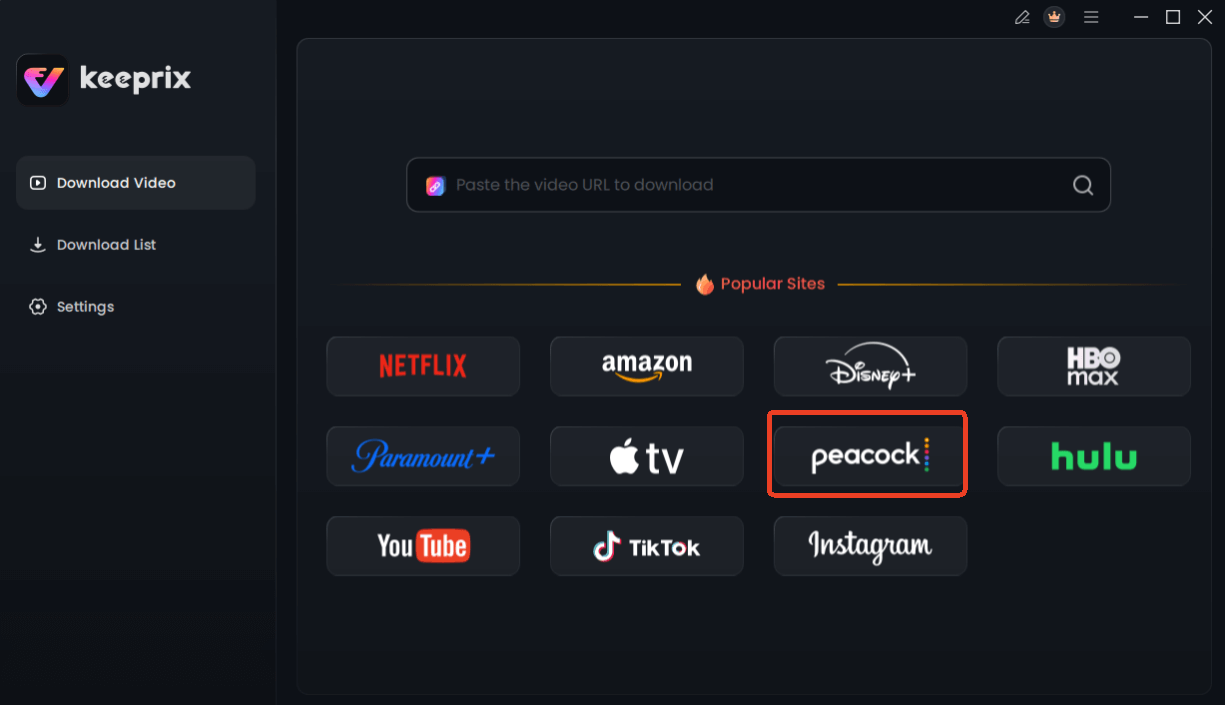
Choose Peacock in Keeprix Downloader
Step 3: Find the Video You Want to Download
Browse the Peacock library to find the movie or TV series you want to save. Click on the title to go to its main page. The software will automatically begin to analyze the video content. You’ll see a small loading icon as it parses the available video streams, which usually takes a few moments.
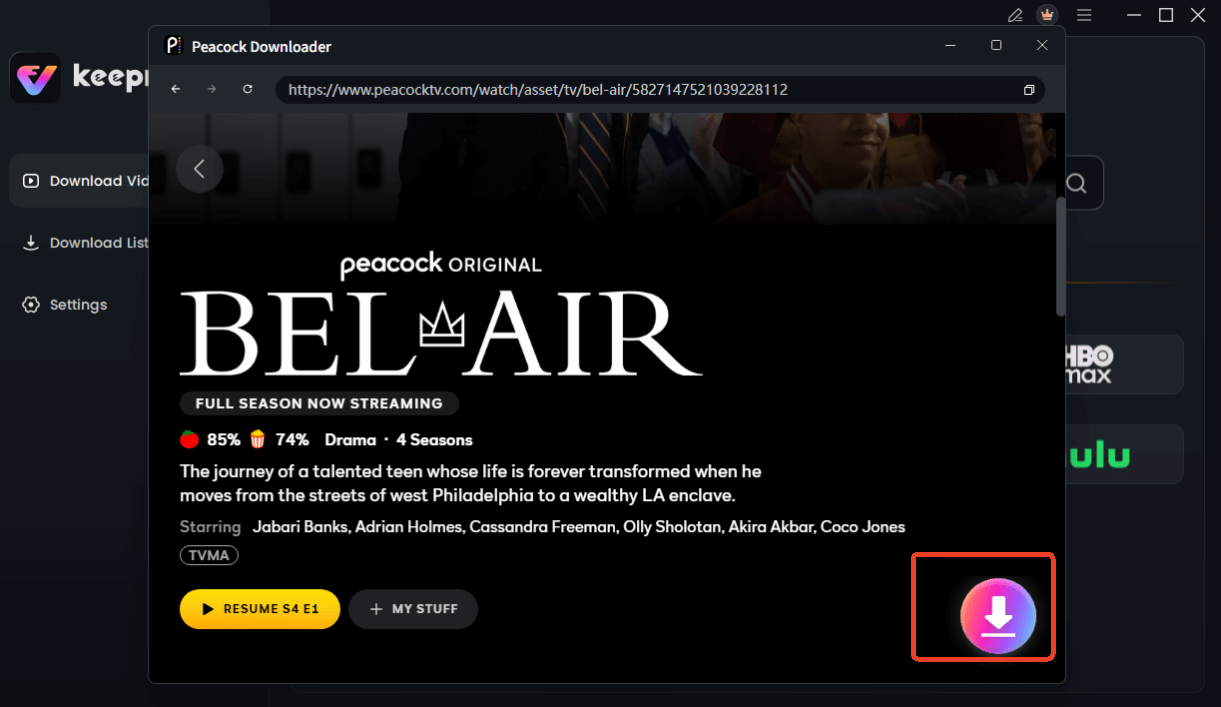
Choose Peacock Video to Download
Step 4: Configure Download Settings
Once the analysis is complete, a download settings window will appear. Here, you can select the video quality (up to 1080p), choose audio tracks, and enable subtitles. For TV series, you can select specific episodes or download an entire season at once.
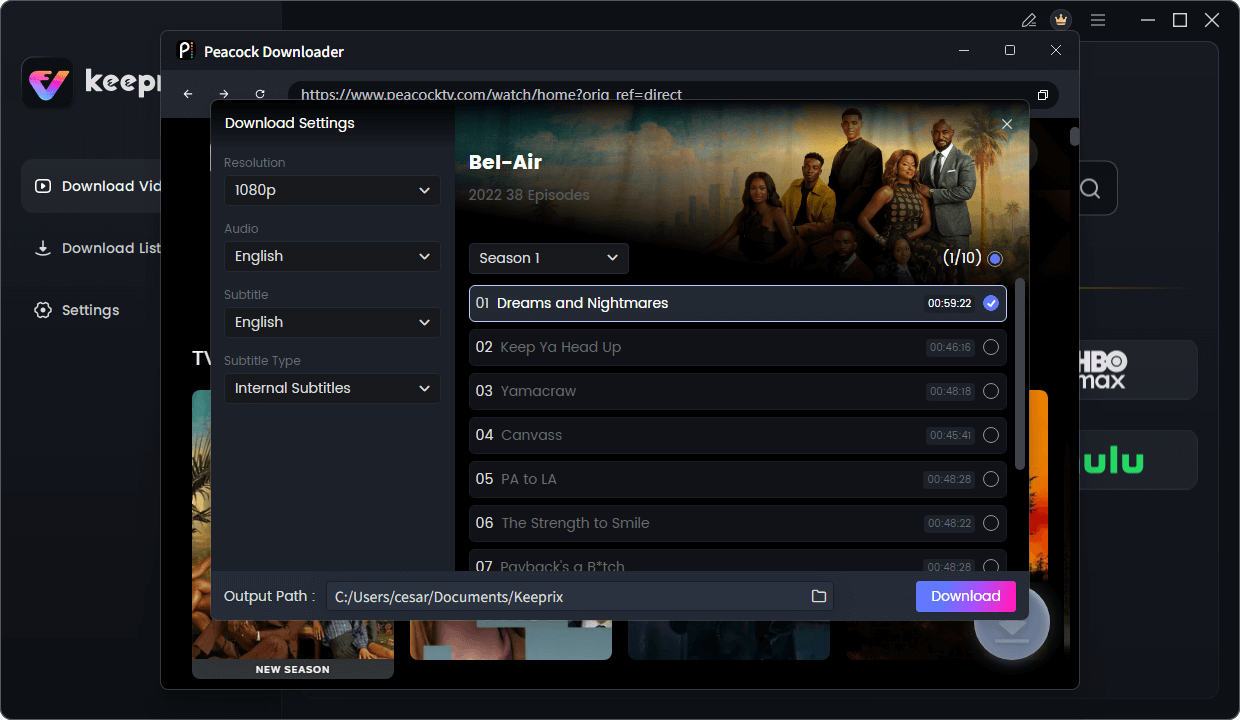
Configure Peacock Download Settings
Step 5: Start the Download and Find Your File
Click the ‘Download’ button to begin. The software will process the video, removing any ads, and save it to your Mac’s hard drive as a high-quality, DRM-free MP4 file. You can monitor the progress in the ‘Downloading’ tab. Once complete, you can find the file in your Downloads folder, ready for offline playback in QuickTime or any other media player.
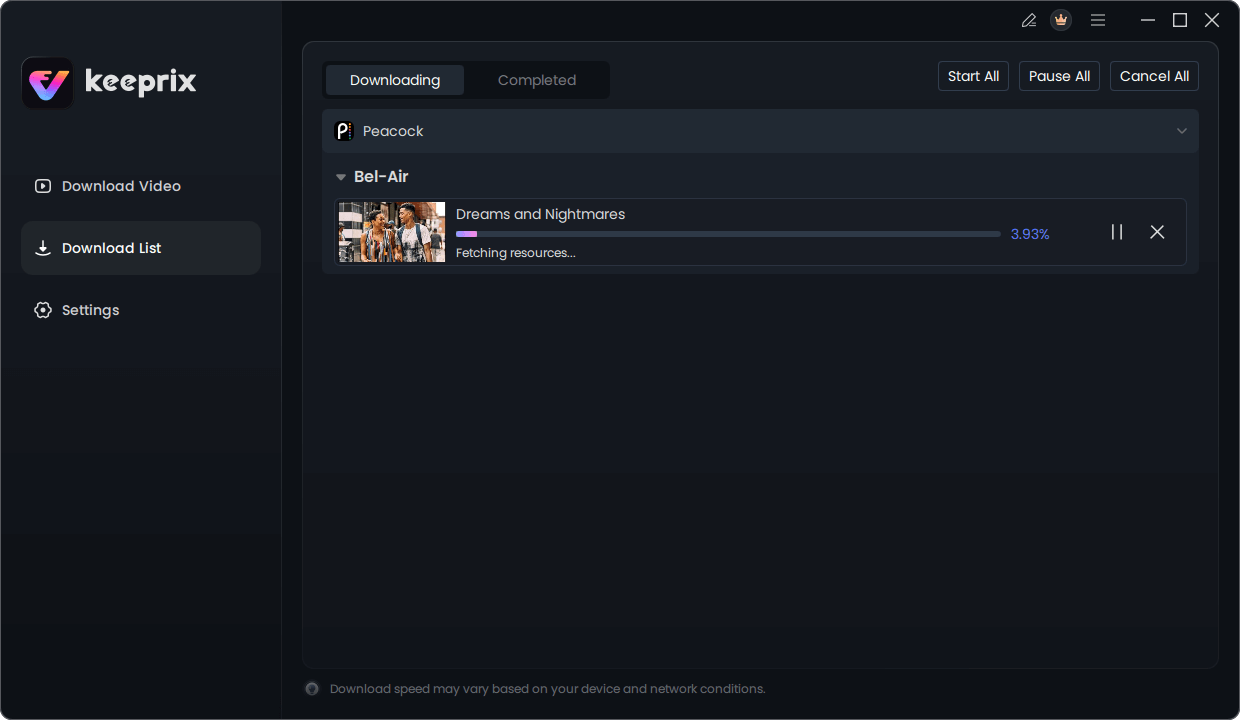
Downloading Peacock Video
Understanding Peacock’s Offline Viewing Limitations on macOS
The reason Peacock doesn’t allow downloads on Mac computers comes down to Digital Rights Management (DRM). DRM is a set of access control technologies used to restrict the use of copyrighted digital content. Streaming services like Peacock are bound by strict licensing agreements that require robust DRM to prevent unauthorized copying and distribution.
It is significantly easier and more secure to enforce DRM within the controlled, “sandboxed” environment of a mobile app (like on an iPhone). In that ecosystem, a downloaded file can be encrypted and tied directly to the app and the device, with strict rules about its expiration and accessibility.
A desktop operating system like macOS offers more user freedom, which makes it harder to lock down a file in the same way. By limiting Mac users to browser streaming on Mac, Peacock can maintain real-time control over the DRM-protected feed. This simplifies their content protection strategy and ensures compliance with licensing deals, even at the cost of user convenience.
⚠️ Warning: The Security Risks of ‘Free’ Peacock Mac Downloaders
When searching for a way to download Peacock on Mac, you will encounter websites offering free tools. Exercise extreme caution. The technology to handle DRM is complex, and reputable developers charge for their software to cover development and maintenance. Many free tools are ineffective, unsafe, or both.
- Malware and Viruses: Free software is a primary vector for distributing malicious code, including spyware, adware, and ransomware that can compromise your Mac and personal data.
- Phishing Attempts: Some apps may use a fake login screen to capture your Peacock username and password, which can then be used for fraudulent activities.
- Poor Quality Output: Many free tools rely on basic screen recording, which results in low-resolution video, poor audio, and watermarks.
- Lack of Updates: Streaming services constantly update their security. Free tools are rarely maintained and quickly stop working, leaving you without a solution.
Investing in a professional, well-supported application is the safest and most reliable way to achieve your goal. A premium tool like Keeprix Downloader includes ongoing updates to adapt to changes in streaming service technology and offers dedicated customer support, ensuring the tool remains a reliable long-term solution.
Frequently Asked Questions About Peacock on Mac
Q1. Is there a Peacock app for Mac?
No, there is no official Peacock app for macOS available in the Mac App Store. Access on a Mac is exclusively through a web browser such as Safari, Chrome, or Firefox.
Q2. Can I download Peacock shows on my MacBook?
Not through any official feature. The Peacock web player does not support downloading content for offline viewing on MacBooks. This functionality is only available in Peacock’s mobile applications.
Q3. Why doesn’t Peacock allow downloads on Mac?
The primary reason is DRM (Digital Rights Management) enforcement. It is easier for Peacock to secure content and comply with licensing agreements within a closed mobile app ecosystem than on a more open desktop operating system like macOS.
Q4. How can I watch Peacock offline on my computer?
The most reliable method is to use a dedicated third-party downloader tool, such as Keeprix Downloader. This software is designed to save videos from the Peacock web player as standard MP4 files on your Mac for offline playback.
Q5. Are Peacock Mac downloaders safe?
It depends. Reputable, paid downloaders from established developers are generally safe. However, free downloader tools advertised online carry a high risk of malware, phishing, and other security threats. It is crucial to use a trusted solution to protect your computer and personal information. [Internal Link Suggestion: Link the preceding phrase to ‘/guide-to-safe-software-downloads’]
Q6. Does Peacock support Safari on Mac?
Yes, Peacock fully supports streaming on Mac using modern web browsers, including Safari, Google Chrome, and Mozilla Firefox.
Q7. What devices support official Peacock offline downloads?
Peacock officially supports offline downloads on iPhones, iPads, and Android mobile devices through their respective native Peacock applications, provided you have a Premium Plus subscription.
Conclusion: Take Control of Your Peacock Viewing on Mac
You no longer have to be limited by browser-only streaming or rely on a small phone screen for your trips. The core frustration of not being able to watch Peacock offline on your MacBook is a solvable problem. While Peacock’s official support has its limitations, using a secure and dedicated tool puts you back in control. It directly addresses the lack of a Peacock Mac app by providing the one feature you need most: the ability to save videos permanently.
Instead of searching for risky or unreliable workarounds, this method provides a clear and tested way to solve the problem. To watch your favorite shows on your terms, download the free trial of Keeprix Downloader and see for yourself how easy it is to build your offline library.