Can You Download Episodes on Peacock? The Complete 2026 Guide

Planning for a long flight or a commute with unreliable internet, you open Peacock to save your favorite show, only to find the option missing or confusingly limited. If you’ve asked, “Does Peacock allow downloads?” you’ve likely discovered the answer isn’t a simple yes or no. The uncertainty over which plan you need, why downloads expire, and the frustration of not being able to watch on a laptop are significant obstacles. This is a common and valid frustration for many viewers.
This guide provides a clear, tested way forward. We’ll walk through the official method for downloading shows on your phone, explain exactly why those frustrating restrictions exist, and introduce a powerful solution for anyone needing to watch Peacock episodes offline on a PC or Mac, permanently.

Can You Download an Episode on Peacock
How to Download Shows on Peacock: The Official Method
For temporary offline viewing, like preparing for a flight, Peacock offers a built-in download feature. However, this mobile app’s offline feature has two non-negotiable requirements:
- Subscription: You must be subscribed to the Peacock Premium Plus plan. The standard Premium and free tiers do not support downloads.
- Device: You must be using the official Peacock app on a compatible iOS or Android phone or tablet.
If you meet these criteria, you can begin to download Peacock TV shows for your trip.
Step-by-Step Guide for Mobile Downloads
Follow this simple procedure to save content directly to your device:
Step 1. Find a Downloadable Title: Open the Peacock app. Not all content is available for download due to licensing agreements. Search for the show or movie you want and look for a download icon, which appears as a downward-facing arrow next to the episode or film title. If you don’t see this icon, the title is not eligible.
Step 2. Start the Download: Tap the download icon for each episode you want to save. The icon will change to a progress circle while downloading and will become a checkmark when complete. You can queue multiple episodes, but be mindful of your device’s available storage space.
Step 3. Locate and Watch Your Content: To access your saved videos, tap the “Downloads” tab in the app’s main navigation menu (usually at the bottom of the screen). Everything you’ve saved will be listed here, ready for peacock offline viewing without needing an internet connection.
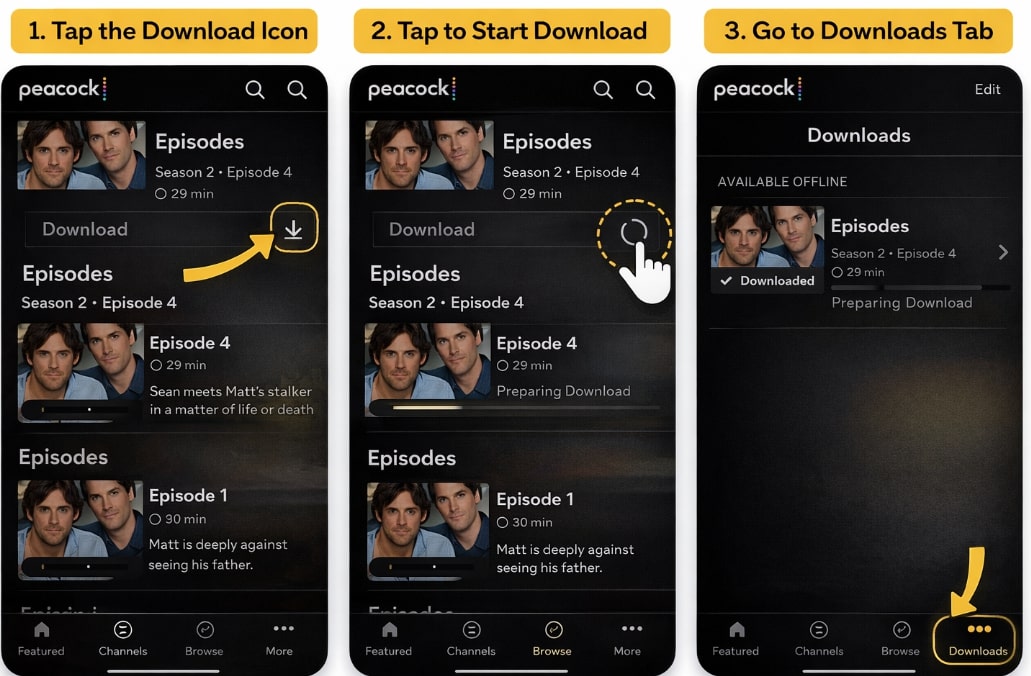
Download Shows on Peacock
Pro-Tips to Avoid Common Frustrations
Based on hands-on experience, here are a few “wish-I’d-known-this” tips to save you from common headaches:
- Warning: Do NOT press play on a download just to “test” if it works before a trip. The moment you press play, the strict 48-hour expiration timer begins, and the show could expire before you get a chance to watch it.
- Check Your Storage: A single season of a show in HD can easily take up 10-15 GB of space. Before you queue up downloads, go to your phone’s settings and confirm you have enough free space to avoid failed or incomplete downloads.
- Use Wi-Fi: Always download over a stable Wi-Fi connection. Downloading multiple episodes over cellular data can consume your entire monthly data allowance in a surprisingly short amount of time.
This official method is convenient for short-term needs. However, the downloaded files are not permanent and come with several important limitations.
Why Peacock Downloads Disappear?
Many users are confused when saved videos vanish, or the download button is missing entirely. These are not app glitches; they are intentional restrictions built into the service. Understanding these rules is crucial for avoiding frustration.
The core reason behind these limits is Digital Rights Management (DRM). Studios and content owners require streaming services like Peacock to use DRM to protect their work from unauthorized distribution. This means your downloads are encrypted downloads tied directly to your account and device—they are not simple video files you can move or share.
Here are the primary download restrictions on Peacock you will face:
- Title Availability: The most common issue is a missing download icon. This simply means Peacock’s licensing agreement for that specific show or movie does not permit offline downloads. Availability can change as these agreements are renewed or expire.
- Device & Plan Limits: As stated, downloads are exclusive to the Peacock Premium Plus plan and are strictly limited to the iOS and Android mobile apps. There is no official way to download content on a PC, Mac, or smart TV.
- The Critical Expiration Rule: This is the single most frustrating limitation for travelers. An unwatched download expires 30 days after you save it. Once you press play, a new, much shorter timer starts: you have just 48 hours to finish watching before it expires. After that, you must reconnect to the internet to “renew” the download license. This makes the feature impractical for long-term storage or watching a series over an extended vacation.
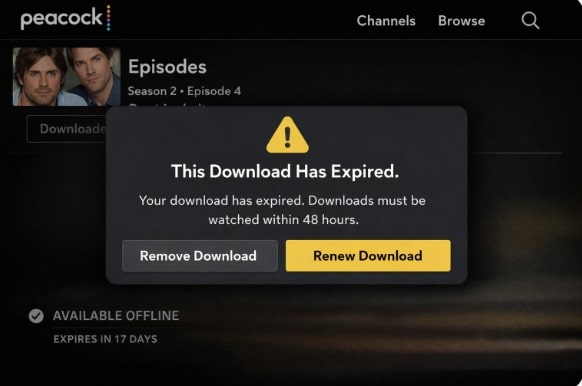
The Download Has Expired
In-App Downloads vs. a Permanent Solution
The official download method is designed for temporary convenience, but its restrictions create problems for users who want more control. If you want to build a personal offline library or watch on a laptop, you need a different tool.
Let’s compare the in-app feature against a dedicated software solution like Keeprix Downloader.
| Feature | Official Peacock App Download | Keeprix Downloader (Permanent Solution) |
| Device Compatibility | iOS & Android Phones/Tablets Only | Windows & Mac Computers |
| Video Permanence | Expires (30 days or 48 hours after play) | Permanent (Saved as MP4/MKV files) |
| Content Availability | Limited to specific licensed titles | Downloads any video available on Peacock |
| File Type | Encrypted, in-app only file | Standard, DRM-free MP4 or MKV |
| Offline Experience | Ad-free (with Premium Plus) | Ad-free (ads are automatically removed) |
The choice depends entirely on your needs. If you just need a movie for a single flight, the in-app feature may suffice. If you want to save a full series to watch on your laptop over several weeks without worrying about expirations, a dedicated tool is the superior method.
How to Download Peacock Movies and Shows on a PC or Mac
For users who need to overcome the mobile-only and expiration-date restrictions, a professional software tool provides a direct and reliable solution. Keeprix Downloader is a paid software designed specifically to solve these core pain points, allowing you to download Peacock episodes on PC or Mac as permanent files.
This tool works by using a built-in browser to access the Peacock video stream and then saves it as a standard, high-quality MP4 or MKV file on your computer. Because the final files are DRM-free, they never expire and can be transferred to any device, including external hard drives, tablets, or phones.
Simple Procedure for Permanent Downloads
Step 1. Install the Software: First, download and install Keeprix Downloader onto your Windows or Mac computer.
Step 2. Log into Peacock: Launch the application. From its main screen, select Peacock from the list of streaming services and log into your account within the tool’s secure, built-in browser.
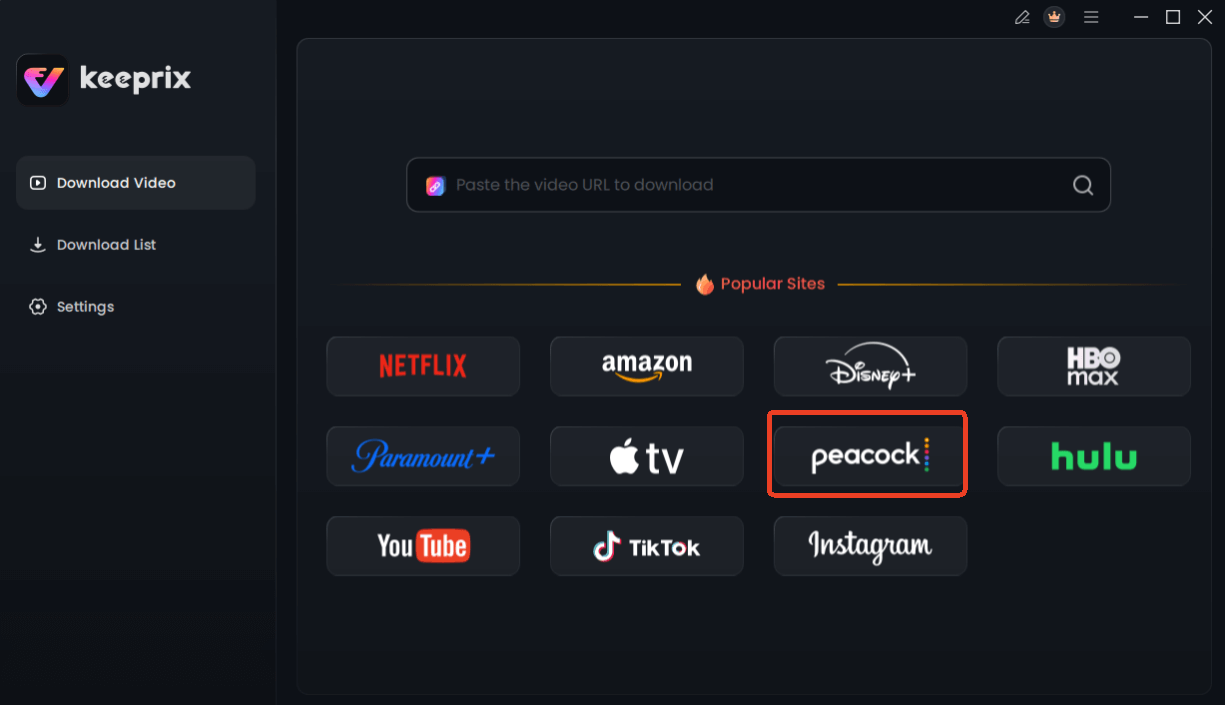
Choose Peacock in Keeprix Downloader
Step 3. Find Your Video: Navigate to the show or movie you want to save, just as you would on the Peacock website.
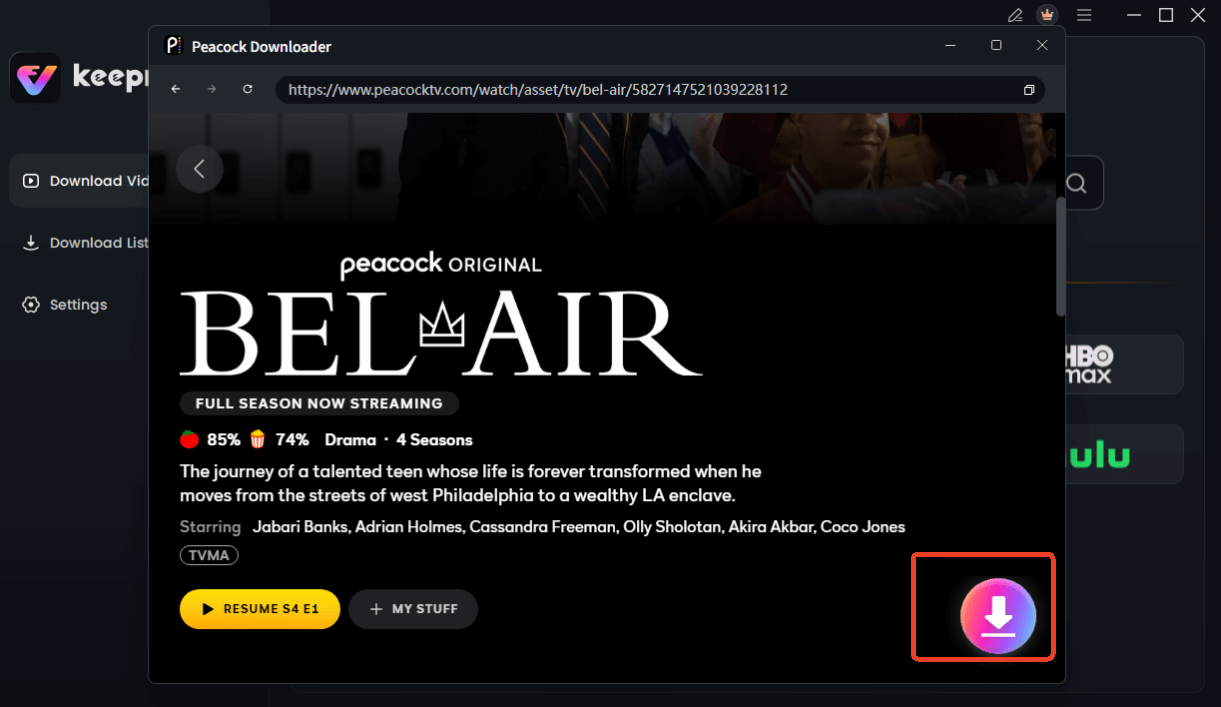
Choose Peacock Video to Download
Step 4. Download and Save: Play the video. The software should automatically detect it and display a download panel. Here, you can select your preferred video quality (up to 1080p), audio tracks, and subtitles. Click the “Download” button to save the video directly to your hard drive.
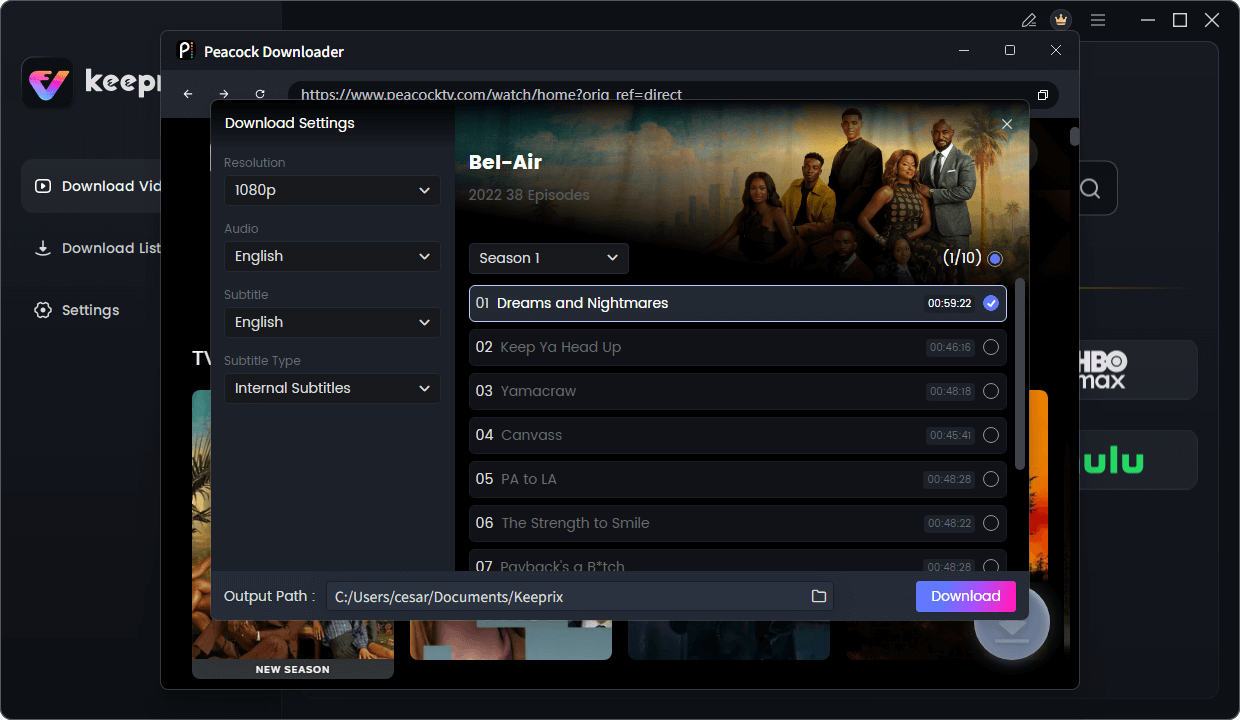
Configure Peacock Download Settings
A Note on Reliability: While automatic detection is very reliable, streaming sites occasionally update their code. If a download panel doesn’t appear, pasting the video’s URL directly into the tool’s search bar or restarting the application usually resolves the issue. Solutions like Keeprix are consistently updated by their developers to adapt to these changes, ensuring long-term functionality and providing customer support.
Frequently Asked Questions (FAQ)
Here are clear answers to the most common questions about Peacock offline viewing.
Q1. Can you download episodes on Peacock?
Yes, but with conditions. You must have the Peacock Premium Plus subscription and use the Peacock app on an iOS or Android device. Downloads are not available on computers or smart TVs via the official app.
Q2. Which Peacock plan allows offline downloads?
Only the highest-tier plan, Peacock Premium Plus, includes the ability to download content for offline viewing.
Q3. Why can’t I download episodes on my device?
This is usually due to one of two reasons: you either don’t have the required Premium Plus plan, or you are trying to download on an unsupported device like a laptop, PC, or smart TV. The feature is exclusive to the mobile app.
Q4. How long do Peacock downloads last?
Saved downloads expire 30 days after you save them. After you start watching an episode, you have 48 hours to finish it before it expires. You must then reconnect to the internet to renew the download.
Q5. Why is the download option missing for a show?
If you have the correct plan and device but don’t see the download icon, it means Peacock’s licensing agreement for that specific title does not permit it to be downloaded for offline viewing.
Q6. Can I download Peacock episodes on a PC?
Not with the official Peacock app. To save episodes on a Windows PC or Mac, you must use a third-party software solution like Keeprix Downloader, which saves them as permanent video files. [Internal Link Suggestion: Link the preceding phrase to ‘/how-to-manage-large-video-files-on-pc’]
Q7. Are Peacock downloads stored as video files?
No. Official in-app downloads are encrypted downloads protected by DRM. They can only be accessed and played from within the Peacock app and are not standard video files like MP4 that you can move or copy.
Sum It Up
You no longer need to worry about being uncertain about watching Peacock episodes offline. The constant worry about expiring content, the frustration of being locked to a mobile screen, and the confusion over missing download buttons can be permanently solved. A dedicated tool like Keeprix Downloader puts you back in control, allowing you to build a reliable, permanent library of your favorite shows and movies. Please save what you want, watch it on any device you own, and never worry about an expiration date again.
Ready to create a truly flexible offline collection? Explore the features of Keeprix Downloader and see how easy it is to save your favorite Peacock content forever.