How to Download The Rings of Power Seasons 1–3 Offline

The Lord of the Rings: The Rings of Power now has three seasons on Prime Video, but the complete third season is not available yet. As of November 20, 2026, Prime Video offers all 16 episodes from Seasons 1 and 2 and the first six episodes of Season 3. The final two episodes are scheduled for November 24.
This guide is about The Rings of Power series, not Peter Jackson’s The Lord of the Rings movie trilogy. Below, you can check the current episode availability, use Prime Video’s official download option, or download supported episodes as local MP4 files with Keeprix.
The Rings of Power: current season and episode availability
| Season | Total episodes | Availability on November 20, 2026 |
| Season 1 | 8 episodes | All episodes available |
| Season 2 | 8 episodes | All episodes available |
| Season 3 | 8 episodes | Episodes 1–6 available; Episodes 7–8 scheduled for November 24 |
| Complete series to date | 24 episodes | 22 episodes currently available; all 24 expected after November 24 |
Season 3 premiered on November 11, 2026, with its first four episodes. Episodes 5 and 6 arrived on November 18, while the final two episodes are scheduled for November 24.
If you are preparing the complete series for a trip, wait until the final two episodes appear on Prime Video before expecting all 24 episodes to be available for download.
Can you download all 3 seasons of The Rings of Power?
Yes, but only episodes already released and available through your Prime Video account can be downloaded.
Based on our November 20, 2026 Keeprix test, the software detected downloadable episodes across all three season pages currently listed on Prime Video. The final two Season 3 episodes were not included in the test because they had not yet been released.
The exact episodes, audio tracks, subtitles and download options available to you can depend on:
- Your country and local Prime Video catalog.
- Your Amazon Prime or Prime Video membership.
- The episode’s release status.
- The audio and subtitle tracks offered for the episode.
- The device and application used for the download.
- Current technical compatibility with the selected title.
Open the official Prime Video series page while signed in to confirm what is currently available through your account.
How to download The Rings of Power with the Prime Video app
Prime Video allows eligible subscription titles to be downloaded through its compatible applications. According to Amazon, official downloads are supported on:
- Amazon Fire tablets.
- iPhone and iPad.
- Android phones and tablets.
- Windows 10 and Windows 11 through the Prime Video app.
- macOS through the Prime Video app.
To download an available episode officially:
- Open the Prime Video app on a supported device.
- Search for The Lord of the Rings: The Rings of Power.
- Select the correct season.
- Choose an episode and select the Download icon, or use Download Season when that option is available.
- Open the Downloads section to watch the saved episode offline.
Official downloads remain managed inside the Prime Video app. They are not ordinary MP4 or MKV files and cannot be directly copied to a USB drive or opened in an unrelated media player.
How long do official Prime Video downloads remain available?
For many Prime Video subscription titles, Amazon generally gives you 30 days to start watching a downloaded video. After playback begins, you typically have 48 hours to finish it.
These are general Prime Video rules rather than a guarantee for every episode. The exact viewing period can vary according to the title, country and type of access. Check the information displayed in the Prime Video app for the episode you downloaded.
Amazon also states that:
- Not every subscription title is available for download.
- The same eligible title can generally be downloaded to two devices at one time.
- The maximum number of simultaneous downloaded titles varies by location and other factors.
- Access to subscription downloads ends if the associated membership expires or is canceled.
Amazon does not publish a universal limit of 15, 50 or 100 downloaded Prime Video titles for every account. The original draft’s fixed figures and “Ultra plan” reference were therefore removed. See our detailed guide to Prime Video download limits for more information.
Prime Video app or local MP4/MKV files: which should you choose?
The Prime Video app is suitable when you only need temporary offline viewing on a supported device. A local-file workflow is more useful when you need to organize supported episodes on a Windows or Mac computer or play them with another compatible media player.
| Feature | Prime Video app | Keeprix local file |
| Output | Download managed inside the Prime Video app | MP4 or MKV file |
| Playback | Prime Video app | Compatible local media player |
| Viewing period | Controlled by Prime Video and the title | Not controlled by the Prime Video app’s offline timer |
| Transfer to USB storage | Not supplied as a normal transferable video file | Possible when the drive and destination player support the file |
| Multiple episodes | Download Season may be available | Batch selection is supported for compatible episodes |
| Free use | Depends on the Prime Video subscription | 1 complete Prime Video download is available for testing |
How to download The Rings of Power as MP4 or MKV
Keeprix Prime Video Downloader is a desktop application for Windows 10/11 and macOS 12 or later. It can download supported Prime Video titles that you already have access to and save them as local MP4 or MKV files for personal, non-commercial offline viewing.
For Prime Video, the available download quality can reach up to 1080p when supported by the source, title, account, region and technical environment. Keeprix can also retain the audio tracks and subtitles available for the selected episode.
Step 1: Download and install Keeprix Video Downloader on your Windows or Mac computer.
Keeprix Prime Video Downloader
Download supported Rings of Power episodes as MP4 or MKV on Windows or Mac. Try 1 Prime Video download free.
Step 2: Open Keeprix, choose Prime Video and sign in with your own valid Amazon account.
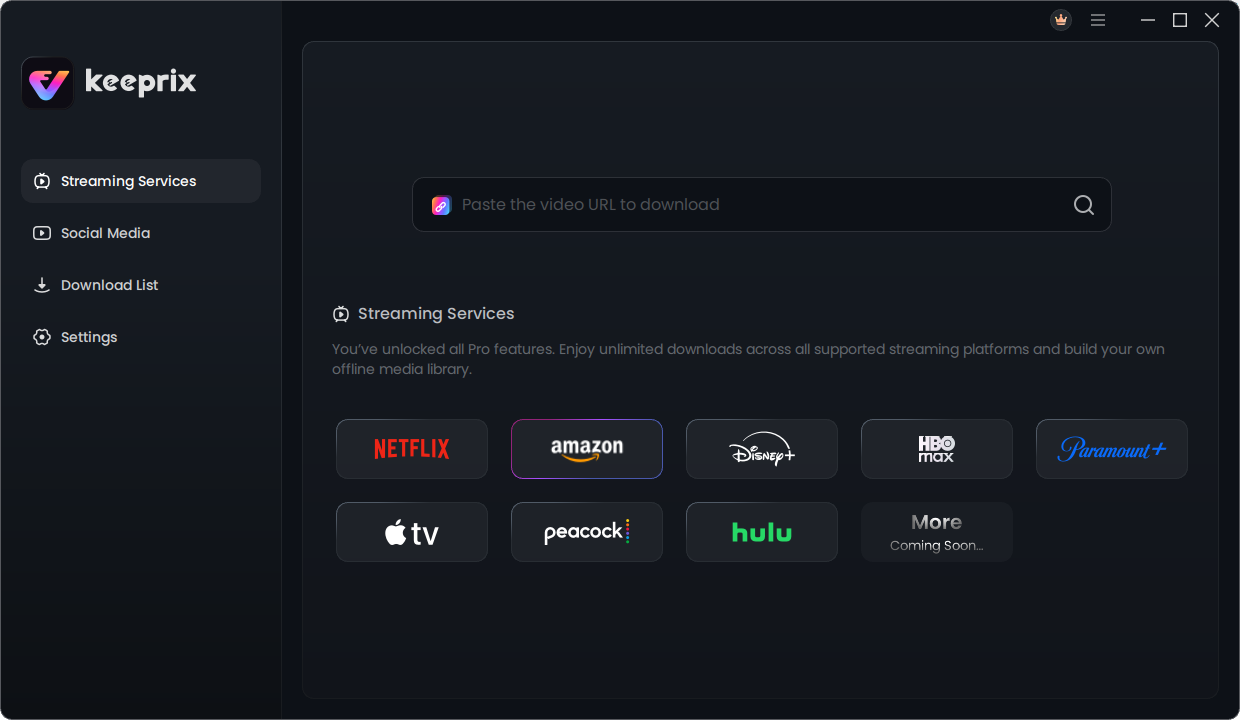
Download and install Keeprix Video Downloader
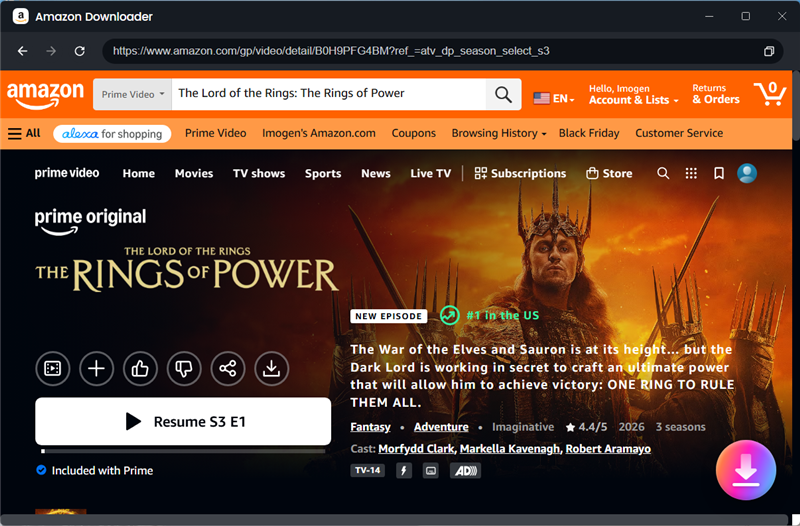
Step 3: Search for The Lord of the Rings: The Rings of Power, select the season and episode you want, and click the Download button.
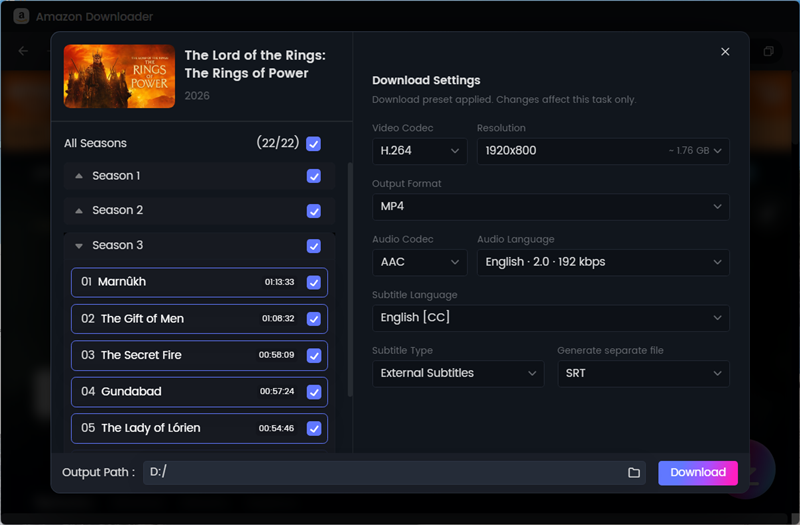
Step 4: Choose MP4 or MKV, then select the available video quality, audio track and subtitle options. Click Download to begin.
Step 5: Open the Completed list and play the downloaded episode locally to check the video, audio and subtitles.
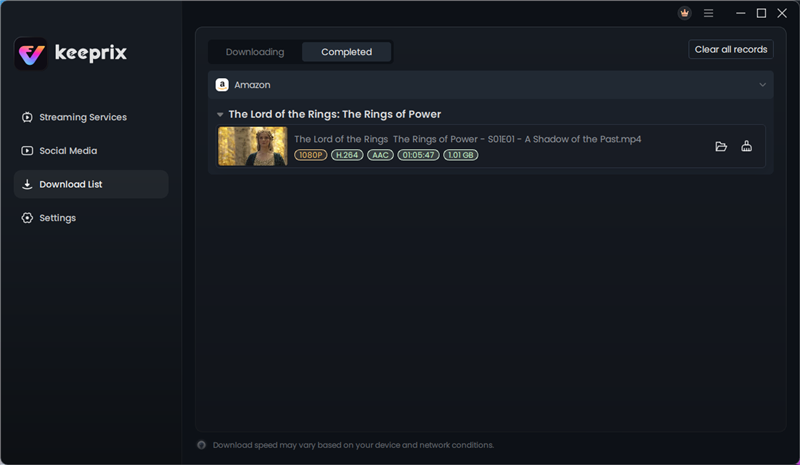
Keeprix provides 1 complete free download on Prime Video. Downloading additional episodes or using batch downloading for a larger selection requires the activated version.
How to prepare all 3 seasons for offline viewing
The first two seasons and the complete third season contain 24 episodes in total. Because individual episodes can run for approximately an hour or longer, downloading the complete series can require substantial storage.
Do not estimate the required space from the episode count alone. File size depends on:
- The selected video resolution.
- The duration of each episode.
- The video and audio codecs.
- The number of audio tracks.
- The selected subtitle format.
- Whether you choose MP4 or MKV.
Before downloading the entire series:
- Download one complete episode using your intended settings.
- Check its file size and playback quality.
- Estimate the remaining storage from that test file.
- Confirm that your destination drive has sufficient free space.
- Download the remaining episodes in manageable batches.
This approach is more reliable than adding all 24 episodes to the queue before checking the output.
Should you choose MP4 or MKV?
MP4 is usually the more convenient option for playback across laptops, tablets, smart TVs and common media players. MKV is useful when you want to manage multiple audio or subtitle tracks and your destination player supports the format.
| Use case | Recommended format |
| General playback across different devices | MP4 |
| Multiple audio and subtitle tracks | MKV |
| Transfer to a smart TV using USB | Usually MP4, after checking the TV’s supported codecs |
| Playback with VLC or another compatible desktop player | MP4 or MKV |
The container format does not guarantee compatibility by itself. Your television, tablet or media player must also support the video and audio codecs included in the file.
Can you move The Rings of Power episodes to a USB drive?
Official Prime Video downloads are managed inside the application and are not provided as standard files that can be freely copied to a USB drive.
A local MP4 or MKV file can be transferred to USB storage when the file system and destination player are compatible. Before transferring an entire season:
- Check whether the television or media player supports MP4 or MKV.
- Confirm support for the video and audio codecs.
- Test one complete episode on the destination device.
- Remember that FAT32 cannot hold an individual file larger than 4 GB.
- Consider exFAT or NTFS only when supported by both the drive and destination device.
See our guide to moving supported Prime Video files to a USB drive for more details.
Frequently asked questions
Q1. Are all three seasons of The Rings of Power available?
Q2. How many episodes are in all three seasons?
Q3. Can Prime Video officially download an entire season?
Q4. How long do Prime Video downloads last?
Q5. Can Keeprix download episodes from all three seasons?
Q6. Can I try downloading a Rings of Power episode for free?
Conclusion
The official app is suitable for temporary offline viewing, while Keeprix can download supported episodes that you can already access as local MP4 or MKV files on Windows or Mac, with Prime Video quality up to 1080p when the source permits and 1 complete free trial download.

Keeprix Video Downloader
- Download supported Prime Video offline.
- Save videos as local MP4 or MKV files.
- Keep the available audio tracks and subtitles.
- Try 1 complete Prime Video download free.