Why Crunchyroll Won’t Download: A Verified Fix Guide

There are few things more stressful than boarding a long flight, opening your tablet, and discovering that crunchyroll won t download your favorite anime episodes. You expect to have a season of entertainment ready for your trip, but instead, you are met with a “Syncing…” status that hangs indefinitely or a queue that refuses to move.
Whether you are dealing with crunchyroll wont download episodes on your iPad or seeing Crunchyroll offline download failed notifications on your Android device, the frustration is immediate. You aren’t just looking for software; you want the service you paid for to work as advertised.
Crunchyroll Won’t Download
If you are seeing any of the following symptoms, this guide is designed for you:
- Downloads are stuck at 0% or 99%.
- The orange “Syncing” icon appears but makes no progress.
- You receive a vague “There was an error” message.
- Previously downloaded episodes have suddenly disappeared.
- The download button is entirely missing for specific shows.
The Platform Reality Check: Mobile vs. Desktop
Before we dive into the settings, we must address a common source of confusion regarding where you can actually watch offline. Crunchyroll Offline Viewing is a Mobile-Only Feature. Currently, the official Sync/Download feature is exclusively available on Android, iOS, and Nintendo Switch.
If you are trying to find a download button on a Windows PC, Mac, or web browser, it does not exist. Crunchyroll discontinued its legacy Windows Store app that supported this, replacing it with a web-wrapper app that requires an internet connection. If you are on a desktop and need to download episodes, skip directly to the section on Professional Software Solutions later in this guide.
If you are on a mobile device and the feature is failing, follow the verified steps below.
Official App Fixes: How to Unstick Mobile Downloads
If you prefer to use the official app and are encountering issues like episodes stuck downloading, follow this technical checklist. These steps address the most common configuration errors that lead to can’t download on crunchyroll scenarios on iOS and Android.
1. Verify Your Premium Status
Not all accounts support offline viewing. Ensure you are subscribed to the Mega Fan or Ultimate Fan tier. The standard “Fan” tier does not include offline capabilities, which is the most frequent reason for the download option missing entirely.
- Check: Go to Account > Membership Plan. If it says “Fan,” you must upgrade to unlock downloads.
2. The “Wi-Fi Only” Toggle (Most Common Cause)
By default, Crunchyroll protects your data plan by restricting downloads to Wi-Fi. If you are trying to download using cellular data—or if the app thinks your public Wi-Fi is a metered connection—the download will pause.
How to fix it:
- Open the Crunchyroll App settings.
- Locate Sync over Wi-Fi only.
- Toggle this OFF if you have a strong data plan, or ensure your Wi-Fi connection is stable.
- Restart the app to trigger the queue.
3. Clear Offline Data Cache (Don’t Reinstall Yet)
Corrupted temporary files often cause downloads to hang at 0%. You can force a reset of the download manager without reinstalling the entire app. This is often the most effective fix for an anime download issue on mobile devices.
For Android/iOS:
- Open the Crunchyroll App.
- Navigate to Settings > My Account.
- Select Clear Offline Data (on some versions, this is under the “General” or “Need Help?” section).
This will remove existing downloads, but it often clears the “invisible blockage” stopping new ones.
4. Storage Location: Internal vs. SD Card (Android Users)
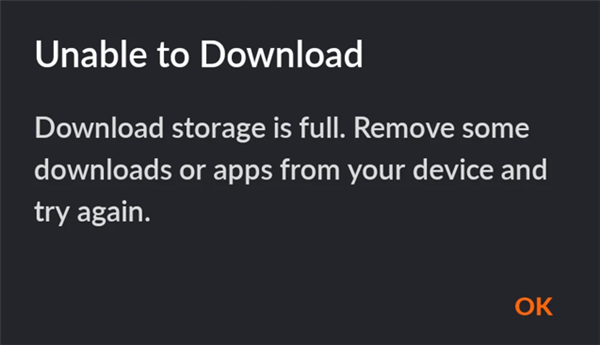
If you are using an Android tablet or phone, Crunchyroll can be finicky about saving to SD cards. If your SD card has a slow write speed (Class 4 or lower) or is slightly corrupted, the download will fail silently.
Crunchyroll Not Downloading – Full Storage
- The Fix: Go to Settings within the app and change the download location to Internal Storage. Internal storage is faster and more stable. If the download works on internal storage, your SD card is likely the culprit.
- Space Buffer: Ensure you have at least 2GB of free space beyond the file size. The app needs buffer space to unpack and encrypt the video file.
5. Check “Background App Refresh”
On iOS, if you exit the app while a download is starting, the operating system might pause the process to save battery.
- iOS: Go to iPhone Settings > Crunchyroll > Toggle Background App Refresh to ON.
- Android: Ensure Battery Saver mode is OFF, as this restricts background data usage.
The “Hidden” Cause: Licensing Restrictions and Expiration Rules
Sometimes, the app is working perfectly, but the download still fails or disappears. This is usually due to intentional licensing rules, not bugs.
The “Disappearing Download” Phenomenon
Downloads on Crunchyroll are not permanent files; they are temporary rentals.
- 7-Day Rule: Unplayed downloads expire after 7 days if you do not connect to the internet.
- 48-Hour Rule: Once you press “Play” on an offline file, a 48-hour timer starts. You must finish watching within that window.
If you are prepping for a trip, do not press “Play” to check the file until you are actually ready to watch. Doing so triggers the 48-hour countdown. If the timer expires while you are mid-flight, the video will lock.
Regional Licensing Blocks
If the download button appears for Naruto but is missing for One Piece, you are encountering a regional restriction. Some licensing agreements grant Crunchyroll streaming rights but specifically withhold offline download rights for certain regions. This is a legal restriction, and no amount of troubleshooting the app will fix it.
Alternative Solution: Archiving for PC & Mac Users (Keeprix)
As mentioned earlier, official downloads are impossible on laptops. However, if you want to watch anime on a generic media player (like VLC) on your MacBook Air, or if you want to avoid the strict 48-hour expiration timers on your tablet, third-party software is the only workaround.
Tools like Keeprix Downloader are designed for users who want to build a permanent library rather than relying on temporary offline syncing.
Why Consider a Downloader?
- Device Independence: Since Crunchyroll doesn’t support PC downloads, this allows you to save the file on your computer and transfer it to any device (iPad, Android, Laptop) without needing the Crunchyroll app.
- Permanent Access: Files downloaded via Keeprix do not have expiration dates. You can watch them a month from now without needing to renew a license online.
- Batch Efficiency: You can queue an entire season to download overnight, rather than manually tapping sync on every episode on your phone.
While the official app is the best way to watch on the go for most users, Keeprix solves the problem of Crunchyroll download not working for desktop users or those who want permanent backups of their favorite series.
FAQ: Common Questions About Crunchyroll Offline Viewing
1. Why won’t Crunchyroll download episodes on my laptop?
Crunchyroll does not support offline viewing on Windows or macOS browsers/apps. The feature is exclusive to Android, iOS, and Nintendo Switch. To watch offline on a laptop, you would need third-party downloader software.
2. Why is the download button missing on my mobile app?
This is usually caused by having a basic “Fan” tier subscription (which lacks offline privileges). Check your account status and ensure you are on “Mega Fan” or “Ultimate Fan.” If your tier is correct, the specific show may be restricted from downloading due to licensing agreements.
3. Why does my download say “Syncing” but never finishes?
This is often a conflict with the “Sync over Wi-Fi only” setting while you are on cellular data, or a corrupted cache. Go to Settings > Clear Offline Data and try toggling Wi-Fi only mode off.
4. How do I fix the “License Expired” error while offline?
Unfortunately, you cannot fix this while offline. You must briefly connect to the internet (even a weak signal) to let the app “handshake” with the servers and renew the license.
5. Does Crunchyroll allow offline viewing on tablets?
Yes, offline viewing is fully supported on iPads and Android tablets. Ensure your storage is set to “Internal” rather than SD Card for the best performance on Android.
“If you choose to use third-party tools like Keeprix, ensure you are running the latest version. Streaming protocols change frequently, and software updates are required to maintain download functionality.”
Conclusion
Dealing with crunchyroll won t download errors is a major inconvenience, especially when you are counting on those episodes for travel. By understanding that this is primarily a mobile feature and adjusting your settings—specifically the Wi-Fi toggle and storage location—you can usually resolve the issue without a headache.
For those on mobile, the official app works well once configured correctly. However, if you are a desktop user or simply want to avoid the stress of expiration timers, exploring a dedicated downloader like Keeprix gives you full control over your library. Choose the method that fits your device, and enjoy your anime anxiety-free.