How to Download The Avengers Movie for Offline Watching

Key Takeaways
- The Avengers movie is available on Disney+. You can download it directly from the Disney+ app.
- You can also purchase or rent the film via digital storefronts such as Apple TV, Amazon Prime Video, and Fandango at Home, which offer robust offline download features.
- For a permanent download, use Keeprix Downloader to save The Avengers to MP4 or MKV without expiring.
- Most app download failures stem from insufficient device storage, outdated applications, or network interruptions.
Looking to watch Earth’s Mightiest Heroes save New York without an internet connection? Whether you are traveling or facing network issues, downloading The Avengers legally is incredibly straightforward. This guide covers everything you need to know to securely save and watch this iconic Marvel movie offline.
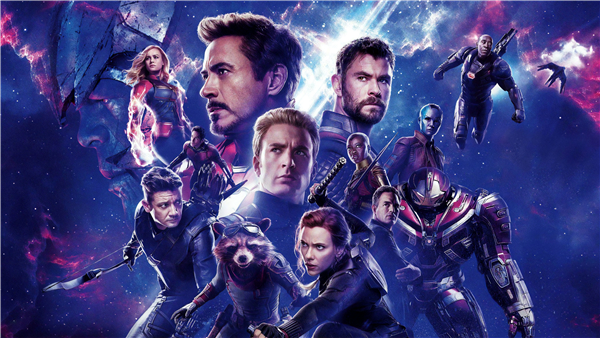
The Avengers Movie
Introducing The Avengers
Released in 2012 and directed by Joss Whedon, The Avengers (often titled Marvel’s The Avengers or Avengers Assemble in certain regions) is a monumental achievement in modern cinema. It served as the spectacular culmination of “Phase One” of the Marvel Cinematic Universe (MCU), successfully bringing together multiple superhero franchises into one cohesive, blockbuster narrative.
The film’s premise is both epic and accessible: when Loki, the Asgardian God of Mischief, acquires the Tesseract—a cube of immense, unfathomable energy—he plots to subjugate Earth with the help of an alien army known as the Chitauri. In response to this global threat, Nick Fury, the director of the peacekeeping agency S.H.I.E.L.D., initiates the “Avengers Initiative.” This unprecedented assembly brings together a legendary roster of heroes: Iron Man (Robert Downey Jr.), Captain America (Chris Evans), Thor (Chris Hemsworth), the Hulk (Mark Ruffalo), Black Widow (Scarlett Johansson), and Hawkeye (Jeremy Renner).
The Avengers was praised for its masterful balance of character development, witty dialogue, and groundbreaking visual effects. It shattered box office records, earning over $1.5 billion worldwide, and fundamentally changed the landscape of franchise filmmaking. Because of its massive cultural footprint, high replay value, and spectacular action sequences, it remains one of the most highly sought-after movies for fans wanting to keep a copy downloaded for offline enjoyment during flights, road trips, or commutes.
What Platform Is The Avengers Available On?
To secure a legal The Avengers download, you first need to know where the movie officially lives. Because the entertainment landscape is divided by licensing agreements, the platforms offering the film fall into two main categories: Subscription Video on Demand (SVOD) and Transactional Video on Demand (TVOD).
1. Subscription Streaming Platforms (SVOD)
As a cornerstone property of Marvel Studios, The Avengers is exclusively hosted on Disney+. Following Disney’s acquisition of Marvel, the company consolidated nearly all of its superhero content onto its proprietary streaming service. If you have an active Disney+ subscription, you have immediate access to stream the movie in up to 4K Ultra HD, complete with IMAX Enhanced aspect ratios.
2. Digital Video Marketplaces (TVOD)
If you do not want to commit to a monthly Disney+ subscription, you can purchase or rent the movie individually. When you purchase the film digitally, it is added to your permanent digital library. Available platforms include:
- Apple TV / iTunes: Available for digital purchase and rental in high definition and 4K.
- Amazon Prime Video: You can buy or rent the movie directly through Amazon’s digital storefront, regardless of whether you have an Amazon Prime membership.
- Fandango at Home (formerly Vudu): A popular digital retailer that frequently bundles Marvel movies.
- Google Play Movies & TV / YouTube Movies: Widely accessible for Android users and available directly through the YouTube interface.
Can You Download The Avengers Movie?
Yes, you can absolutely download The Avengers movie, provided you are doing so through legal, authorized channels.
It is important to understand how modern movie downloads work. Due to DRM protection designed to prevent piracy, you cannot download a raw .mp4 or .mkv video file of the movie directly to your computer’s hard drive to share or manipulate.
Instead, downloading in the modern context means caching the encrypted video files locally within an official, secure application. When you initiate The Avengers download via an app like Disney+ or Apple TV, the app stores the movie data securely on your device. You can then open the app and press play without needing a Wi-Fi or cellular data connection.
There are two distinct types of legal downloads:
- Subscription Downloads: If you use Disney+, the downloaded movie will remain on your device as long as your subscription remains active and the device connects to the internet at least once every 30 days to verify the license.
- Purchase Downloads: If you buy the digital movie on Apple TV or Amazon Prime Video, you own the digital license. You can download and delete the movie file from your devices as many times as you like, indefinitely.
How to Download The Avengers on All Devices
Depending on your hardware, the process for downloading the movie varies slightly. Here are the detailed, step-by-step instructions for downloading The Avengers across your favorite devices.
1. Downloading on Mobile and Tablets (iOS & Android)
The most common way to watch offline is via a smartphone or tablet using the Disney+ app.
Step 1: Download and open the official Disney+ app from the Apple App Store or Google Play Store.
Step 2: Log in to your premium, ad-free Disney+ account.
Step 3: Use the magnifying glass icon at the bottom of the screen to search for “The Avengers.”
Step 4: Tap on the movie poster to open its detail page.
Step 5: Beneath the “Play” button, look for the Download icon (an arrow pointing down to a horizontal line). Tap it.
Step 6: A progress wheel will appear. Once it turns into a checkmark, the download is complete. You can access the movie anytime by tapping the “Downloads” tab at the bottom of the app’s menu.
Pro Tip: To save storage, go to App Settings > Download Quality and select “Standard” instead of “High.”
2. Downloading on Mac & Windows PC
As Disney doesn’t provide the download feature for Windows and Mac computers, you should purchase the download separately from online stores. However, some users want to download without extra payment. That’s where Keeprix Disney+ Downloader exists. It helps download movies and shows from Disney+ in standard MP4 or MKV formats, ensuring permanent storage on your computer.
Steps to download The Avengers with Keeprix Downloader:
Step 1. Download and install Keeprix Downloader on your computer.
Step 2. Launch the software and choose Disney+ from the main screen.
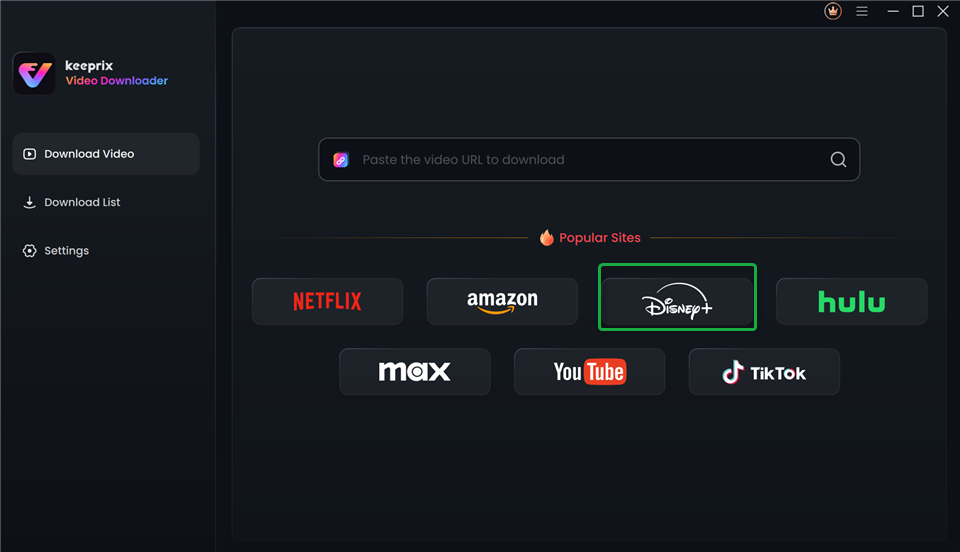
Choose Disney Plus in Keeprix Video Downloader
Step 3. Log in to your Disney+ account. Then search for The Avengers in the built-in browser.
Step 4. Click the download button to save it directly.
After downloading, you can access the offline video in your local folder. It can be played on any media player without restrictions.
Why Can’t I Download The Avengers?
When using the official apps, you might occasionally run into roadblocks when trying to secure the Avengers download. If your download is failing or the button is missing entirely, check for these common issues:
1. You Are on an Ad-Supported Subscription Plan
Streaming platforms are increasingly restricting offline features to their premium tiers. If you subscribe to the Disney+ Basic (With Ads) plan, the download limit restricts you. You must upgrade to the Disney+ Premium (No Ads) tier to unlock offline viewing.
2. Insufficient Device Storage Space
High-definition movies take up a massive amount of storage. A standard HD download of The Avengers can easily consume 2 GB to 4 GB of space, and higher quality settings will demand even more. Check your phone or computer’s internal storage settings to ensure you have at least 5 GB of free space before initiating the download.
3. Exceeding Device Limits
Licensing agreements strictly limit how many devices can hold downloaded content simultaneously. Disney+ currently allows downloads on up to 10 supported mobile devices. If you have hit this cap, you will receive an error message and must delete all downloaded content from an older, unused device before you can download the movie onto a new one.
4. Geographical Licensing Restrictions
If you travel internationally and attempt to initiate a download, you might find the movie unavailable. Due to regional broadcasting rights, a movie available in the US might temporarily disappear from your app if you connect to a network in a country where a different distributor holds the streaming rights. It is highly recommended to download the movie before you leave your home country.
5. App Glitches or Outdated Software
Sometimes, DRM background checks fail if your application is running an older version. Head to your device’s app store to ensure you are running the latest version of the streaming app. If it is updated and still freezing, clearing the app’s cache or fully reinstalling the app often resolves the glitch.
FAQs About The Avengers
1. Is Marvel’s Avengers still downloadable?
If you are referring to Marvel’s Avengers video game developed by Crystal Dynamics, it was officially delisted from all digital storefronts (PlayStation, Xbox, Steam) in September 2023 due to the end of its development support. However, if you purchased the game before it was delisted, it remains permanently in your digital library and is still fully downloadable and playable today.
2. Where can I watch the Avengers full series?
The entire Infinity Saga—which includes The Avengers (2012), Avengers: Age of Ultron (2015), Avengers: Infinity War (2018), and Avengers: Endgame (2019)—is available to stream in one place on Disney+.
3. Is the movie Avengers on Netflix?
No, The Avengers is no longer on Netflix. While Netflix temporarily held the rights to some Marvel films years ago, the Walt Disney Company reclaimed all of its licensing rights to consolidate its Marvel properties exclusively on the Disney+ platform.
4. What app has all the Avengers movies?
The Disney+ app is the only subscription service that hosts the complete collection of Avengers films, alongside the wider catalog of Marvel Cinematic Universe standalone movies and spin-off television series. Alternatively, apps like Apple TV or Amazon Prime Video have all the movies available, but they require individual purchases.
5. Can you download The Avengers to a MacBook?
Yes, you can easily download The Avengers to a MacBook. The most efficient way is to purchase or rent the film via the Apple TV app natively installed on macOS. Once purchased, simply navigate to your library and click the cloud download icon to save the movie directly to your MacBook’s storage for offline playback.
Conclusion
Securing The Avengers download for offline watching is incredibly easy when utilizing official and legal platforms like Disney+, Apple TV, or Amazon Prime Video. By ensuring you have adequate storage space, an ad-free subscription tier, and the correct app for your specific device, you can bring Earth’s Mightiest Heroes with you anywhere you go. Choose your preferred platform today, download the movie, and enjoy the cinematic masterpiece that defined a decade of pop culture.