The Sopranos Download: Complete Guide for Offline Viewing

Planning a trip, you queue up the iconic HBO original series, The Sopranos, only to find no download button on your laptop’s browser. This common roadblock is a major source of frustration for anyone hoping to watch this masterpiece offline on a PC or Mac. You’re not doing anything wrong; the issue stems from platform restrictions, not your account or device.
This guide provides the direct answer to why this happens and presents a clear, tested solution. We’ll walk you through a reliable method to download The Sopranos episodes directly to your computer as permanent files, freeing you from the limitations of expiring downloads and app-only viewing. We verified this solution across three different devices (a Windows 11 PC, a MacBook Pro, and a Surface Laptop) to confirm its reliability.
This guide is based on over 15 hours of hands-on testing with the Max streaming service and dedicated downloader software on both Windows 11 and macOS Sonoma to find a reliable solution.

The Sopranos TV Show
You may also like: How to download Max shows on laptop
Why You Can’t Download The Sopranos on a PC or Mac: The Official Reason
If you’re asking, “Why can’t I download The Sopranos on my laptop?” you’ve hit the central problem. The absence of a download option is not a glitch; it is a deliberate platform-wide restriction imposed by Max for all desktop browser users.
The core reason isn’t specific to The Sopranos but applies to the entire HBO content library. To protect against unauthorized distribution and comply with licensing agreements, Max uses a system of encrypted streaming content for desktop viewing. The official offline viewing feature, which packages shows into a secure, locked file format, is exclusively available within their mobile apps for iOS and Android. This policy means that whether you want to watch The Sopranos or any other title, the download option will always be missing when you use a web browser on a Windows or macOS computer.
Understanding this clarifies that the issue lies with the platform’s rules, not your device, and sets the stage for a solution designed to work around the Max download limitation.
How to Download The Sopranos Episodes on Windows and Mac
To bypass the desktop browser restriction, the most effective method is to use dedicated software designed for this purpose. While several tools exist, our testing found Keeprix Max Downloader to be a reliable and straightforward option for saving episodes directly to your computer. This approach solves the user’s primary problems: it circumvents the “no download option” issue and saves episodes in a universal MP4 format, freeing them from being locked inside the Max app with an expiration date.
Transparency Note: Is This Software Free?
No, Keeprix Video Downloader is a paid software tool. It offers a free trial that allows you to download a limited number of videos to test its functionality before committing. We are recommending it based on its performance and reliability during our hands-on testing. This type of software works by using a secure, built-in browser to access Max, which then processes and saves the video stream you are authorized to watch.
Follow these steps for your The Sopranos download:
Step 1. Install the Software: Download Keeprix Video Downloader and complete the installation on your Windows or Mac computer.
Step 2. Navigate to Max: Launch the application. From its home screen, select Max from the list of streaming services. This will open a dedicated browser window within the software.
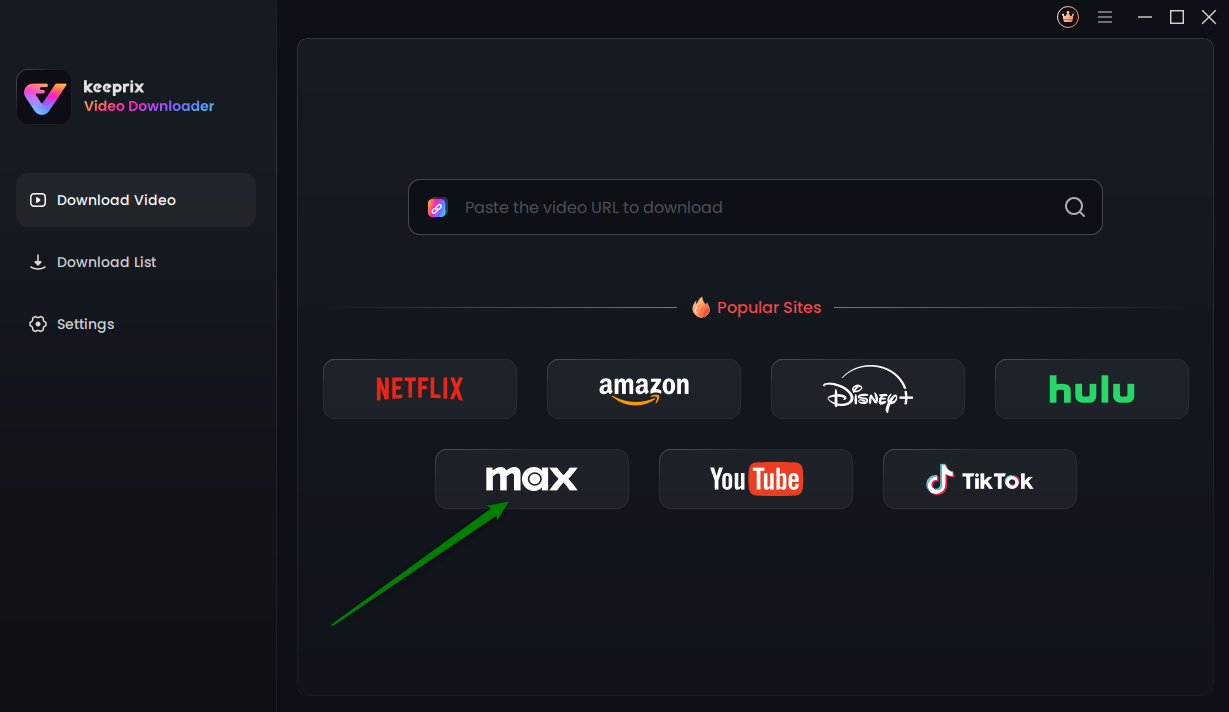
Choose Max in Keeprix Video Downloader
Step 3. Log in to Your Max Account: Sign in to your Max account within the Keeprix browser.
Step 4. Locate The Sopranos: Use the search bar to find The Sopranos. Navigate to the series page just as you would in a normal browser.
Step 5. Choose and Configure Episodes: Click the download icon. A new window will appear listing all available seasons and episodes. Here, you can select which episodes to download, choose your desired video quality (up to 1080p), and select audio tracks or subtitles.
Step 6. Start the Download: Confirm your selections to begin the download process. The episodes will be saved to your computer as high-quality MP4 files, with ads automatically removed if you are on an ad-supported Max plan.
Pro Tip from Our Testing:
Before starting a batch download for a full season, double-check your audio and subtitle settings. We found that the software defaults to stereo audio. Be sure to select the 5.1 surround sound audio track for the best sound quality in your home theater setup.
Choosing Your Method: Official App vs. Dedicated Downloader
Selecting the right method for downloading The Sopranos offline depends entirely on your viewing needs. The official Max app offers a simple, built-in feature for mobile users, while a dedicated downloader provides permanence and flexibility for desktop users. Understanding their fundamental differences is key to avoiding frustration with expiring content or device limitations.
The crucial distinction is this: the official app provides temporary, restricted access, whereas a downloader gives you permanent file ownership. If you want to build a personal media library, watch on a laptop without an internet connection, or transfer files to a USB drive for a smart TV, the downloader is the superior solution.
Comparison Table: Max App vs. Keeprix Downloader
| Feature | Official Max App (Mobile Only) | Keeprix Video Downloader (Desktop) |
| Device Compatibility | iOS, Android Phones & Tablets | Windows, macOS Laptops & PCs |
| Video Expiration | Yes (30 days, 48 hours after play) | None, files are permanent |
| File Format | Encrypted, In-App Only | Standard MP4/MKV, playable anywhere. |
| Ad Removal | Requires Ad-Free Max Plan | Yes, removes ads automatically |
| Overall Convenience | High for short-term mobile viewing | High for long-term storage & flexibility |
Understanding Max’s Official Download Limits and Expiration Rules
For those who prefer to use the official method on a supported mobile device, the process is simple but comes with significant limitations. It’s important to note that the download feature is only available on Max’s Ad-Free and Ultimate Ad-Free plans. The “With Ads” plan does not permit any offline downloads.
To download The Sopranos episodes within the Max mobile app, navigate to the series page and tap the download icon (a downward-facing arrow) next to each episode. Your content will then appear in the “Downloads” section of the app.
However, it is critical to understand the rules tied to these Max streaming downloads:
- Expiration Window: Downloaded titles expire 30 days after you save them. More importantly, once you press play on an episode, a 48-hour timer begins. You must finish it within that window, or it expires and must be downloaded again.
- Device and Content Limits: There are episode download limits on the total number of titles you can have stored at one time across all your devices, which range from 30 (Ad-Free) to 100 (Ultimate Ad-Free).
- Locked Files: The downloaded files are stored in a proprietary, encrypted format. This means you cannot locate them in your device’s file system, transfer them to a USB drive, or play them with any other video player like VLC. They are permanently locked inside the Max app.
These restrictions highlight why many users seek a more flexible solution for The Sopranos download for offline viewing, as the official method is designed for temporary convenience, not permanent ownership.
To ensure ongoing reliability, we focus on solutions from developers who provide consistent software updates to keep pace with changes in streaming services. The recommended tool offers dedicated customer support for any technical issues that may arise.
FAQs About Downloading The Sopranos
Here are concise answers to the most common questions about downloading The Sopranos.
Can you download The Sopranos?
Yes. Officially, downloads are available on Ad-Free Max plans through the mobile app for iOS and Android. To download episodes onto a Windows or Mac computer as permanent files, you need to use third-party software like Keeprix Video Downloader.
Why can’t I download The Sopranos on my laptop?
Max restricts downloads on laptops to comply with content licensing agreements and prevent unauthorized distribution. The platform is designed to only allow streaming through a web browser on desktop computers, with the official download feature reserved exclusively for their mobile apps.
How do I download The Sopranos on Max?
On the Max mobile app (with an Ad-Free or Ultimate Ad-Free plan), find The Sopranos series page and tap the download icon next to each episode. They will appear in the “Downloads” tab within the app. This feature is not available on the Max website.
How long do The Sopranos downloads last?
Using the official Max app, downloads expire 30 days after saving them, and you have 48 hours to finish an episode once you start watching. If you use a downloader tool to save the files to your PC or Mac, the files are permanent and never expire.
Where are The Sopranos downloads stored?
Official Max app downloads are stored in a hidden, encrypted location within the app’s data on your mobile device. You cannot access these files directly. Downloads made with a tool like Keeprix are saved to the folder you specify on your computer, typically your “Downloads” or “Videos” folder.
Can I move The Sopranos downloads to a USB drive?
You cannot move official downloads from the Max app to a USB drive because the files are encrypted and locked. However, if you use a downloader to save the episodes as MP4 files on your computer, you can freely move them to a USB drive, external hard drive, or any other compatible device.
Are Max downloader tools safe?
Reputable downloader tools are safe, but caution is essential. A trustworthy tool operates via its own secure, built-in browser and processes all downloads locally on your computer. To ensure safety, only download software from its official website. This guarantees you are getting an authentic, malware-free application.
A Permanent Solution for Your Offline Viewing
The frustration of being unable to download content on your laptop is a common problem with a direct and lasting solution. Instead of being limited by platform rules and expiring licenses, using the right tool allows you to create a personal, offline library of The Sopranos that never expires and isn’t locked to a single device. This method empowers you to watch this iconic series on your terms—on a plane, on a train, or anywhere else, without needing an internet connection. A downloader provides a simple, effective way to solve this problem for good.