Downloading a video is only part of the job. If the file is saved as WebM, has no audio, or cannot be opened on your phone, TV, or video editor, you still do not have a usable MP4.
This guide explains how to download YouTube videos to MP4, how to choose between H.264 and AV1, and what to do when YouTube provides video and audio as separate streams. You will also learn how to handle 4K and 8K videos, Shorts, playlists, oversized files, and MP4 compatibility problems.
Download only videos you created, content you have permission to save, or material whose license allows downloading. Do not redistribute or commercially use copyrighted videos without authorization.
Which MP4 Settings Should You Choose?
For the widest device compatibility, use these settings:
Container: MP4
Video codec: H.264
Audio codec: AAC
Resolution: 1080p or lower for general use
Frame rate: Same as the source
Audio: Stereo AAC
Fast start: Enabled when available
Choose H.264 and AAC if you want the video to play on an iPhone, iPad, Android device, Windows PC, Mac, smart TV, or common video editor.
AV1 can provide better compression at high resolutions, but it may not work smoothly on older devices or in some editing programs. For 4K or 8K downloads, check device compatibility before choosing AV1.
How to Download Your Own YouTube Videos as MP4
YouTube allows creators to download videos they have uploaded to their own channels.
Follow these steps:
- Sign in to YouTube Studio.
- Select Content from the left-hand menu.
- Find the video you want to save.
- Open the Options menu next to the video.
- Select Download.
According to YouTube Help, your own uploaded videos may be downloaded as MP4 files in 720p or 360p, depending on the video and its availability.
This method does not let you download another creator’s video as a regular MP4 file. YouTube Premium downloads are also stored for offline playback inside the YouTube app rather than exported as normal MP4 files.
How to Free Download YouTube Video to MP4
If you need a local MP4 file for content you are permitted to download, Keeprix Video Downloader provides a URL-based YouTube download option.
Keeprix YouTube downloads are free. Supported videos can be saved in up to 8K when that resolution is available from the original source. Actual output options may vary according to the video, source streams, region, and technical availability.

Free YouTube Downloader
- Free download videos on Windows & Mac.
- Save streaming videos as local MP4/MKV files.
- Batch download streaming videos and TV series.
- Watch videos offline, no ads, no interruption.
Step 1: Download and install the free Keeprix YouTube Downloader app on your Windows or Mac computer.
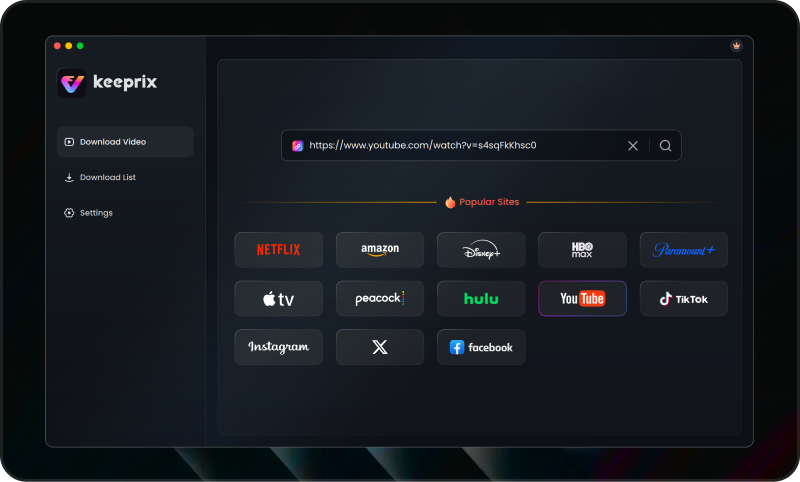
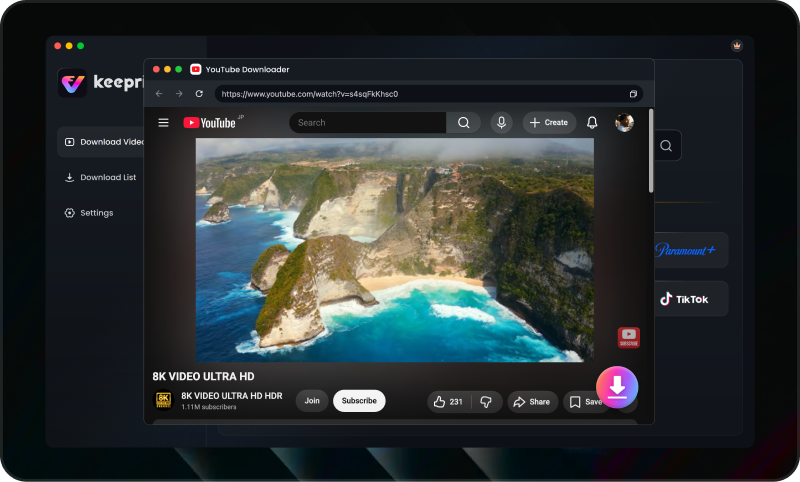
Step 2: Copy the URL of the YouTube video you want to save, and paste it into Keeprix (or navigate to the video using the app’s built-in browser). Click on the Download button.
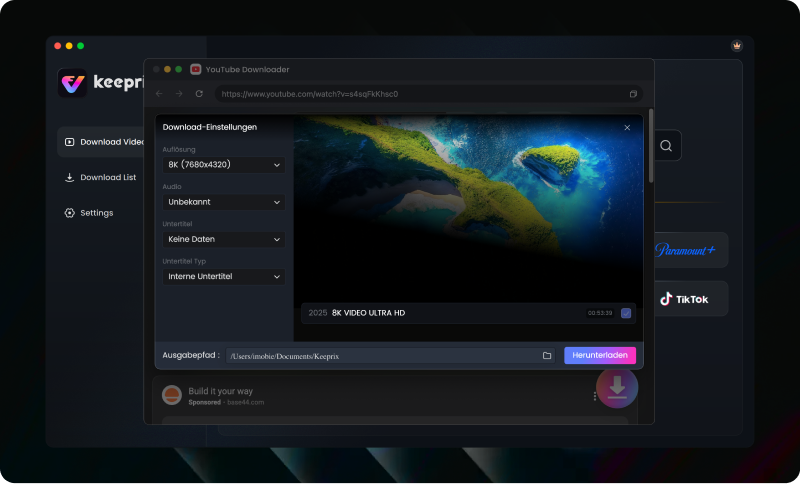
Step 3: Select MP4 as your preferred output format and choose your desired video resolution (up to 8K, depending on the source video quality). Click the download button. You can also use the batch feature to queue up entire playlists at once.
MP4 vs WebM: What Is the Difference?
MP4 and WebM are containers. A container holds video, audio, subtitles, and other media information, but it does not determine the video quality by itself.
MP4 commonly contains:
- 264, HEVC, or AV1 video
- AAC audio
- Broad support across phones, computers, TVs, browsers, and editors
WebM commonly contains:
- VP9 or AV1 video
- Opus or Vorbis audio
- Efficient delivery for web playback
- More limited compatibility with some older devices and editing software
MP4 is usually the safer option when compatibility matters. WebM can be useful when you want to preserve an efficient VP9 or AV1 stream and know that your player supports it.
Changing a filename from video.webm to video.mp4 does not convert the file. The container and codecs remain unchanged, so the renamed file may still fail to play.
H.264 vs AV1: Which Codec Should You Use?
H.264 is the most practical choice for general use.
Choose H.264 when:
- You want to play the file on an iPhone or iPad.
- You use QuickTime Player.
- You plan to copy the video to a smart TV or USB drive.
- You want to edit the video in widely used software.
- You need reliable playback on an older computer or phone.
Choose AV1 when:
- You want a smaller file at a similar visual quality.
- You are downloading high-resolution content.
- Your computer, phone, player, and editor support AV1.
- Compatibility with older hardware is not important.
An MP4 extension does not guarantee compatibility. For example, an MP4 containing AV1 video may fail on a device that can open H.264 MP4 files.
If you are unsure, select MP4 with H.264 video and AAC audio.
Why Does the YouTube MP4 Have No Audio?
A silent MP4 often means that only the video stream was downloaded.
YouTube commonly separates high-resolution video from audio. A downloader must retrieve both streams and combine them into one file. If that final step fails, the result may contain a picture but no sound.
Try these fixes:
- Confirm that an audio track is selected before downloading.
- Try a lower resolution, such as 1080p.
- Download the video again with MP4, H.264, and AAC selected.
- Update the downloader to its latest version.
- Check whether separate video and audio files were saved.
- Combine the existing streams with a media tool.
If you have an MP4 video file and a separate M4A audio file, they can be combined with FFmpeg: ffmpeg -i video.mp4 -i audio.m4a -c copy -shortest final-video.mp4
This process is called muxing. It combines the streams without re-encoding them, so it is usually fast and does not reduce video quality.
Can You Download YouTube Videos in 720p, 1080p, 4K, or 8K MP4?
Available resolution depends on the original video and the formats provided by YouTube.
720p: Suitable for mobile viewing, presentations, and smaller file sizes. It normally offers strong compatibility with older devices.
1080p: The best general-purpose option for computers, phones, TVs, and video editors. Choose MP4 with H.264 and AAC when compatibility is the priority.
4K: Provides more detail but requires more storage and processing power. YouTube may provide 4K through VP9 or AV1 streams rather than H.264.
8K: Keeprix supports YouTube downloads in up to 8K when an 8K source is available. However, 8K files can be very large and may not play smoothly without compatible hardware and software.
Which MP4 Format Works Best on Your Device
For iPhone and iPad:
Use MP4 with H.264 video and AAC audio. This combination offers the most reliable playback and transfer experience.
For Mac and QuickTime Player:
Use MP4 with H.264 and AAC. Some newer Macs support HEVC and AV1, but H.264 remains the safer option when the file needs to work on multiple devices.
For Windows:
MP4 with H.264 and AAC works with most players. VLC can open a broader range of containers and codecs if the default player cannot play the file.
For smart TVs and USB playback:
Check the TV specifications before downloading. MP4 with H.264 and AAC is generally the most widely supported combination.
For video editing:
Use MP4 with H.264 and AAC unless your editor recommends another format. If playback is uneven, convert the file with a constant frame rate before editing.
How Large Is a YouTube MP4 File?
File size depends on the bitrate, duration, resolution, frame rate, codec, and audio quality.
Approximate size for one hour of video:
720p: About 1–2.5 GB
1080p: About 2–5 GB
4K: About 7–16 GB
8K: About 16–36 GB or more
These are estimates rather than fixed limits. An AV1 file may be smaller than an H.264 file at a similar visual quality, while high-frame-rate content may require more storage.
Frequently Asked Questions
Q1: Can I download a YouTube video directly as MP4?
Creators can download their own uploads through YouTube Studio. For other content, download only when you own the video, have permission, or the download is otherwise authorized. When using a supported tool, select MP4 before starting the download.
Q2: Is MP4 better than WebM?
MP4 is generally better for compatibility. WebM can provide efficient VP9 or AV1 video but may not work with some devices, players, or editing programs.
Q3: What is the best YouTube MP4 format?
MP4 with H.264 video and AAC audio is the best general-purpose combination. It works across most phones, computers, TVs, and video editors.
Q4: Why are 4K YouTube videos downloaded as WebM?
YouTube frequently delivers higher-resolution video through VP9 or AV1 streams. These streams are often stored in WebM rather than a traditional H.264 MP4.
Q5: Can an MP4 file contain AV1 video?
Yes. MP4 is a container and can contain different codecs, including AV1. However, an AV1 MP4 may not work on devices that support only H.264 MP4 files.
Q6: Can I download YouTube videos in 8K?
Keeprix supports YouTube downloads in up to 8K when the original video and available source streams provide 8K. Actual options depend on the video and technical availability.
Q7: Are YouTube downloads free with Keeprix?
Yes. YouTube is included among Keeprix’s free social-platform download services. Available formats and resolutions still depend on the source video.
The Bottom Line
The most reliable way to download a YouTube video to MP4 is to choose the complete output format rather than looking only at the file extension. For maximum compatibility, select:
- MP4 container
- 264 video
- AAC audio
- 1080p or an appropriate source resolution
Use AV1 for efficient high-resolution storage only when your playback and editing devices support it. If a downloaded file is WebM, silent, or incompatible, convert or mux the existing streams instead of simply renaming the extension.
Keeprix can save supported YouTube videos for free in up to 8K when the source provides that quality. Download only videos that you own or are authorized to save, and respect YouTube’s terms and applicable copyright rules.
Keeprix Video Downloader
Download videos from YouTube for free. Enjoy seamless offline watching on Windows and Mac computers.