How to Watch Netflix Offline on PC and Mac without Network

1. Official App Downloads and Their Limitations
Official downloads are currently limited to mobile devices and tablets using the native Netflix app, but they come with strict limitations that can disrupt your travel plans. If you are on the ad-supported tier, you are allowed a maximum of 15 downloads per device per month. Those on the ad-free tier can have up to 100 downloads at a time.
More importantly, official downloads expire 48 hours after you start playback, or 30 days if left unplayed. Additionally, downloaded shows are subject to regional locks; if you travel to a different country, your downloaded titles may become completely unavailable unless you use specific device workarounds. Understanding these Netflix download limits is essential before heading off the grid.
2. How to Watch Netflix Offline on PC and Mac
For Windows and Mac users who lost official offline access after the July 2024 update, Keeprix Video Downloader provides a practical desktop solution. It helps you save accessible Netflix videos as standard MP4 or MKV files for flexible offline viewing. Because these are local files, they do not expire after 48 hours, meaning you can comfortably watch them on the laptop screen you actually use.
Keeprix supports downloading Netflix up to 1080p, depending on your source quality and account subscription plan, making it easy to build a reliable personal offline media library.

Keeprix Netflix Downloader
- Download Netflix videos on Windows & Mac.
- Save streaming videos as local MP4/MKV files.
- Batch download streaming videos and TV series.
- Watch videos offline, no ads, no interruption.
Here is how to use Keeprix Netflix Downloader to prepare your laptop for offline viewing:
Step 1:Download and install Keeprix on your Windows or Mac computer. Open the Keeprix app on your Windows PC or Mac. Choose Netflix.
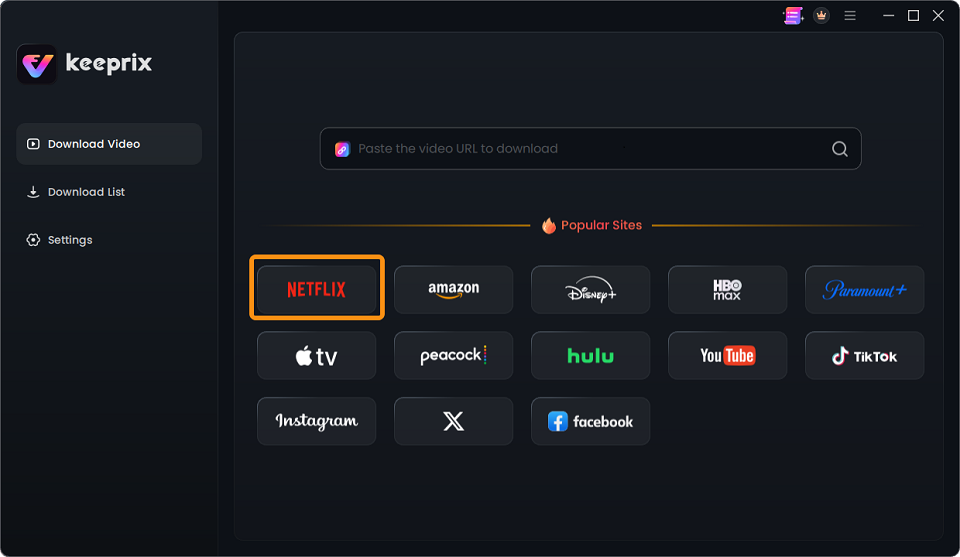
Choose Netflix
Step 2: Use the built-in browser to open Netflix and sign in to a valid account. Search for the movie or TV show episode you want to watch offline.
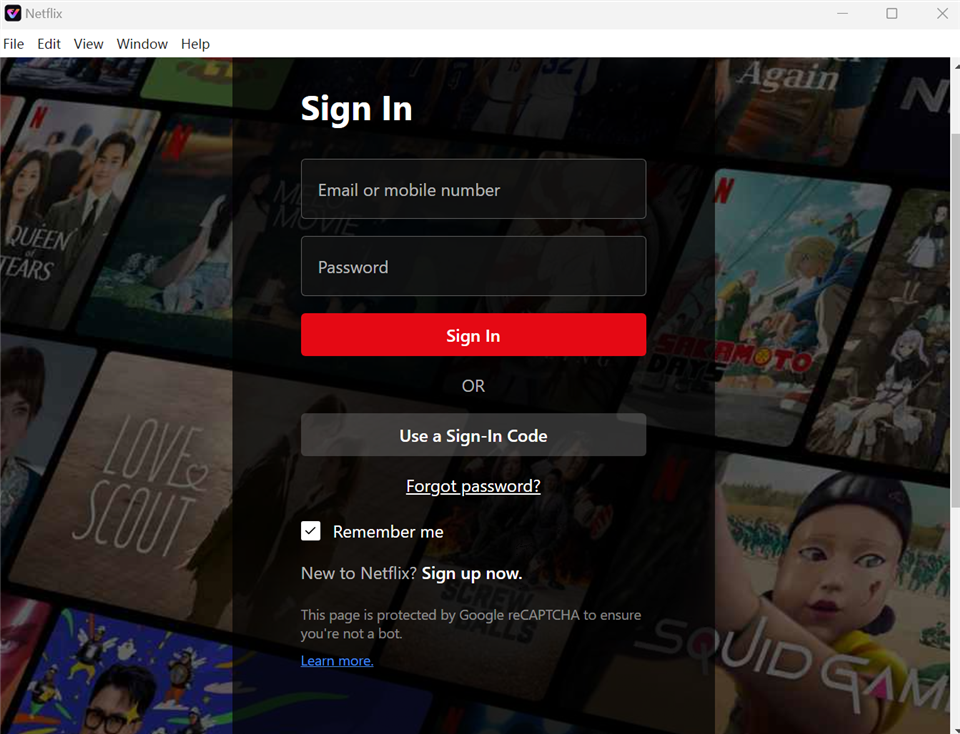
Sign In to Your Netflix Account
Step 3: Select your preferred format (MP4 or MKV), resolution (up to 1080p, depending on your plan and source quality), and desired audio or subtitle tracks.
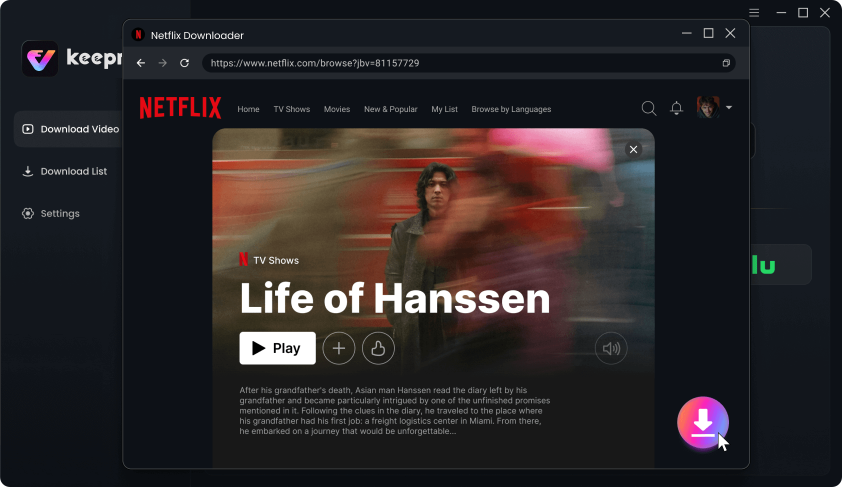
Download Movies You Want on Netflix
Step 4: Add the video to your queue or batch download multiple episodes so you can prep a whole season for a long flight.Test your downloaded MP4 or MKV file using a local media player (like VLC) before leaving for the airport to ensure your offline library is ready for the trip.
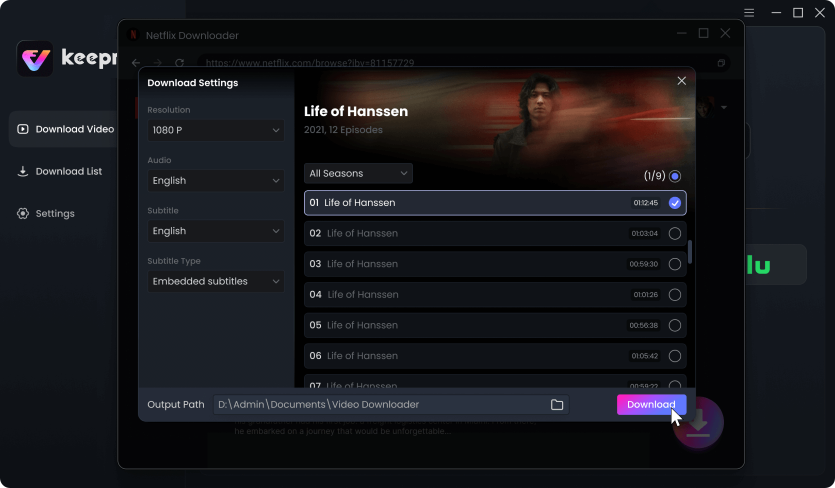
Customize Download Setting
3. Comparison: Official App vs. Local MP4 Workflow
Understanding the differences between the official app and a file-based workflow can help you choose the best preparation method for your next trip:
| Feature | Official Netflix App | Keeprix Local MP4/MKV Workflow |
|---|---|---|
| Supported Devices | iOS, Android, Fire tablets | Windows and Mac desktop computers |
| Playback Expiration | Expires 48 hours after starting | Permanent local storage |
| Monthly Limits | 15/month (ad-tier) | Trial quota (full version removes the download quota for uninterrupted watching) |
| Travel Region Locks | Subject to region locks when abroad | No region locks for local files |
| File Flexibility | Locked in-app playback only | Transferable and organizable MP4/MKV files |
4. Travel Checklist for Avoiding Region Locks
To make sure your downloaded movies actually play when you are on the plane or in a hotel abroad, follow this checklist when you prepare movies before travel:
- Switch to airplane mode immediately: For official app users, place your mobile device or tablet in airplane mode before connecting to any foreign Wi-Fi network. This prevents the app from pinging the server and region-locking your downloaded videos.
- Verify local playback: For Keeprix users, open your saved MP4 or MKV files without an internet connection at home to confirm they play smoothly.
- Pack external storage: Use USB flash drives or portable hard drives if you are downloading large batches of 1080p episodes for a long trip. This keeps your laptop’s internal storage free.
5. Frequently Asked Questions
Q1: How can I watch Netflix offline on my laptop?
Netflix removed offline viewing from its Windows app in July 2024. To watch on a laptop, you can use a desktop tool like Keeprix to save accessible videos as local MP4 or MKV files.
Q2: Can I watch Netflix offline on a Mac?
There is no official native Netflix app for offline viewing on Mac. However, you can use a local MP4 workflow to download Netflix movies on a Mac for accessible offline viewing on macOS.
Q3: How many downloads are allowed on the Netflix Standard with Ads plan?
The ad-supported Netflix plan restricts users to a maximum of 15 downloads per device per month.
Q4: Do Netflix downloads expire while traveling?
Yes, official downloads can trigger a 48-hour expiration or become region-locked if your device connects to the internet in a different country without being in airplane mode.
Q5: How long do downloaded Netflix movies last?
In the official app, downloaded titles expire 48 hours after you press play, or 30 days if they remain unseen.
Final Thoughts
Instead of dealing with 48-hour expirations or regional locks on a small mobile screen, you can build a personal offline media library before lose your internet connection. Try Keeprix to save your videos in MP4 or MKV, and get your watchlist ready for your next trip.
Keeprix Video Downloader
Download streaming videos from Netflix without limits. Enjoy seamless offline watching on Windows and Mac computers.