AnyStream Is Still Down in 2026: 5 Best Alternatives

If you are looking for an AnyStream alternative, the short answer is that RedFox AnyStream has remained unavailable since June 2024. The RedFox website, forum, activation infrastructure, and software services went offline without a verified recovery announcement.
However, not every replacement works like AnyStream. Some programs download supported streams as local MP4 or MKV files, while others record the video during playback. This guide compares Keeprix, StreamFab, KeepStreams, PlayOn, and Audials by workflow, operating system, supported services, video quality, trial policy, and cost.
The specifications below were checked on September 2, 2026. Features, prices, supported services, and available resolutions may change after streaming-platform updates.
Quick Answer: What Is the Best AnyStream Alternative?
- Best overall for testing full downloads: Keeprix
- Closest feature-heavy direct downloader: StreamFab
- Best for frequent multi-service downloading: KeepStreams
- Best cloud-recording alternative: PlayOn Cloud
- Best Windows recording suite: Audials One
For former AnyStream users who want local MP4/MKV files, batch processing, subtitles, audio-track selection, and Windows or Mac support, a direct downloader will usually provide the closest replacement. PlayOn and Audials are recording alternatives rather than exact AnyStream equivalents.
RedFox AnyStream Shutdown Timeline
| Date | What Happened | What It Means for Users |
| Early June 2024 | The RedFox website, forum, and related services suddenly went offline. | Users began reporting problems with activation, access, and software functionality. |
| June 2024 onward | No verified recovery announcement appeared from RedFox. | Old licenses and installers could no longer be treated as a dependable solution. |
| 2025 | AnyStream remained unavailable while streaming platforms continued changing their playback systems. | Even an old installation became less likely to work consistently with current content. |
| September 2026 | RedFox and AnyStream still have not returned as an active, maintained product. | Former users need a maintained downloader or recording alternative. |
Can an Old AnyStream Installation Still Work?
An old AnyStream installation may still open on some computers, but that does not mean it can reliably activate, analyze current streams, receive compatibility updates, or complete new downloads.
What Happened to Existing AnyStream Downloads?
Videos previously saved as normal local files should not disappear simply because AnyStream went offline. If you still have playable MP4 or MKV files on your computer, back them up before removing the old software or changing storage drives.
What Happened to AnyStream Lifetime Licenses?
There is currently no verified RedFox recovery or refund process that users can rely on. This is why trial transparency, active maintenance, short-term subscription options, and current support channels should be considered before purchasing another downloader.
Direct Downloaders vs. Screen Recorders
AnyStream used a file-based downloading workflow. A direct downloader is therefore usually a closer replacement than a screen or browser recorder.
| Feature | Direct Downloader | Screen or Browser Recorder |
| How it works | Processes a supported stream and saves it as a local file | Captures the video while it plays |
| Processing speed | May process faster than the video’s running time | May record in real time or at an accelerated rate, depending on the tool |
| Batch support | Usually more suitable for multiple episodes | Usually less efficient for large seasons |
| Subtitles and audio | May preserve selectable subtitle and audio tracks | Results depend on the recording mode and source playback |
| Computer usage | Can generally continue in the background | Recording may use more CPU and memory |
| Closest to AnyStream | Yes | No; better treated as an alternative workflow |
Recording software is not automatically limited to normal playback speed. Some products advertise accelerated recording. However, recording and downloading remain different workflows, and accelerated recording results depend on the service, computer, and selected settings.
5 Best AnyStream Alternatives Compared
The following table uses publicly available product information checked in September 2026. Maximum advertised quality is not a guarantee for every service or title.
1. Keeprix: Best AnyStream Alternative for Testing Full Downloads
Keeprix is a direct video downloader for Windows and Mac. It is designed for users who want to save supported streaming videos as local MP4 or MKV files and play them outside the original streaming app.
Keeprix allows three full downloads on each supported streaming platform. This means you can test a complete Netflix title, a complete Prime Video title, and three complete videos from other supported services separately before purchasing.
Keeprix also handles batch downloads, available subtitles, and multiple audio tracks. These are important replacement features for users who previously used AnyStream to organize complete shows rather than save occasional short clips.
Keeprix Video Quality by Platform
- Netflix: up to 1080p
- Amazon Prime Video: up to 1080p
- Peacock: up to 1080p
- Paramount+: up to 4K when available
- Hulu.com: up to 4K when available
- Disney+: up to 4K when available
- Max: up to 4K when available
- Apple TV+: up to 4K when available
- YouTube: up to 8K when available
- Hulu.jp: up to 720p
Available quality still depends on the title, region, subscription access, source stream, and current technical compatibility.
Pros
- Works on Windows and macOS.
- Provides three complete free downloads on each streaming platform.
- Social-platform downloads for YouTube, TikTok, Instagram, Facebook, X, and Dailymotion are free.
- Saves supported videos as MP4 or MKV.
- Supports batch downloads, subtitles, and multiple audio tracks.
- Uses one application for multiple streaming and social platforms.
Cons
- Maximum quality differs by streaming platform.
- Not every source title is available at the maximum advertised resolution.
Step 1: Download and install the free Keeprix YouTube Downloader app on your Windows or Mac computer.
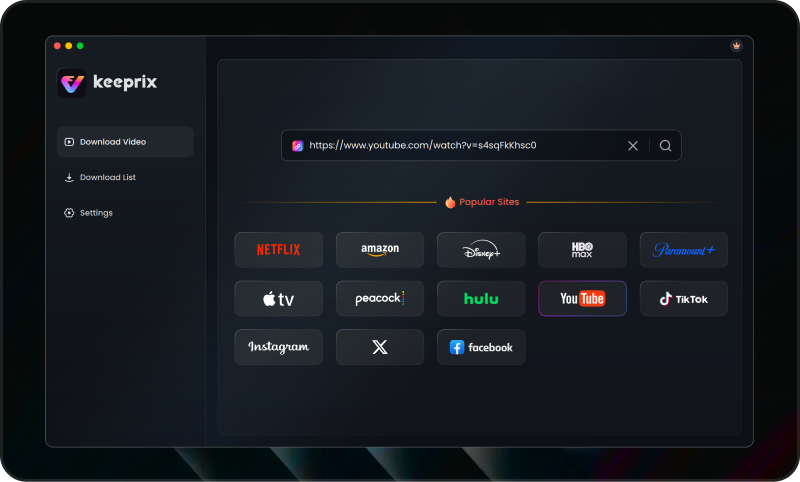
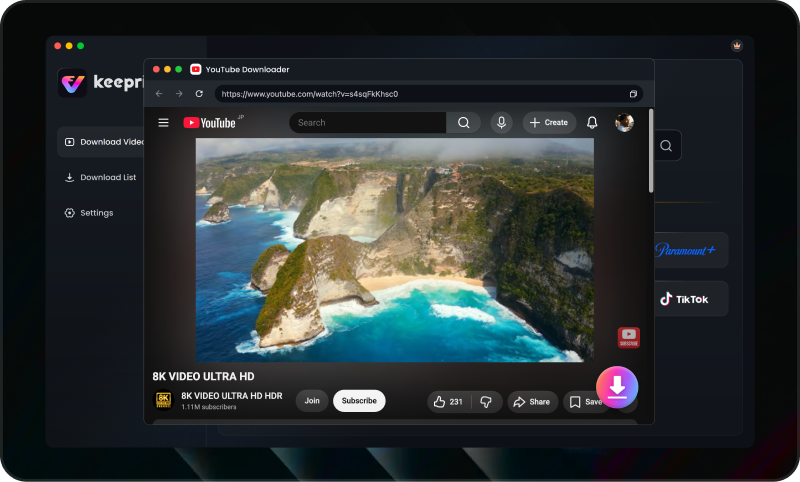
Step 2: Open the Keeprix built-in browser and log into your supported streaming account (e.g., Netflix, Prime Video). Search for a video you have permission to access and play it to trigger the download prompt.
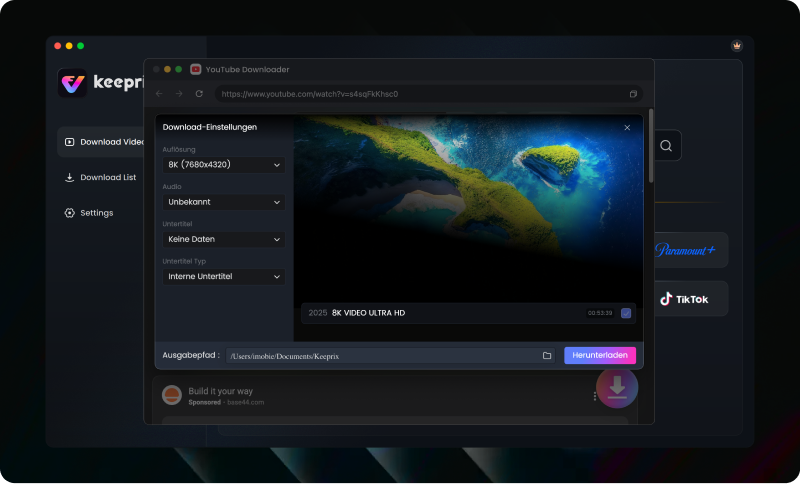
Step 3: Select your preferred resolution (such as 1080p or 4K, based on platform limits and source quality), choose your required audio tracks and subtitles, and queue the batch download. Access your saved MP4 or MKV files locally to play offline, store in your personal library, or move across compatible devices.
Best For
Keeprix is best for former AnyStream users who want a Windows or Mac direct-downloading workflow and prefer to test complete videos from each service before committing to a paid plan.
2. StreamFab: Best Feature-Heavy Direct Downloader
StreamFab is one of the closest current alternatives to AnyStream in terms of overall product category. It is a direct downloader for Windows and macOS with separate modules for major streaming services and an All-In-One package covering more than 60 downloader modules.
The software supports MP4 and MKV output, subtitle and audio selection, batch processing, and scheduled downloads for supported services. Available quality is service-specific, so an overall claim such as “up to 8K” should not be interpreted as 8K support for Netflix or every premium streaming platform.
StreamFab currently provides a 30-day trial with three titles per supported service. Its paid products also use service-specific download quotas, with public documentation listing base limits of up to 100 downloads per day and 700 per week for each supported service.
Pros
- Works on Windows and Mac.
- Provides a large selection of streaming-service modules.
- Supports MP4/MKV, batch downloads, subtitles, audio tracks, and scheduled episodes.
- Offers three trial downloads per supported service.
- Provides detailed format and codec controls for experienced users.
Cons
- The interface and number of modules may feel complex to new users.
- The All-In-One lifetime package requires a larger upfront payment.
- Maximum quality and successful analysis vary by streaming service.
- Paid daily and weekly quotas still apply.
Best For
StreamFab is best for former AnyStream users who want a broad direct-downloader package and are comfortable managing multiple modules, settings, and service-specific limits.
For a more focused comparison, see the StreamFab alternatives guide.
3. KeepStreams One: Best for Multi-Service Batch Downloads
KeepStreams One combines more than 40 streaming downloaders in one Windows and Mac application. It supports standard MP4 and MKV output, batch queues, selectable subtitles, audio tracks, metadata, and automatic episode detection.
The vendor advertises service-dependent video quality of up to 4K, but this does not mean every platform or title can be downloaded at that resolution. Former AnyStream users should test the specific streaming services they use instead of judging the product by its global maximum.
KeepStreams provides three full free downloads from each module during a 30-day trial. Its All-In-One pricing is higher than buying a single platform module, so the complete package makes the most sense for users who regularly download from several services.
Pros
- Supports Windows and macOS.
- Offers MP4 and MKV output.
- Can process multiple episodes and detect new releases.
- Includes subtitle, audio, and metadata options.
- Provides three full trial downloads for each module.
Cons
- The All-In-One monthly and lifetime plans require a relatively high payment.
- Advertised 4K support is service- and source-dependent.
- Users who need only one platform may not benefit from the full package.
Best For
KeepStreams One is most suitable for users who regularly save complete seasons from several streaming platforms and want automatic episode detection.
4. PlayOn: Best Cloud and Scheduled Recording Alternative
PlayOn does not replicate AnyStream’s direct-download method. Instead, it records supported streaming videos and lets users download the completed recordings for offline playback.
There are two main versions. PlayOn Home runs on a Windows PC, while PlayOn Cloud records remotely and is managed through iOS or Android. Cloud recordings can then be downloaded to a computer during the available storage period.
PlayOn supports up to 1080p depending on the source and selected product. Cloud recordings use credits: standard-definition and 720p recordings generally use one credit, while 1080p recordings use three credits.
Pros
- Offers both computer-based and cloud-recording workflows.
- Supports closed captions and complete-season recording.
- Can automatically record new episodes on supported plans.
- Does not require a Windows computer for PlayOn Cloud recording.
- Downloaded recordings can be stored locally.
Cons
- It is a recorder rather than a direct AnyStream-style downloader.
- PlayOn Home is limited to Windows.
- Cloud recording costs depend on the number and resolution of recordings.
- 1080p cloud videos use more credits than 720p videos.
- Large seasons can consume credits quickly.
Best For
PlayOn is best for users who prioritize scheduled recording, automatic new episodes, or a cloud workflow over direct stream downloading.
5. Audials One: Best Windows Recording and Media Suite
Audials One is a Windows-only media recording suite. It records streaming playback from supported services and saves the results in formats including MP4, MKV, AVI, and WebM.
Unlike AnyStream, Audials is not primarily a direct file downloader. However, it provides video recording, automatic ad detection, subtitles, media information, format conversion, and library-management features in one application.
Audials advertises recording speeds of up to four times normal playback under supported conditions. This is a vendor maximum, not a guarantee for every streaming service. Audials One Premium can also upscale existing videos with AI, but an AI-upscaled file should not be described as a native 4K download from the original streaming source.
Pros
- Records video from multiple supported streaming services.
- Supports MP4, MKV, AVI, WebM, and other formats.
- Includes subtitle, metadata, ad-removal, conversion, and library tools.
- Can record faster than real time in supported situations.
- Offers subscription and one-time purchase options.
Cons
- No native macOS version is available.
- Recording is not the same workflow as AnyStream’s direct downloading.
- Results depend on playback, recording settings, and computer performance.
- AI upscaling does not restore original native 4K source detail.
- The number of features may be excessive for users who only need a simple downloader.
Best For
Audials One is suitable for Windows users who want a general media-recording, conversion, and organization suite rather than a direct AnyStream replacement.
How to Move from AnyStream to a New Downloader
Switching programs should involve more than installing the first product that appears in a search result. Use the following process to protect your existing library and avoid paying for software that does not support your services.
Step 1: Back Up Your Existing AnyStream Files
Locate the MP4, MKV, subtitle, artwork, and metadata files already saved on your computer. Copy important files to another drive before uninstalling AnyStream or reorganizing your library.
Step 2: List the Streaming Services You Actually Use
Create a short list of the services you need, such as Netflix, Prime Video, Disney+, Max, Hulu, Paramount+, Peacock, or Apple TV+.
Step 3: Choose Downloading or Recording
Choose a direct downloader if your priorities are MP4/MKV files, batch queues, subtitles, audio tracks, and processing multiple episodes efficiently. Choose PlayOn or Audials if you prefer a recording workflow or need recording features that a direct downloader does not provide.
Step 4: Test One Complete Title from Each Important Service
Do not test only a public trailer or short video. Whenever the trial permits it, download or record one complete title from each service you use.
Step 5: Inspect the Completed File
Open the saved file in VLC, QuickTime, or your preferred player. Check its duration, resolution, audio synchronization, subtitle timing, and playback compatibility.
Step 6: Test a Small Batch
Before downloading a complete season, queue two or three episodes. Confirm that episode names, numbers, subtitles, audio tracks, and output folders remain correct.
Frequently Asked Questions
Q1: Is AnyStream permanently down?
Yes. RedFox AnyStream shut down permanently in June 2024 and remains offline. There are no official signs that it will return, requiring users to find a stable 2026 alternative.
Q2: Can I still download from Amazon and Netflix as MP4?
Yes. True download alternatives allow you to save accessible videos and convert Amazon Prime Video To MP4 or MKV files, supporting up to 1080p when source quality is available.
Q3: Do AnyStream alternatives support batch downloading and subtitles?
Yes, provided you choose a true file-based downloader rather than a basic screen recorder. Tools like Keeprix preserve multiple audio tracks and subtitles while allowing you to queue full seasons for batch downloading.
Q4: Are free trials for these alternatives limited to partial clips?
Many are, but it depends on the tool. Keeprix solves this frustration by offering 3 full free downloads per supported streaming platform, allowing you to test the complete workflow without restrictive clip limits.
Q5:Will AnyStream alternatives work on both Windows and Mac?
Most modern alternatives support both operating systems. For example, Keeprix is fully compatible with Windows 10/11 and macOS 11 Big Sur and above.
Final Verdict
While AnyStream is permanently offline, the need for a stable, true file-based downloader remains critical. Keeprix stands out as the most transparent choice in 2026 for saving accessible videos as flexible MP4 or MKV files. Try Keeprix first and see if it fits your workflow—start by trying 3 full downloads free per platform to safely test the true downloading experience without risking any upfront costs.
Keeprix Video Downloader
- Download streaming videos on Windows & Mac.
- Save streaming videos as local MP4/MKV files.
- Batch download streaming videos and TV series.
- Watch videos offline, no ads, no interruption.