The Best StreamFab Alternative: Finding a Reliable Video Downloader

Finding a reliable StreamFab alternative currently comes down to navigating a confusing split market: bloated software “clones” that share the same bugs, slow screen recorders, and streamlined direct desktop downloaders. While StreamFab remains a prominent tool for offline viewing, users are actively searching for replacements due to its high lifetime pricing – often cited around $299 for the All-In-One package – and recent technical bugs causing expected 1080p resolutions to drop to 720p or 480p.
Many of the tools ranking on search engines are virtually identical under the hood, meaning when one tool experiences a platform DRM update failure, they all fail simultaneously. Furthermore, the sudden shutdown of the popular independent competitor AnyStream in June 2024 left a massive market gap, making users deeply hesitant to invest hundreds of dollars into expensive upfront lifetime licenses.

The State of Video Downloaders: AnyStream, Clones, and DRM Updates
If you have spent any time searching for an alternative to StreamFab, you have likely noticed that many of the heavily marketed options look exactly the same. This is because many tools on the market (such as KeepStreams and FlixPal) are essentially “clones.” They share the exact same underlying backend technology as StreamFab, simply repackaged with a different user interface and pricing structure.
This shared backend explains the massive frustration surrounding recent platform updates when users try to download protected videos. When a major streaming service updates its backend protection, all of these connected tools typically drop to 480p or 720p simultaneously until a global patch is released.
Historically, users relied on AnyStream as an independent alternative, as it used different technology. However, AnyStream permanently shut down in June 2024, removing a key purchasing option and leaving users anxious about spending large sums on software that could disappear overnight.
For the shutdown history and current replacement options, see the best AnyStream alternatives.
Direct Downloaders vs. Screen Recorders
Before choosing a new tool, it is crucial to understand the fundamental technology you are buying. Many competitor lists mix up direct downloaders and screen recorders, leading users to accidentally buy slow recording software when they wanted instant file saving.
Direct Downloaders (like Keeprix or StreamFab) process the source video file directly. They offer significantly faster speeds, support batch processing, and can extract original audio tracks and subtitles.
Screen Recorders (like PlayOn) literally play the video on your screen in real-time and record it. This means a two-hour movie takes two hours to process, and the visual quality is often lower due to re-encoding.
Here is a quick comparison to help you distinguish the two:
| Feature | Direct Downloaders | Screen Recorders |
| Processing Speed | Fast (often minutes per episode) | Slow (1:1 real-time playback speed) |
| Output Quality | High (pulls from source file limits) | Lower (subject to screen re-encoding) |
| Background Use | Yes (can minimize and work elsewhere) | Limited (often disrupts computer use) |
| Subtitles & Audio | Preserves original selectable tracks | Often burned directly into the video frame$5/month |
For most users trying to build a personal offline library efficiently, direct downloaders provide a vastly superior and more flexible experience.
Keeprix: The Streamlined Alternative for MP4/MKV
If you are overwhelmed by $299 All-In-One packages and confused by identical software clones, Keeprix offers a practical “Stream to File, File to Freedom” alternative. It is a streamlined desktop video downloader for Windows and Mac tailored specifically for users who just want standard MP4 or MKV files without bloated features or hidden rules.
Instead of overpromising “unlimited 4K everywhere,” Keeprix operates on transparent capabilities: available resolution depends on platform facts (e.g., up to 1080p for a Netflix MP4 download or Prime Video; up to 4K for Disney+ or YouTube when source quality is available).
How the Keeprix Workflow Operates:
Keeprix Video Downloader
Download streaming videos from hot platforms without limites. Enjoy seamless offline watching on Windows and Mac computers.
Step 1: Open the App: Launch Keeprix on your Windows or Mac computer.
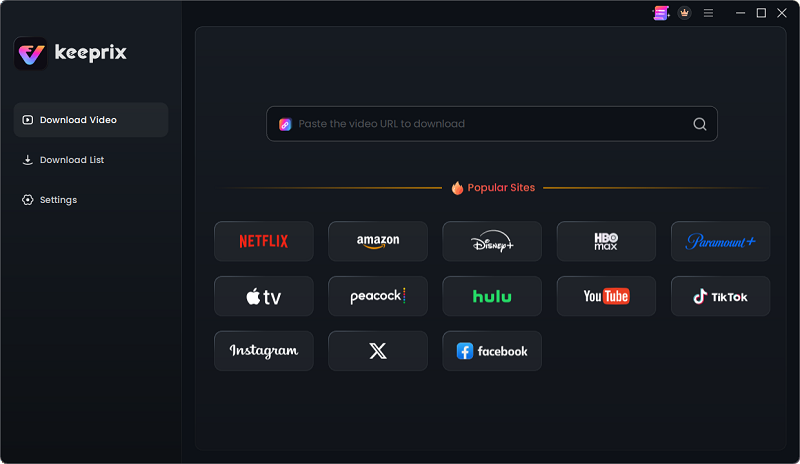
Choose Hulu in Keeprix
Step 2: Use the Built-in Browser: Navigate to your supported streaming platform and access a video using your valid account.
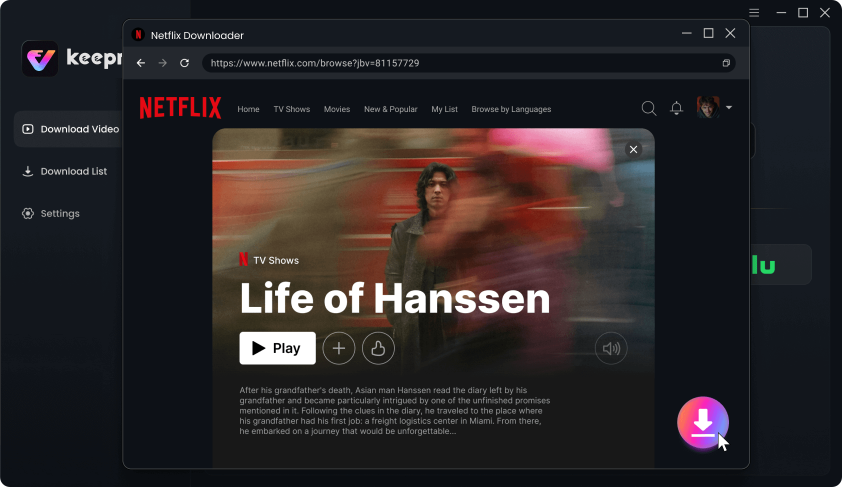
Download Movies You Want on Netflix
Step 3: Select Your Preferences: Choose MP4 or MKV, and select available original subtitles or audio tracks.
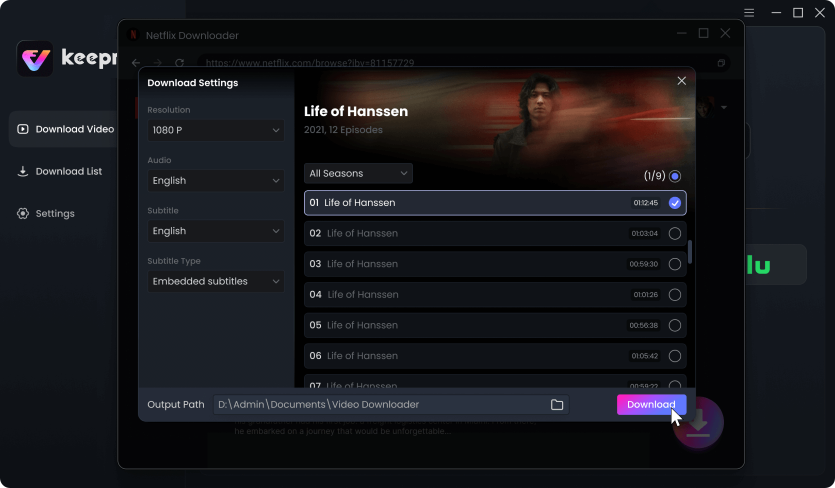
Customize Download Setting
Step 4: Export to Your Library: Save the accessible video as a flexible local file for personal offline viewing.
Keeprix provides a clear trial: you can test the workflow by downloading up to 2 full videos to ensure it fits your offline setup. Upgrading to the activated version simply removes this trial download quota for uninterrupted watching within the product terms, rather than hiding unexpected 50-100 daily download caps inside a paid tier.
Other Alternatives: KeepStreams, MovPilot, and PlayOn
As you research alternatives, you will encounter a few other names repeatedly. To help you evaluate the landscape quickly, here is how the top tools compare under the hood:
| Tool | Keeprix | KeepStreams / FlixPal | MovPilot | PlayOn |
| Workflow Type | Direct Downloader | Direct Downloader | Direct Downloader | Screen Recorder |
| Backend Technology | Independent Desktop App | Shared StreamFab Clone | Modular Platforms | Independent Recording |
| Processing & Output | Fast / Source-dependent (up to 4K) | Fast / Source-dependent | Fast / Source-dependent | Slow (1:1 real-time) / Lower Quality |
| Best Fit For | Building a clean MP4/MKV offline library without bloat. | Replicating the exact StreamFab suite experience. | Users exclusively downloading from one or two services. | Bypassing direct DRM blocks via screen capture. |
Here is a deeper, objective breakdown of what these tools actually do:
- KeepStreams / FlixPal
If the app fails after an update or stops analyzing videos, use this KeepStreams not working troubleshooting guide before switching tools.
Pros: Offers a robust feature set virtually identical to a standard Streamfab Netflix Downloader or All-In-One package. Good if you just want a different user interface or prefer their specific package structures.
Cons: Because they share the same backend technology as StreamFab, they face the exact same technical outages and resolution drops when streaming platforms update their backend protection.
- MovPilot
Pros: Focuses heavily on single-platform modules rather than forcing you into a massive “All-In-One” suite. This is useful if you exclusively watch just one or two streaming services.
Cons: Can become expensive quickly if you suddenly decide you need to add multiple platforms later.
- PlayOn
Pros: As the dominant screen recorder on the market, it is sometimes less affected by immediate direct download blocks, because it simply records what plays on the screen rather than extracting the direct file.
Cons: Extremely slow (1:1 recording times) and delivers noticeably lower visual quality compared to direct downloaders.
How to Choose: Which Alternative is Right for You?
Making a confident software choice depends entirely on your personal workflow and tolerance for complexity. Use this framework to decide which tool fits your exact situation:
| If your main goal is… | Best Option |
| A straightforward, transparent tool for personal MP4/MKV files without spending nearly $300. | Keeprix. Best for building a clean offline media library with standard files and transparent rules. |
| Getting the exact same feature set as StreamFab, but you just want a different logo or UI. | KeepStreams / FlixPal. Best if you are comfortable with the clone backend and accept the synchronized resolution outages. |
| Bypassing temporary direct-download blocks and you do not mind slow, real-time 1:1 recording. | PlayOn. Best for users who prioritize having a copy regardless of the lower visual quality and massive time cost. |
For most users building a flexible personal media library, moving away from bloated packages and slow recorders toward a streamlined direct downloader provides the clearest value.
Frequently Asked Questions
1.Are there cheaper or free alternatives to StreamFab?
Free tools often lack support for premium streaming platforms and frequently struggle with backend protections. Paid alternatives range widely from expensive, bloated suites to budget-friendly, streamlined desktop tools like Keeprix.
2.Which alternative actually supports 1080p/4K after recent updates?
No tool on the market can guarantee a 100% 4K success rate everywhere. Actual download resolution depends heavily on the platform’s backend rules, the source video quality available, and your specific subscription account tier.
3.What is the difference between StreamFab, KeepStreams, and FlixPal?
Very little. KeepStreams and FlixPal are widely considered to be software “clones” of StreamFab. They share the same underlying backend technology, which means when one tool drops in resolution due to a platform update, the others almost always do too.
4.Is there an alternative that doesn’t limit daily downloads?
Many expensive suites hide unexpected 50-100 daily download caps inside their paid tiers. Keeprix handles this transparently: its free trial allows 2 full videos, and activating the software simply removes the download quota for uninterrupted watching within the product terms.
5.Why do some tools record the screen while StreamFab downloads directly?
Screen recorders (like PlayOn) play the video in real-time to capture the display, which is a slower method used to avoid direct extraction blocks. Direct downloaders pull the source file directly, resulting in faster processing and higher quality, but they require continuous software updates to match platform changes.
6.What happened to AnyStream?
AnyStream was a highly popular, independent direct downloader alternative. However, it permanently shut down in June 2024, which is why users are currently hesitant to purchase expensive lifetime licenses from other providers.
If you want a clean, value-focused “Stream to File” workflow, you need a tool with transparent rules that outputs standard MP4 and MKV files. Keeprix provides exactly that—a straightforward desktop alternative designed to help you build your personal offline media library without the bloat.
The best way to know if a tool fits your specific streaming accounts and device setup is to stop researching and start testing. Download the Keeprix free trial to your Windows or Mac, test the 2-video allowance on your own computer, and experience file-based freedom for yourself.
Keeprix Video Downloader
- Download videos from streaming platforms on Windows & Mac.
- Save streaming videos as local MP4/MKV files.
- Batch download streaming videos and TV series.
- Watch videos offline, no ads, no interruption.