How to Change Location on Apple TV Plus [Latest]

| Quick Overview |
| To change location on Apple TV+, you can adjust your Apple ID region or use a VPN to access content from another country. For an easier solution, try Keeprix Video Downloader so you don’t need to worry about how to change location on Apple TV+ at all. |
Apple TV+ can leave you frustrated when your favorite shows are missing because of strict regional controls. This common difficulty makes streaming frustrating, especially when famous movies or early releases aren’t available in your country. So, users want to explore content offered in other regions for a better experience. This guide explains quick ways to learn how to change location on Apple TV easily and safely.
You may also like: How to Download Crunchyroll Episodes for Offline Viewing on Mobile, PC, and Mac

How to Change Location on Apple TV
Why Change Location on Apple TV+?
Because Apple TV+ libraries vary by region, many users change their location to access more content and enjoy a better viewing experience. Here are some common reasons for doing so:
- Wider Access: Altering the location unlocks shows not offered within your current region. It helps you watch new movies that are blocked in your country.
- Early Releases: Some places get episodes earlier based on release schedules and rights. Switching regions lets you enjoy content before official dates arrive.
- Language Choices: Different regions offer better subtitles and alternate narration language options. Changing location improves comfort by matching your preferred viewing language settings.
- Account Sync: Region change helps keep services aligned when using multi-device accounts. It ensures apps display the same shows across all connected devices.
- Exclusive Content: Some areas host unique titles unavailable in your home region. Changing location allows viewing rare shows created for specific audiences.
Common Issues When Changing Location on Apple TV+
It is also helpful to understand the problems you might face during the process before learning how to change location on Apple TV. This section covers some common issues that can slow you down or stop the change from working:
- Payment Conflict: Old payment details may clash with new region rules. Such conflicts block services because billing details fail to pass needed checks.
- Location Lock: Device settings may lock your region despite account updates. The system protects old settings and stops changes until permissions are updated.
- Content Block: Some shows remain blocked even after changing your region. Limited permissions stop access even after you select a new region.
- Account Sync: Many times, account sync issues show up when data does not update across devices properly. Different devices hold old details and create confusion during region changes.
- Server Delay: It occurs when many users try to update regions at the same time. Heavy demand slows the process and creates long waiting times.
Understanding these issues makes the process much easier, because you’ll know what to expect, and how to avoid getting stuck halfway.
How to Change Location on Apple TV+?
Changing your region on Apple TV can feel confusing for many users. Yet, this part shows 2 different methods to help you understand how to change location on Apple TV safely.
Way 1. Use a VPN
To change your location on Apple TV+, using a VPN is one of the easiest and most effective methods.. It hides your real location by giving you a new IP address in another country. This can solve the problem of restricted areas and unlock the content that is not available in your location. VPNs also keep your online activity private and protected from hackers. You can go through the steps below to find out how to change location on Apple TV:
Step 1. On your PC browser, install any VPN extension like “Free VPN.” Once installed, click on its icon in the “Extension” section and click “Optimal Location.”
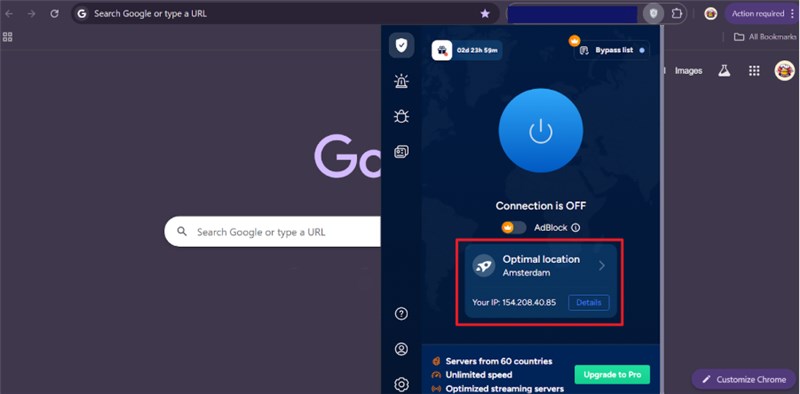
Click Optimal Location
Step 2. Find and choose your desired region or location available in the extension.
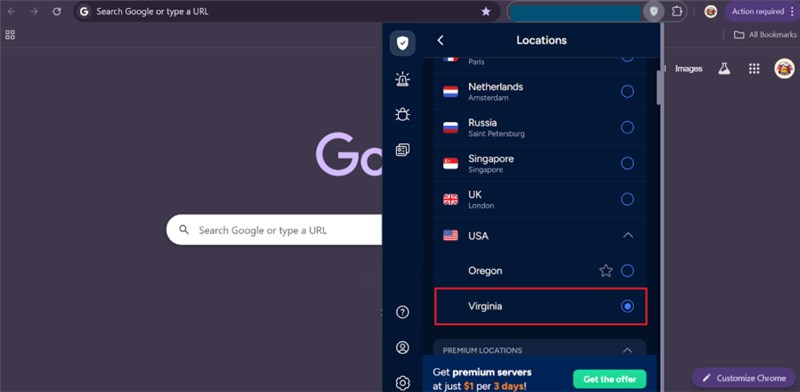
Choose Desired Region
Step 3. After opting for a location, press the “Power” button to turn it on and then access the “Apple TV” website to view additional content.
Way 2. Update Your Apple ID’s Region
Updating your Apple ID’s region can also help access Apple TV content unavailable locally. When you change your account region, Apple adjusts available apps and shows because Apple services are linked to your account. Changing your region also allows access to new apps and payment options available there. Remember, some subscriptions and purchases may not work after changing regions. Take guidance from the given steps to learn how to change location on Apple TV:
Step 1. Navigate to your device settings and tap on your “Apple ID” to select the “Media & Purchases” section.
Step 2. When you see a prompt, tap “View Account” and then press the “Country/Region” section.
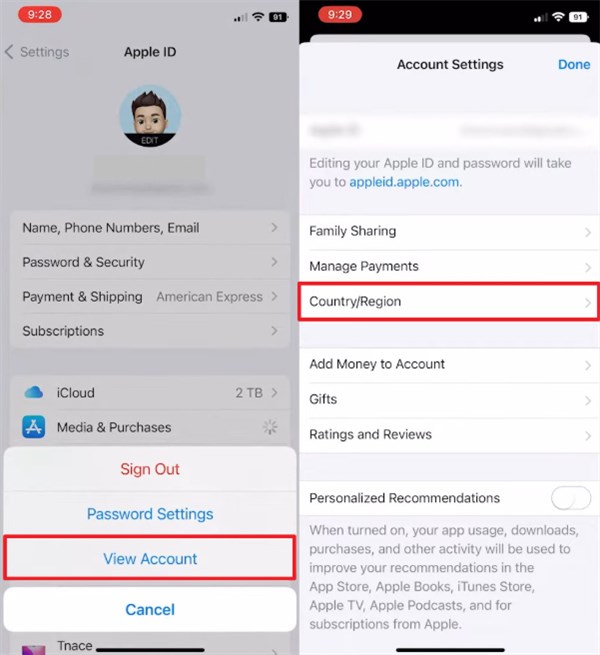
Tap Country/Region
Step 3. Select your desired country, accept the terms and conditions, and add a valid regional payment method.
Watch Apple TV+ Content Without Region Restriction
Watching Apple TV+ without region limits can feel impossible due to strict restrictions. Many users searching for how to change location on Apple TV still face playback issues later. Fortunately, Keeprix Video Downloader can help you enjoy Apple TV+ content without regional restrictions. It directly downloads shows and movies in MP4/MKV formats suited for any device or player. This Apple TV+ downloader also lets you choose your preferred resolution for streaming quality, like 720p and 1080p. You can even select from 13 different audio languages to match your listening preference while viewing.
Key Features of Keeprix Video Downloader:
- Delivers quick download performance to save time and avoid frustrating delays.
- Simple, intuitive design helps beginners download content without confusion.
- Provides uninterrupted downloading with zero ads for comfortable user interaction every time.
- Downloads remain unrestricted, letting you watch content freely on any device.
Detailed Steps to Download Apple TV+ Content and Shows:
Step 1. Download and launch Keepirx Video Downloader on your desktop and select the “Apple TV” feature from the homepage.
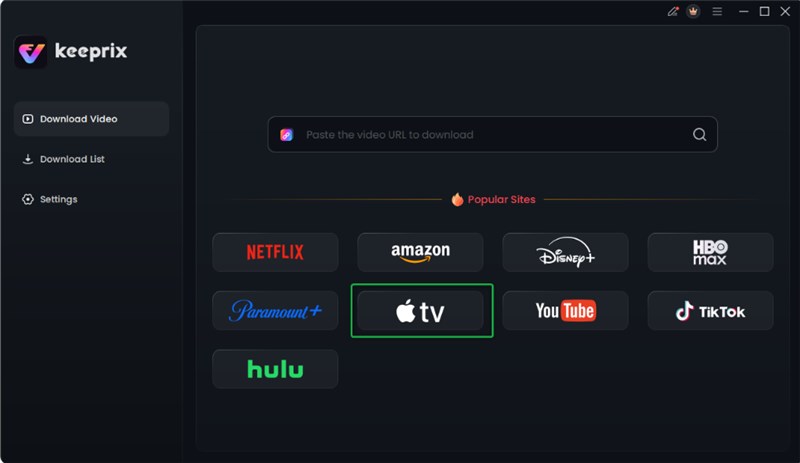
Choose Apple TV Platform
Step 2. Log in using your Apple ID credentials to unlock your library and view available media.

Log in Apple TV Account
Step 3. Explore your collection to select the show you wish to save and hit “Download” to proceed.
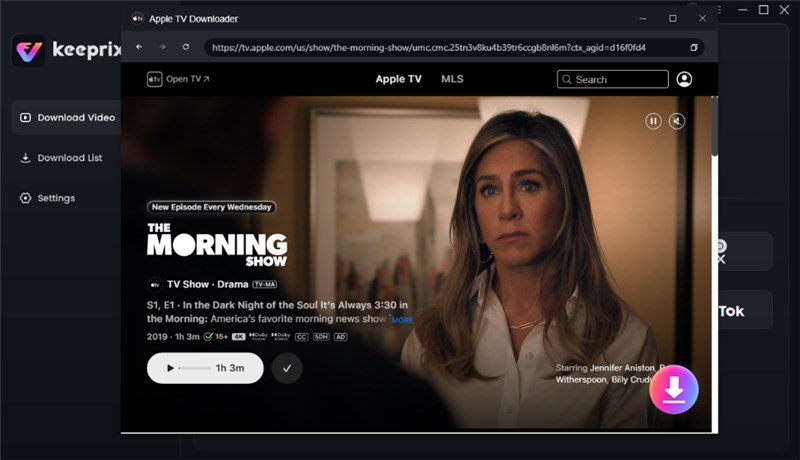
Click Download Button
Step 4. Customize the quality and other settings, then press “Download” to store your content offline. Then you can just wait for the download to be completed.

Apple TV Video Download Completed
FAQs About How to Change Location on Apple TV+
Q1. Is Apple TV+ region-locked?
Yes, Apple TV+ is region-locked because its content depends on your selected country. Each region offers different shows and movies based on licensing and distribution rights. Changing your region or using permitted methods helps access unavailable shows and movies.
Q2. How to Fix Apple TV+ not available in your region?
In case Apple TV+ isn’t available in your region, try changing your Apple ID. Go to the “Media & Purchases” section from your phone’s settings and select a different valid country option. Alternatively, use a trusted VPN to bypass regional limits and access Apple TV+.
Q3. How to change your Apple TV Location Services settings?
You can manage Location Services directly from your Apple TV settings. Go to Settings > General > Privacy > Location Services, where you can turn Location Services on or off and adjust how individual apps use your location.
Conclusion
To sum up, changing your Apple TV region helps unlock more shows and improves your viewing variety. This guide has shown you 2 ways to learn how to change location on Apple TV. It removes content limits to support new releases and aligns your account with global preferences. For easier offline watching without restrictions, try Keeprix Video Downloader for Apple TV+. Download and start using Keeprix Video Downloader today to enjoy Apple TV+ content offline without region restrictions!