How to Download Instagram Stories Without Stickers (2026 Guide)

It’s a frustratingly common scenario. You’ve created the perfect Instagram Story, added a few fun stickers to boost engagement, and published it. Later, you want to save the original photo or video for your camera roll, only to find the stickers are permanently stuck. This feeling of your own content being trapped behind unremovable elements is a significant pain point for many users. If you’re searching for how to download Instagram stories without stickers, let’s provide the clear, direct answer upfront: it is not possible to remove stickers, text, or GIFs after a story has been published.
The good news is that there is one simple, 100% effective method to get a clean copy of your media. This guide focuses on that proactive solution: saving your content before you add any overlays. We will walk you through the exact steps, explain the technical reasons behind Instagram’s download limitations, and show you how to avoid the unsafe third-party tools that make false promises.
How to Download Instagram Stories Without Stickers
The Only Working Method: Save Your Instagram Story Clean Before Posting
The most effective way to keep your original media is to save it at the right moment. The key is to act before any Instagram story stickers or other creative elements are added. This simple habit ensures you have a high-quality copy of your photo or video stored directly on your device for personal archives or repurposing.
Follow these steps precisely within the Instagram story editor to save your Instagram story clean.
Step-by-Step Guide to Saving Your Unaltered Media
Step 1. Open the Story Editor: Launch the Instagram app. Swipe right from your home feed or tap the + icon at the bottom and select “Story” to open the creation screen.
Step 2. Capture or Upload Your Media: Take a new photo or video using the Instagram camera, or select an existing one from your phone’s photo gallery. At this point, your media is still in its original, unaltered state.
Step 3. Save the Original Media: Before you add any stickers, polls, text, or music, look for the “Save” icon at the top of the screen. It looks like a downward-pointing arrow. Tap this icon.
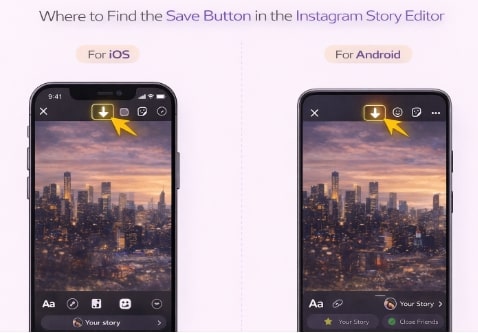
Find the Save Button in the Instagram Video Editor
Step 4. Confirm the Save: Your photo or video will be saved directly to your device’s camera roll or gallery. Instagram will typically display a brief confirmation message like “Saved” on the screen.
Step 5. Proceed with Editing: Now that you have a pristine version of your original story media saved, you are free to add all the stickers, GIFs, and other content overlays you want before publishing your story for your audience to see.
This procedure is the only official and guaranteed way to have a copy of your Instagram story with no stickers.
Why You Can’t Remove Stickers: The Technical Reason
Understanding why you can’t simply peel off stickers from a published story comes down to a technical process called rendering.
When you are in the Instagram story editor, the app treats your original photo or video and the stickers you add as separate, independent layers. This is what allows you to move them around, resize them, or delete them. However, the moment you tap “Your Story” to publish, Instagram renders all of those separate layers into a single, new file.
This process essentially “flattens” the image. The stickers are no longer distinct objects; they become a permanent part of the image’s pixels, just like the pixels that make up the background. Because of these Instagram saving limitations, any tool claiming to remove stickers from an Instagram story download is making a technically impossible promise. The platform does not store a separate copy of your original media after publishing.
Story Drafts vs. Published Stories: A Key Distinction
A common source of confusion is the difference between saving a draft and publishing a story.
- Story Drafts: If you save a story as a draft, Instagram preserves the separate, editable layers. You can return to it later and continue editing the stickers and text as if you never left.
- Published Stories: Once a story is published, it becomes a final, rendered file. When you download it from your archive, you are simply saving a copy of this flattened file, which is why the stickers are always included.
The Proactive Method vs. Risky Third-Party Tools
When you need a clean version of your story, you have two approaches: the proactive saving method detailed above and the false promise of third-party tools. The following comparison makes the correct choice clear.
| Criteria | Proactive Saving (Before Posting) | Third-Party ‘Sticker Remover’ Tools |
| Success Rate | 100% — Guarantees a perfect, clean copy every time. | 0% — It is technically impossible for these tools to work. |
| Time Cost | Low — Adds approximately 2-3 seconds to your workflow. | High — Wasted time searching for, installing, and using fake tools. |
| Technical Skill | None — Requires only a single tap on a native app icon. | Varies, but all attempts ultimately lead to failure and frustration. |
| Safety Risk | Zero — You are using an official, built-in Instagram feature. | High — Serious risk of malware, personal data theft, and account scams. |
This table clearly shows that prevention is the only viable and safe solution. Taking a few seconds to save your content beforehand protects your data and guarantees you get the result you want.
A Critical Warning: Avoid Fake ‘Sticker Remover’ Tools
A search for a way to download an Instagram story without stickers will inevitably lead you to websites and apps that claim they can solve your problem. It is critical to understand that these services are universally fake and often malicious.
As we’ve explained, a published story is a single, flattened media file. No external tool can reverse the rendering process to “peel off” the stickers. These fraudulent services are designed to exploit your need for a solution. Their true purpose is often one of the following:
- Phishing for Credentials: Tricking you into entering your Instagram username and password on a fake login page to steal your account.
- Data Theft: Gaining access to the personal information on your device.
- Malware Installation: Infecting your phone or computer with viruses or spyware.
Your first line of defense is skepticism. Never provide your account password to any third-party service that makes unrealistic technical claims. The only secure and effective method to get your content without stickers is the one provided by Instagram itself.
For Archiving: A Reliable Way to Download Public Stories As-Is
While you can’t remove stickers from published content, there are many valid reasons to download an existing public story exactly as it appears online—for creating a personal archive, conducting competitor research, or saving content for inspiration. For this specific task, using a reliable tool that prioritizes quality and security is essential.
Keeprix Downloader is a professional solution for saving public video content from Instagram and other major platforms. To be clear, Keeprix does not remove stickers. Its purpose is to download the final, published story in the highest possible quality, addressing the common risk of quality loss seen with free online downloaders.
By using a secure, desktop application, you also bypass the privacy risks associated with dubious web-based tools. Keeprix is a straightforward solution for a specific need: high-fidelity archiving of published content. It allows you to save public stories to your computer in standard MP4 or MKV formats, creating a permanent offline library of content that matters to you. For users who need to reliably save stories as-is, it provides a professional and secure method.
How to Download Instagram Stories via Keeprix Downloader:
Step 1. Copy the Instagram Video URL
Using your web browser, navigate to the Instagram Reel, video, or Story you wish to save. Click the three-dots menu (…) on the post and select “Copy Link.” The URL for the content is now copied to your clipboard.
Step 2: Paste the Link into Keeprix Downloader
Open the Keeprix application. The software is designed to automatically detect a copied link from your clipboard. If it doesn’t, click the prominent “Paste Link” button. Keeprix will immediately analyze the URL and display the video thumbnail along with available download options.
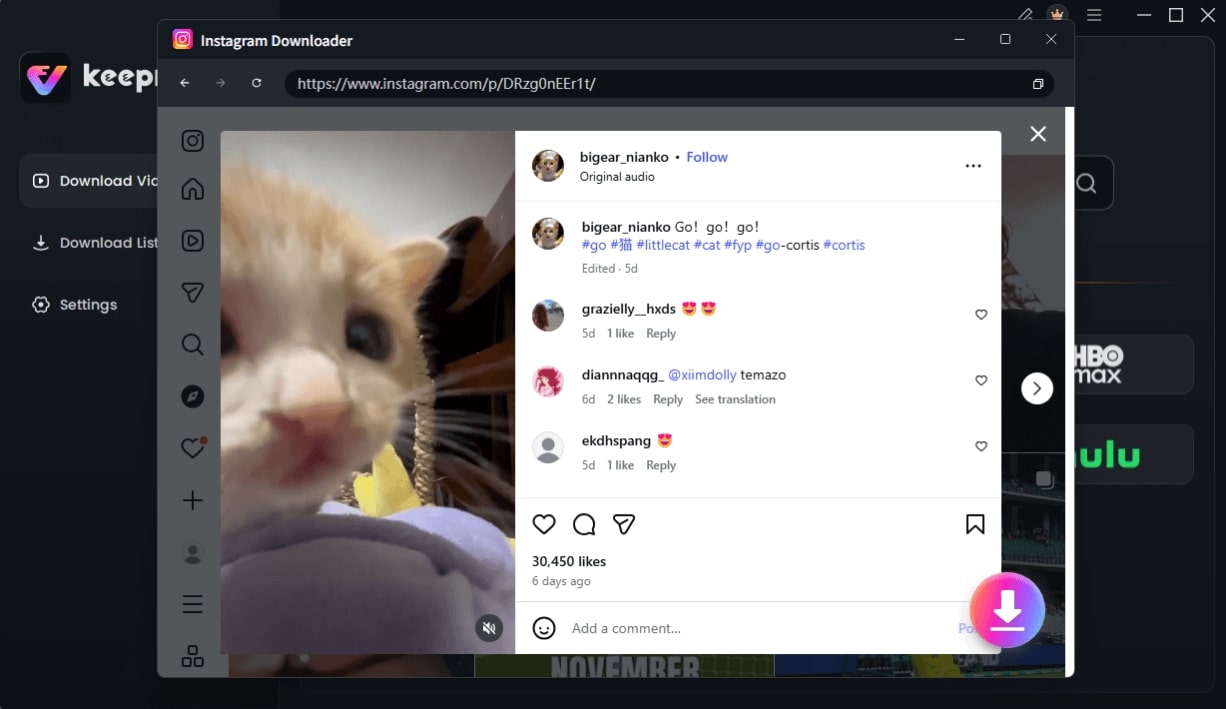
Choose Instagram Video and Click Download
Step 3: Choose Your Quality and Download
Select your preferred video resolution—Keeprix often provides multiple quality options up to 1080p for superior clarity. Once you have made your selection, click the “Download” button. The video will be saved to your designated folder, ready for offline viewing without watermarks or interruptions.
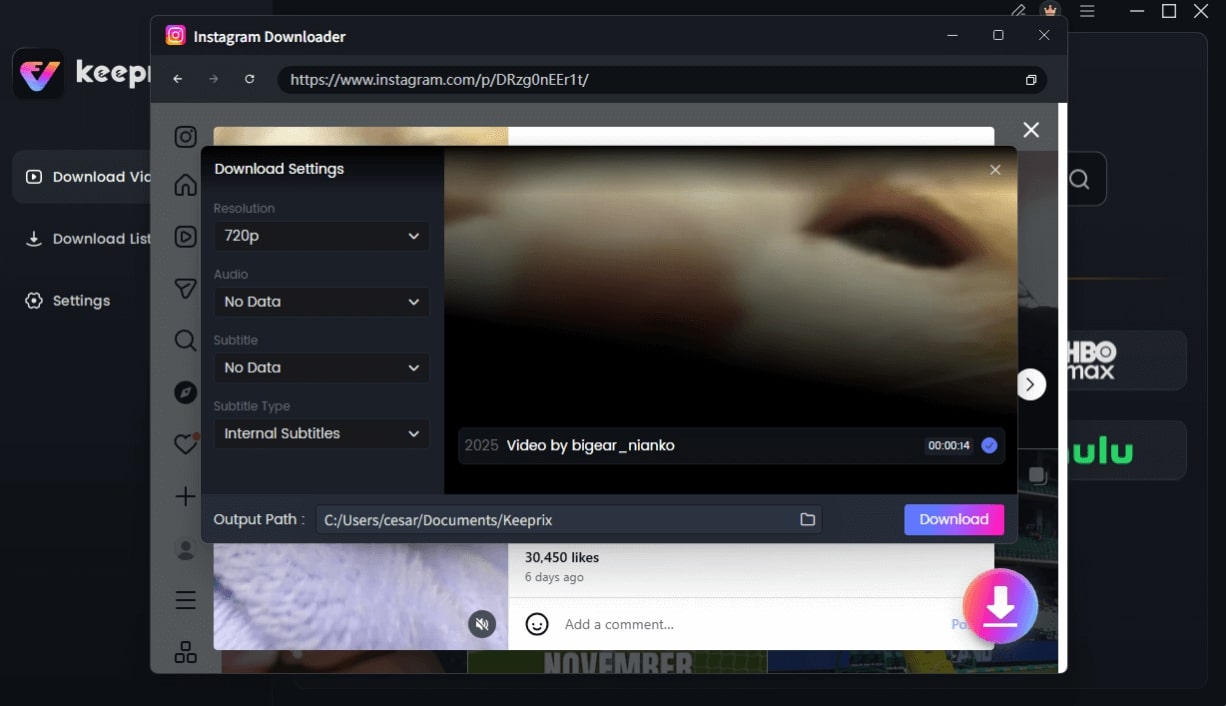
Configure Instagram Download Settings
Frequently Asked Questions
Here are direct answers to the most common questions about saving Instagram Stories.
Q1. Can I download Instagram stories without stickers?
No, not after the story has been published. The only way to get a version without stickers is to save the original photo or video to your device before you add any stickers and post it.
Q2. Why do my saved stories from the archive include stickers?
When you publish a story, Instagram renders the stickers and media into a single, permanent file. Your archive stores this final, “flattened” version. Therefore, any downloads from the archive will always include the stickers.
Q3. Can stickers be removed after posting?
No. Once a story is live, stickers become a permanent part of the image or video data. They cannot be removed or edited.
Q4. How do I save a story before adding stickers?
In the Instagram story editor, after selecting or capturing your media, tap the ‘Save’ (downward arrow) icon at the top of the screen. Do this before placing any stickers, text, or other elements on the story.
Q5. Are sticker removal tools safe?
No. Tools claiming to remove stickers from published stories are not legitimate and cannot work due to technical limitations. They are often scams designed to steal your data or install malware and should be avoided at all costs.
Q6. Does Instagram keep original story files?
No. Once a story is published, Instagram only stores the final, rendered version with all content overlays included. It does not keep a separate copy of your original, unedited media.
Q7.What is the difference between a draft and a published story?
A draft saves your story with editable layers, meaning you can still move or delete stickers. A published story is a final, single file where all layers have been merged permanently.”
Conclusion: Take Control of Your Content Proactively
The frustration of dealing with permanently embedded stickers in your downloaded stories is a problem with a simple, preventative solution. By making it a habit to save your photos and videos before adding creative elements, you eliminate this issue. This proactive method puts you in full control, ensuring you always have a clean, high-quality version of your original story media for your personal archive. You no longer have to worry about the platform’s technical limitations or fall for the false promises of unsafe third-party tools.
For those times when you need to archive public stories as they are, a professional tool like Keeprix Downloader offers a secure and reliable way to build your offline library. Download it today to take control of your content archiving needs.