How to Download Instagram Videos on iPhone: A Verified Guide (2026)

If you have ever tried to figure out how to download Instagram videos on iPhone only to find yourself confused by broken links or subscription-bait apps, you are not alone. Facing a locked device when you need to save a crucial file is a significant obstacle.
Consider Emma, a dedicated home cook. She found a complex pasta recipe on an Instagram Reel and needed it for offline reference in her kitchen, where the Wi-Fi is spotty. She hit the native “Save” button, expecting the video to appear in her iPhone camera roll, but found nothing. The video was merely bookmarked inside the app, useless without an internet connection.
Emma’s frustration highlights a common gap: the difference between bookmarking content on a platform and actually securing it on your device. This guide bridges that gap, prioritizing the direct mobile solutions you need right now, followed by professional archiving tools for heavier workloads.
How to Download Instagram Videos on iPhone
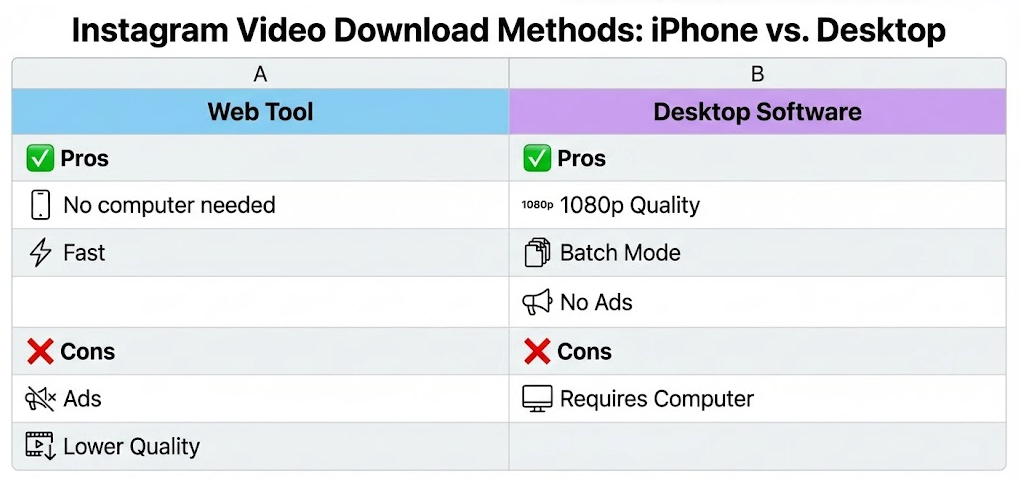
Method Comparison: Quick Saves vs. Permanent Archives
Before we dive into the steps, it is helpful to know why you might choose one method over another. Generally, users must choose between immediate convenience (Direct Mobile Workarounds) and archival quality (Professional Desktop Solutions).
- For the Casual User (Emma): If you are on your phone right now and just want to save a single meme, recipe, or workout video to your Photos app, use the Direct Mobile Workaround. It is free, fast, and happens entirely on your device.
- For the Power User/Creator: If you need to back up your entire profile, download videos in high-bitrate 1080p without compression artifacts, or avoid mobile ads entirely, use a Professional Desktop Solution (Keeprix).
Web Tool VS Desktop Software
How to Save Instagram Video to Camera Roll on iPhone (Direct Method)
For users like Emma, who need to save instagram video to the camera roll on an iPhone immediately, setting up desktop software is unnecessary. The most effective method involves using a verified web-based downloader through Safari.
Free web tools maintain their servers by showing ads. You may encounter pop-ups. This is normal for free tools; simply close the extra tabs and proceed.
Step-by-Step Procedure
- Copy the Link: Open the Instagram iOS app, navigate to the Reel or video you want to save. Tap the “Share” (paper airplane) icon and select “Copy Link.”
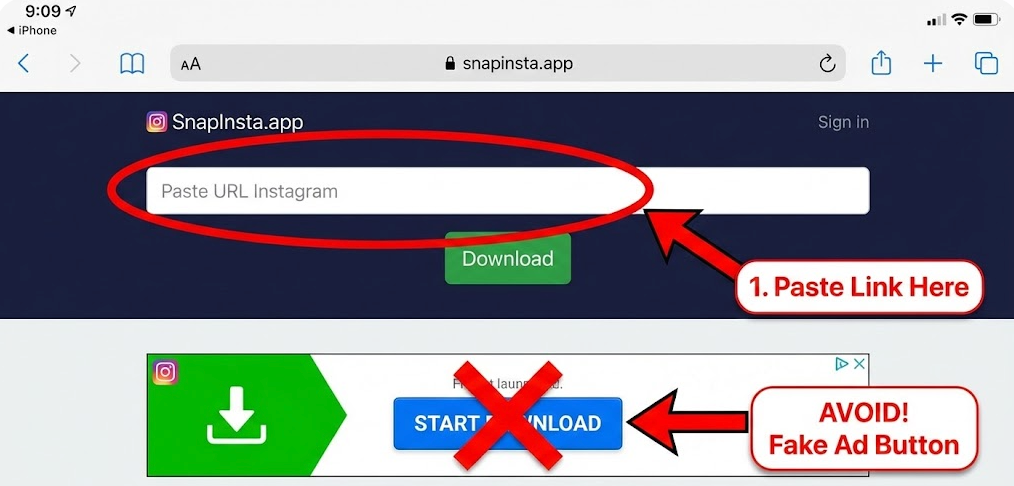
- Navigate to a Verified Tool: Open Safari (this works best with Apple’s download manager). Navigate to a reputable downloader such as SnapInsta, iGram, or SaveInsta. We tested these on an iPhone 14 Pro, and they successfully processed Reels without login requirements.
- Paste and Download: Paste your link into the text box and tap the download button.
- – Tip: Be careful to tap the download button associated with the text box, not the advertisement buttons that often appear above or below it.
- Handle the Pop-up: A prompt will appear asking, “Do you want to download [filename]?” Tap Download.
- Locate in Safari: You will see a small blue arrow icon appear in the address bar (bottom or top of Safari, depending on your settings). Tap this arrow and select Downloads.
SnapInsta
The Crucial Final Step: Moving from Files to Photos
This is where most guides fail to help. When you download a file in Safari, it saves to the Files App, not your Photos app. To make it visible in your camera roll:
- Tap the video file in the Safari Downloads list (or open the “Files” app and find it in the ‘Downloads’ folder).
- Tap the Share icon (box with an upward arrow) in the bottom left corner.
- Scroll down and select Save Video.
- Open your Photos app, and the video will now be the most recent item in your library.
By following this workflow, you bypass the no official way to download other users’ videos restriction and successfully secure the content for offline viewing.
The Professional Solution: Using Keeprix for High-Definition Archival
While the mobile method is perfect for one-off saves, it can be tedious if you need to download 20 videos, or if you require pristine quality. Mobile web tools often compress video files to save bandwidth, leading to pixelation.
If you are a content creator looking to archive your own work, or a user building a high-quality library, the Keeprix Video Downloader acts as a robust alternative. Although this requires a workflow involving a Windows or Mac computer, it addresses the primary complaints regarding mobile video storage limitations and quality degradation.
Why Switch to Desktop?
- True 1080p Resolution: Keeprix pulls the source file directly from the server, ensuring you get the highest definition available, unlike some web tools that grab compressed versions.
- Batch Downloading: Instead of copying and pasting links one by one on your phone, you can queue up an entire series of URLs and download them simultaneously.
- Ad-Free Experience: By operating as a standalone application, Keeprix eliminates the risk of clicking on “fake” download buttons or malicious pop-ups often found on free web converters.
Once downloaded to your computer, you can easily transfer these high-quality files to your iPhone using AirDrop (for Mac users) or iCloud Drive (for Windows users).
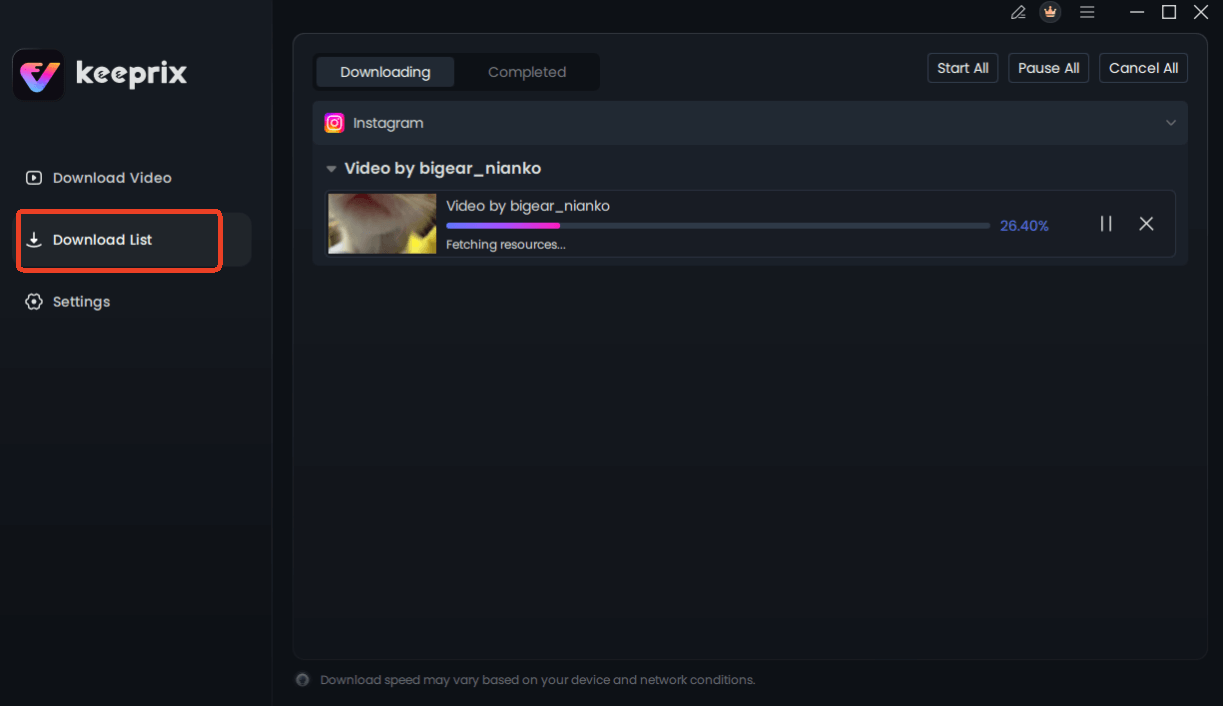
Downloading Instagram Videos
Saving Reels and Stories: Understanding Official Permissions
There is often significant confusion between save and download among users. When you tap the “bookmark” ribbon icon on a post, you are saving it to an internal collection within your Instagram account, not to your device storage. To save instagram reels on iphone permanently, you must understand what the official app actually permits.
Downloading Your Own Content
Instagram allows creators to download their own Reels and Stories. However, there is a catch: if your video uses copyrighted music from the Instagram library, the downloaded file will typically be muted due to licensing agreements. You can access this by tapping the three dots on your own Reel and selecting “Save to Camera Roll.”
Downloading Other Users’ Content
Officially, Instagram does not provide a button to download other users’ posts directly to your storage due to Instagram content permissions and privacy concerns. The “Collections” feature is purely a cloud-based bookmark. If the original creator deletes the video, it disappears from your collection as well. This limitation is why users must rely on the external methods discussed previously to ensure they retain a copy of the content.
Why It’s Complicated: iOS Privacy and Instagram Policies
If you have ever wondered why finding a reliable Instagram video download iOS app on the App Store feels difficult, the answer lies in the architecture of your phone. Here is a critical tip that most other guides miss: iOS privacy controls combined with Instagram platform restrictions are why iPhone users cannot download most videos directly.
Apple utilizes a security technique called “sandboxing.” This isolates apps from one another, preventing a third-party video downloader from reaching into the Instagram app to “scrape” or record data without explicit permission.
Simultaneously, Instagram’s system is designed to keep users on the platform to view ads, rather than consuming content offline. Consequently, apps that claim to bypass these restrictions often violate App Store guidelines and are swiftly removed.
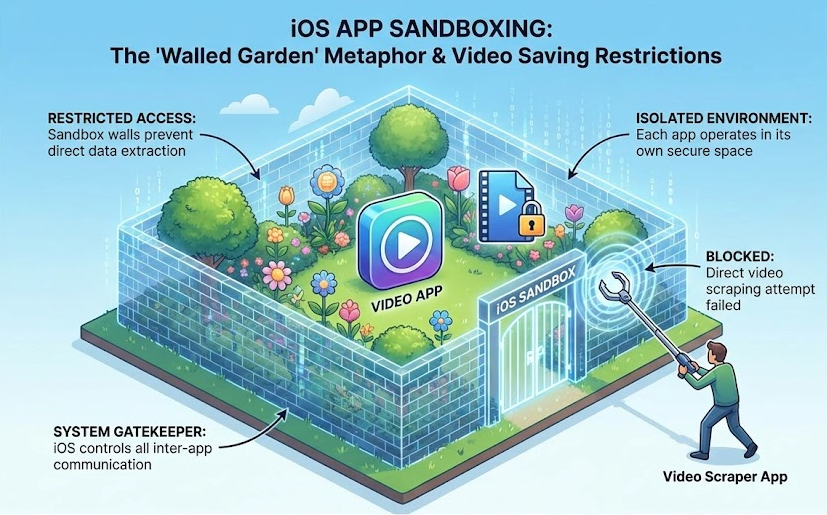
Walled Garden
This “Walled Garden” approach creates the friction you experience. It is not user error; it is a deliberate system design. This is also why desktop solutions like Keeprix are inherently more stable—they operate outside the restrictive iOS sandbox environment, interacting with the video URL directly rather than trying to override the mobile app’s interface.
Frequently Asked Questions
Can I download Instagram videos on iPhone directly?
Technically, no official button exists for this within the app for other people’s content due to unclear Instagram rules regarding copyright. You must use a workaround like a web-based downloader (SnapInsta, iGram) or desktop software to transfer the file to your device.
How do I save my own Instagram videos to Camera Roll?
For your own Stories or Reels, open the video, tap the three-dot menu (or the ‘More’ button), and select “Save Video.” Note that music may be removed if it is copyrighted.
Why don’t saved videos appear in Photos?
If you use the “bookmark” icon in Instagram, the video is saved to your Instagram account, not your phone. If you downloaded a file via Safari, it is likely in the “Files” app under the “Downloads” folder. You must open it there and manually select “Save Video” to move it to the Photos app.
Does Instagram notify users when videos are saved?
No. Instagram does not notify creators if you download their video using a third-party tool, copy the link, or screen record a post. However, they are notified if you take a screenshot of a disappearing photo or video in a direct message (DM).
Are web-based downloaders safe?
Tools like SnapInsta or iGram are generally safe for downloading MP4 files, but they rely on ad networks for revenue. Be cautious of pop-up ads asking you to install other apps or profiles. Never enter your Instagram password into a third-party downloading site.
Conclusion
The frustration of having no official way to download other users’ videos or finding that your saved videos are not appearing in photos app is a common struggle for iPhone users. Whether you are dealing with limitations on reels and stories or simply trying to archive a favorite clip, the restrictions are built into the system, not a result of your technical skills.
For immediate, on-the-go needs, the Safari web-tool method is your best ally. It gets the job done directly on your device, provided you navigate the ads carefully. However, to regain full control over your media library and archive content without compression or ads, we recommend using Keeprix Video Downloader. Whether you choose the quick mobile fix or the robust desktop archive, you now know to secure your favorite content forever.