Vizio TV Netflix Not Working? Quick Fixes and Backups

1. Netflix Not Working on Vizio TV? Quick Fixes First
Stuck on the Netflix loading screen? Vizio SmartCast apps are notorious for occasional freezing when you just want to relax. Before tweaking any complex settings, your best first step is a soft power cycle: unplug the TV for 60 seconds, hold the physical power button for 10 seconds, and plug it back in. This simple trick clears most temporary glitches instantly.
- Soft Power Cycle: Unplug the TV for 60 seconds to clear temporary system glitches.
- Check for TV Firmware Updates: Navigate to the TV’s system menu and ensure your device is running the latest SmartCast software version.
- Restart Your Home Router: Unplug your Wi-Fi router for 30 seconds to refresh your network, as smart TVs can sometimes silently drop their connection to streaming servers.
If these immediate steps do not get you past the Netflix logo, you will need to dig a little deeper into the TV’s memory and cache.
2. Why is Netflix Stuck on the Loading Screen?
If YouTube works fine but Netflix is stuck loading, you’re likely facing an app-specific cache issue or a Vizio SmartCast bug. You’re not alone—this is a well-documented problem on Reddit.
Many Vizio TVs struggle with strict internal memory limits. When Netflix tries to load its massive catalog of HD thumbnails and auto-playing trailers, the TV’s processor gets overwhelmed. While bad Wi-Fi causes low-quality video, a complete app freeze is almost always a sign of a hardware bottleneck struggling to run the native software.
3. Fixes for Vizio TV Netflix App Crashes
When a simple restart is not enough, you can force the TV to refresh its memory and data connections. Here is a step-by-step troubleshooting flow to fix Vizio TV Netflix app crashes, ordered from the easiest method to the most involved:
- Soft Power Cycle via Menu: Don’t want to unplug the TV? Use your remote. Go to Menu > System > Reset & Admin > Soft Power Cycle. Confirm to safely reboot and clear minor glitches.
- Reboot SmartCast (Clear Memory): Vizio lacks a standard “clear cache” button. Instead, switch to the SmartCast input, set System > Power Mode to Quick Start, then go to System > Reset & Admin > Reboot TV.
- Update TV Firmware: Outdated software causes app crashes. Go to Menu > System > Check for Updates. Install any available updates and relaunch Netflix.
- Test Network Connection: If Netflix opens but buffers, check your speed via Network > Test Connection. You need at least 3-5 Mbps for HD streaming. If it’s too slow, switch to a wired Ethernet cable or move your router.
4. Will a Factory Reset Fix Vizio SmartCast Problems?
If standard troubleshooting fails, official support channels often recommend a factory reset – but is it actually worth it? A factory reset completely wipes your TV, returning it to the state it was in when you first took it out of the box.
Here is a quick look at the pros and cons of performing a factory reset to fix a broken app:
Pros:
* Clears all deep-seated software bugs and corrupted cache data.
* Forces the TV to redownload fresh, updated versions of all native apps.
Cons:
* Deletes all your custom picture and audio settings.
* Logs you out of every streaming app, forcing you to find passwords and re-authenticate everything.
* Erases your saved Wi-Fi network data.
* Does not guarantee a permanent fix if the TV’s internal hardware is simply too slow to run modern apps smoothly.
For many users, losing everything just to fix one app is a major pain point. Furthermore, even after a reset, SmartCast apps might still buffer or freeze over time as cache builds up again. If you have tried basic fixes and want to avoid the destructive nature of a factory reset, it is time to look for a reliable hardware workaround or a file-based alternative that bypasses the SmartCast system entirely.
5. Tired of Buggy Apps? How to Bypass SmartCast Entirely
When Vizio’s SmartCast apps fail, Reddit users often suggest buying a Roku or Fire Stick. But you don’t need to spend money on new hardware to fix the problem. To bypass buffering and buggy apps entirely, try Keeprix Video Downloader.
Available for PC and Mac, Keeprix lets you save your favorite Netflix shows as MP4 or MKV files. Simply transfer them to a USB drive and play them directly on your Vizio TV for a flawless offline experience.
Here is how the main viewing alternatives compare when your native app stops working:
| Feature | Native SmartCast App | Streaming Stick | Keeprix + USB Playback |
|---|---|---|---|
| Cost | Free (built-in) | $30 – $50+ | Software license + existing USB |
| Hardware Required | TV only | Requires an open HDMI port | Requires a PC/Mac and a USB drive |
| Internet Dependence | Requires strong Wi-Fi on the TV | Requires strong Wi-Fi on the TV | No Wi-Fi needed on the TV to watch |
| Buffering Risk | High (if TV memory is low) | Low to Medium (depends on Wi-Fi) | Zero buffering (plays local file) |
| Workflow Focus | App-based viewing | App-based viewing | File-based offline viewing |
Streaming sticks are a perfectly valid way to get better app performance. However, if you want guaranteed smooth playback and the flexibility of offline files that do not depend on your living room Wi-Fi, Keeprix offers a buffering-free bypass.
6. How to Download Netflix Shows for USB Playback on Vizio TV
If you are ready to move from app-only frustration to file-based freedom, using Keeprix is straightforward. By preparing your watchlist on your computer, you can watch smoothly via USB without relying on the buggy SmartCast app or slow Wi-Fi.
Here is the step-by-step workflow to get your accessible Netflix shows onto your Vizio TV:
Keeprix Video Downloader
Download streaming videos from hot platforms without limites. Enjoy seamless offline watching on Windows and Mac computers.
Step 1: Download and open the Keeprix on your Windows PC or Mac. Choose Netflix.
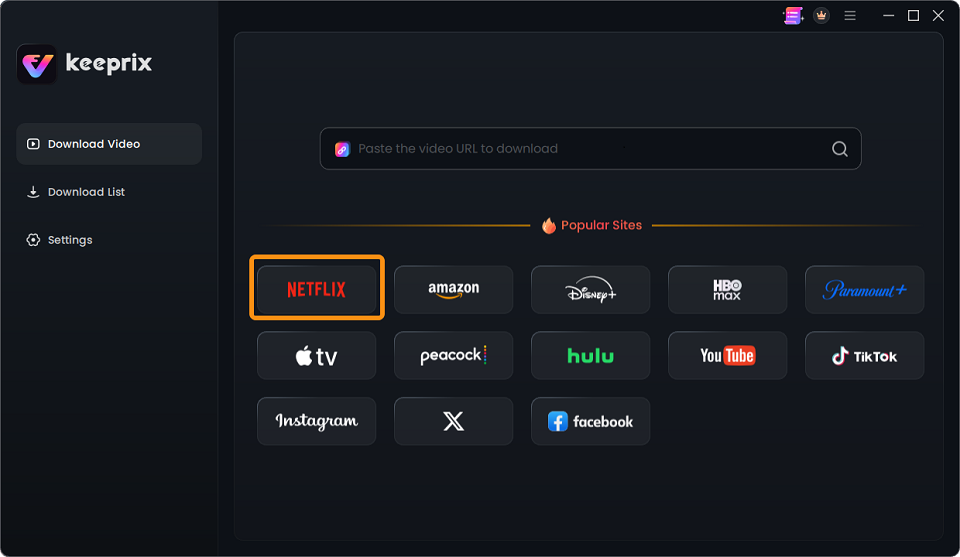
Choose Netflix
Step 2: Use the built-in browser inside Keeprix to log into your Netflix account and locate the specific movie or show you want to watch.
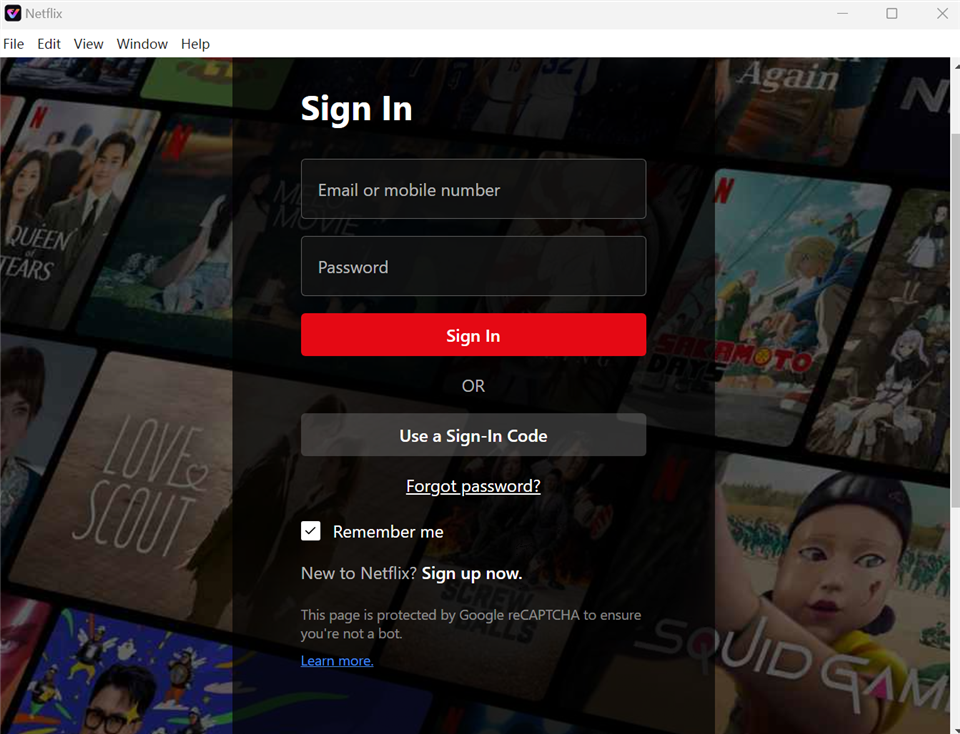
Sign In to Your Netflix Account
Step 3: Choose your preferred audio tracks and subtitles, then initiate a Netflix MP4 download to your local drive. Keeprix supports Netflix downloads up to 1080p, depending on the source quality and your account plan.
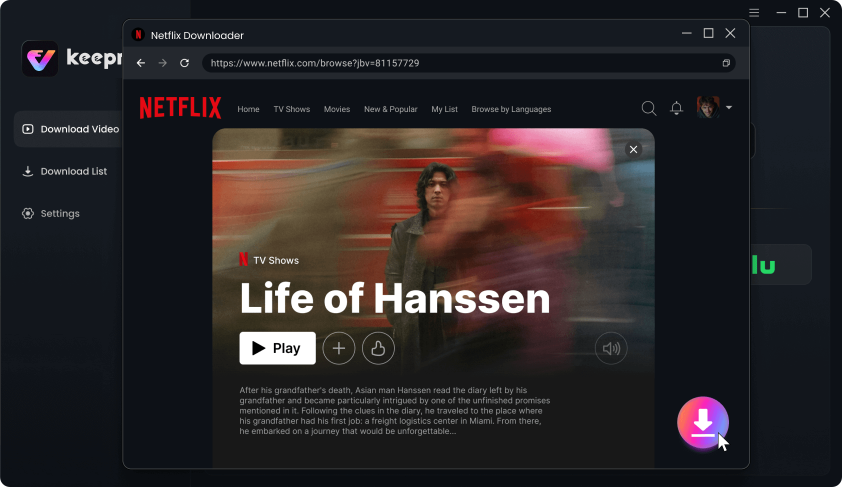
Download Movies You Want on Netflix
Step 4: Choose your preferred available audio and subtitle tracks, and select MP4 or MKV as the output format.
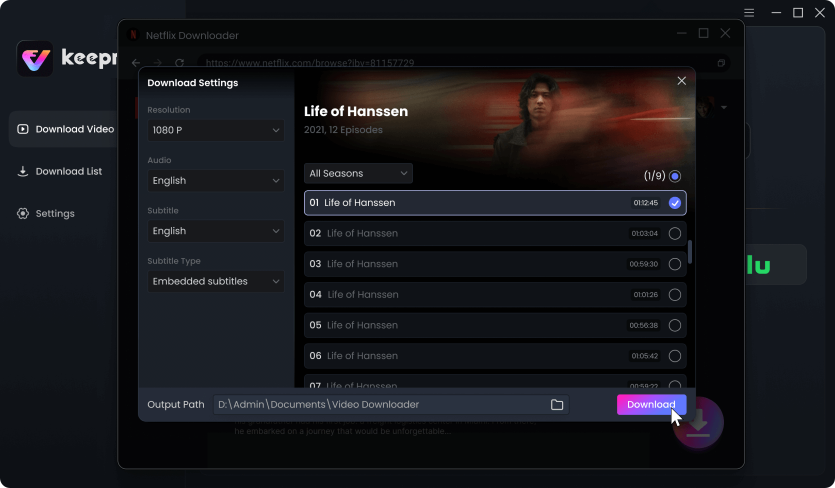
Customize Download Setting
Play on Your Vizio TV: Safely eject the USB drive from your computer, plug it into the USB port on the back of your Vizio TV, and open the TV’s media player app. Select your file and enjoy smooth playback without any buffering interruptions.
7. Frequently Asked Questions
Why is my Vizio TV so slow with streaming apps?
Many smart TVs, including older Vizio models, have limited internal processing power and memory. As streaming apps update and become heavier, the TV struggles to load high-resolution thumbnails and video streams, resulting in lag, slow navigation, and buffering.
How do I clear the cache on a Vizio TV without a physical button?
Because Vizio SmartCast does not have a traditional “clear app cache” menu for individual apps, the best method is to navigate to System > Reset & Admin and select Reboot TV, or simply perform a soft power cycle by unplugging the unit for 60 seconds.
Will unplugging my Vizio TV reset it?
No, unplugging your TV only performs a soft power cycle. It will clear temporary memory and minor bugs, but it will not delete your passwords, custom settings, or saved Wi-Fi network data.
Can I install the Keeprix app directly on my Vizio Smart TV?
No, Keeprix is strictly desktop software designed for Windows and Mac computers. To watch Keeprix downloads on your Vizio TV, you must save the video on your computer first and then transfer the file to a USB flash drive for local playback.
What video formats does Vizio TV support via USB?
Most Vizio TVs support widely used video formats like MP4 and MKV for USB playback. Both of these formats are available as standard output options when saving videos with Keeprix.
Does Keeprix support 4K for Netflix?
Keeprix supports saving accessible Netflix videos up to 1080p. The final resolution always depends on the original source quality of the video, your specific Netflix subscription plan, and account restrictions. If you want to better understand how to download Netflix videos at the best possible quality, always ensure your subscription plan supports HD playback.
Final Thoughts
While power cycles and updates can temporarily fix a frozen Netflix app, Vizio’s native SmartCast software will always struggle with memory limits. Skip the endless buffering and expensive streaming sticks. Use Keeprix to download your Netflix shows directly to your computer as MP4 or MKV files. Move them to a USB drive, plug it into your TV, and enjoy a 100% buffer-free offline library, totally independent of buggy TV apps.
Keeprix Video Downloader
- Download Netflix videos on Windows & Mac.
- Save streaming videos as local MP4/MKV files.
- Batch download streaming videos and TV series.
- Watch videos offline, no ads, no interruption.