Does Peacock Have Commercials? Your Complete Guide for 2026

Before subscribing to a new service, you want a simple answer to a critical question: will your viewing be interrupted? If you’re like Lauren, an ad-sensitive viewer who just wants to enjoy a movie night peacefully, the confusion around streaming service ads is a major frustration. You’re asking, “Does Peacock have commercials?” and finding vague answers about its subscription plans. The marketing language around “ad-free” options often feels misleading, leaving you uncertain if paying more actually solves the problem.
This guide provides clear, direct answers. We will break down exactly how many commercials you can expect on each Peacock plan and explain why even the top tier isn’t completely ad-free. All information here is based on hands-on testing of both Peacock subscription tiers on a Samsung Smart TV, an iPhone 15, and a Windows 11 PC.

Does Peacock Have Commercials
Peacock Ads Explained: A Comparison of Subscription Plans
To understand whether you’ll see Peacock commercials or ads, you need to look at its two distinct subscription plans. Each is designed for a different user, and the primary difference is how they handle ad-supported streaming for the on-demand library.
| Feature | Peacock Premium | Peacock Premium Plus |
| Price | Lower Monthly Cost | Higher Monthly Cost |
| On-Demand Ads | Yes (Approx. 5 min/hr) | No (on most titles) |
| Live TV & Sports Ads | Yes | yes |
| Download for Offline Viewing | No | Yes (on select titles) |
| Access to Local NBC Live | No | Yes |
Still Seeing Ads on Peacock Premium Plus? Here’s Why
One of the most common user frustrations is paying for Peacock Premium Plus specifically to avoid ads, only to encounter them anyway. This is not a technical glitch; it is a built-in limitation of the service based on broadcasting and licensing rights.
The critical detail often missed is that Premium Plus removes ads from Peacock’s on-demand library. Due to contractual obligations, certain types of content will always contain commercials, no matter which plan you have. This is a standard industry practice for streaming services that include a live component.
You will always see commercials on the following content, even with Premium Plus:
- Live Sporting Events: Any event streamed in real-time, like NFL Sunday Night Football, Premier League matches, or WWE events, will include the same commercial breaks you would see on broadcast TV.
- Live TV Feeds: Your local NBC station feed contains its scheduled ad breaks.
- Peacock Channels: These are curated, 24/7 streams that mimic traditional TV channels (e.g., a channel playing Saturday Night Live clips). Because they operate like a broadcast channel, they include ads.
- A Small Number of Titles: Due to specific licensing agreements, a very small selection of on-demand movies or shows may still feature brief promotional content from Peacock.
So, if you ask, “Is Peacock ad-free with the Plus plan?” the answer is no. It significantly reduces ads but does not eliminate them.
How to Get Peacock Without Commercials: Two Main Strategies
Now that you understand the limits of Peacock’s “ad-free” offering, you have two primary methods for achieving the viewing experience you want. The choice depends on your budget, viewing habits, and desire for convenience versus total control.
Strategy 1: Upgrade to Peacock Premium Plus
This is the most straightforward solution. By upgrading your subscription, you instantly remove nearly all commercials from the on-demand library. This method is ideal if:
- You primarily watch on-demand movies and TV shows.
- You value convenience and don’t want to use extra software.
- You are not bothered by ads during live sports or channels.
The main drawbacks are the recurring monthly cost and the fact that it is not a 100% ad-free solution.
Strategy 2: Use an Offline Downloader
This approach provides a complete solution for viewers who want to eliminate every single commercial. By using a third-party Peacock downloader, you can download content from Peacock to your computer. During this process, the software strips out all ads, leaving you with a clean video file that you own permanently. This is the best method if:
- You want a truly ad-free experience on all content, including live events after they air.
- You want to build a personal media library for offline viewing on any device.
- You prefer a one-time software cost over a recurring subscription increase.
The trade-off is that you need to plan and download your content before you want to watch it.
The Ultimate Method to Get Peacock Without Ads-Keeprix Downloader
For viewers who demand complete control and a guaranteed 100% commercial-free experience, the most effective technique is using a dedicated tool like Keeprix Downloader. This software is specifically designed to resolve the common pain points of streaming service ads, including the exceptions found in Peacock’s Premium Plus plan.
Keeprix Downloader works by saving video streams directly to your computer as local files. Here’s how this paid tool solves the ad problem entirely:
- Automatic Ad Removal: The software identifies and removes all commercials during the download. This means you get a clean video file, even from content that would normally have ads on Premium Plus.
- Works with Any Peacock Plan: You do not need the more expensive Premium Plus subscription to get ad-free videos. The ad-removal feature functions perfectly even with the standard, ad-supported Premium plan, allowing you to save on the monthly subscription fee.
- Permanent, DRM-Free Files: Videos are saved in universal MP4 or MKV formats in up to 1080p quality. These files never expire, are not tied to your subscription status, and can be transferred to a phone, tablet, or external drive for viewing anywhere, anytime.
By downloading your favorite shows and movies, you create your own personal library that is guaranteed to be free of all ad interruptions.
Stepwise Guide to Download Peacock Videos with Keeprix Downloader
Step 1. Download Keeprix Downloader and install it on your computer.
Step 2. Open Keeprix Downloader and choose Peacock from the main menu. Then sign in to your Peacock account.
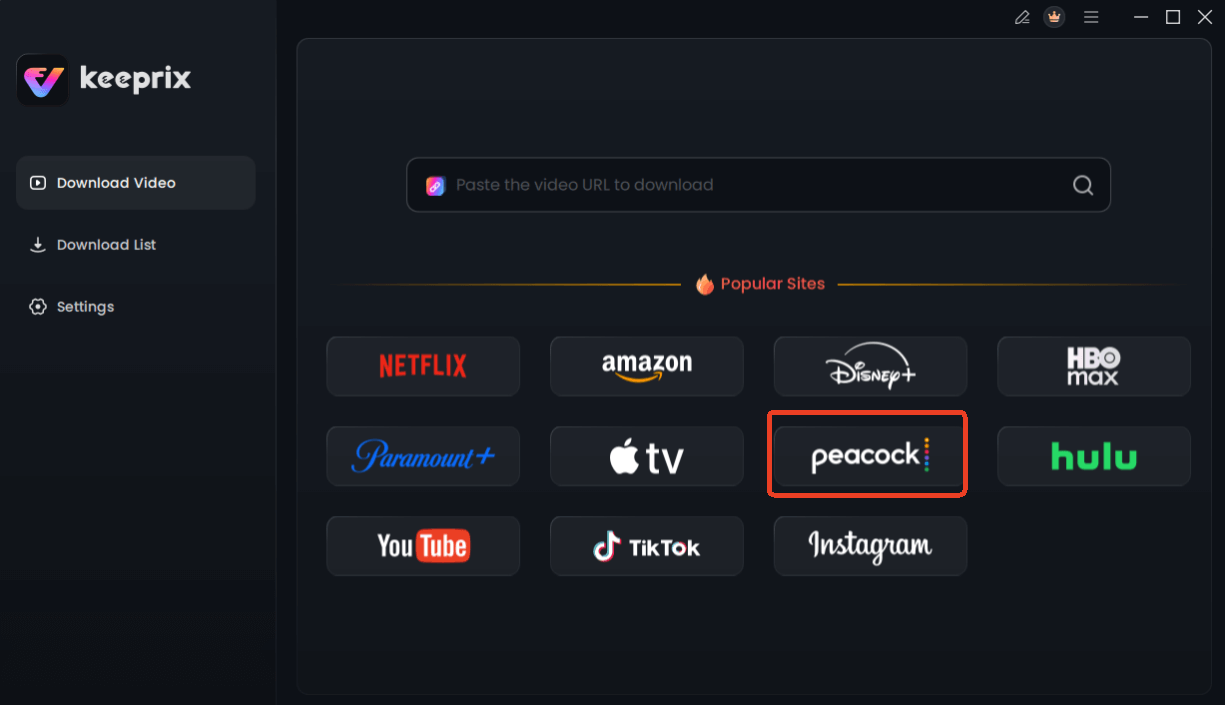
Choose Peacock in Keeprix Downloader
Step 3. Use the integrated browser to find the movie or TV show you want to save. Alternatively, you can paste the video’s URL into the downloader. Then click Download.
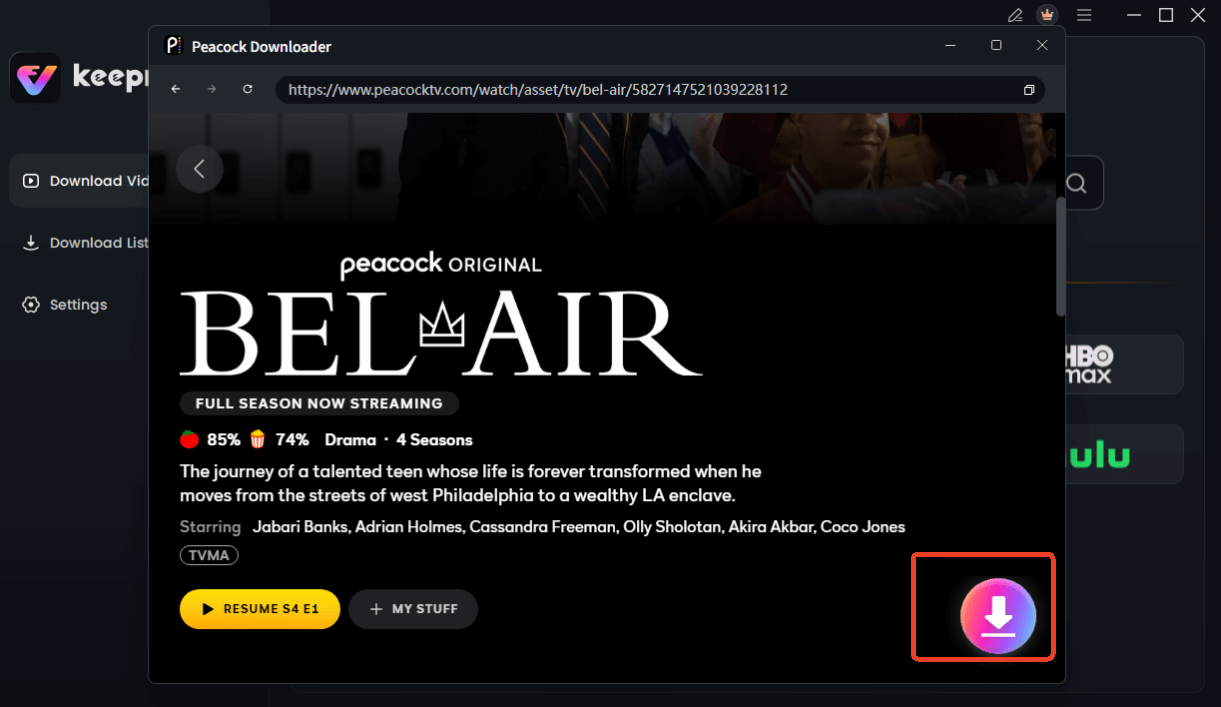
Choose Peacock Video to Download
Step 4. You can then choose your preferred video quality (up to 1080p), audio language, and subtitle format.
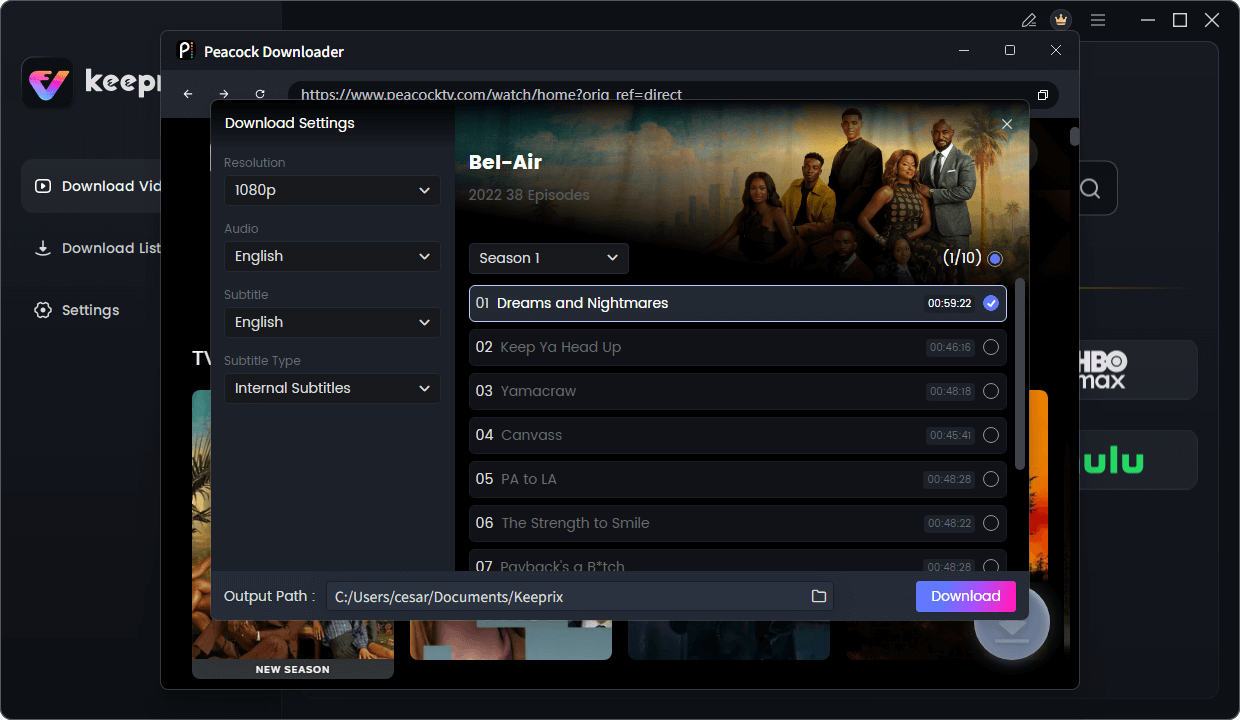
Configure Peacock Download Settings
Step 5. Click the Download button. The software will process the video, remove ads, and save the permanent file to your computer.
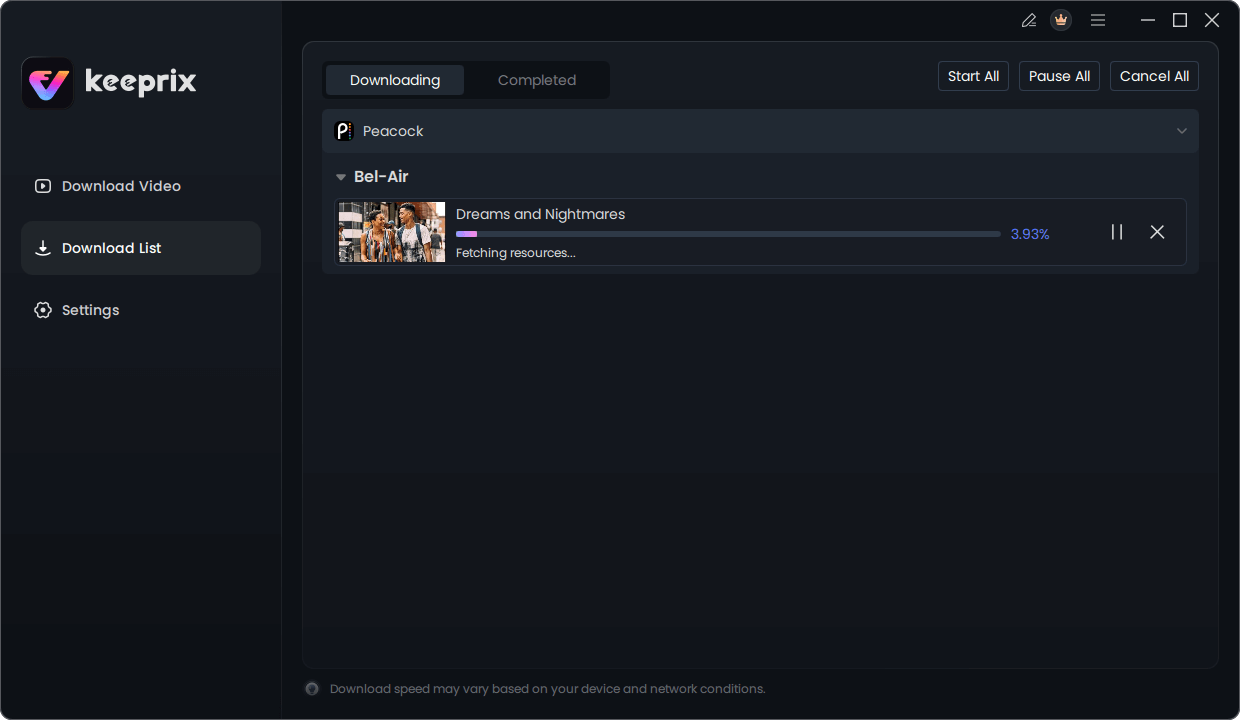
Downloading Peacock Video
Frequently Asked Questions About Peacock Ads
Q1. Which Peacock plan has no ads?
No Peacock plan is 100% ad-free. Peacock Premium Plus is the “low-ad” option, as it removes commercials from the vast majority of on-demand movies and shows. It is the closest you can get to an ad-free experience within the Peacock app itself.
Q2. Does Peacock Premium Plus remove all ads?
No. It removes ads from the on-demand library but not from live TV, live sporting events, or curated Peacock Channels. This is due to contractual advertising requirements for live content.
Q3. Why am I seeing ads on Peacock with Premium Plus?
You are most likely watching live content, such as a sports game or your local NBC news feed. These streams include the same commercial breaks as broadcast television for all viewers, regardless of subscription tier.
Q4. Does Peacock show ads during movies?
The standard Premium plan shows ads during movies. The Premium Plus plan removes ads from on-demand movies, providing an uninterrupted experience for that specific content.
Q5. Are there ads on live TV and sports?
Yes, all live content on Peacock includes commercial breaks for all subscribers. [Internal Link Suggestion: Link the preceding phrase to ‘/complete-guide-to-streaming-live-sports’]
Q6. How can I reduce ads on Peacock?
The primary method within the Peacock service is to upgrade from Premium to Premium Plus. This eliminates most ads from on-demand content. To remove all ads from all content types, the only solution is to use an offline downloader tool.
The Final Verdict: Taking Control of Your Viewing Experience
The frustration over Peacock commercials stems from the gap between marketing language and reality. While Peacock Premium Plus offers a significantly better viewing experience by removing most on-demand ads, it is not the completely ad-free solution many users expect. The presence of commercials during live sports and channels means even top-tier subscribers will face interruptions.
For viewers who want to eliminate this uncertainty and regain full control, a tool like Keeprix Downloader offers a direct and permanent solution. It is the only method that removes 100% of ads from all Peacock content, giving you the power to build a personal, offline library that you truly own. End the cycle of ad-related frustration and enjoy your shows and movies exactly as you want to: uninterrupted.