The Ultimate Peacock Downloader Guide for 2026: Watch Offline on Any Device

Getting ready for a long flight, you meticulously plan your entertainment, only to find the Peacock shows you want to watch are trapped on your phone. The goal was to enjoy them on your laptop, but the search for a reliable Peacock downloader for PC leads to a maze of confusing and unsafe websites. This guide cuts through that frustration. Facing device limitations when you need flexibility is a significant obstacle, especially when dealing with expiring downloads and plan restrictions. We will provide a clear, tested procedure to download Peacock videos for true offline viewing on any device you own, including your PC or Mac.

Peacock Downloader
How to Use Peacock’s Official Download Feature (And Its Limits)
Peacock offers a built-in download feature, but it’s essential to understand its specific requirements and limitations. This official method is designed exclusively for mobile devices and is not available on computers, web browsers, or smart TVs.
Key Requirements for Official Downloads
Before you begin, ensure you meet the following criteria:
- Subscription Plan: You must be subscribed to the Peacock Premium Plus plan. The standard Premium and free tiers do not support Peacock offline viewing.
- Supported Device: You need an iPhone, iPad, or Android phone/tablet with the latest version of the Peacock app installed.
- Content Availability: Not all shows and movies on Peacock are available for download due to licensing agreements and other streaming service restrictions.
Step-by-Step Download Procedure
Open the Peacock App: Launch the app on your supported mobile device and log in to your Premium Plus account.
Step 1. Find Downloadable Content: Browse or search for the movie or TV show you wish to save. Look for a download icon, which is typically a downward-facing arrow next to the episode or movie title.
Step 2. Start the Download: Tap the download icon. The download progress will be displayed in your notifications and within the app. You can queue multiple episodes for download.
Step 3. Access Your Downloads: Once complete, navigate to the ‘Downloads’ tab in the app’s main menu to see all your saved content.
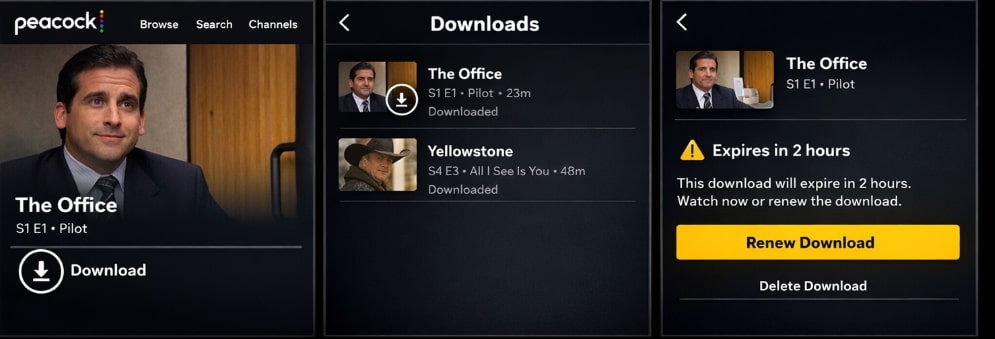
Download Peacock in App
Keep in mind that these downloads have an expiration date. They typically expire 30 days after downloading or 48 hours after you start watching, whichever comes first. This is a common pain point for users who want to save content for longer periods without needing to reconnect to the internet to renew the license.
Choosing Your Method: Official App vs. Dedicated Peacock Downloader
The choice between the Peacock app download feature and a dedicated Peacock TV video downloader depends entirely on your goal: temporary mobile viewing or permanent, flexible access on any device, including your laptop. The table below shows a direct comparison.
| Feature | Official Peacock App | Keeprix Downloader |
| PC & Mac Support | ❌ | ✅ |
| Permanent Downloads (No Expiration) | ❌ | ✅ |
| Standard MP4/MKV Format | ❌ | ✅ |
| Ad Removal (from Ad-Supported Plans) | ✅ | ✅ |
| Batch Episode Downloads | ✅ | ✅ |
| HD 1080p Video Quality | ✅ | ✅ |
How to Download Peacock Videos on PC and Mac: The Step-by-Step Solution
For users who need to perform a Peacock movies download or save TV shows on a computer, the Keeprix Downloader provides a direct and reliable method. This software is engineered to bypass the official app’s limitations by creating standard MP4 or MKV files that you can play on any device, transfer to a USB drive, or store permanently. This directly answers the common question, “Can I download Peacock shows on PC?”
Keeprix operates by using a secure, built-in browser to access your Peacock account, allowing it to download content directly to your hard drive.
Here is the straightforward process:
Step 1. Install and Launch Keeprix: Download the Keeprix Downloader software for your Windows or Mac computer from the official website. Install and open the application.
Step 2. Select Peacock Service: From the main interface, click on the Peacock icon from the list of supported streaming services.
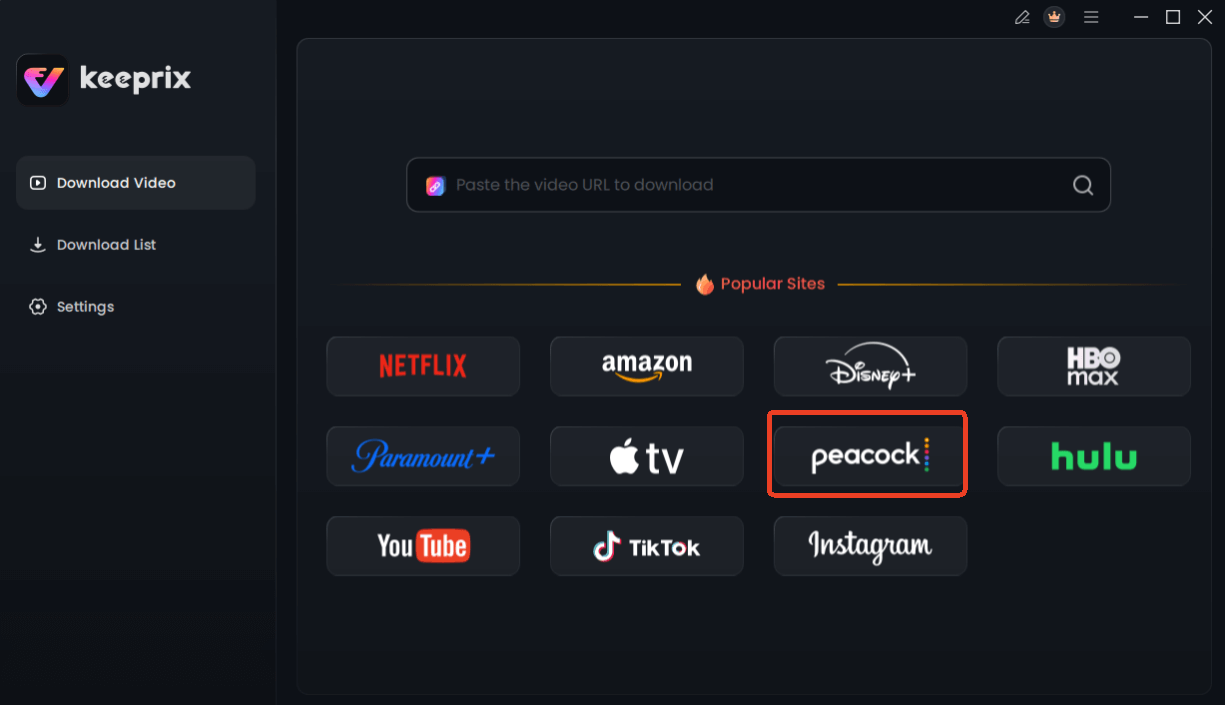
Choose Peacock in Keeprix Downloader
Step 3. Log In to Your Peacock Account: A built-in, secure browser window will open. Log in to your Peacock account just as you would on the web. Your credentials are not stored by the software.
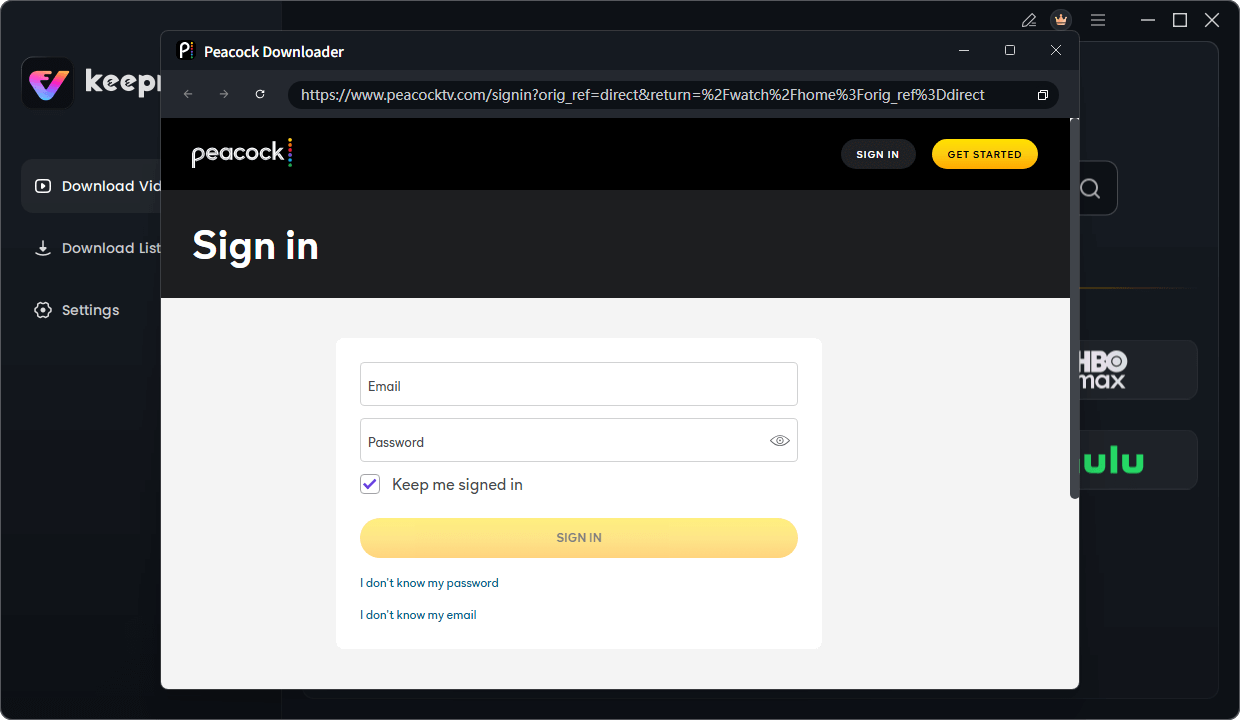
Sign in Your Peacock Account
Step 4. Find and Play Your Video: Navigate to the show or movie you want to download. Begin playing the video for a few seconds to allow the software to analyze the stream.
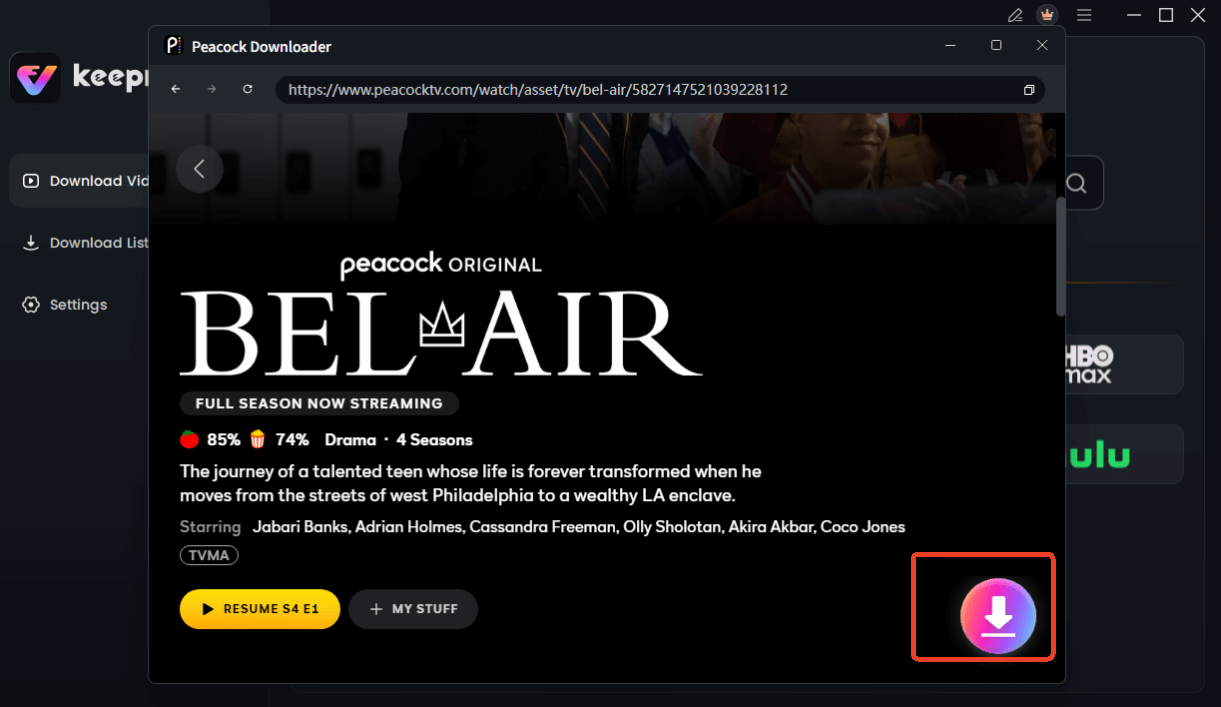
Choose Peacock Video to Download
Step 5. Configure Download Options: After a moment of analysis, a download settings window will automatically pop up. Here, you can select the video quality (up to 1080p), audio tracks, and subtitles. If you’re downloading a TV series, you can select an entire season for batch downloading.
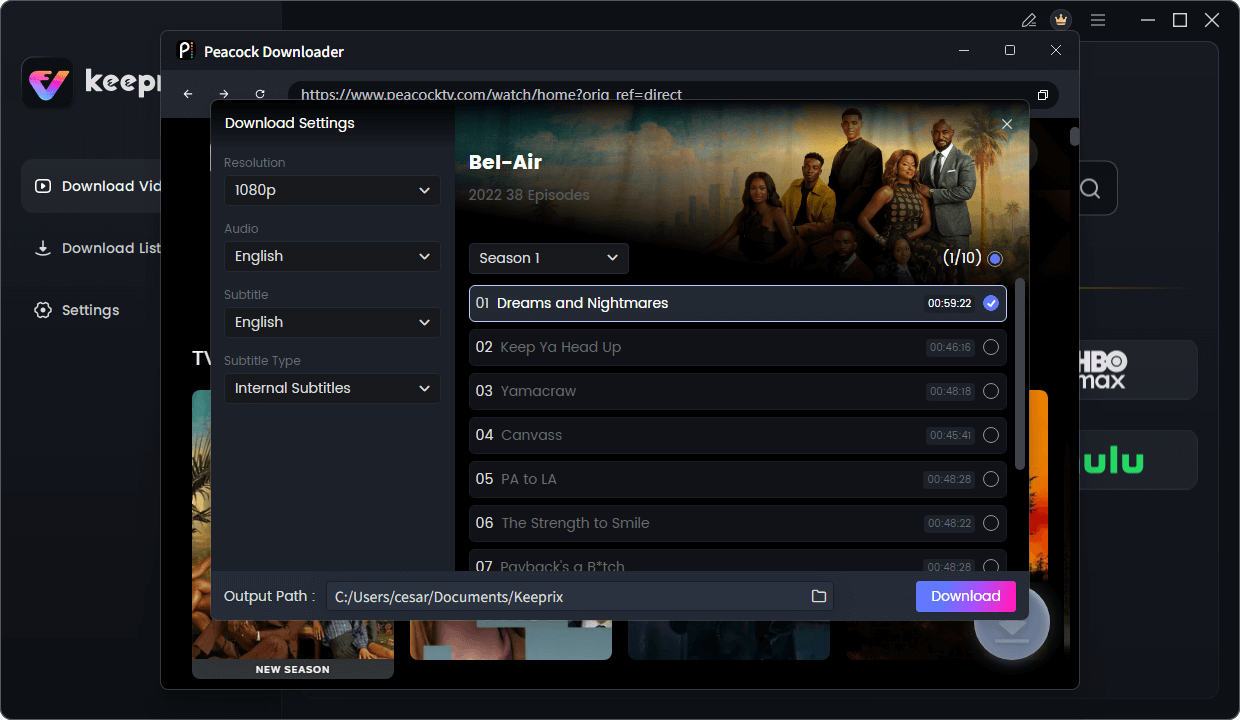
Configure Peacock Download Settings
Step 6. Download the Video: Click the ‘Download’ button to start the process. The files will be saved to your computer as high-quality, ad-free MP4 or MKV files.
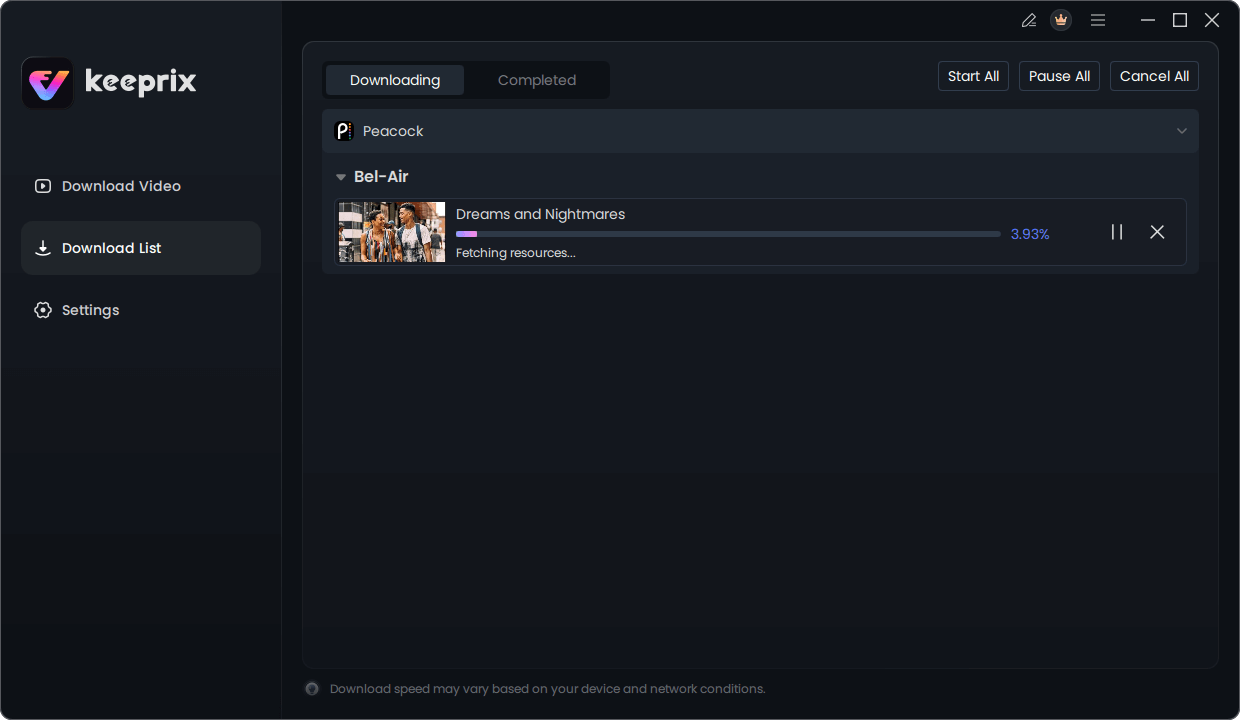
Downloading Peacock Video
Why You Can’t Move Peacock Downloads: Understanding DRM Protection
If you’ve ever tried to copy a downloaded show from your phone and wondered why it won’t play, the answer is Digital Rights Management (DRM). Streaming services use DRM-protected streaming to comply with content licensing agreements and prevent unauthorized copying.
When you use the official Peacock app, you aren’t saving a standard video file. You are saving an encrypted video download. These files are device-bound, meaning the encrypted file is locked to the specific app on the specific device that created it. It contains a digital key that only that instance of the Peacock app can read. This is why you cannot transfer it to a USB drive or play it with another video player like VLC—the key to unlock it doesn’t exist anywhere else.
This system is what enforces download expirations and device limitations. A dedicated peacock downloader like Keeprix works by capturing and re-encoding the video stream during playback into a standard, DRM-free format that is not device-bound.
IMPORTANT SECURITY WARNING: The Risks of Free Online Downloader Sites
A search for a peacock video downloader will undoubtedly lead you to websites claiming to download videos for free by simply pasting a URL. It is critical to approach these services with extreme caution. The vast majority are ineffective and pose serious security risks because they cannot handle Peacock’s DRM technology.
Here’s what you need to be aware of:
- Malware and Viruses: Many free downloader sites bundle their downloads with malicious software. Clicking a button might install adware, spyware, or even ransomware on your system.
- Phishing Scams: Some sites use fake login pages to steal your Peacock account credentials. Once they have your username and password, your account and personal information are compromised. [Internal Link Suggestion: Link the preceding phrase to ‘/how-to-spot-and-avoid-phishing-scams’]
- Privacy Invasion: Unreputable tools can track your browsing activity and collect personal data from your computer.
For security and reliability, always use reputable, installable software from a known developer. A trusted application like Keeprix processes everything locally on your computer, protecting your account credentials and personal data. The Keeprix software is also regularly updated by its developers to adapt to changes in streaming service technology, ensuring long-term functionality and user support.
Frequently Asked Questions About Peacock Downloads
Here are concise answers to the most common questions about downloading content from Peacock.
Q1. Does Peacock allow video downloads?
Yes, Peacock allows downloads through its official app on supported mobile devices, but this feature is exclusively for subscribers of the Peacock Premium Plus plan.
Q2. Which Peacock plan supports offline viewing?
You must have the top-tier Peacock Premium Plus plan to use the official download feature. The standard Premium and free plans do not support saving content offline.
Q3. How long do Peacock downloads last?
Downloads made through the official app typically expire 30 days after being saved or 48 hours after you start watching them, whichever comes first. After they expire, you must reconnect to the internet to renew them.
Q4. Can I download Peacock shows on PC?
You cannot download shows on a PC or Mac using the official Peacock application. To accomplish this, you need to use a third-party software solution like Keeprix Downloader, which saves videos as standard MP4 or MKV files on your computer’s hard drive.
Q5. Why can’t I export Peacock downloads?
Official Peacock downloads are protected by DRM (Digital Rights Management). The files are encrypted and device-bound, meaning they are locked to the specific app and device that created them and cannot be moved or played on other devices or applications.
Q6. Are Peacock downloader tools safe?
It depends entirely on the source. Reputable, installable software from established developers is generally safe and a reliable solution. However, free online downloader websites should be avoided as they pose significant security risks, including malware, phishing attacks, and data theft.
Sum up
The frustration of being unable to save peacock shows offline for your laptop or finding that your downloaded movies have expired is a common problem rooted in technical restrictions. While the official app offers a limited mobile solution, it doesn’t meet the needs of users who want permanent, flexible access to the content they pay for. A dedicated tool like Keeprix Downloader is the direct solution to these pain points, allowing you to create a permanent, ad-free, and high-quality offline library. You can finally watch what you want, when you want, on any screen you choose.
To solve this problem in minutes and regain control over your offline entertainment, explore a free trial of Keeprix Downloader.