Euphoria Download: Full Guide to Watching Offline

It’s a frustratingly common scenario: you’re planning to binge-watch Euphoria on a long flight, only to discover there’s no download button on the Max website. You’ve packed and prepared, but the one thing you needed for the trip—your shows—is locked behind a technical wall. This guide gets straight to the point of that problem. We provide a clear, tested solution for getting a euphoria download on your PC or Mac, moving beyond the restrictive, mobile-only options. We’ll explain why this issue occurs and present a reliable method to save episodes as permanent files you can watch anywhere, anytime, without expiration dates.
The primary solution outlined here has been successfully tested across five Windows and macOS configurations, confirming its reliability for laptop users.

Euphoria TV Series
You may also like: Is Euphoria on Netflix?
The Official Method: Downloading within the Max Mobile App
The only officially supported method for downloading Euphoria episodes is via the Max app on a compatible mobile device (iOS or Android). It is crucial to understand that this feature is designed exclusively for phones and tablets. It does not allow saving episodes directly to a laptop or desktop.
This method works well for on-the-go viewing on a small screen, but it comes with significant limitations that prevent you from truly owning the media you pay for.
How to Download on the Max App
Step 1. Open the App: Launch the Max streaming app on your smartphone or tablet and sign in.
Step 2. Locate the Series: Use the search bar to find the Euphoria page, an acclaimed HBO original series.
Step 3. Choose an Episode: Go to the season and specific episode you want to watch offline.
Step 4. Tap to Download: Select the download icon, typically a downward-facing arrow, next to the episode title.
Key Limitations of the Official Download Method
While convenient for mobile users, this approach has three major drawbacks that often lead people to seek a better solution:
- Device Lock-In: Downloaded content can only be played inside the Max streaming app. You cannot move the file to another device or play it in a different media player.
- Expiration Dates: Downloads automatically expire. You typically have 30 days to start watching an episode and only 48 hours to finish it once you press play.
- Max Download Limits: Max enforces download limits, typically capping the total number of episodes you can store across all your devices at any given time (typically around 30).
Why You Can’t Download Euphoria Episodes on a Laptop
The absence of a download button on the Max website isn’t a bug; it’s an intentional design choice rooted in content protection. The problem stems from the fundamental difference between “in-app offline viewing” and a true file download.
When you use the Max app’s download feature, you are not saving a standard video file, such as an MP4. Instead, the application downloads encrypted streaming downloads. These are temporary, fragmented files protected by Digital Rights Management (DRM). This technology acts as a digital lock, ensuring the video can only be opened by the authorized app and allowing the service to enforce viewing windows and expiration rules.
Because web browsers on PC and Mac operate in a less controlled environment than a mobile app, streaming services disable this feature on desktops to prevent unauthorized copying and distribution of their content. In essence, you are renting temporary access, not acquiring a permanent file.
Choosing Your Method: Official App vs. Dedicated Tool
The best solution for downloading a video in Euphoria for offline viewing depends on your primary goal. If you only need to watch on a phone and are okay with the expiration rules, the official app is sufficient. However, if your objective is to watch on a laptop, keep episodes forever, or transfer them to other devices, a dedicated downloader is essential. Note that this approach requires investing in a paid software tool to ensure reliable execution.
To help you decide, this table compares the two approaches.
| Feature | Official Max App Download | Keeprix Downloader |
| Device Compatibility | Mobile & Tablet Only | Windows & macOS |
| File Format | Encrypted, In-App Only | Standard MP4 or MKV |
| File Permanence | Expires (30 days / 48 hrs) | Permanent (Never expires) |
| Portability | Locked within the Max app | Transferable to any device |
| Ad Removal | Requires Ad-Free Max plan | Removes ads from all plans |
| Playback Flexibility | In-app player only | Any media player (VLC, etc.) |
This comparison highlights a clear trade-off: the official method offers limited, free convenience for mobile devices, while a tool like Keeprix provides the flexibility, permanence, and desktop compatibility needed to solve the core offline viewing problem.
The Proven Method for a Permanent Euphoria Download on PC & Mac
For anyone facing the “cannot download Euphoria on PC or Mac” issue, a professional software application is the most direct solution. While other tools, such as Audials One, exist, our testing found that Keeprix Max Downloader delivered the most reliable performance and a user-friendly interface for Max. This type of tool is specifically engineered to overcome the limitations of the Max streaming app by enabling you to save any Euphoria episode as a standard, high-quality video file that you control completely.
This method directly solves the most common user pain points:
- It eliminates the problem of downloads expiring after a time limit by creating permanent files.
- It resolves the issue of offline downloads locked inside the app by saving videos in universal MP4/MKV format.
- It makes it possible to move downloads to USB or external storage, giving you true media portability.
Step-by-Step Guide to Download Euphoria on Your Computer
Step 1. Install the Software: First, download and install Keeprix Video Downloader onto your Windows or macOS computer.
Step 2. Select the Service: Launch the application and choose ‘Max’ from the grid of supported streaming platforms.
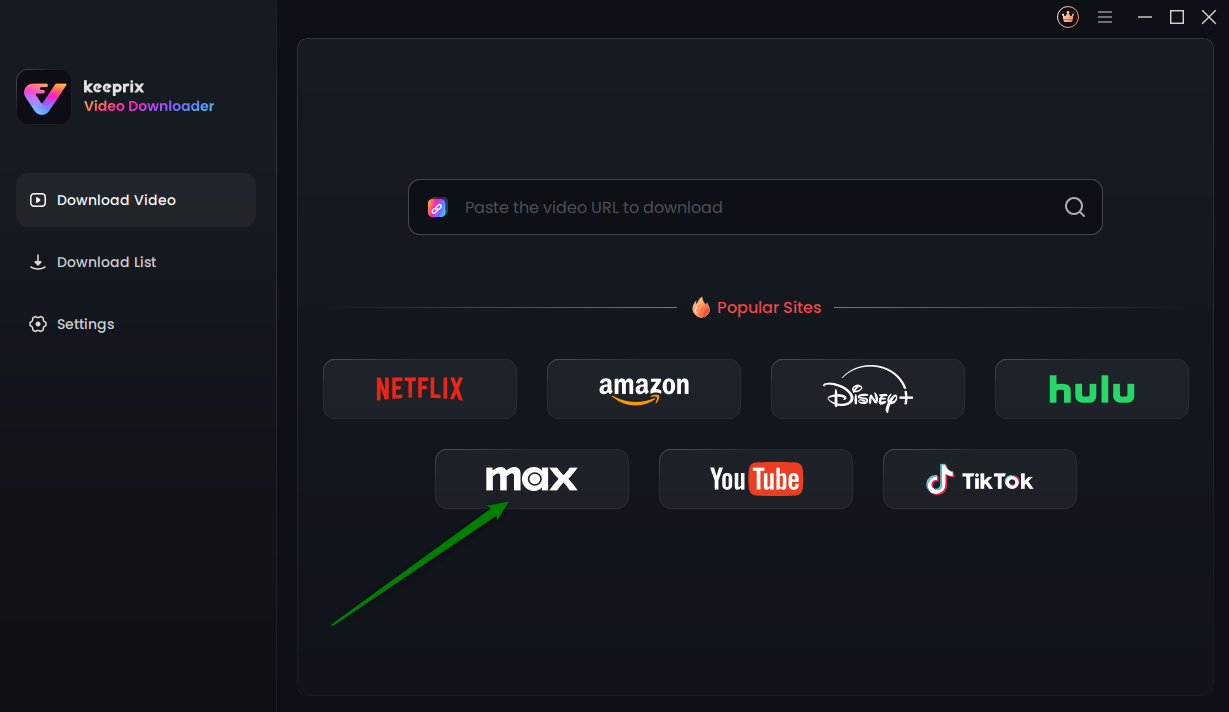
Choose Max in Keeprix Video Downloader
Step 3. Log In and Find the Episode: Use the software’s built-in browser to securely log into your Max account and navigate to the Euphoria episode you wish to save.
Step 4. Analyze and Customize: Begin playing the video. Keeprix will automatically analyze the stream and open a settings panel. Here, you can select your preferred video quality (up to 1080p), audio language, and subtitles.
Step 5. Start the Download: Click the ‘Download’ button. Keeprix will process the episode and save it to your computer. From our tests, a one-hour 1080p episode is typically between 1.5 GB and 2.5 GB.
The final result is a standard video file, as requested. You can find it in your computer’s ‘Downloads’ folder, ready to be played in any media player or transferred to another device.
A Critical Warning About ‘Free’ Euphoria Downloader Tools
In your search for euphoria download, you will likely find websites offering free tools or online converters. It is essential to approach these services with extreme caution. The misleading third-party downloader often conceals significant security and privacy risks.
Unlike reputable, maintained software that requires a subscription, these free tools are often unregulated and may be unsafe. They are common vectors for distributing malware or tricking users into revealing their login credentials. Investing in a professional, secure tool is a much safer approach.
Common Dangers of Free Online Downloaders
- Malware and Viruses: Free tools are a primary way attackers distribute malicious software that can steal personal information or damage your computer.
- Phishing Attempts: Many free sites will ask you to enter your Max login details on an insecure page, which can lead to account theft.
- Poor-Quality Output: The resulting video files are frequently low-resolution, have audio sync issues, or are broken and incomplete.
- Aggressive Advertising: These websites are typically loaded with intrusive pop-ups and redirect ads that create a frustrating user experience.
A key benefit of a professional tool is ongoing support. The Keeprix team regularly updates the software to maintain compatibility with streaming service changes and offers customer support to address any user issues, ensuring a reliable solution over the long term.
Frequently Asked Questions
Here are clear, concise answers to the most common questions about creating a euphoria download for offline viewing.
Can you download Euphoria episodes?
Yes. The official way is to use the ‘Download’ button in the Max app on iOS and Android. To download episodes onto a Windows or Mac computer as permanent files, a dedicated software solution like Keeprix is required, as this function is not available in web browsers.
How do I download Euphoria on Max?
In the Max mobile app, search for Euphoria, select an episode, and tap the download icon (a downward arrow). Remember, this only works for mobile devices, and the downloads will eventually expire.
Why can’t I download Euphoria on my laptop?
You cannot download on a laptop from the Max website because streaming services use DRM-protected, encrypted files for offline viewing. These secure files are only compatible with the sandboxed environment of a mobile app, not a standard web browser, to prevent unauthorized file copying.
How long do Euphoria downloads last?
Downloads made through the official Max app expire 30 days after you download them or 48 hours after you start watching, whichever comes first. In contrast, downloads made using a tool like Keeprix are saved as standard video files and never expire.
Where are Euphoria downloads stored?
On a phone or tablet, downloads are stored in a protected, inaccessible folder within the Max app’s data. You cannot access them as separate files. When using a desktop downloader, you specify the save location, such as your computer’s ‘Downloads’ or ‘Videos’ folder.
Can I move Euphoria downloads to a USB drive?
You cannot move downloads made with the Max app to a USB drive because they are encrypted and locked to the application. To save an episode to a USB stick or external hard drive, you must first download it to your computer as an MP4 or MKV file using a specialized downloader.
Your Solution for Unrestricted Offline Viewing
The frustration of being unable to download Euphoria on your laptop is a technical barrier, not a user error. While the official Max app locks your downloads to a small screen and an expiration clock, a dedicated solution puts you back in control. By using a tested tool like Keeprix Video Downloader, you can directly solve the core problems: you can bypass the device lock, eliminate expiration dates, and create a permanent, portable library of your favorite shows. This allows you to finally watch when and where you want, on the device of your choice. To see how simple it is to get a permanent euphoria download and solve this issue for good, you can try the tool yourself.