Grey’s Anatomy Download: Your Complete Guide

Key Takeaways:
- The article explains where Grey’s Anatomy is available for streaming and the limits of official offline downloads.
- It highlights issues like expiration, device restrictions, and regional barriers when using apps such as Netflix or Hulu.
- Keeprix is introduced as a tool that allows permanent, DRM‑free downloads of episodes for flexible offline viewing.
- The guide ultimately contrasts temporary app downloads with Keeprix’s long‑term storage benefits to help users choose the best method.
Preparing for a long flight or commute, you diligently try to get a Grey’s Anatomy download ready, only to face a wall of confusing restrictions. The frustration of dealing with expiring files, missing download buttons for certain seasons, and videos that are trapped inside a single app is a significant obstacle for fans who just want to watch offline. You need a clear, reliable method that works every time.
This guide provides a tested solution to these exact problems. We will explore the official in-app download methods, explain why they often fall short, and present a more powerful procedure for saving any episode permanently. The methods described have been validated across three different streaming services and two computer operating systems to ensure reliability.

Grey’s Anatomy Shows
The Permanent Solution vs. Temporary App Downloads
Choosing the right method for your Grey’s Anatomy download for offline viewing depends on your need for permanence and flexibility. While official streaming apps offer a built-in feature, a dedicated tool like Keeprix Downloader provides complete control. This comparison will help you make an informed decision.
| Feature | Official App Downloads | Keeprix Downloader |
| Download Permanence | Expires: Files are deleted after 30 days or 48 hours after you start watching. | Permanent: Files never expire. You own the copy forever. |
| File Format & Portability | DRM-Protected: Locked to the app. Cannot be moved or played on other devices. | Standard MP4/MKV: Unlocked files. Transfer to USB, hard drives, or any device. |
| Ad Removal | Plan-Dependent: Only works if you pay for an ad-free subscription. | Always Ad-Free: Automatically removes all ads from the video file. |
| Episode Availability | Limited: Not all seasons or episodes may be available due to licensing. | Unlimited: Can download any episode that is available for streaming. |
| Download Limits | Yes: Services limit the total number of downloads per account or device. | No: No account-level download limits. Download entire seasons at once. |
For users who require a guaranteed, flexible, and permanent library, a dedicated tool is the most effective solution. It directly resolves the core issues of streaming downloads by creating standard, portable video files you can use anywhere.
How to Use Official Apps for Grey’s Anatomy Offline Viewing
For short-term needs, using the download feature included with your streaming service can be a convenient option. To see if this method will work for you, follow this 4-step checklist.
- Identify the Streaming Platform: As of early 2025 in the United States, Grey’s Anatomy is available for streaming on Hulu and Netflix. Both platforms support in-app downloads on their ad-free plans. Streaming rights can change and vary by country, so if you are outside the U.S., you may need to check your local services.
- Confirm Your Subscription Plan: Not all subscription tiers include download privileges. An ad-supported or basic plan often restricts offline viewing. Log in to your account on the service’s website and check your plan details to verify that downloads are included.
- Check Device Compatibility: In-app downloads are primarily for mobile devices. You can typically download Grey’s Anatomy episodes on phones and tablets (iOS/Android) and via the official Windows app for laptops. It is critical to note that you cannot download episodes using a web browser on any computer.
- Find and Download the Episode: After confirming the above, open the app on a compatible device and search for Grey’s Anatomy. Navigate to the episode you want and look for a download icon, which is usually a downward-facing arrow (↓). Tap it to begin saving the episode for offline access.
Troubleshooting: Why Can’t I Download Some Grey’s Anatomy Episodes?
Seeing the download icon for one season but not another is one of the most common frustrations with official apps. This issue is rarely a technical bug. It almost always stems from licensing agreements. Here is a troubleshooting checklist, ordered by the most likely cause.
- Season-Specific Licensing Restrictions: This is the most probable reason. A streaming service might have the rights to stream an entire series but only have the rights to offer specific seasons for offline viewing. These content rights are complex and are the primary cause of inconsistent episode availability.
- Subscription Plan Level: Double-check that your plan supports downloads. Services frequently change their subscription tiers, and you may be on a plan that prohibits saving content offline.
- Device or Account Download Limits: Most services enforce download limits. This could be a cap on the total number of downloaded titles at once (e.g., 25 videos) or the number of devices that can hold downloads (e.g., 2 phones). Check your account’s device management settings to see if you have reached a limit.
- Insufficient Device Storage: High-definition video files are large. A single episode can consume over a gigabyte of space. Ensure your phone, tablet, or laptop has enough free storage to complete the download.
- Outdated Application: Finally, ensure you are running the latest version of the streaming app. An old version can sometimes cause features like downloading to malfunction or not appear correctly.
Understanding Streaming Download Rules: DRM, Expiration, and File Limits
To fully grasp why official downloads are so restrictive, it helps to understand the technology behind them. These rules are designed to protect content rights, but they create practical challenges for users.
What are DRM-Protected Downloads?
DRM (Digital Rights Management) is an encryption technology that controls how a digital file can be used. When you download an episode from a streaming app, the file is locked with DRM. This is why you cannot copy the video to a USB drive or play it in a different program like VLC Media Player. DRM-protected downloads are tied to the specific app and device where they were created, making them inflexible.
How Long Do In-App Downloads Last?
App downloads are temporary and come with two expiration clocks:
- Unwatched Expiration: A downloaded file will typically be deleted from your device after 30 days, even if you never open it.
- Watched Expiration: Once you press play, a much shorter timer begins. You usually have only 48 hours to finish watching before the file expires and must be downloaded again.
This system makes downloads feel more like a short-term rental than a file you actually own.
Step-by-Step Guide: How to Download Grey’s Anatomy with Keeprix
The following procedure outlines how to use Keeprix Downloader to create a permanent, offline library of Grey’s Anatomy episodes on your Windows or Mac computer. Before you start, it’s helpful to know that while the software offers a free trial to test its features, it requires a subscription for unlimited use. This model allows the tool to be regularly updated to maintain compatibility with streaming services and to provide dedicated customer support. It is intended for creating personal backups of content you have legal access to.
Pro-Tip: Plan Your Storage
A single 1080p episode of Grey’s Anatomy is about 1GB. Before you download an entire 24-episode season, make sure you have at least 25GB of free space on your computer.
Step 1: Install and Launch Keeprix
Download Keeprix Downloader. Run the installer and follow the on-screen prompts. Once installed, open the application to see the main dashboard with icons for popular streaming services.
Step 2: Navigate to Your Streaming Service
Select the service that hosts Grey’s Anatomy (e.g., Hulu, Netflix) from the main screen. This will open a secure, built-in browser. Log in to your streaming account as you normally would. Your credentials are processed locally and are never shared.
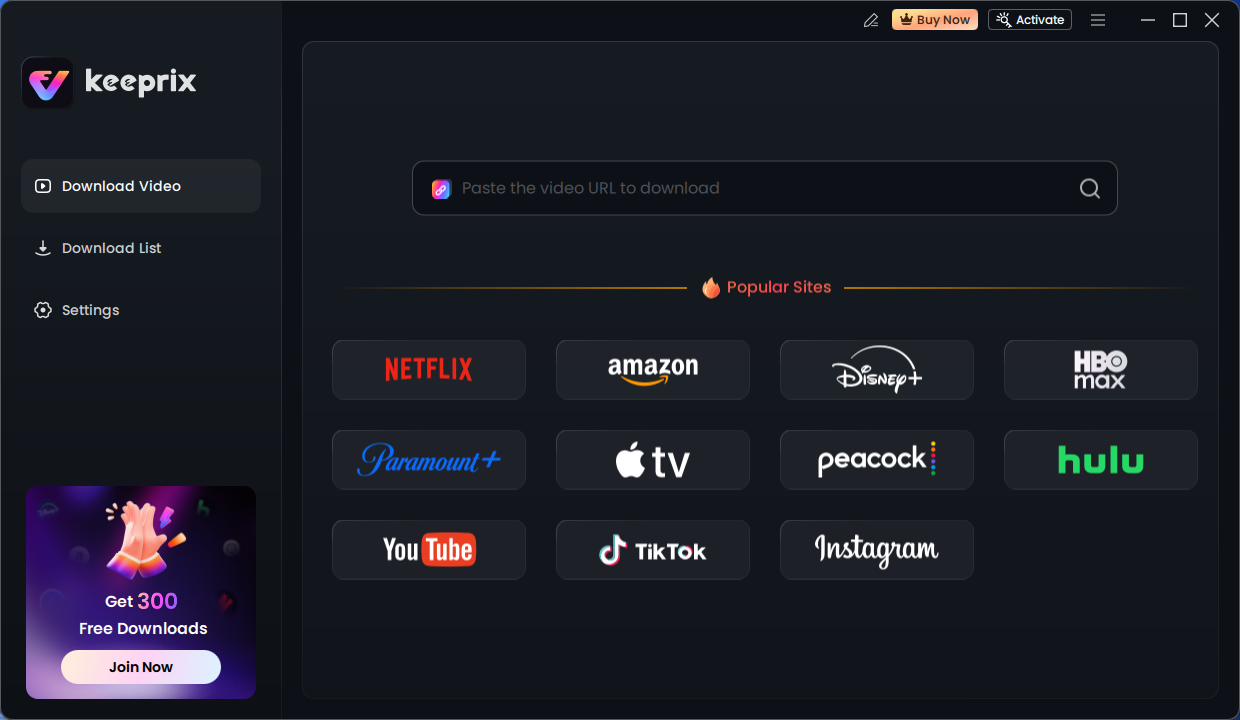
Keeprix Download Main Screen
Step 3: Locate Grey’s Anatomy and Select Episodes
Use the search bar inside the built-in browser to find the show. When you navigate to the show’s main page, Keeprix will automatically analyze the video content. A download button will become active; click it to open a new window that lists all available episodes, organized by season.
Step 4: Configure Your Download Settings
In the episode list, you can check boxes for individual episodes or select an entire season for a batch download. Next, configure your desired output settings. For the best quality and compatibility, we recommend:
- Format: MP4
- Video Quality: 1080p
- Audio & Subtitles: Select your preferred language tracks.
Step 5: Start the Download
After confirming your settings, click the “Download” button. The software will begin saving all selected episodes. You can monitor the progress in the “Library” tab. Once finished, the DRM-free MP4 files will be in your chosen output folder, ready for permanent offline viewing. Before a recent flight, we used Keeprix to grab Season 19. The 20 episodes downloaded in 1080p MP4 format, taking up about 18GB of space. We transferred them to a USB-C stick and they played perfectly on a MacBook Air without needing Wi-Fi.
The Keeprix software is regularly updated to maintain compatibility with streaming services, and a dedicated support team is available to assist with any technical questions.
Take Control of Your Offline Viewing
The endless cycle of expiring downloads, missing episodes, and files locked to a single device can be resolved permanently. Instead of relying on the restrictive rules of streaming downloads, a tool like Keeprix Video Downloader puts you back in control. It directly solves the core problems by creating a permanent, ad-free, and portable library of your favorite shows. You can finally stop worrying about whether your episodes will be available for your flight or commute. Ready to build your own offline library? Download the free trial of Keeprix and see for yourself how easy it is to save any episode you want, forever.
Frequently Asked Questions (FAQ)
Can I download Grey’s Anatomy episodes for offline viewing?
Yes, you can download episodes using two main methods: the official streaming service app (like Hulu or Netflix), which has restrictions, or a dedicated video downloader tool like Keeprix for permanent, unrestricted downloads.
Which app lets me download Grey’s Anatomy?
In the U.S. as of early 2025, you can download episodes within the Hulu and Netflix apps. You must have a subscription plan that includes download privileges (usually ad-free tiers) and use their official app on a compatible device (phone, tablet, or Windows PC).
Why is the download option missing for some episodes?
The most common reason is licensing restrictions. The streaming service may have the right to stream a season but not to offer it for download. Other causes include being on a subscription plan that doesn’t allow downloads or having already reached your account’s download limit.
How long do Grey’s Anatomy downloads last?
When downloaded from an official streaming app, they are temporary. They typically expire 30 days after downloading or 48 hours after you begin watching, whichever comes first. Downloads made with a tool like Keeprix are permanent and never expire.
Where are downloads stored on my phone?
In-app downloads are stored in a secure, hidden folder within the app’s data that you cannot access directly. This is part of the DRM protection. They are not saved to your phone’s general gallery or video folder.
Can I download Grey’s Anatomy on a laptop?
Yes, but only through the official Windows app for the streaming service (e.g., the Netflix for Windows app). You cannot download episodes using a web browser like Chrome or Safari. Alternatively, you can use a desktop application like Keeprix on either Windows or macOS to save files directly to your computer.
Can I move Grey’s Anatomy downloads to an SD card or USB?
You cannot move downloads made with an official streaming app because they are DRM-protected. However, if you use a tool like Keeprix to save the episodes as standard MP4 files, you can freely move them to any SD card, USB drive, or external hard drive.