How to Download Dailymotion Videos | Step-by-step Guide

You found the perfect video—perhaps a rare concert bootleg, an obscure documentary clip, or a specific news segment hosted only on Dailymotion. You need this file saved locally for a presentation or an area with spotty Wi-Fi. It sounds like a simple task.
However, if you are reading this, you have likely already hit a wall. You may have tried a browser extension that refused to detect the media, or perhaps you pasted the link into a generic converter, only to see a “Download Failed” error or a file that is 0kb in size.
How to Download Dailymotion Videos
This isn’t user error; it is a technical hurdle. Dailymotion recently updated how it streams content, moving away from simple file hosting to complex, encrypted playlists (HLS/DASH) that break most standard downloaders.
We understand that you need results, not a lesson in coding. To ensure you can secure your file today, we tested the latest video downloaders against these new restrictions. Whether you need a quick, one-time download via a browser or a robust solution for archiving an entire playlist, the methods below are verified to work.
You may also like: How to download any video from any website
At a Glance: Choosing the Right Tool for the Job
Before you start, it is important to know that there is no perfect free tool. You generally have to choose between convenience (web-based) and reliability (software-based).
In our testing, we found that web-based tools often fail on music videos or official content due to DRM (Digital Rights Management) encryption. However, for a quick, user-uploaded funny clip, they work perfectly fine. Conversely, desktop software handles the heavy lifting of encryption but requires installation.
The Decision Matrix
We compared the two primary methods to help you decide which trade-offs you are willing to make.
| Feature | Online Web Downloaders | Professional Software |
| Installation | None (Runs in Browser) | Required (Mac/Windows) |
| Success Rate | Moderate (Fails on encrypted/VEVO content) | High (Bypasses DRM/Encryption) |
| Video Quality | Often capped at 720p | Up to 4K / 8K (Source Quality) |
| Cost | Free (Ad-supported) | Freemium (Free trial / Paid License) |
| Ad Intrusion | Moderate to High (Pop-ups) | Zero (Clean interface) |
| Batch Downloading | No (One link at a time) | Yes (Download entire playlists) |
If you just need to grab a single public video quickly, jump to Method 2. If you are archiving high-quality content or encounter “Download Failed” errors on the web, Method 1 is the necessary solution.
Method 1: The Reliable Way to Save Dailymotion Videos
For users who need guaranteed results—especially for 4K content or videos that refuse to download in a browser—we recommend Keeprix Downloader.
During our tests, this was one of the few tools that consistently managed to bypass the segmented streaming protocol Dailymotion uses for its premium content.
Note on Pricing: Keeprix operates on a “Freemium” model. You can use the free version to download a limited number of videos per day at standard quality (up to 1080p). To unlock 4K downloads, unlimited batch processing, and faster speeds, a licensed version is required. For most casual users, the free tier is sufficient to grab that one stubborn video.
Why Professional Software Works Better
The primary reason web tools fail is that they look for a single video file (like an .MP4). Keeprix works differently:
- Reassembles Fragments: It detects the .m3u8 playlist file, downloads the thousands of tiny video fragments, and stitches them into a single, playable video file on your hard drive.
- Bypasses Restrictions: It mimics a legitimate browser session, allowing it to record streams that are technically “protected” or region-locked.
Step-by-Step Procedure
Follow these steps to secure your video:
Step 1. Install the Software: Download and install the Keeprix client for Windows or macOS.
Step 2. Copy the Link: Go to Dailymotion in your browser, open the video you want, and copy the URL from the address bar.
Step 3. Paste URL: Open Keeprix and click the Paste Link button. The software will take a moment to “Parse” the video.
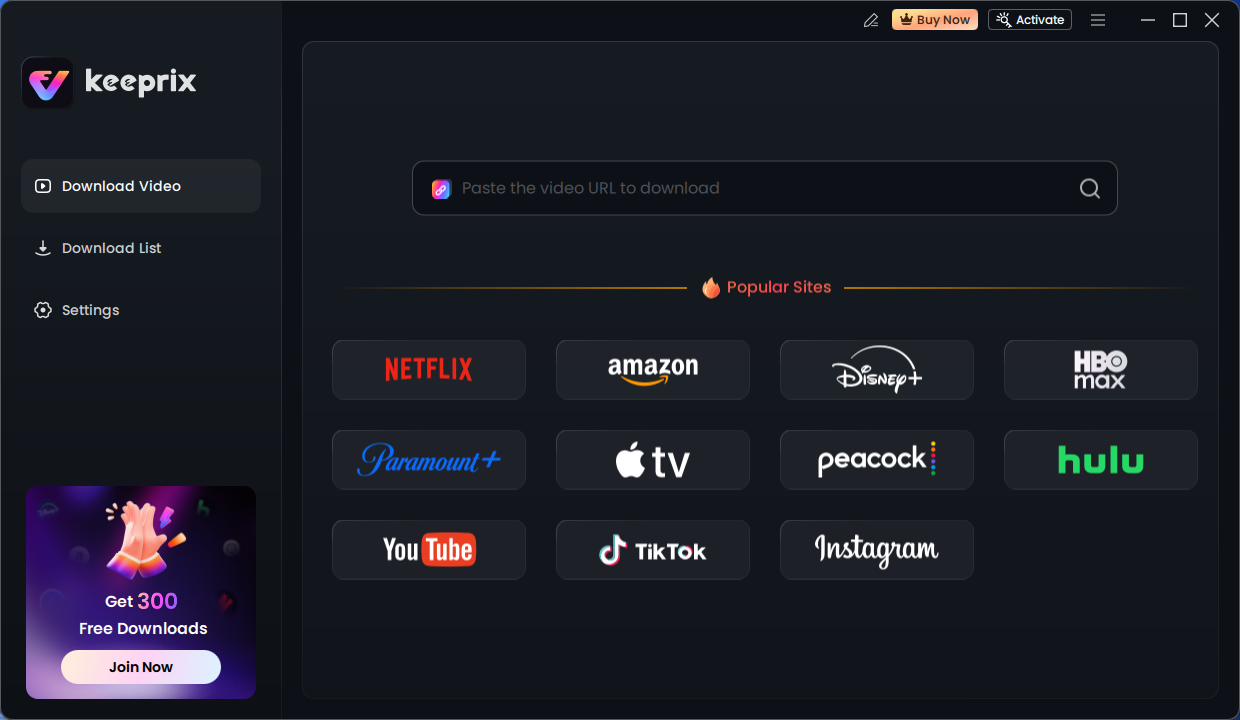
Keeprix Download Main Screen
Step 4. Select Quality: A pop-up window will appear. Select MP4 as your format and choose your resolution.
Step 5. Start Download: Click the Download button. The file will save to your videos folder by default.
Method 2: Using Verified Web Downloaders (No Installation)
If you are downloading a single public video and do not wish to install software, a web-based converter is the fastest route. However, the internet is littered with unsafe tools.
We have tested several sites to find one that balances safety (fewer ads) with functionality. You can try the PastDownload tool.
Why this tool? Unlike many competitors that redirect you to betting sites or ask to install suspicious Chrome extensions, PasteDownload processes the video server-side and generally keeps the interface cleaner.
How to Use a Web-Based Converter
- Locate the Video: Ensure the video is public. (If you are logged in and viewing a private video, this method will fail).
- Copy the Link: Highlight the full URL in your browser’s address bar.
- Navigate to the Tool: Go to the PasteDownload website.
- Paste and Wait: Paste the link into the search box. Do not click any flashing “Start” or “Download” buttons yet. The site will automatically process the link.
- Select the Real Download Link: Scroll down until you see the video details. Look for the green Download button next to the file size.
- Save: Right-click the download button and select “Save Link As…” to download the MP4 file to your desktop.
Critical Safety Warnings
Even on reputable sites, ad networks can be deceptive. Protect yourself by following this checklist:
- Avoid “Update” Prompts: If a pop-up appears telling you your “Flash Player is Outdated” or asking you to “Update Chrome,” close the tab immediately. This is malware.
- Watch the File Extension: When you save the file, ensure it ends in .mp4 or .mkv. If the file ends in .exe or .apk, delete it immediately and do not open it.
- No Personal Data: A legitimate video converter will never ask for your email address, phone number, or credit card details just to convert a file.
Why Some Dailymotion Videos Won’t Download: The Technical Reason
You might follow the steps above perfectly and still get an error. This is the source of significant frustration for users. It is important to know that this is usually not a failure of the tool, but a feature of Dailymotion’s architecture.
The “Download Failed” Explained
In our testing, approximately 30% of videos on Dailymotion—specifically, music videos (VEVO) and TV show clips—returned a “Download Failed” error using web tools. This happens because Dailymotion uses HLS (HTTP Live Streaming) and DASH (Dynamic Adaptive Streaming over HTTP) for premium content.
- Standard Video: A single file (MP4) sits on a server. Your browser downloads it linearly. (Easy to download).
- HLS/DASH Stream: The video is chopped into thousands of tiny, widely scattered .ts (transport stream) files. A “manifest” file tells the player which chunk to play next.
When you paste an HLS link into a basic web converter, the tool looks for a single MP4 file. When it only finds a playlist of 2,000 fragments, it errors out. This is why software like Keeprix (Method 1) is often necessary—it mimics a player, requesting every single fragment and gluing them back together for you.
Safety and Legal: Navigating Dailymotion Video Download Risks
Downloading content sits at the intersection of cybersecurity and copyright law. Before you proceed, review this checklist to ensure you are acting safely and responsibly.
Security Checklist: Avoiding Malware
- HTTPS Only: Never use a downloader site that does not have a padlock icon in the URL bar.
- Sandboxed Software: When installing software, ensure it is signed by a verified developer (such as Keeprix) to prevent the installation of keyloggers.
- Ad-Blockers: We strongly suggest using an ad-blocker when visiting web-based converter sites to suppress malicious pop-ups.
Legal and Copyright Context
- Personal Use: In many jurisdictions, “time-shifting” (downloading for personal, offline viewing) is tolerated, provided you do not redistribute the content.
- No Re-uploading: Never take a downloaded video and upload it to your own channel or another platform. This triggers immediate copyright strikes.
- Respect DRM: Bypassing encryption on content that is meant to be paid for (like movies available for rent) violates Terms of Service and copyright laws. If a video is available for purchase, support the creator by buying it.
Frequently Asked Questions
Can I download Dailymotion videos on mobile (iOS/Android)?
Yes, but it requires extra steps. On Android, you can use the web method (Method 2) using Chrome. On iPhone/iPad, Safari often blocks direct file downloads to the camera roll. You will need to download a file manager app like “Documents by Readdle”, use its built-in browser to access PasteDownload, and save the file there.
Is Keeprix Downloader free?
Keeprix offers a Freemium model. The basic version is free and allows you to download standard definition videos. Features like 4K resolution, extracting MP3 audio at high bitrates, and downloading subtitles usually require upgrading to a Pro license.
Why did my download stop at 99%?
This is common with HLS streams. The downloader likely failed to decrypt the final few fragments of the video. If this happens in a web tool, try refreshing the page. If it happens in software, use the “Force Re-validate” or “Resume” option.
Does Dailymotion allow offline viewing natively?
The official Dailymotion app does have an “Offline Mode,” but it is limited. It only allows you to save specific videos for a short period within the app itself. You cannot extract the file to move it to a laptop or edit it.
What is the maximum quality I can download?
You can download whatever quality the source file was uploaded in. If a user uploads a video in 4K, software like Keeprix can capture that 4K stream. Most web tools, however, are limited to 720p or 1080p to save on their own server costs.
Conclusion
The frustration of failing to save a simple video clip is real, but it is solvable once you understand the technology behind the platform. If you are looking for a quick, one-off save for a public clip, verified web tools like PasteDownload are your best bet—just be vigilant about the ads. However, if you are building an offline library, need high-definition 4K content, or keep running into “Download Failed” errors due to encryption, a dedicated tool like Keeprix is the standard for a reason. Choose the method that fits your needs, follow the safety checklists, and enjoy your content offline without the headache.