How to Download Facebook Videos: A Verified Guide

If you have ever clicked “Save” on a Facebook video only to realize later that you cannot watch it without an internet connection, you are not alone. Facing a “No Connection” error when you need to access a critical tutorial or a cherished memory can be a significant obstacle.
This scenario is common for users like Mike, who recently found an important DIY tutorial on his feed. Needing to reference it while working in a garage with spotty Wi-Fi, he clicked the “Save video” button, assuming the file was stored on his hard drive. Unfortunately, he discovered too late that Facebook’s “Save” feature merely bookmarks the post within the app.
To actually watch videos offline, you must perform a file download – a process Facebook generally restricts to keep users on its platform. This guide is the result of hands-on testing on desktop only, using the latest Windows 11 and macOS Sonoma builds. We will clarify the confusion between bookmarking and downloading and provide a verified video downloader to download Facebook videos safely, whether you need a quick clip or a high-quality archive.
How to Download Facebook Videos
The Landscape: Quick Web Tools vs. Professional Software
Before diving into the how-to part, it is important to be honest about your options. If you simply need to grab a low-resolution meme to share in a group chat once, a free web-based converter might suffice, provided you have a good ad-blocker installed.
However, for users who need reliability, high definition (1080p or 4K), or the ability to save content from private groups, web-based tools often fall short. They frequently compress video heavily to save server costs, resulting in grainy footage that is difficult to watch on larger screens.
You may also like: How to download any video from any website
The Reliable Method: Using a Professional Video Downloader
For scenarios where quality and safety are non-negotiable, such as archiving a tutorial you need to follow precisely, we recommend using dedicated desktop software like Keeprix Downloader. Unlike web converters that process files on a remote server, desktop software handles the download locally on your machine, ensuring better quality control and privacy.
Visual Proof: Quality Differences
During our testing, we compared the output of a popular free web converter against the output from Keeprix. The web converter automatically compressed the video to 720p and introduced significant artifacts (blocky pixels), making text in the video difficult to read. Keeprix retained the original 1080p source file.
Step-by-Step Procedure with Keeprix
To replicate the high-quality results from our testing:
- Install and Launch: Open Keeprix Downloader on your Windows or Mac desktop.
- Copy the Link: Navigate to the Facebook video posts you wish to save. Click the “Share” arrow (or the three dots in the top right corner of the post) and select “Copy Link.”
- Paste and Parse: Click “Paste Link” inside Keeprix. The software will analyze the URL to detect available video and audio streams.
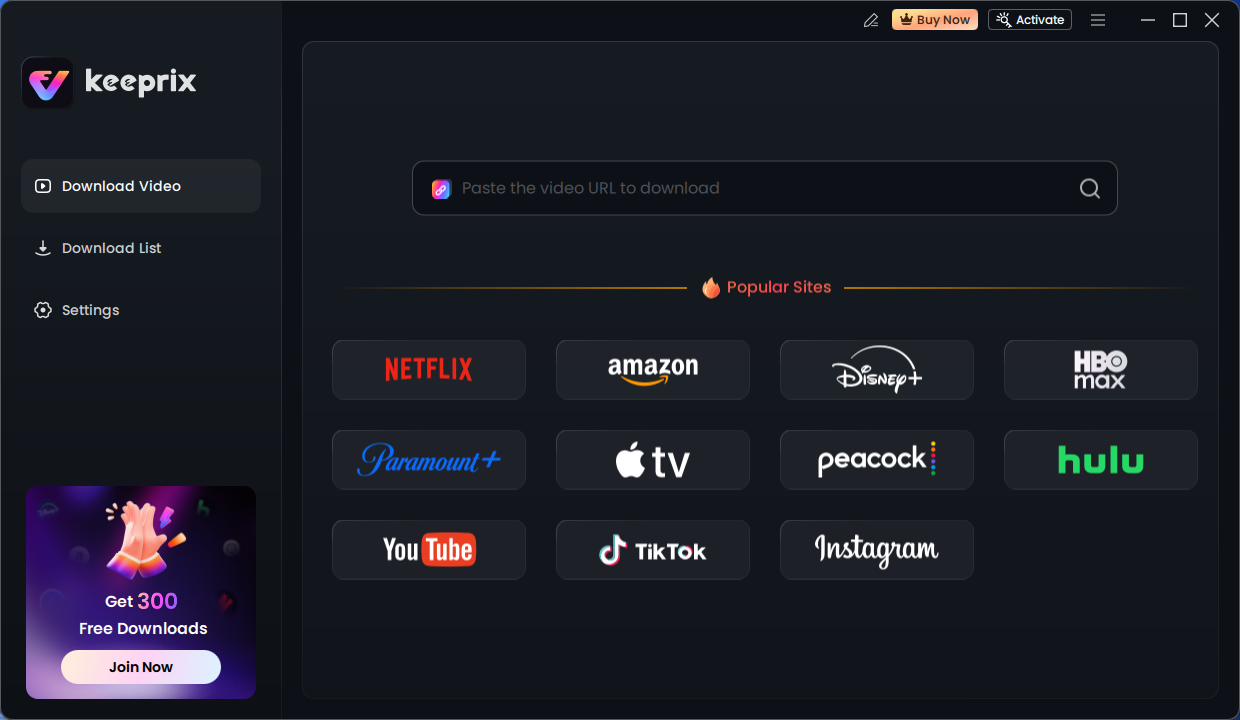
Keeprix Download Main Screen
- Select Quality: You will be presented with a list of resolutions. Choose the highest available bitrate and click “Download.”
Addressing Key User Obstacles
This solution resolves specific issues that frustrate casual users:
- Quality Retention: Keeprix bypasses the aggressive compression algorithms used by free sites, preserving high-definition audio and video streams (up to 4K).
- Batch Efficiency: If you are archiving a series, such as a multi-part guide, Keeprix supports batch downloading. This allows you to queue an entire playlist at once rather than processing URLs individually.
- Security: By using standalone software, you avoid the risks associated with ad-heavy free websites.
Decision Guide: Professional Software vs. Online Downloaders
When searching for a Facebook video download solution, you will encounter two main categories: browser-based free converters and professional desktop software. While free tools appear convenient for one-off tasks, they come with trade-offs regarding safety and data integrity.
Use the table below to determine which method suits your current needs.
Comparison Criteria
1. Success Rate & DRM
Many Facebook video posts use complex streaming protocols (DRM) that break simple browser extensions. Keeprix Downloader includes DRM circumvention capabilities, ensuring a higher success rate where free sites often fail or return “Video Not Found” error messages.
2. Safety and Privacy
A major concern for users is that third-party tools may be unsafe. Free online converters often rely on aggressive advertising networks or redirect loops that can expose your browser to malware. Professional software operates locally on your machine without data harvesting or intrusive ads.
3. Audio/Video Quality
Online converters frequently separate audio and video tracks to save bandwidth, forcing you to download them separately or accept a lower-quality combined file. Dedicated software handles the processing locally, ensuring synchronized, high-bitrate audio and video.
Official Method: How to Download Your Own Facebook Video Posts
If your goal is to recover a video file you originally uploaded to your own profile, you do not need third-party software. Facebook provides a native tool for this specific scenario.
However, it is crucial to understand the limitation: this method only works for content you own. You cannot use these steps to download videos from Facebook that were posted by other users or pages.
Step-by-Step Instructions
To retrieve your own content:
- Navigate to your Facebook profile and click on the Videos tab (usually found under “More”).
- Click on the specific video you wish to download to open it in full-screen mode.
- Click the three-dot menu icon located in the upper-right corner of the video player.
- Select Download Video from the dropdown menu. The file will save to your computer’s default downloads folder in MP4 format.
This distinction is vital: Facebook restricts direct file downloads to content owners to maintain platform retention, which is why external tools are required for all other use cases.
Further reading: Can’t download YouTube videos
Why You Can’t Download Private Videos (and How to Work Around It)
One of the most persistent issues users face involves public vs private videos. You may have noticed that a standard online downloader works fine for a public news clip but fails immediately when you try to download a recording from a private Facebook Group.
The Technical Hurdle
This happens because of Facebook’s permission architecture. A public video URL is accessible to any request from the open web. However, a private video resides behind a “walled garden.” It requires an active, authorized session cookie to view. If a web-based downloader tries to access that link, Facebook blocks it because the server doesn’t have your permission to see the content.
The Critical Difference: Remote vs. Local Login
Here is where many users get confused—and rightfully so. We often warn against logging into third-party sites, yet professional tools like Keeprix sometimes require a login to access private content. What is the difference?
The “Bad” Login (Phishing Risk):
When a free web converter asks you to log in, you are essentially typing your password into a remote server. You have no way of knowing if that server is saving your credentials. This is a high-risk activity that can lead to account theft.
The “Good” Login (Local Token):
Professional desktop software like Keeprix uses an embedded browser engine (similar to Chrome or Edge) running locally on your computer. When you log in through the app to access a private video, the authentication happens directly between your computer and Facebook. The software uses the “session token” (the digital key that says you are logged in) to grab the video file, but it does not transmit your password to any external Keeprix server.
This local authentication bridges the gap, allowing you to download private Facebook videos safely without handing your keys to a stranger.
Is it Safe? Privacy, Copyright, and Facebook Policies
Before you proceed, it is essential to understand the safety and legal landscape. A common question is, “Can I download Facebook videos legally?”
Plain Language Explanation of Policies
The answer depends heavily on your intent. Downloading a video for personal offline viewing—like watching a tutorial during a commute—is generally considered a gray area often tolerated under fair use principles in many jurisdictions, provided you do not redistribute the content.
However, re-uploading someone else’s video to another platform is a violation of copyright and Facebook’s Terms of Service. Always respect the creator’s rights.
Security Warning
When evaluating third-party downloader tools, be extremely cautious. If a web-based site asks you to log in to verify a download, leave immediately. As explained above, this is a common phishing tactic. Stick to verified standalone software that processes downloads locally to ensure your data remains secure.
FAQ: Common Questions About Facebook Video Downloads
1. Can I download Facebook videos to my computer?
Yes, but Facebook only provides a direct download button for videos you personally uploaded. For all other content, you must use third-party software like Keeprix Downloader to save the file locally.
2. Does this method work for a Facebook Reels download?
Yes. Facebook Reels use the same streaming technology as standard video posts. Professional downloaders can detect the Reel URL and save the short-form video as an MP4 file, just as they would a longer video.
3. What is the difference between ‘Save’ and ‘Download’ on Facebook?
This is a common point of confusion. Clicking “Save video” on Facebook only creates a bookmark within your Facebook account (Saved Items). It does not store the file on your device. To watch videos offline, you must download the file to your hard drive using a specialized tool.
4. Does Facebook notify the user when I download their video?
No. Facebook does not send notifications when a video is downloaded using third-party tools. However, you should always respect the privacy of the content creator and use the downloaded material responsibly.
Conclusion
The confusion regarding how to download Facebook videos stems from the platform’s design, which prioritizes online engagement over offline accessibility. Relying on the “Save” button can lead to frustration when you need access to a video file most but find yourself without an internet connection.
While manual downloads are possible for content you own, and free web tools can handle the occasional low-quality clip, the most reliable way to save Facebook videos for archiving or offline viewing is through professional software. Tools like Keeprix Downloader solve the problems of low resolution, intrusive ads, and the inability to access private groups by providing a secure, local environment for your downloads.
By choosing the right tool for your specific needs, you regain control over the media you need to access, ensuring that your tutorials, memories, and entertainment are available whenever and wherever you need them.