StreamFab Not Working? Fixes and Alternatives

If your StreamFab is suddenly stuck on analyzing, returning Error 314 or 310, or forcing a drop to 540p resolution, the most likely cause is a digital rights management (DRM) update from the streaming platforms. Sudden downtime is usually tied to these backend platform changes rather than user error on your device. When a platform updates its security, downloader software loses access to the required decryption keys, leaving users frustrated with endless analysis spinners and severe resolution caps.
Understanding how to download protected videos helps clarify why these backend updates cause such severe disruptions. While minor glitches can sometimes be solved with basic troubleshooting, persistent DRM-related failures require you to either wait for a developer patch or switch to an alternative tool to resume preparing your offline watchlist.
Fix Common StreamFab Errors (314, 310, and Stuck on Analyzing)
Before giving up on your current version, it is worth ruling out simple software glitches. Errors like 314 and 310 typically point to authentication or decryption failures, similar to instances of a Netflix download not working due to credential timeouts or cache conflicts.
Meanwhile, an endless analyzing loop often means the software is struggling to read the video’s data. Try these official troubleshooting steps first:
- Check for software updates: StreamFab must be on the latest version to handle recent patches. Restart the application and check for any available updates in the settings menu.
- Clear the cache and temporary folders: Corrupted analysis data can cause the software to freeze. Go to your settings, locate the temporary file section, and clear the cache completely.
- Log out and log back in: Sometimes the connection to the streaming platform expires. Open the built-in browser within StreamFab, log out of your streaming account, and sign back in to refresh your authentication token.
If you complete these steps and the analyzing loop or error codes persist, the issue is highly likely on the developer’s side, meaning basic fixes will no longer work.
DRM Updates: Why Generic Fixes Often Fail
Streaming platforms frequently update their digital rights management (DRM) protocols to prevent unauthorized access. When a major DRM update hits, downloader tools often lose access to the keys required for 1080p or 4K playback. This results in the infamous 540p fallback—where your downloads are severely capped in resolution—or completely broken analysis processes.
It is important to admit that when a platform updates its DRM, generic fixes like clearing your cache or restarting your PC simply will not work. Users are forced to wait for developers to reverse-engineer the changes and release a patch, which can take days or even weeks.
For users who rely on building an offline watchlist for an upcoming trip or poor internet environments, waiting for these patches causes a severe disruption in their workflow. If you cannot afford to wait, the only practical solution is to find an alternative that works right now.
3 StreamFab Alternatives When You Cannot Wait
If you need immediate MP4 or MKV files and cannot wait weeks for a patch, you will need to pivot to alternative software. Many competitor lists feature identical software clones, but it is critical to evaluate tools based on actual stability during DRM shifts, output formats, and ease of use. Keep in mind that older legacy options are dwindling—for instance, AnyStream has reportedly shut down, leaving users with fewer reliable choices. Finding a stable StreamFab alternative is essential for uninterrupted offline viewing.
Here is how top alternatives compare for building a local media library:
| Feature / Criteria | KeepStreams | MovPilot | Keeprix |
| Primary Focus | Broad module support similar to StreamFab. | Platform-specific video saving. | Streamlined, stable “File to Freedom” offline media building. |
| Output Formats | MP4, MKV | MP4, MKV | MP4, MKV |
| Ease of Use | Complex interface; often faces similar DRM delays. | Simple interface, but requires separate apps for each platform. | Clean desktop app (Mac/Windows); unified interface without unnecessary bloat. |
| Best For | Users willing to troubleshoot complex module errors. | Users who only need a single specific platform. | Users who want a stable, easy way to save accessible videos across supported platforms. |
Keeprix: A Streamlined ‘File to Freedom’ StreamFab Alternative
For users tired of complex troubleshooting and frequent breakages, Keeprix Video Downloader offers a streamlined alternative. Keeprix is a stable desktop app for Windows and Mac that helps you save videos you can already access from supported streaming and social media platforms as local MP4 or MKV files.
It supports up to 1080p for platforms like Netflix and Prime Video, 8K for YouTube, and up to 4K for Disney+, Apple TV, Hulu, and Max when the source allows. Keeprix preserves available subtitles and audio tracks, supports batch downloading for full watchlists, and avoids unnecessary software bloat.

Download Streaming Videos with Keeprix
- Download movies &TV series on Windows & Mac.
- Save streaming videos as local MP4/MKV files.
- Batch download streaming videos and TV series.
- Watch videos offline, no ads, no interruption.
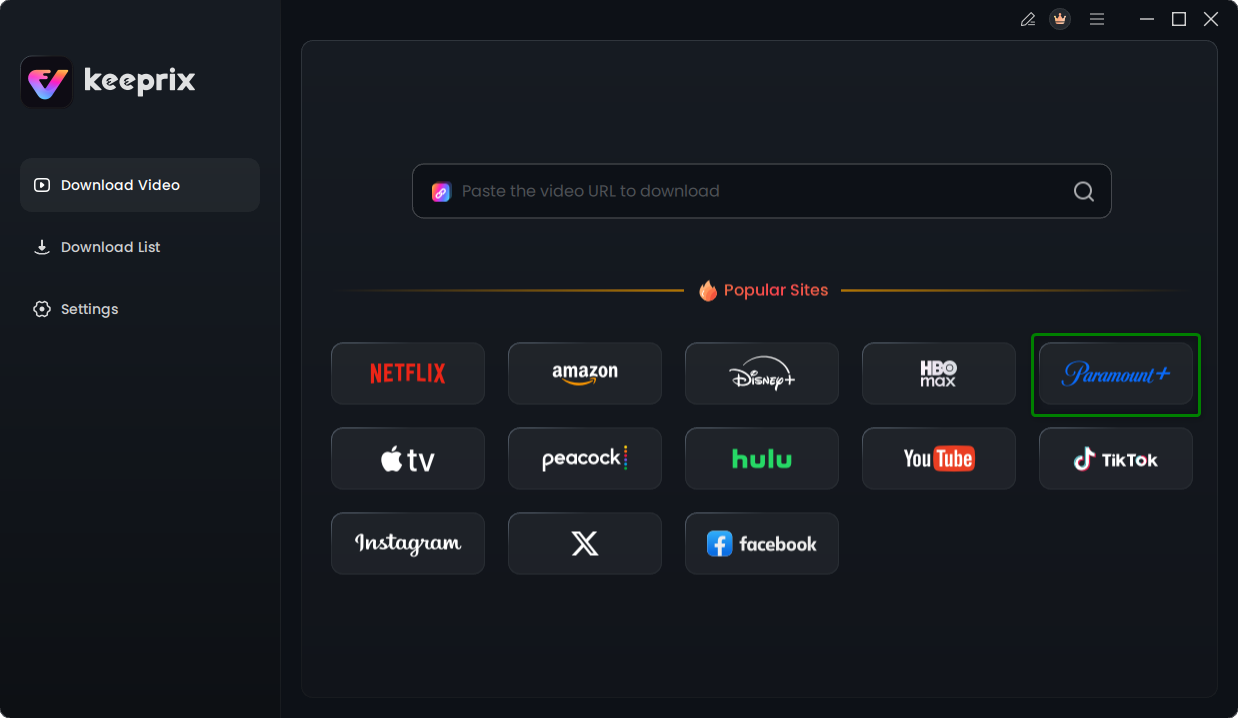
Step 1: Download and install Keeprix on your computer. Launch the desktop app and choose a platform you want to download videos from for example: Paramount+.
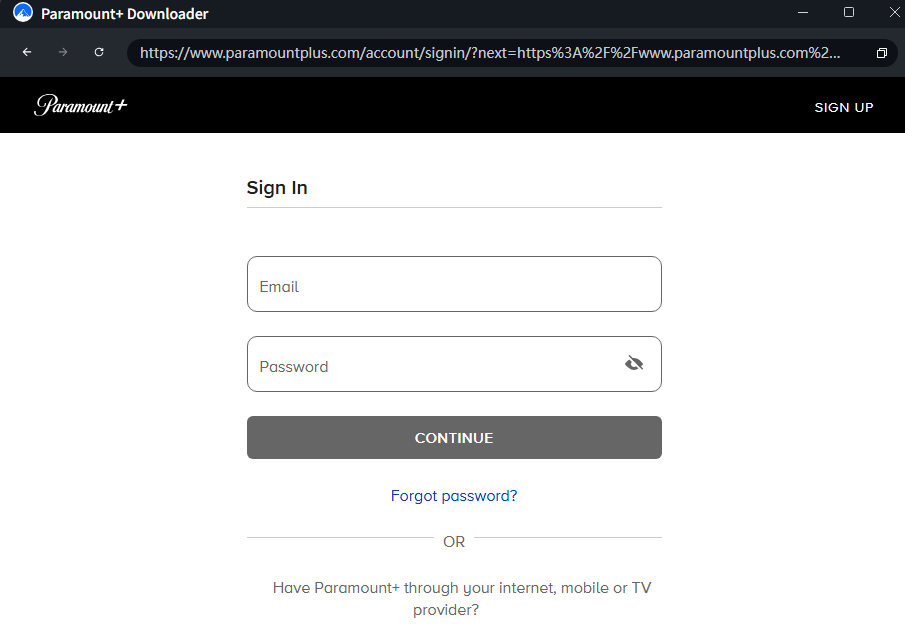
Step 2: Log into your platform: Use the built-in browser to securely access your supported streaming account.
Step 3: Select your video: Choose the episode, movie, or batch of videos you want to save.
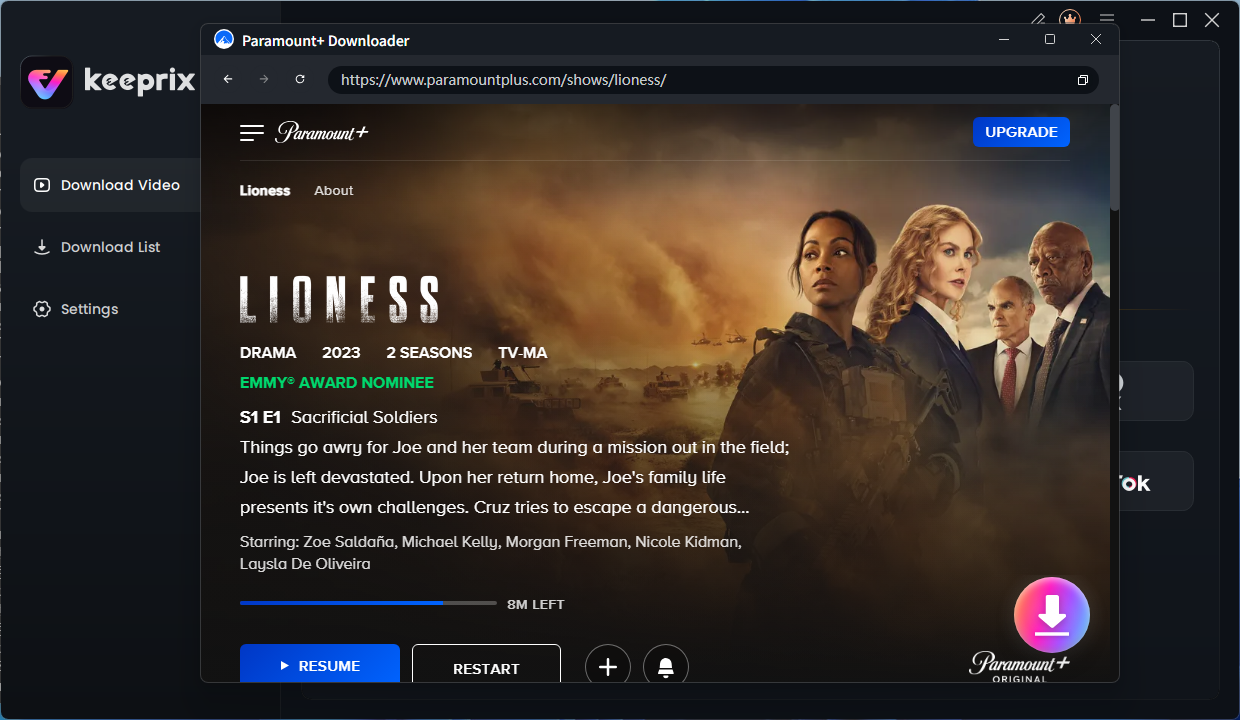
Step 4: Select MP4 or MKV, and pick your preferred audio tracks and subtitles. Click the Download button to start.
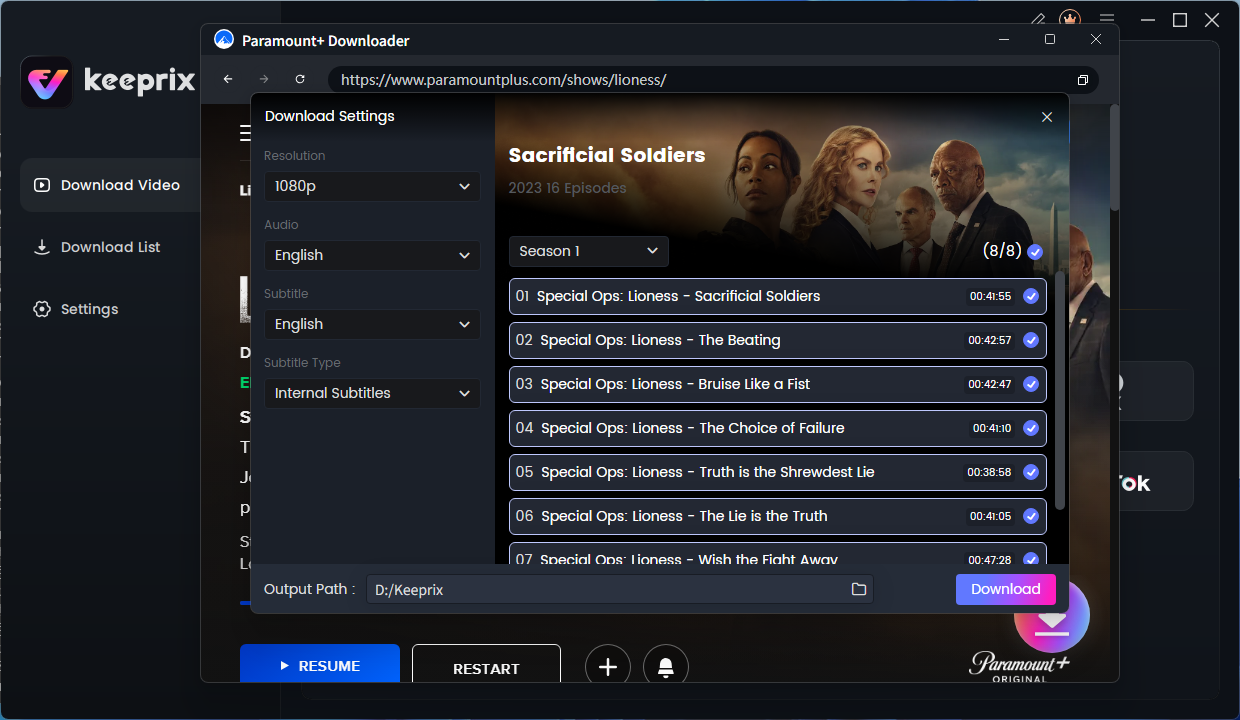
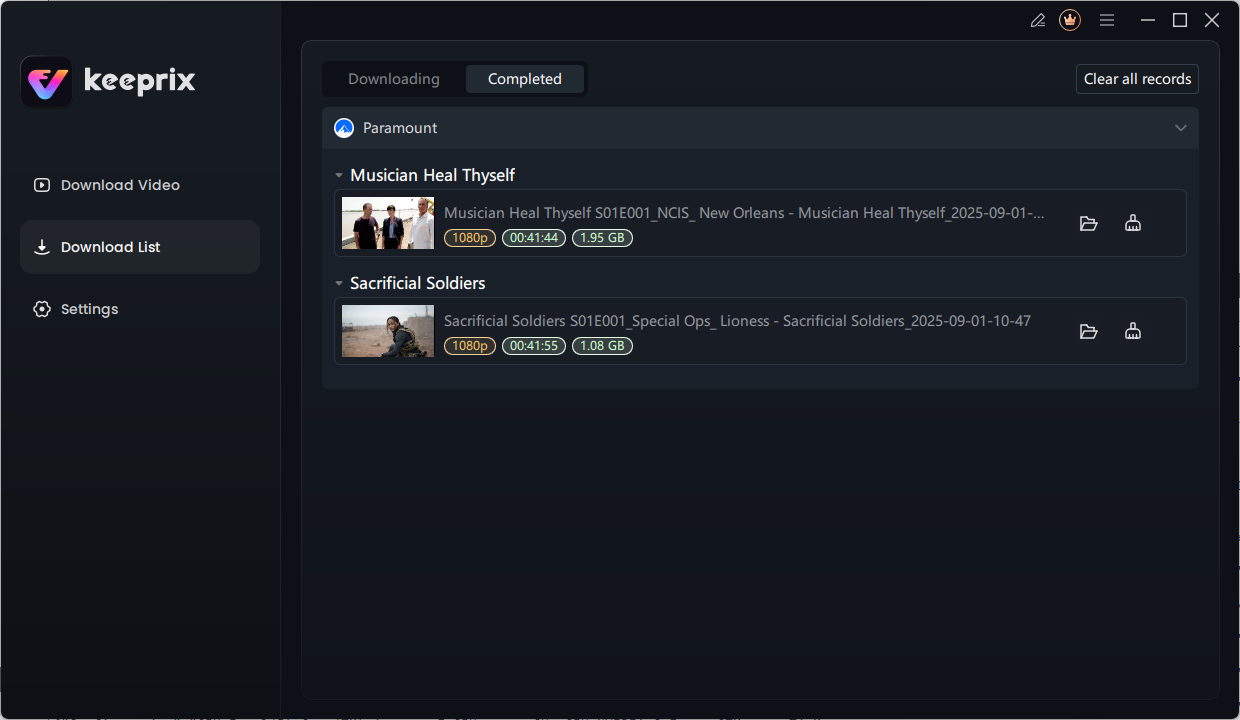
Step 5: Save the video directly to your local drive for flexible offline playback. Once activated, Keeprix removes the trial download quota for uninterrupted video downloads, making it the ideal choice to get your watchlist ready before a trip.
Frequently Asked Questions
1: Why is StreamFab stuck on analyzing?
StreamFab gets stuck on the analyzing screen when the streaming platform changes its DRM (Digital Rights Management) protocols. The software tries to decrypt the video data but fails, resulting in an endless loading loop until the developers release a patch to fix the compatibility issue.
2: How do I fix StreamFab error 314 or 310?
To fix StreamFab error 314 or 310, start by updating the software to the latest version, clearing your temporary cache folders in the settings, and logging out and back into the streaming platform via the built-in browser. If these standard troubleshooting steps fail, the error is caused by a backend platform DRM update and requires waiting for a developer patch.
3: Why are my StreamFab downloads stuck at 540p?
Your StreamFab downloads drop to 540p because the streaming platform recently updated its DRM protocols. When this happens, the downloader temporarily loses access to the specific decryption keys required for high-definition playback, forcing a 540p resolution fallback until the developers release a compatibility patch.
4: How long does it take for StreamFab to patch DRM updates?
Depending on the complexity of the platform’s update, a patch can take anywhere from a few days to several weeks. During this time, users are typically unable to download new releases in high quality and may be stuck with a 540p fallback.
5:Does KeepStreams work better than StreamFab?
KeepStreams offers a very similar feature set and architecture to StreamFab, which means it often faces the exact same DRM challenges and delays. Users seeking more stability often look for cleaner alternatives focused on streamlined local media library building.
6: What happened to AnyStream?
AnyStream has also shut down, so if you are comparing maintained replacements after a downloader disappears entirely, see our AnyStream alternatives guide for direct-download and recording-based options.
7: Can I still download streaming videos as MP4/MKV while StreamFab is down?
Yes, you can still save accessible videos as MP4 or MKV files by using stable alternative software like Keeprix on supported platforms. This allows you to continue building your offline watchlist without waiting for StreamFab to patch its software.
The Bottom Line
Switching to a reliable alternative is the best move to regain control of your offline media. Keeprix offers a straightforward, stable way to save the videos you can already access as MP4 or MKV files for seamless cross-device playback. Stop worrying about endless analysis loops and complex error codes—get your files now and try building your personal media library with Keeprix today.
Keeprix Video Downloader
Download streaming videos as MP4/MKV from 1,000+ sites. Enjoy seamless offline watching on Windows and Mac.